
KCEVE Four-Monitor HDMI DisplayPort KVM
4.7Editor score
Four-display workstation support
HDMI and DisplayPort inputs
Copy and extend modes
KVM Switch for 4 Computers guide comparing ten models for single and multi-monitor setups, HDMI and DisplayPort, USB sharing, switching, and display resolution.
A KVM switch for 4 computers lets one keyboard, mouse, and display serve four systems without repeatedly changing cables. The right model depends on monitor count, connector types, resolution, USB device requirements, and whether you need a remote controller, EDID emulation, or extended-display support.
This guide compares ten KVM switches for 4 computers across single-monitor, dual-monitor, triple-monitor, and four-monitor arrangements. The evaluation focuses on video standards, shared USB connectivity, switching methods, display modes, included accessories, installation requirements, and important compatibility limitations.
Each recommendation reveals a different use case, from a straightforward four-port HDMI model to elaborate multi-screen workstations. Ratings and specifications reflect the supplied product information, while prices and availability change over time, so compare current listings before making a final purchasing decision.
4.7Editor score
4.8Editor score

4.2Editor score
The table below compares all ten switches by display configuration, video support, USB sharing, and control options, making it easier to identify the model that matches your computers, monitors, and workflow.


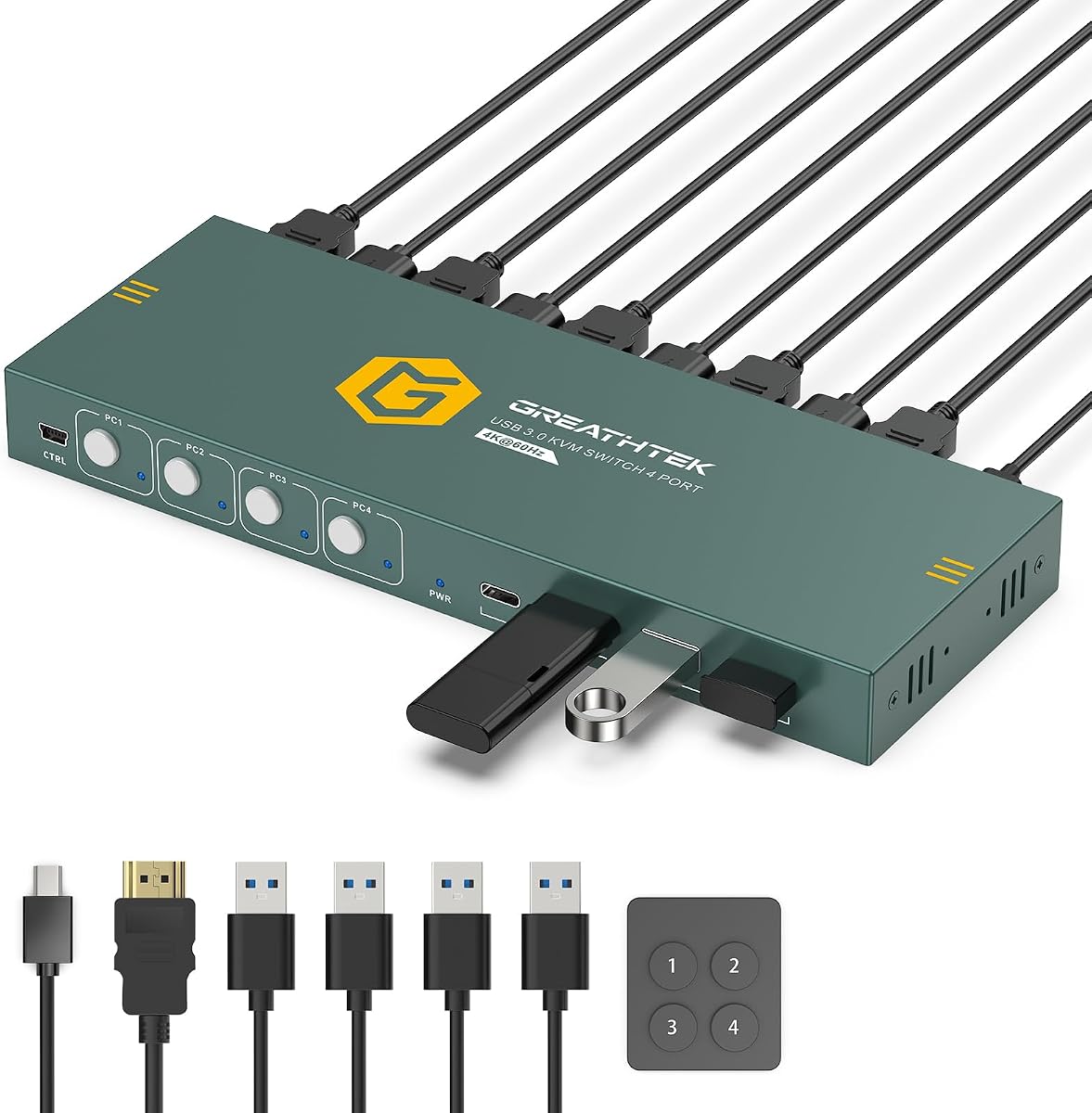
This four-port HDMI KVM is the strongest all-around recommendation in the group, combining a 4.8 rating with a balanced set of everyday features. It controls four computers through one monitor, keyboard, and mouse while providing 4K60 video, adaptive EDID, four shared USB 3.0 connections, front-panel buttons, and a wired remote.
We may earn a commission when you buy through this link, at no additional cost to you.
Video support extends to 3840×2160 at 60Hz through HDMI 2.0, with backward compatibility for 4K30 and 1080p and lower resolutions. The 18Gbps bandwidth figure gives the switch ample room for modern desktop use, while adaptive EDID is intended to help each computer recognize the connected display and settle on an appropriate picture mode.
Peripheral sharing is handled by three USB-A 3.0 ports and one USB-C data port, each offering data speeds up to 5Gbps. That makes the unit useful for a keyboard, mouse, webcam, printer, or removable drive, although every source still requires the proper HDMI and USB connections. The included remote is valuable when the switch is mounted below a desk, but hotkey switching is unavailable.
This is the best choice for users who need one high-quality display and four sources without an elaborate multi-monitor installation. Its 4.8 rating, 4K60 capability, generous USB selection, remote, and mounting hardware make it a particularly complete and flexible package for a home office, test bench, or professional workstation.
Numbered front-panel buttons and the included wired desktop remote allow direct selection of each computer. LED indicators show the active source, and hotkey switching is not needed.
Three USB-A 3.0 ports and one USB-C data port let users move common peripherals between four computers while reducing repeated cable changes.
We may earn a commission when you buy through this link, at no additional cost to you.
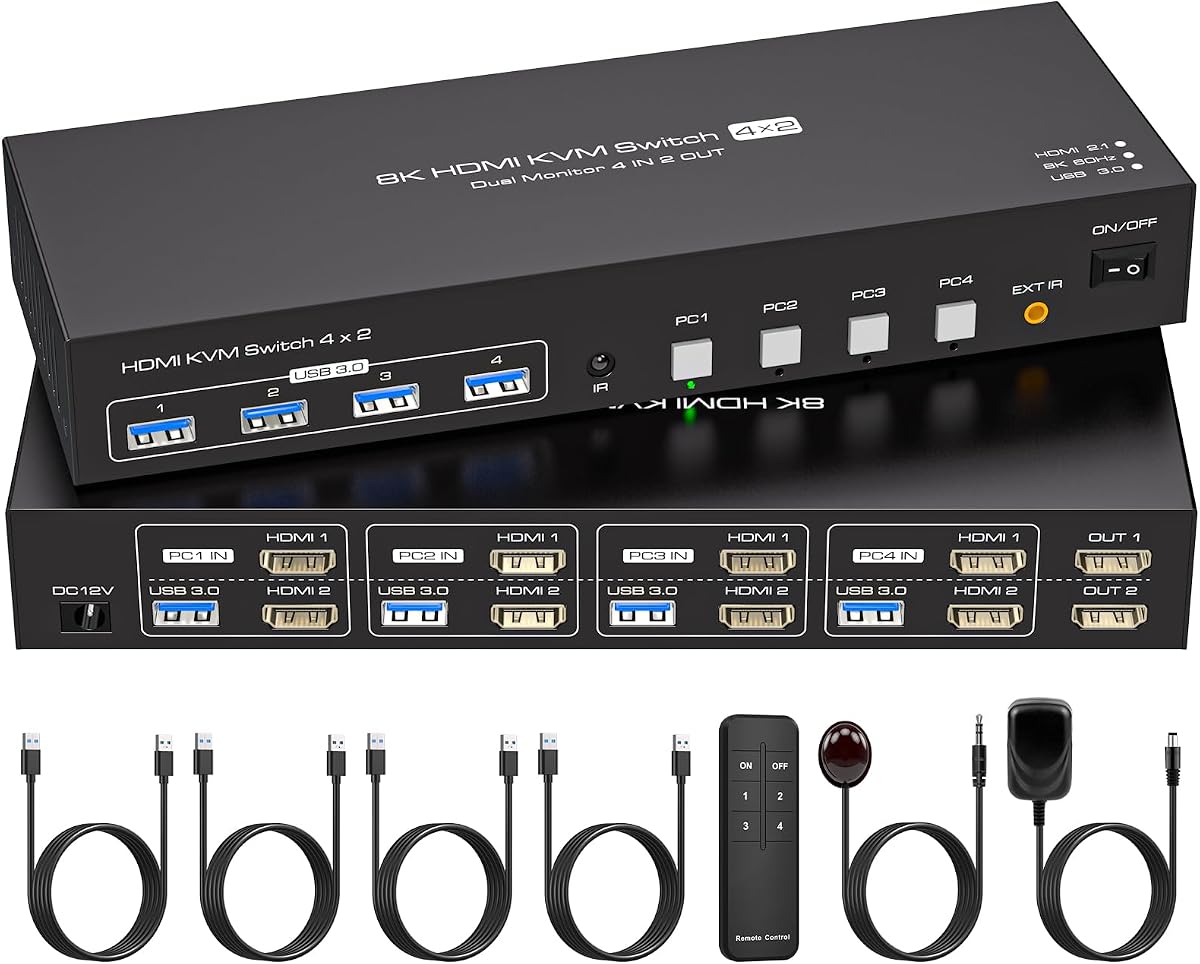
This dual-monitor KVM delivers an advanced feature set for four computers and two displays. Its 4.7 rating is supported by 8K60 and 4K120 video claims, EDID emulation, four USB 3.0 ports, and the ability to place either monitor in copy or extend mode.
We may earn a commission when you buy through this link, at no additional cost to you.
The most important requirement is host readiness. Each computer needs two HDMI outputs, while each of the two monitors needs an HDMI connection, and an external 12V 1A power supply should remain connected for stable operation. The stated 8K performance also depends on compatible source hardware, display, and cables rather than the switch alone.
EDID emulation is a meaningful addition for multi-computer users because it stores monitor parameters and is designed to reduce window rearrangement after switching. The four USB 3.0 ports support peripherals such as keyboards, mice, printers, webcams, and flash drives at speeds up to 5Gbps, with backward compatibility for older USB devices.
Choose this model when two displays are important but four are unnecessary. It is particularly compelling for offices, monitoring stations, and creative users who want high refresh rates, flexible screen layouts, and remote selection without building a much more complicated multi-monitor system.
Copy mode can present the same content on both monitors, while extend mode allows different windows and tasks to occupy separate screens.
Built-in EDID emulation stores display parameters to help computers recognize the monitor quickly and avoid repeated desktop rearrangement.
We may earn a commission when you buy through this link, at no additional cost to you.
UGREEN's four-computer, one-monitor KVM stands out for its unusually broad shared-peripheral selection. It combines a 4.7 rating, 4K60 HDMI 2.0 support, and six USB ports, including four USB 3.0 connections and two USB 2.0 connections, with front-button and desktop-controller switching.
We may earn a commission when you buy through this link, at no additional cost to you.
The switch supports 4K60, 4K30, 1080p at 240Hz, and lower resolutions, along with HDCP 2.2 and 1.4, 3D, and HDR. EDID emulation can be enabled by holding the first switch button for approximately five seconds until the indicators flash, helping retain monitor identification and display configuration.
Installation is straightforward for standard PCs, but the supplied information makes clear that each computer needs an HDMI cable and a USB-A-to-C data cable. The cables and power adapter are not included, and docking stations are unsupported. A powered connection is recommended, while laptops should be awakened from sleep before switching.
This is a strong recommendation for users who regularly share several USB peripherals across four sources but only need one screen. The six-port arrangement, programmable EDID behavior, high-refresh compatibility, and desktop controller give it more flexibility than many conventional four-port models.
Six shared connections can accommodate a keyboard, mouse, camera, printer, drive, and another USB accessory without reducing the switch to four ports.
A button-activated EDID mode is designed to preserve display identification and reduce resolution changes or window rearrangement.
We may earn a commission when you buy through this link, at no additional cost to you.
The KCEVE model is the premier choice for users who need all four computers to drive four monitors. Its 4.7 rating accompanies DisplayPort and HDMI connectivity, four shared USB 3.0 ports, a 3.5mm audio jack, wired control, and support for copy and extended layouts.
We may earn a commission when you buy through this link, at no additional cost to you.
To use all four displays, each computer must have three DisplayPort outputs and one HDMI output. That requirement makes the switch most appropriate for professional workstations equipped with capable graphics cards. The information specifically notes that USB 3.0 cables must also connect to each computer for shared peripherals to operate correctly.
Video claims include 8K60 when compatible HDMI and DisplayPort cables, source equipment, and displays support that resolution. The 3.5mm audio connection adds a convenient option for live streaming, remote meetings, or online education, while the larger wired controller is designed for more comfortable operation.
Few switches in this category manage four full displays without imposing similarly extensive hardware requirements. For a studio, trading desk, control room, or advanced multi-GPU workstation, this model offers the necessary scale. It would be excessive for ordinary office users, but it is purpose-built for demanding four-screen environments.
Each computer can feed four displays through a combination of three DisplayPort and one HDMI output, consolidating far more screen real estate.
Four USB 3.0 ports support shared keyboards, mice, drives, printers, and scanners, while the audio jack handles analog sound output.
We may earn a commission when you buy through this link, at no additional cost to you.
This HDMI 2.1 KVM is built for a single high-end display and four source computers. Its 4.2 rating is paired with support for 8K60 and 4K120 output, four shared USB 3.0 ports, an EDID function, an IR extension receiver, and a controller.
We may earn a commission when you buy through this link, at no additional cost to you.
The high refresh rate is most relevant to fast-moving content, video editing, and detailed graphics work. Achieving the stated modes still requires compatible computers, monitors, and cables. All four computers and the display need HDMI connections, and the product information specifically states that conversion cables are not supported.
Four USB 3.0 ports can handle a keyboard, mouse, printer, and removable hard drive simultaneously, with transfer speeds up to 5Gbps. The IR receiver allows the controller to be placed away from the switch, which is useful if the device itself must remain close to the computers or under a desk.
The package includes a power supply, controller, IR cable, four USB 3.0 cables, a manual, and an after-sales card. This model is best for a high-refresh single-screen setup where remote placement and strong shared-USB performance matter more than multiple displays.
4K120 support targets demanding motion and detailed workflows, although every component in the signal chain must support the selected mode.
An IR extension receiver allows the controller to operate even when the switch is mounted away from the user's normal seating position.
We may earn a commission when you buy through this link, at no additional cost to you.
UGREEN's aluminum switch targets users who care primarily about high-resolution and high-refresh output from one display. It carries a 4.0 rating and supports 8K60, 4K60, 4K30, 2560×1440 at 120Hz, and 1080p at 240Hz according to the supplied specifications.
We may earn a commission when you buy through this link, at no additional cost to you.
Four USB 3.0 ports provide shared access to devices such as keyboards, mice, printers, storage, and flash drives. The three USB-A and one USB-C arrangement supports data speeds up to 5Gbps, with the caution that high-power equipment should be connected to the power source.
Front-panel and desktop-controller switching provide two ways to select a computer, but hotkey operation is unsupported. The controller is useful for placing the switch outside the immediate work area, while the aluminum enclosure gives it a more substantial appearance than a basic plastic box.
This is a capable option for high-end gaming, media, and graphics workflows, with broad source compatibility that includes PCs, laptops, Mac systems, and several game consoles. Its lower rating should be considered alongside the explicit lack of EDID emulation, which may make the newer UGREEN model with EDID a safer choice for users who switch frequently.
Support for 4K240 and 1080p240 provides extra flexibility for compatible fast displays, while 8K60 caters to high-resolution desktop work.
The switch is listed for Windows, macOS, and Linux computers as well as laptops and several popular game consoles.
We may earn a commission when you buy through this link, at no additional cost to you.
This single-monitor HDMI KVM is a budget-minded option for a four-computer desk. It offers 4K60 video, four shared USB 3.0 connections, adaptive EDID, front-panel buttons, and a wired remote while maintaining a straightforward plug-and-play design.
We may earn a commission when you buy through this link, at no additional cost to you.
The display specification reaches 3840×2160 at 60Hz and supports lower resolutions such as 4K30 and 1080p. Adaptive EDID is intended to identify connected display devices, while the four USB connections can be used for a keyboard, mouse, camera, flash drive, and other accessories.
Two switching methods are offered: numbered buttons on the front panel and a clearly labeled wired remote keypad. LED indicators reveal the active computer. Hotkey switching is not supported, so users should confirm that physical and remote selection suits their preferred workflow.
The package includes an HDMI cable, four USB 3.0 cables, a power cable, a controller cable, and a desktop controller. It is a practical recommendation for budget-conscious users who want one display, four computers, and 4K support without paying for a multi-monitor model.
One keyboard, mouse, and display can serve four systems through direct physical selection, making it easy to maintain an organized shared workstation.
The package includes the principal HDMI and USB connections needed to begin a standard four-computer installation.
We may earn a commission when you buy through this link, at no additional cost to you.
The Hearvo S7415H is a conventional four-port HDMI KVM for sharing one monitor, keyboard, and mouse among four computers. It has a 4.0 rating, 4K60 video, HDCP 2.2, four USB 3.0 ports, adaptive EDID, and both on-device and remote switching.
We may earn a commission when you buy through this link, at no additional cost to you.
Three USB-A ports and one USB-C port provide shared access to data devices at speeds up to 5Gbps. The switch can be used with keyboards, mice, scanners, printers, flash drives, headsets, and webcams, and it automatically recognizes connected devices according to the product information.
Video support includes 4K60, 4K30, 2K, 3D, and 1080p. Front-panel buttons and a wired remote make direct switching possible, with the remote allowing the switch itself to sit in a hidden or distant position. The package also includes an HDMI cable, four USB 3.0 cables, rubber feet, a manual, and a protection-plan card.
This model suits basic office, testing, and home setups where one screen and four source computers are enough. Buyers should note an ambiguity in the supplied description, which refers to two HDMI ports despite describing a four-port unit; checking the latest listing and package contents is advisable before ordering.
HDCP 2.2 compliance supports protected multimedia content, while 4K60 provides a sharp image for general productivity and media use.
The wired remote and rubber pads help keep the switch accessible, organized, and stable on a shared desk.
We may earn a commission when you buy through this link, at no additional cost to you.
This three-monitor KVM provides an effective middle ground between one-screen and four-screen installations. Its 4.5 rating, support for four computers and three displays, and support for 4K144 make it a compelling choice for productivity-focused multi-screen workstations.
We may earn a commission when you buy through this link, at no additional cost to you.
Every computer needs two DisplayPort and one HDMI connection. Systems using both integrated and discrete graphics must have those outputs on the same discrete graphics card, according to the supplied guidance. This configuration supports copy and extended modes, allowing users to mirror content or distribute windows across multiple screens.
The HDMI portion supports up to 8K60, 4K120, and 4K60, while the DisplayPort side supports up to 8K30 and 4K144. Short HDMI 2.1 and DisplayPort 1.4 cables are advised, and the included USB 3.0 host cables are approximately 1.5 meters long.
This is a strong recommendation for analysts, editors, traders, and developers who routinely use three screens but do not need the complexity or graphics requirements of a four-monitor KVM. Panel buttons and an included wired remote make source selection straightforward.
Three displays can divide research, communication, and production tasks across separate panels, reducing repeated application switching.
DisplayPort can reach 4K144, while HDMI supports modes up to 8K60, provided the source, display, and cable meet those requirements.
We may earn a commission when you buy through this link, at no additional cost to you.
This dual-monitor KVM balances display capability, EDID behavior, and shared USB access. It carries a 4.4 rating and lets four computers share two HDMI displays, four USB 3.0 peripherals, a keyboard, and a mouse through panel or infrared remote controls.
We may earn a commission when you buy through this link, at no additional cost to you.
Each source computer must have two HDMI ports. The supplied information notes that an active adapter may be needed if a computer or monitor lacks sufficient HDMI connections. Its EDID emulator stores the display's resolution and refresh rate, then reapplies that information after switching to help keep window order stable.
Video support extends to 8K60 and 4K144, with backward compatibility for 4K60, 1080p60, and 720p60. As with other high-resolution switches, the source device, display, and HDMI cable must all support the intended resolution and refresh rate.
The metal enclosure and four USB 3.0 ports give it a durable, workstation-oriented feel. It is a good fit for two-monitor users who want high refresh rates and consistent desktop layouts, while the EDID feature makes it more attractive for routine multi-computer switching than a basic four-port unit.
EDID emulation stores display settings so that source changes are less likely to disrupt the arrangement of windows across the dual-screen setup.
Users can select sources from front-panel keys or use infrared remote control, including through an included IR cable for a hidden switch.
We may earn a commission when you buy through this link, at no additional cost to you.
Choose by matching the switch to your source-computer outputs, monitor count, desired resolution, shared USB devices, and preferred control method. The most important rule is to verify the full signal chain rather than focusing only on headline resolution figures.
Single-monitor KVMs direct one video output to one display and are the easiest option for basic office, home, and testing setups. Dual-monitor models usually require two outputs on every computer, while three- and four-monitor units need even more graphics connections and may require a dedicated graphics card. Confirm whether each source uses HDMI, DisplayPort, or a mixture before choosing a model.
Match the switch to the number of displays you actually use, not the largest configuration the hardware may theoretically support.
A 4K60 switch is suitable for many single-screen users, while 8K60 and 4K120 models serve specialized high-end displays. The switch's maximum specification is only one part of the chain: every computer output, display, adapter, and cable must also support the selected resolution and refresh rate. Check whether the stated rate applies to HDMI, DisplayPort, or both.
Prioritize the mode your monitor and computer can actually sustain rather than selecting solely by the largest advertised number.
A basic switch with three USB-A ports and one USB-C port can usually accommodate a keyboard, mouse, and one or two additional peripherals. Models with six or more ports offer more flexibility for webcams, printers, scanners, storage, and specialist equipment. Check whether USB-C is a data port, a power input, or another function before planning the connection layout.
Choose the number of shared ports around your real peripherals, while leaving room for temporary devices.
EDID allows a display to communicate its capabilities and preferred settings. Emulation can help a computer retain monitor identification, resolution, and desktop arrangement when users move between different source systems. It is especially helpful in multi-monitor environments, where window rearrangement can otherwise be disruptive. However, some performance claims depend on system configuration, graphics hardware, and operating system.
Treat EDID as a convenience feature, not a guarantee that every operating system will behave identically.
Front-panel buttons are direct and dependable, while a wired desktop controller lets the switch sit out of the way. Infrared remotes can also work when the switch is hidden, provided the receiver has a clear path or the supplied IR extension receiver is positioned correctly. Several models explicitly do not support hotkey switching, so users who rely on keyboard commands should verify this before buying.
Select the control style that suits the switch's physical location and your daily workflow.
Copy mode shows the same image on multiple displays, while extend mode allows different content across the screens. These features are valuable for monitoring, presentations, editing, and multitasking, but they do not guarantee that every computer supports every multi-display arrangement. Integrated and discrete graphics outputs can behave differently, so the operating system and graphics drivers also matter.
Confirm both source and display support the desired arrangement before relying on multi-screen modes.
Some switches include host cables, while others require you to supply them. USB host connections may need USB-A-to-C data cables even on desktop systems, and several models require a dedicated power connection for stable operation. Docking stations and passive conversion cables are explicitly unsupported by some products. Check the package list and setup notes carefully before assembling a multi-computer workstation.
Budget for missing cables and any required power adapter so the installation is ready on arrival.
A compact box with front controls is convenient when the switch is visible, but a wired or remote controller is useful when it is mounted under a desk, inside a cabinet, or near the computers. Some products include under-desk brackets, while others offer rubber feet for stable placement. Metal enclosures may be preferable for a heavily used professional setup, and removable displays or devices can be added as needed.
Plan the physical location before installation, especially if you expect to add a second or third display later.
Begin by identifying the video and USB connection available on every source computer. Connect each computer to its numbered KVM input with the required HDMI or DisplayPort cable and USB host cable, then connect the KVM outputs to the monitors. Attach the keyboard, mouse, and other shared peripherals only to the KVM's shared USB ports, and connect the power supply before switching on the equipment.
After the hardware is connected, turn on the monitor and source computer, then select the desired channel with the front-panel buttons, desktop controller, or remote. Allow the display to recognize the monitor and verify that the resolution, refresh rate, and multi-monitor arrangement are correct. If a source is a laptop, wake it from sleep before changing channels, and allow a few seconds for the new image to stabilize.
For care, keep the switch away from moisture, excessive heat, and loose cables that could be pulled from the ports. Use the supplied or specified cables rather than unsupported passive adapters. Do not press switching buttons while cables are being connected, and consult the product instructions if a display flickers, a USB device fails, or the source does not recognize the selected channel.
It depends on the number of displays and outputs. A single-screen KVM typically has one monitor output, while a dual-monitor model has two and often requires two outputs from every source computer. Three- and four-monitor switches need still more graphics connectivity and may demand a capable discrete graphics card.
Most models can share standard keyboards, mice, printers, scanners, flash drives, and webcams through their USB 3.0 connections. Data performance depends on the switch, cable, source device, and destination device. For frequently disconnected storage, check that the model explicitly supports the device type and use the specified USB data cables.
Only if the switch itself lists 8K support. Even then, the source computer, display, and every relevant cable must support 8K at the desired refresh rate. Otherwise, the connection may fall back to a lower resolution or refresh rate rather than delivering the advertised maximum.
EDID emulation stores or reproduces the connected display's identification and preferred settings. This can help each source computer recognize the monitor consistently and reduce resolution changes or window rearrangement when switching. Results may still vary with the graphics hardware, drivers, and operating system used by each computer.
Not with every model. Several switches in this roundup explicitly support only front-panel buttons, a wired desktop controller, or an infrared remote. If keyboard hotkeys are important, check the product specifications and current listing carefully before purchasing.
Some models explicitly support laptops and gaming devices in addition to desktop computers, but compatibility depends on the HDMI version, available output, and device behavior. A sleeping laptop may not switch properly until awakened. Game-console support also varies by model, so verify the specific source-device list.
Many modern switches include a power connection, and several product descriptions specifically recommend or require the external adapter for stable operation. Connect the supplied power supply if one is included. This is particularly advisable when using high-power USB equipment or multiple fast peripherals.
Yes, but you need a model designed for two-monitor operation. It will generally require two compatible video outputs on every computer, suitable cables for each display, and enough graphics support in the operating system. A dedicated dual-monitor model also makes it easier to manage copy and extend layouts.
The Four-PC Single-Monitor HDMI Switch is the strongest overall pick because it combines a 4.8 rating with 4K60 video, four USB 3.0 ports, adaptive EDID, a wired remote, and mounting hardware. The KCEVE Four-Monitor KVM is the premium choice for complex workstations, while the budget USB3.0 HDMI KVM provides a practical four-source, one-screen core feature set.
Prioritize the number and type of monitor outputs, then confirm that every computer has the required video and USB connections. Consider EDID emulation for frequent switching, remote or wired control according to placement, and the total number of shared peripherals. Multi-monitor users should also verify copy and extend support against their graphics hardware.
Product prices, ratings, availability, and package contents can change, so check the current listing and compatibility notes before ordering. The most suitable KVM switch for 4 computers is the one that matches your displays, computers, peripherals, and daily workflow without adding unnecessary complexity.