
SUNLU Filament Dryer Box S1 Plus
4.3Editor score
Adjustable 35–55°C temperature
Built-in circulation fan
Humidity and timer display
Explore the best filament dryer for 3D printing options, comparing capacity, temperature, airflow, humidity control, filament compatibility, and ease of use.
A filament dryer helps protect moisture-sensitive material from the effects of humid air, making it easier to achieve consistent layers, clean surfaces, and reliable adhesion. The right unit should match your spool size, filament type, printing volume, and tolerance for hands-on monitoring.
The products in this guide were compared using their stated capacity, heating range, circulation, humidity monitoring, filament compatibility, controls, outlet design, and storage features. The list includes compact single-spool models, detachable dry-and-store systems, and larger cabinets built for multiple printers.
Each review identifies the strongest use case and the compromises worth considering. Specifications and configurations can change, so check the current listing, filament guidance, and included accessories before making a final selection.
4.3Editor score
4.4Editor score

4.6Editor score
This side-by-side comparison highlights each dryer's capacity, temperature range, monitoring features, and filament support, making it easier to identify the model that fits your printer setup and material routine.



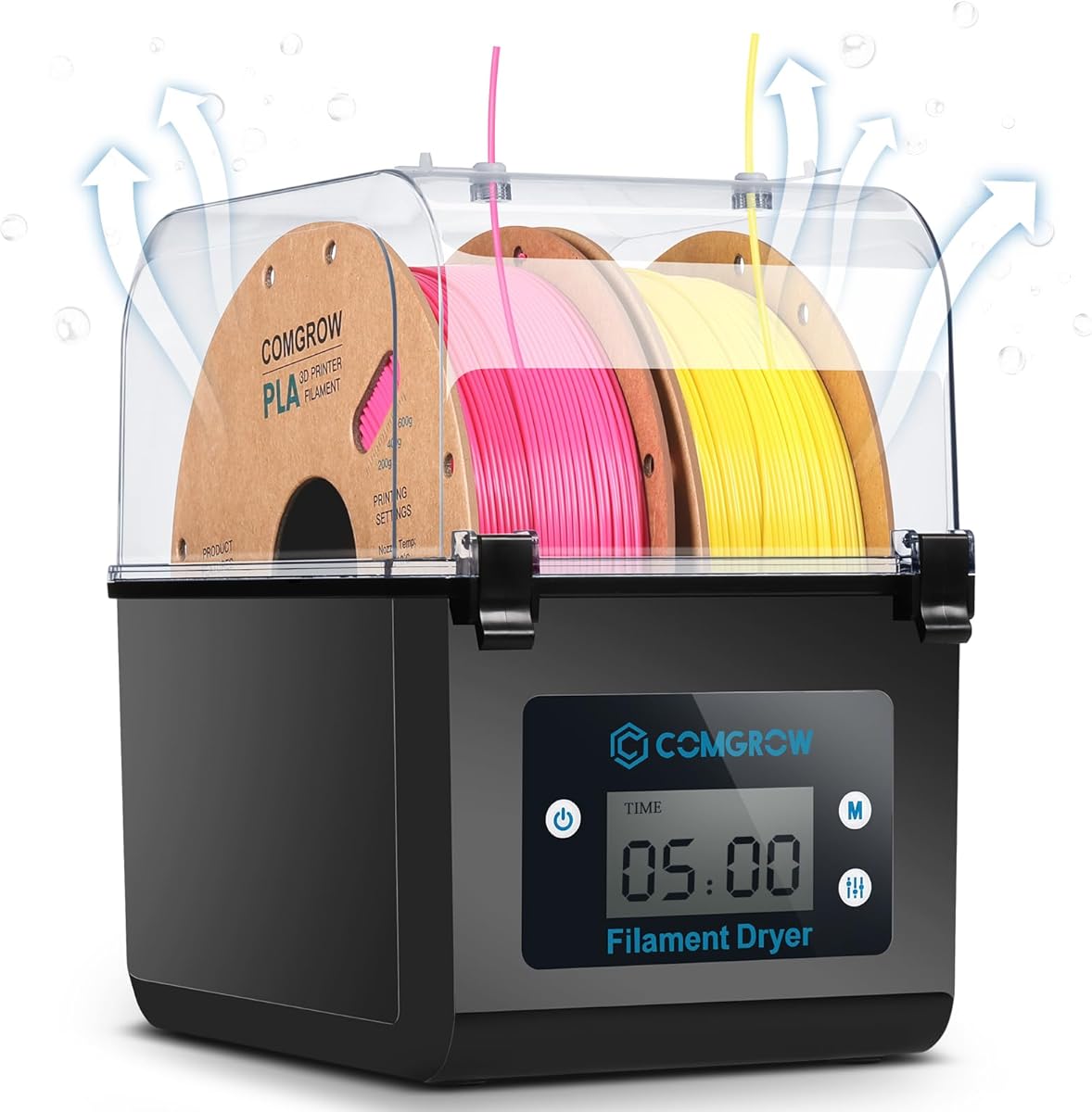
The Comgrow SH01 is a two-spool filament dryer with a 4.4 rating and a clear focus on practical moisture control. Its inner chamber measures 9.29 by 6.49 by 9.13 inches, giving it enough room for two rolls of 1kg filament. The 2-inch LCD provides an at-a-glance view of temperature, humidity, and operating status.
We may earn a commission when you buy through this link, at no additional cost to you.
Its main strengths are straightforward controls and a useful combination of drying and storage. The temperature adjusts from 40°C to 50°C, while drying time can be set from six to twelve hours. A silicone-sheathed cable and PTFE outlet support direct feeding, and the outlet plug helps preserve dry conditions when the unit is not actively drying.
The main limitation is its deliberately narrow thermal range. A 50°C ceiling is suitable for many common PLA, PETG, and ABS workflows, but it does not provide the flexibility offered by dryers reaching 65°C, 70°C, or 85°C. The six-to-twelve-hour timer is also less flexible than the 0-to-48-hour or 0-to-99-hour settings found on several competitors.
This is a strong general recommendation for home makers who want to dry two spools and can benefit from continuous storage without moving the filament elsewhere. Choose it when straightforward monitoring, direct feeding, and a compact two-spool footprint matter more than access to aggressive high-temperature drying.
The SH01 is designed to address moisture both before and during printing. Its sealed lid, closable outlet, internal heating, and real-time humidity display make it more versatile than a passive storage box.
The touch-button interface and LCD keep the primary variables visible. Users can change drying time and temperature after startup, while the display provides useful feedback about chamber conditions.
We may earn a commission when you buy through this link, at no additional cost to you.
The SUNLU S1 Plus is a compact single-spool dryer that offers a manageable way to control filament moisture. It carries a 4.3 rating, includes a built-in fan, and displays temperature, time, and humidity on a 2-inch LCD. It is well suited to makers who want better drying without a large cabinet.
We may earn a commission when you buy through this link, at no additional cost to you.
The fan is the model’s distinguishing addition, helping excess moisture move out of the filament chamber. Temperature can be adjusted from 35°C to 55°C, allowing users to tailor conditions to the material and environment. The stated material list covers PLA, PETG, ABS, TPU, and nylon in 1.75mm, 2.85mm, and 3.00mm diameters.
The trade-off is capacity. The stated maximum chamber size of 210 by 89mm indicates that this is a single-spool design rather than a solution for maintaining several rolls at once. Its 55°C ceiling also rules out the most aggressive drying profiles offered by higher-temperature models, so advanced materials may require more careful preset selection.
The S1 Plus is a sensible pick for a first dryer, a small workbench, or a maker with one active material. It gives more control and feedback than a simple heated storage box without moving into large multi-spool territory.
Moving air through the chamber supports more consistent drying than a stationary heat source. The fan also helps address the stringing, clogging, and adhesion issues associated with wet filament.
Compatibility with 1.75mm, 2.85mm, and 3.00mm filament is useful for mixed collections. The adjustable range supports common thermoplastics, although the maximum temperature should still be checked against the filament manufacturer's guidance.
We may earn a commission when you buy through this link, at no additional cost to you.
The Creality Space Pi X4 is the most advanced model in this comparison, combining a 4.6 rating, four-spool capacity, dual 200W heating chambers, and a maximum temperature of 85°C. It is intended for users who print frequently, maintain several materials, or need more drying options than a conventional single-spool appliance offers.
We may earn a commission when you buy through this link, at no additional cost to you.
Its dual-chamber design can support four standard 1kg spools or two large 2kg spools. The 50–60°C region is presented for common materials such as PLA, PETG, and TPU, while the 80–85°C range opens possibilities for ABS, PET, PC, ASA, PA, and PAHT. A touch interface and illuminated window make the cabinet easier to operate and check without unnecessarily opening it.
The important distinction is that the X4 is designed as a combined dryer and storage system. Its silicone-sealed enclosure is intended to reduce moisture reabsorption, while active humidity maintenance during printing pauses can help protect filament that has already been conditioned. That makes it especially relevant to printers that run long jobs or operate in humid environments.
This premium recommendation suits serious hobbyists, small studios, and multi-printer users who prioritize capacity, thermal range, and integrated storage. Those with only occasional printing and one active spool may find simpler models easier to justify.
The ability to hold four 1kg spools or two 2kg spools separates the X4 from most compact dryers. It is better suited to users who want to condition several filament types without moving them between containers.
The 85°C ceiling provides useful flexibility for engineering polymers and other temperature-demanding materials. A broader range does not remove the need to follow each filament supplier's recommended drying schedule.
We may earn a commission when you buy through this link, at no additional cost to you.
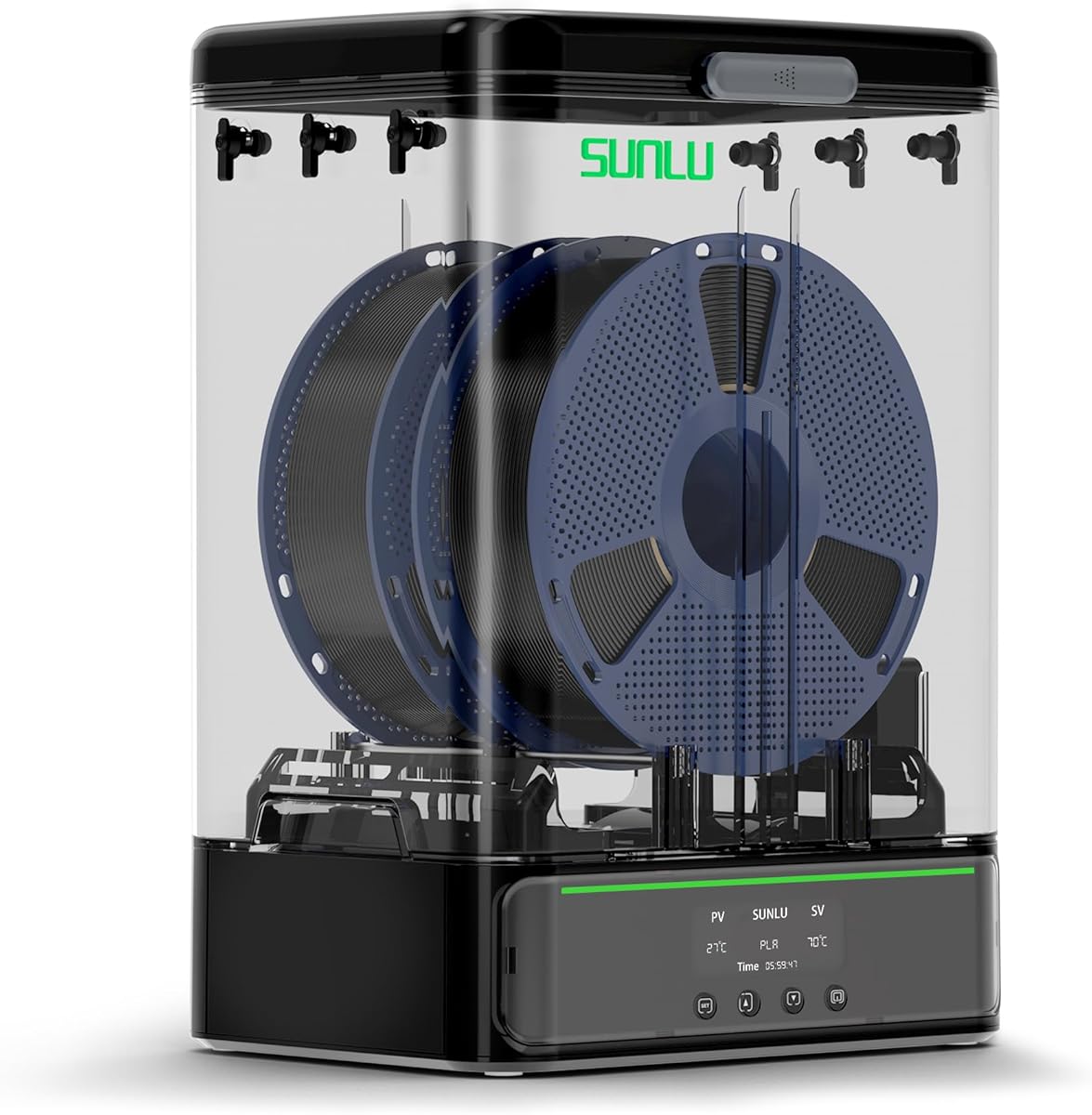
The SUNLU S4 combines four-spool capacity with eight filament exit holes, making it particularly attractive to users who operate multiple printers or want several loading angles. Its 4.5 rating reflects a well-equipped package with a 350W PTC heater, three circulation fans, and a 35–70°C adjustment range.
We may earn a commission when you buy through this link, at no additional cost to you.
The three fans are positioned to circulate air throughout the chamber and support even drying. A timer extending to 99 hours provides considerable scheduling flexibility, while the stated material compatibility includes PLA variants, PETG, ABS, TPU, PA, PC, and nylon in three common diameters.
Its 460 by 220 by 310mm external dimensions and 4kg net weight make it a substantial countertop unit. That scale is justified for a busy print room, but it would be excessive for someone who prints occasionally with one spool. Although the product can be modified for 3kg rolls or other uses, the standard configuration is more relevant to most buyers.
The S4 is an excellent middle ground between compact dryers and the dual-chamber Creality X4. It offers high capacity, useful outlet routing, and a wide timer range without reaching the X4's 85°C maximum.
Eight outlets allow several spools to be connected without forcing a narrow loading arrangement. This is especially helpful when different printers require different materials or feed directions.
Three fans help distribute heated air across the full chamber. Combined with the PTC heater and 360-degree heating approach, the design targets more consistent drying throughout the cabinet.
We may earn a commission when you buy through this link, at no additional cost to you.
The Creality Space Pi Plus is a two-spool dryer centered on approachable controls and detailed material presets. It has a 4.4 rating, a 3.7-inch touch screen, twelve one-key filament settings, and a temperature range of 45–70°C. It should appeal to users who want guided setup without giving up manual control.
We may earn a commission when you buy through this link, at no additional cost to you.
Its 110W PTC heater and built-in fan circulate hot air through the chamber. The interface can display temperature, drying time, and humidity, switch between Celsius and Fahrenheit, and select presets for common and composite filaments such as PLA-CF, PA-CF, and ASA. The timer can run from zero to 48 hours.
Compared with the Creality X4, this model offers a smaller capacity and a lower maximum temperature. Those are meaningful differences for users who dry large quantities or work with materials requiring 80–85°C environments. Its touch interface also makes it more dependent on electronics than a simple knob-based dryer.
The Space Pi Plus is ideal for a maker with two active spools who values presets, a large display, and humidity visibility. It is a particularly good fit for mixed filament collections where switching between PLA, PETG, ASA, and reinforced variants is common.
Twelve presets reduce the need to memorize a temperature for every filament. Users can begin with a material-specific setting and then refine the duration according to the condition of the spool and local humidity.
The 3.7-inch LCD touch screen gives drying conditions and settings a prominent place in the interface. Celsius and Fahrenheit switching adds convenience for different preferences.
We may earn a commission when you buy through this link, at no additional cost to you.
The Polymaker Polydryer distinguishes itself with a connected dry-store-feed design rather than functioning as a conventional heating cabinet. The 4.3-rated product combines a 1kg spool drying dock, sealed storage protection, desiccant support, direct filament feeding, and a built-in hygrometer.
We may earn a commission when you buy through this link, at no additional cost to you.
Its purpose is to reduce the number of transfers required between drying, storage, and use. Filament can be conditioned, kept in a protected storage environment, and fed toward the printer with less repeated exposure to ambient air. The hygrometer provides a way to judge the internal humidity without relying entirely on an automatic material schedule.
The trade-off is that the supplied details emphasize the integrated workflow more than a detailed temperature and timer range. This makes it harder to compare its exact drying precision with products that publish explicit temperature and duration settings. Capacity is also limited to a single 1kg spool, so it does not address multi-material storage needs.
The Polydryer is best for users who dislike repeatedly moving filament between a dryer, a sealed bag, and a printer. It is particularly relevant to makers who want an all-in-one routine and broad support for PA, PLA, PVB, PETG, ABS, ASA, and TPU.
The central benefit is continuity. Drying, sealed storage, and direct feeding are combined so filament does not need to be moved through several separate containers before every print.
The built-in hygrometer adds a practical reference for day-to-day management. It can help users judge when a spool needs more attention instead of relying exclusively on a fixed timer.
We may earn a commission when you buy through this link, at no additional cost to you.
The Creality Space Pi SE is a compact 1kg-spool dryer built around quick heating, a precision sensor, and uncomplicated operation. It has a 4.3 rating, a 45–65°C temperature range, and a stated ability to reach 65°C within 15 minutes. It does not require assembly according to the supplied product information.
We may earn a commission when you buy through this link, at no additional cost to you.
A built-in fan circulates hot air through the chamber, while internal insulation helps retain warmth and reduce the chance of contact with a hot wall. The screen and knob provide access to humidity readings, a countdown timer, temperature, and drying duration. Filament types listed as compatible include PLA, PLA+, PETG, TPU, ABS, ASA, PP, PC, and PA.
The principal limitations are its single-spool capacity and 65°C maximum. That ceiling covers many common materials but offers less margin for advanced polymers than the Space Pi X4 or SUNLU S4. The suggested practice of storing dried filament in a vacuum bag also means the dryer itself is only one part of the complete moisture-control routine.
The SE is a good match for a single-printer setup that wants fast access, visible humidity information, and simple controls. It is especially convenient for users who want a device that can be positioned and used without a complicated setup routine.
A display-and-knob layout keeps adjustments uncomplicated. The unit can be used directly from the box, making it convenient for users who want minimal installation before their first drying session.
The sensor and display make chamber conditions easier to track. Combined with a timer extending to 24 hours, this gives users useful control without a large touch interface.
We may earn a commission when you buy through this link, at no additional cost to you.
The SUNLU S4 Four Spool combines a 4.6 rating with a large chamber, a 350W PTC heater, and three circulation fans. It is built to dry as many as four 1kg spools, making it one of the strongest options for users who want substantial capacity without moving to a dual-chamber premium cabinet.
We may earn a commission when you buy through this link, at no additional cost to you.
Eight filament outlets support multiple printers and varied loading arrangements. The 35–70°C range accommodates PLA, PLA Plus, PLA Meta, PETG, ABS, TPU, PA, PC, and nylon, with compatibility across 1.75mm, 2.85mm, and 3.00mm diameters. A timer up to 99 hours provides a very wide scheduling range.
The product is large, measuring 460 by 220 by 310mm externally, and weighs 4kg. Those are important considerations for a compact studio, but the dimensions are reasonable for a dedicated filament station. The included PTFE tubes, clips, silicone plugs, power cable, and guide provide a more complete multi-outlet setup than many single-spool models.
This S4 configuration is a compelling choice for high-volume hobbyists and small print rooms. It offers the balanced temperature range, broad material support, and extensive routing of a larger dryer while avoiding the X4's dual-chamber construction and 85°C maximum.
Four standard spools and a 70°C ceiling cover both common materials and higher-temperature workflows. This balance makes the model useful for varied collections rather than one narrow material group.
Eight exits and the included PTFE tubes make multi-machine routing more practical. Sealing unused openings also helps maintain the chamber's dry environment.
We may earn a commission when you buy through this link, at no additional cost to you.
The SUNLU SP2 is a two-spool dryer and storage system with a detachable design. Its 4.4 rating and combination of a 250W PTC heater, 70°C maximum, 360-degree heating, and a removable storage base make it a versatile choice for makers who want more than a fixed heating box.
We may earn a commission when you buy through this link, at no additional cost to you.
The heater is stated to reach 70°C in 15 minutes, and the chamber can hold two 1kg rolls. When drying is complete, the dryer can be lifted from the base to serve as a sealed storage box. Rollers accommodate spools up to 3kg, while the bar holder supports smaller 250g, 500g, and paper spools.
The system includes six silicone holes, two PTFE tubes, a dryable hygrometer, and desiccant containers. Its HD touch screen displays temperature, time, and humidity and provides material presets. Compared with a permanently integrated chamber, however, the detachable arrangement introduces an extra step when moving between drying and storage.
The SP2 is well suited to users with a variable mix of spool sizes who value a real storage routine. Its support for larger rolls, sealing latches, gaskets, and desiccant protection makes it more versatile than many compact single-spool dryers.
The detachable upper dryer and lower base create a clear two-stage workflow. Material can be conditioned in the heated section and then kept in the sealed storage compartment until needed.
Rollers and a bar holder support both standard and large spools, including rolls up to 3kg. This broad physical compatibility is valuable for users who switch between personal and larger-format filament.
We may earn a commission when you buy through this link, at no additional cost to you.
The SUNLU S2 is a single-spool dryer that emphasizes a broad temperature range and simple operation. It carries a 4.3 rating, adjusts from 35–70°C, and offers a timer from zero to 99 hours. Its translucent lid allows users to check the spool without opening the chamber.
We may earn a commission when you buy through this link, at no additional cost to you.
A built-in spindle rotates the filament during drying to support more even exposure to heat. The dryer can be used as a spool holder and can continue drying material during a print, which is useful in humid rooms such as basements. Compatibility covers 1.75mm, 2.85mm, and 3.00mm filament.
Capacity is the clearest constraint. Only one spool is handled at a time, so users with several active materials will need to rotate filament through the appliance. It also does not offer the multi-outlet routing or larger storage systems found in the SUNLU S4 and SP2. The lack of a stated humidity display also limits environmental feedback.
The S2 remains a practical choice for someone who prints with one material at a time and wants a wide thermal range. It is especially useful when direct drying during printing matters more than multi-spool organization or advanced storage features.
The rotating spindle helps expose different areas of the spool to the heated chamber. That approach is valuable when the goal is to recover an older or more thoroughly damp roll.
The S2 can serve as both a holder and an active dryer while a print is underway. This helps protect filament in humid locations where open storage would allow moisture to accumulate.
We may earn a commission when you buy through this link, at no additional cost to you.
The right dryer depends on the number of spools you use, the materials you print, your available space, and how much monitoring you want. The following factors are the most important details to evaluate before choosing a model.
Begin with the number of spools you expect to dry and store at once. A single-spool appliance is compact and straightforward, while two-spool systems are easier for makers alternating between materials. Four-spool cabinets suit active collections and multi-printer workflows. Physical dimensions also matter because external width, depth, and height determine whether the unit fits beside a printer. Check whether the rollers support standard plastic reels, cardboard reels, small personal spools, and large production spools rather than relying only on a stated kilogram capacity.
A broad temperature range gives you more freedom when working with different polymers. Basic dryers often top out around 50–55°C, which can suit many common workflows. Models reaching 65–70°C provide more options for demanding materials, while an 85°C system offers a wider envelope for advanced plastics such as ABS, PC, ASA, PA, and PET. Temperature capability does not mean every material should be dried at the maximum. Always follow the filament manufacturer's recommended temperature and duration, and confirm whether the unit offers a suitable preset for the exact blend you use.
Even airflow is essential because a single hot spot or a stationary heat source can leave parts of a spool unevenly conditioned. Fans distribute heated air through the chamber, while PTC heating is used by many current models to provide controlled warming. Consider the number of circulation fans, the placement of the heater, and whether the product claims 360-degree heating. A rotating spindle is another way to expose filament evenly, as seen in the SUNLU S2. The most useful system is the one that maintains stable conditions around the full spool rather than simply reaching a target temperature quickly.
Temperature and time are essential, but humidity readings provide useful context for judging whether a spool is dry. A built-in hygrometer, screen display, or precision sensor can help reveal changes in a sealed chamber and make drying easier to manage. The interface should be legible and comfortable to operate, whether through buttons, a knob, or a touch screen. Larger screens may simplify material selection, while simple physical controls tend to be faster and less dependent on menus. Check whether the display shows active status, remaining time, current humidity, and the selected temperature together.
If you want to dry material while it feeds directly into a printer, the outlet arrangement matters. Confirm that the connector accepts your filament diameter and that the included PTFE tubes and silicone ports reach your printer. Multi-hole designs are more convenient when several machines or loading angles are involved. The filament must also enter the spool in the correct direction, and the spindle or rollers must rotate freely. A direct-feed layout reduces exposure to ambient air, but it ties the dryer to one printing station unless you purchase enough compatible tubes and route the filament carefully.
A dryer that also functions as sealed storage can protect filament after the heating cycle. Some models maintain active humidity control during long printing pauses, while others provide a detachable heated section and a separate storage base. Integrated desiccant holders offer another layer of protection in passive storage. Active systems are convenient for continuous workflows but use more electricity and may require a larger enclosure. Detached systems are easier to organize, but they add a transfer step. Choose based on whether your filament is usually consumed immediately or stored for later.
Effective drying is only half the objective; the chamber must prevent moisture from returning too quickly. Look for a close-fitting lid, secure latches, and sealed cable or filament openings. Unused ports should be closable so the enclosure does not become an uncontrolled moisture path. The outlet structure must also permit wet air to escape during active drying while limiting exposure when the unit is idle. Pay attention to the instructions provided with each model, because a sealed hole may need to be opened during operation and closed afterward for the enclosure to perform as intended.
Material presets save time and reduce the chance of selecting an unsuitable temperature, especially for beginners. A useful range includes PLA, PETG, ABS, TPU, and common advanced polymers. Check whether the package includes PTFE tubes, silicone plugs, clips, desiccant, or a hygrometer, because these items can be necessary to establish direct feeding and protected storage. Also consider the manufacturer's support and documentation. Clear setup instructions, replacement parts, and a straightforward error process are especially valuable for electrical products intended for long operating sessions.
Before the first use, remove any packing material, place the unit on a stable, heat-resistant surface, and confirm that the chamber, rollers, and filament path are clean. Read the filament manufacturer's recommended drying temperature and duration, then set the dryer accordingly. If the dryer includes PTFE tubing, inspect it for kinks or damage and ensure that the connector is seated firmly. Never place loose filament, tools, or combustible items inside the chamber.
Load the spool in the specified direction and make sure the filament can rotate without rubbing the lid, heater, or outlet. Close unused ports where the design provides plugs, and follow the instructions for any vent that must remain open during drying. If direct feeding is not being used, allow the chamber to heat before beginning the cycle, then monitor the display until the programmed drying time is complete.
After drying, let the filament cool briefly if needed and return it to a sealed storage environment. Many users also use desiccant in compatible containers, and the Creality Space Pi SE specifically recommends vacuum storage after drying. Clean the chamber and rollers with a dry, lint-free cloth, remove dust from vents and fans, and inspect connectors periodically. Never immerse the unit, spray liquid into it, or open the housing while it is connected to power.
No, and the dryer should always be matched to the material. PLA, PETG, ABS, TPU, nylon, PC, ASA, and many reinforced filaments can benefit from controlled drying, but each has its own recommended temperature and duration. Some blends may also use a different conditioning method. Use the filament supplier's instructions as the primary guide rather than assuming that a higher dryer temperature produces better results.
The required time depends on the material, spool size, initial moisture level, and drying system. Some users schedule shorter cycles for recently opened material, while older filament or storage in a humid room may need a longer session. The models in this guide offer timer ranges from as little as six hours to as long as 99 hours. Check the filament's guidance and evaluate the result through print quality and measured humidity.
Yes, several models are designed to dry filament while it feeds directly into a printer. The outlet, PTFE tube, and filament path must be arranged without sharp bends or excessive friction. Direct feeding can reduce repeated exposure to ambient moisture, especially during long jobs. It also ties the dryer to that printer, so users running multiple machines should consider a model with more exit holes.
No. A higher ceiling expands material options, but excessive heat can deform a spool or damage filament when used incorrectly. The most useful dryer provides enough range for your materials and allows precise control within that range. Always select a temperature and duration recommended for the specific filament, and avoid using maximum heat by default.
Humidity monitoring is not essential for every setup, but it makes dry storage easier to understand and can reduce guesswork when diagnosing inconsistent prints. A built-in hygrometer or sensor helps show whether the chamber is maintaining a dry environment. It is particularly helpful for users printing hygroscopic materials, maintaining multiple spools, or storing filament for extended periods between jobs.
Drying before printing is generally the most straightforward approach because the spool can rotate freely and receive even exposure. If the dryer supports direct feeding, the filament may also remain in the dryer during printing. Always confirm the recommended loading direction and ensure the filament does not scrape against the chamber or outlet. Following the manufacturer's setup instructions is the safest way to preserve smooth feeding.
Wet filament is a common contributor because absorbed moisture can vaporize during extrusion, creating bubbles, rough surfaces, and weak adhesion. Other possible causes include an unsuitable temperature, dirty or worn nozzle, incorrect retraction, and poor first-layer conditions. Drying can help address the moisture component, but it should not be treated as a substitute for checking the rest of the printer setup.
Disconnect it according to the product instructions, allow hot components to cool, and keep the chamber clean and dry. If the model includes storage desiccant, keep it charged and positioned as directed. Store the unit away from excessive dust and moisture, and make sure cables and PTFE tubes are not kinked. For long-term filament storage, a properly sealed box or vacuum bag may provide additional protection after the drying cycle.
The SUNLU S1 Plus is a straightforward option for one spool, while the Comgrow SH01 adds two-spool capacity and a direct-feed outlet. The Creality Space Pi X4 stands apart with four spools, dual chambers, and an 85°C maximum, making it the most capable premium system in the group. Between those extremes, the SUNLU S4 and Creality Space Pi Plus offer practical multi-spool configurations.
Prioritize the requirements that affect your daily workflow. Choose capacity based on active materials, temperature range based on the most demanding filament, and airflow based on how thoroughly you want the spool conditioned. Humidity monitoring, sealed storage, direct feeding, and multi-printer routing can matter more than small differences in warm-up time, especially once the dryer becomes part of a regular print routine.
Finally, check the current listing details before ordering. Confirm the chamber dimensions, included tubes and accessories, outlet configuration, voltage requirements, and latest operating instructions. Product configurations and availability can change, so verifying those details will help ensure that the chosen filament dryer fits your printer, materials, and workspace.