
Novation Launchpad Mini MK3
4.5Editor score
Eight-by-eight RGB grid
Ableton clip-launching workflow
Three customizable control modes
Our pad controllers for beat making guide compares 10 options for sound, velocity response, connectivity, controls, portability, and DAW integration today.
Pad controllers turn finger movements into samples, drum hits, melodies, and effects, making them essential tools for producers who want faster, more tactile music creation. The right model depends on pad feel, velocity response, available controls, wireless support, DAW integration, and how portable your setup needs to be.
We compared all ten featured controllers across their pad layouts, sensitivity options, knobs, faders, buttons, connectivity, bundled software, and practical creative uses. The guide covers compact models for beginners and mobile creators as well as grid-based and keyboard-style options for more established beat-making workflows.
Each pick highlights the strongest feature of that controller and explains the compromises to consider. Ratings and product details reflect the supplied listings, while prices and availability can change, so readers should confirm the current listing before making a final purchase decision.
4.5Editor score

4.6Editor score

4.4Editor score
This side-by-side comparison highlights the differences in pad count, expression, connectivity, controls, and DAW focus across all ten featured beat-making controllers.




The Akai Professional MPD218 combines 16 substantial MPC-style pads with an unusually generous collection of 18 assignable rotary potentiometers. Its 4.4 rating reflects a balanced design that feels familiar to beat makers while still offering enough control depth for detailed studio work, sample triggering, and everyday arrangement.
We may earn a commission when you buy through this link, at no additional cost to you.
Three dedicated pad banks expand the working surface to 48 assignable positions without changing the compact footprint. Full-level controls, note repeat, and velocity-sensitive behavior make the pads useful for both live finger drumming and more controlled production tasks, while the knobs provide direct access to effects, virtual instruments, and DAW parameters.
The main limitation is its grid arrangement. Unlike a launch-focused controller, the MPD218 does not offer a large eight-by-eight matrix for displaying clips or scenes. It also depends on a wired USB connection for normal computer use, so it is less convenient for mobile improvisation than the Bluetooth-equipped models in this guide.
Choose the MPD218 if you want the physical feel of MPC pads, extensive rotary control, and a portable unit that can cover both beat creation and detailed mixing. It is particularly suitable for producers who already understand MPC-style layouts and want tactile parameter control without carrying a full keyboard.
The 18 pot-style controls offer much more than a basic pad surface. Producers can map them to virtual instrument parameters, effects, channel settings, or DAW functions and reach those controls without shifting attention away from the performance.
Dedicated bank switching expands 16 physical pads into 48 assignable positions. That flexibility makes it easier to keep drums, samples, melodic one-shots, and effect triggers organized across separate sets.
We may earn a commission when you buy through this link, at no additional cost to you.
The PreSonus ATOM is built around 16 full-size velocity- and pressure-sensitive RGB pads, making it one of the most expressive traditional pad controllers in the group. Its 4.3 rating reflects strong hands-on performance features supported by close integration with Studio One Artist and Ableton Live Lite.
We may earn a commission when you buy through this link, at no additional cost to you.
Selectable velocity curves and adjustable pressure thresholds let users shape how physical input translates into MIDI output. Eight assignable banks, 20 assignable buttons, and four endless rotary encoders create a broad control surface, while MIDI keyboard mode, note repeat, and full velocity mode support different production and performance styles.
Its wired USB connection and strong emphasis on bundled PreSonus and Ableton software make it less universal for creators who require immediate Bluetooth operation. Users outside those ecosystems may need to spend more time configuring mappings for other major DAWs, although the controller remains compatible with most music software.
The ATOM suits musicians who care about nuanced dynamics and pressure response. It is a compelling choice for producers who want expressive finger drumming, sample manipulation, and hands-on navigation without moving to a larger grid controller.
Pressure sensitivity allows performers to vary output beyond simple velocity changes. This can make sustained pads, filtered samples, and repeated effects feel more dynamic during a live sequence or an improvised production session.
Keyboard mode, note repeat, full velocity, and application-dependent modes cover several common production tasks. These features make the ATOM useful not only for one-shot triggering but also for melodic input and rhythmic repetition.
We may earn a commission when you buy through this link, at no additional cost to you.
The Akai Professional APC Mini MK2 is a polished performance and production controller with 64 RGB pads, nine faders, and close integration with Ableton Live. Its 4.6 rating makes it one of the strongest all-around options here for creators who want immediate clip launching, mixing, and expressive pad control.
We may earn a commission when you buy through this link, at no additional cost to you.
The eight-by-eight matrix provides visual feedback for clips and is designed for launching loops, scenes, vocals, and melodic samples. Eight assignable faders plus a master fader can control Ableton mixer channels, pan, devices, or macros, while Device mode provides quick access to macros without changing the overall workflow.
Drum mode works with Ableton Drum Rack, and Note mode uses the built-in Smart Scale View to assist melodic playing. The tradeoff is a strong emphasis on Ableton Live, even though the included Ableton Live Lite and virtual instrument package make the package approachable for newcomers.
This is the strongest recommendation for an Ableton-based producer who wants a complete performance surface rather than a basic sample trigger. It also works well for live clip launching, studio improvisation, and anyone who values clear visual feedback from an illuminated grid.
Each RGB pad can provide immediate visual status, reducing the need to watch a computer display while launching clips. This makes the controller particularly useful for live sets and fast arrangement decisions.
Eight channel faders and one master fader give performers direct access to mixing and macro parameters. Their tactile travel makes adjustments feel more immediate than repeatedly reaching for on-screen controls.
We may earn a commission when you buy through this link, at no additional cost to you.
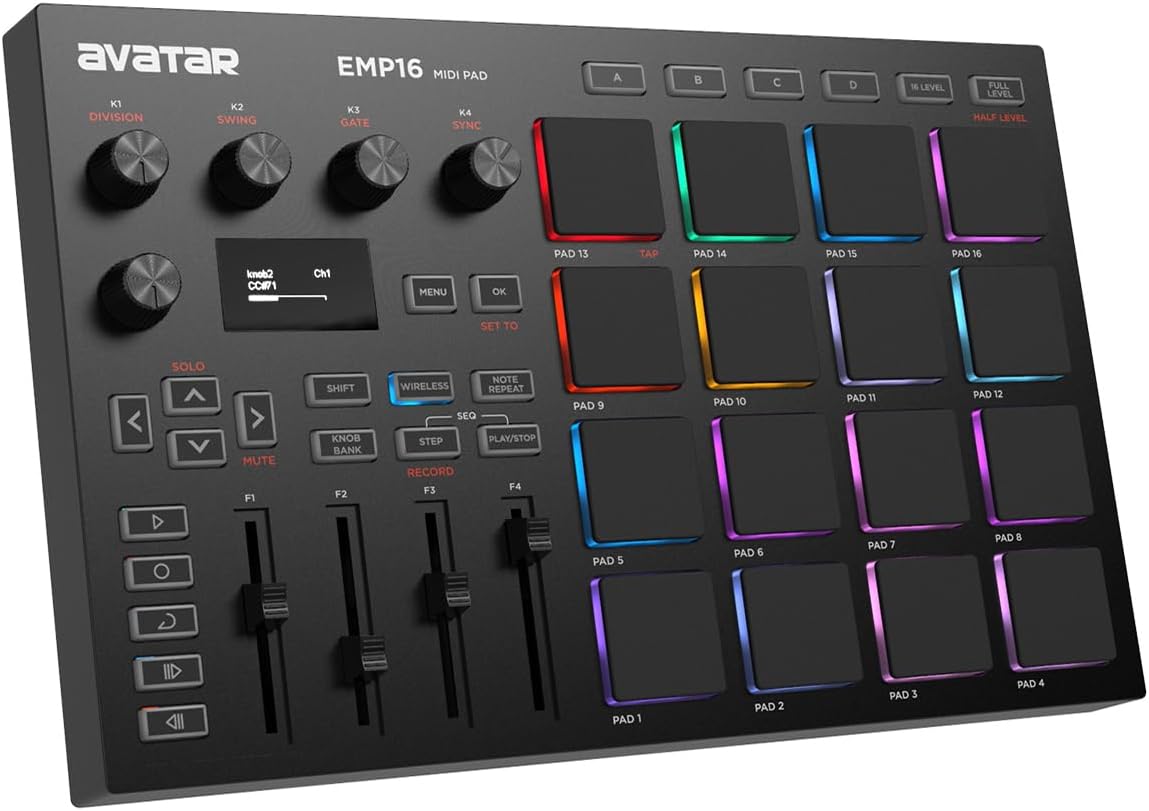
The EMP16 combines 16 customizable RGB pads with Bluetooth, USB MIDI, an OLED display, and a generous collection of performance controls. Its 4.2 rating is supported by broad connectivity and an unusually deep feature set for a portable beat-making device.
We may earn a commission when you buy through this link, at no additional cost to you.
Three velocity curves, configurable thresholds, aftertouch, and level options let users fine-tune the response of the pads. Four banks expand the controller to 64 assignable positions, while faders, buttons, rotary knobs, note repeat, swing, gate, sequencing, clock synchronization, transport, and tap tempo support both studio and stage use.
The OLED is a notable advantage because it provides immediate visual feedback without requiring the user to open a separate editor on a computer. Standard MIDI inputs and outputs also expand compatibility with external equipment, although this makes the EMP16 more involved than a straightforward plug-and-play pad.
Choose it when wireless freedom, customizable response, and deep performance control matter more than immediate simplicity. It is a strong fit for mobile beat production, portable studio sessions, and creators who want to trigger drum samples, effects, and external MIDI gear from one compact surface.
The OLED presents current settings where the player can see them. That is valuable when switching velocity curves, banks, or performance functions while moving between a studio and a mobile setup.
The four faders, five buttons, and four knobs go beyond simple sample triggering. With multiple banks and sequencing functions, the controller can serve as the central control surface for a compact mobile production rig.
We may earn a commission when you buy through this link, at no additional cost to you.
This mini wireless MIDI controller is designed for beat makers who want to work away from a desk. It combines 16 velocity-sensitive RGB pads, aftertouch, Bluetooth MIDI, USB MIDI, and a rechargeable battery, earning a 4.2 rating as a portable production option.
We may earn a commission when you buy through this link, at no additional cost to you.
Three pad banks expand the available assignments to 48 positions, and three assignable buttons support essential commands. KuSuite software allows users to customize pad mappings, MIDI commands, velocity curves, and lighting for iPhone, iPad, macOS, Android, and Windows environments.
Its primary compromise is the limited number of dedicated assignable buttons compared with larger controllers. Customization also depends on the companion software, which may feel less immediate for someone who wants to begin triggering sounds without configuring a mapping first.
The controller is well suited to mobile producers, DJs, and beginners seeking a lightweight entry into hardware beat making. Its combination of wireless operation, aftertouch, and reasonable battery life makes it especially useful for travel, live remixing, and ideas developed away from a studio.
Bluetooth MIDI removes the need to remain tethered to a laptop. A phone or tablet can become the center of a production session while the controller handles samples, notes, and effects.
Velocity sensitivity and aftertouch bring more variation to a controller that occupies little desk or bag space. This makes it useful for performers who want expressive input without carrying a larger hardware surface.
We may earn a commission when you buy through this link, at no additional cost to you.
The JP-1 wireless MIDI controller pairs 16 velocity-sensitive RGB pads with eight assignable knobs and six customizable buttons. Its 5.0 listing rating is the highest in this group, reflecting a well-received balance of compact design, wireless freedom, and practical controls.
We may earn a commission when you buy through this link, at no additional cost to you.
The knobs can be assigned to tempo, volume, effects, filters, and other parameters, while the buttons provide quick access to functions such as Knob Mode, Full Level, and Shift. Bluetooth and USB MIDI support accommodate mobile use and a more stable wired studio connection.
Unlike the EMP16, it does not include a built-in display, so creators cannot expect to view changing settings directly on the hardware. Its effectiveness also depends on the mapping capabilities of the connected DAW, although the product is listed as compatible with Ableton Live, Logic Pro, FL Studio, Cubase, and other major platforms.
Choose the JP-1 for a portable beat-making station that needs more physical controls than a basic 16-pad unit. It is a strong candidate for beginners, traveling producers, and DJs who want plug-and-play connectivity plus enough knobs to shape sounds in real time.
Eight assignable controls give the controller meaningful depth without requiring a larger enclosure. They can be tied to performance parameters, workflow commands, or mixing controls according to the user's setup.
The rechargeable battery is listed to deliver up to 20 hours of continuous use. That endurance supports mobile sessions and live performance work where dependable operation matters more than replacing batteries.
We may earn a commission when you buy through this link, at no additional cost to you.
The Akai Professional MPK Mini IV combines 25 velocity-sensitive mini keys with eight MPC-style RGB pads and a full-color screen. Its 4.6 rating reflects a versatile design that supports beat production, melodic writing, sound design, and live performance in one compact enclosure.
We may earn a commission when you buy through this link, at no additional cost to you.
Eight assignable 360-degree knobs, a push-and-turn encoder, DAW-mapped transport controls, and the screen provide extensive access to settings without requiring constant mouse use. The advanced arpeggiator includes pattern, freeze, and mutate functions, while chord and scale modes help users explore melodic ideas.
The mini keys are the clearest compromise. They are compact for travel, but musicians accustomed to full-size piano spacing may find the layout less natural for extended playing. The bundled suite also includes many sounds and learning tools, which can be valuable but may create a substantial initial software setup.
Choose the MPK Mini IV when a pad-only controller would be too restrictive. It is especially well suited to producers who want to combine finger drumming, bass lines, synth leads, chord progressions, and sample triggering without managing two separate devices.
The keyboard section makes the controller useful for chord progressions, bass parts, and synth melodies, while the MPC pads handle drums and samples. Combining both functions reduces the need to switch between separate instruments.
The vibrant full-color screen displays relevant settings and supports more intuitive navigation. Combined with the push-turn encoder, it reduces dependence on small computer menus during production or performance.
We may earn a commission when you buy through this link, at no additional cost to you.
The Mini Wireless Aftertouch Pads offer 16 RGB velocity-sensitive pads, aftertouch, and both Bluetooth and USB MIDI in a slim format. Its 4.7 rating makes it one of the strongest-rated options here, particularly for creators who prioritize portability and expressive response.
We may earn a commission when you buy through this link, at no additional cost to you.
Three assignable function buttons and three banks expand the surface to 48 available pad positions. The KuSuite app supports remapping, MIDI command changes, velocity curve selection, and lighting control across mobile and desktop platforms, providing flexibility beyond the small physical layout.
With only three assignable buttons and no display, it is less suited to creators who want immediate access to a large bank of functions without configuring software. The requirement to use the companion app for deeper customization also places it behind controllers with more onboard navigation and controls.
This model is a strong recommendation for mobile producers and DJs who want a lightweight expressive pad surface. It is particularly appealing for travel, rehearsal, and spontaneous sessions where Bluetooth operation and a compact body matter more than extensive hardware buttons.
Velocity and aftertouch support make it possible to vary output with different levels of pressure. That additional control can give sampled instruments and effects a more natural response during live manipulation.
The editing app lets users adjust mappings, commands, curves, and lighting for different devices and workflows. This helps one controller move between a phone-based session, a laptop studio, and a live performance rig.
We may earn a commission when you buy through this link, at no additional cost to you.
The Novation Launchpad Mini MK3 is a compact eight-by-eight grid controller designed to make an Ableton Live session easy to read and control. Its 4.5 rating reflects strong visual feedback, dependable integration, and a slim form that fits comfortably into a studio or traveling setup.
We may earn a commission when you buy through this link, at no additional cost to you.
The 64 RGB pads mirror the clip arrangement in Ableton Live, allowing performers to launch clips and scenes at a glance. Dedicated Stop, Solo, and Mute controls support hands-on performance management, while Novation Components and three Custom Modes allow users to alter MIDI mappings.
Unlike expressive finger-drumming controllers, the pads do not provide the velocity-sensitive dynamics emphasized by several ATOM and Akai models. Its grid format is less natural for general drum triggering, and the deepest experience is centered on Ableton Live and compatible clip-launching workflows.
Choose the Launchpad Mini MK3 for live electronic performance, rapid idea arrangement, and visual control of a DAW session. It is a refined choice for producers who organize clips into scenes and want to perform them from a dedicated, illuminated hardware grid.
The RGB grid displays the current Ableton arrangement in a straightforward visual format. A producer can identify and launch clips without constantly checking a crowded computer screen.
Three Custom Modes make the controller more than a fixed Ableton accessory. Users can assign MIDI controls to suit different software, instruments, or performance requirements.
We may earn a commission when you buy through this link, at no additional cost to you.
The Akai Professional LPD8 offers eight RGB-backlit MPC pads, eight Q-Link knobs, and a remarkably straightforward approach to hardware control. Its 4.4 rating reflects an easy-to-use controller that fits comfortably in a laptop bag and integrates with a wide range of DAWs.
We may earn a commission when you buy through this link, at no additional cost to you.
The eight assignable knobs provide tactile control over virtual instruments, effects, and DAW parameters. Four programmable preset slots let users recall different mapping sets immediately, while the slim enclosure offers a more manageable footprint than a full grid or keyboard controller.
The main limitation is the eight-pad layout. It provides enough room for drums or essential samples, but it is less accommodating for users who want a broad bank of one-shots, clips, or performance triggers visible at once. There is also no wireless connectivity for mobile use.
Choose the LPD8 for beginners, laptop-based producers, and anyone seeking an uncomplicated controller that can begin making beats immediately. It also works for established producers who mainly need a compact sample trigger and several physical parameter controls.
USB plug-and-play operation removes the need for a dedicated driver or power adapter. The result is a controller that is easy to add to a Mac or PC setup and begin using with compatible production software.
Four programmable slots make it simple to switch between mappings for different instruments, effects, or projects. This is helpful for creators who regularly change software or want to keep separate workflows ready.
We may earn a commission when you buy through this link, at no additional cost to you.
A useful pad controller should match your software, playing style, and mobility needs. The most important considerations are the layout, expression features, connectivity, and amount of direct control required for your production workflow.
The pad layout determines how much of your sound library remains visible and how easily clips, samples, and effects can be triggered. A traditional four-by-four arrangement provides large pads suited to finger drumming, while an eight-by-eight grid supports clip launching and broad banks of visible assignments. Smaller eight-pad designs prioritize portability over screen coverage.
Choose a grid for Ableton-style performance and a conventional pad layout for percussion-focused production. The right format depends on whether you think in clips and scenes or in drums, samples, and one-shots.
Velocity sensitivity allows a pad to respond differently according to how hard it is struck. Pressure sensitivity and aftertouch add another dimension by responding to changes in pressure during a held note. These features improve dynamics, but they are most useful when the connected software or virtual instrument supports expressive MIDI control.
Look for adjustable velocity curves or pressure thresholds if realism and nuanced performance matter to you. For clip launching, where consistent triggering is often more important, expressive response may carry less priority than a clear illuminated grid.
Some controllers offer dedicated layouts and pre-mapped controls for a specific DAW. The APC Mini MK2 and Launchpad Mini MK3 are especially oriented toward Ableton Live, while the ATOM closely integrates with Ableton Live Lite and Studio One Artist. General MIDI compatibility gives you broader freedom but may require more manual mapping.
Check whether your principal DAW has a ready-made template, a native integration, or a dependable custom-mapping path. Confirm included software separately from third-party compatibility, since bundled applications can help beginners without replacing the features of a full production platform.
Bluetooth MIDI can remove cable restrictions and make a phone or tablet more practical as a beat-making center. It is valuable for travel, live performance, and spontaneous ideas, although reliability varies by operating system, software, and connection method. USB remains the predictable choice for a fixed studio setup.
If mobility is important, verify that the controller supports the exact devices and applications you use. Look for USB operation as a fallback, and confirm whether a cable is included for charging, wired MIDI, or both.
Extra controls let a producer shape sounds, adjust effects, navigate software, and manage a performance without repeatedly using the mouse. Knobs suit continuous parameter changes, faders provide intuitive mixer and macro control, and buttons can handle note repeat, shift functions, transport, or mode changes. Larger control surfaces offer more options but consume desk and travel space.
Prioritize the controls you use most often. Eight assignable knobs may be more valuable than many secondary buttons, while a dedicated master fader is especially useful for clip-launching and mixing workflows.
Portable controllers should be light enough to carry and reliable enough for sessions away from a desk. Battery life becomes essential for wireless models, especially during rehearsals, outdoor recording, and live performance. Wired and bus-powered devices avoid battery management entirely and often remain slimmer.
Compare case size, weight, and battery endurance together. A controller with a long battery can still be inconvenient if it is bulky, while a compact wired model may be ideal for a laptop-focused producer who never performs away from home.
RGB lighting communicates clip status, pad assignments, selected banks, and performance states at a glance. A display goes further by showing changing parameters and providing menu navigation. Both improve hardware control, but they can also create a strong preference between visual clarity and simplicity.
Choose lighting when you need immediate awareness of assignments and choose a display when you often change detailed settings. Compact models without a screen are still effective when their controls are mapped consistently and the software provides sufficient visual feedback.
Bundled DAWs, virtual instruments, samples, and lessons can shorten the path from unboxing to making music. The MPD218 includes MPC Beats and Ableton Live Lite, the APC Mini MK2 includes Ableton Live Lite and a virtual instrument pack, and the MPK Mini IV offers a large instrument suite plus learning tools. Software quantities do not replace the need to choose a DAW that suits your production style.
Review the included software carefully, especially if you already have a preferred DAW. Treat bundles as useful extras rather than the sole reason to buy, and focus on the controller's hardware, mapping options, and compatibility with your established workflow.
Begin by connecting the controller with its supported USB or Bluetooth method, opening your DAW, and selecting it as the MIDI input. Load the manufacturer's mapping template when available, then start with a small set of pads assigned to your most frequently used sounds. Test velocity behavior, bank changes, note repeat, and any transport controls before building a larger arrangement.
Build your workflow in layers: assign percussion first, then melodic samples, then effects or mixer controls. Use lighting to identify different groups, label banks in your software, and save mappings or preset slots once the layout feels logical. For grid controllers, keep related clips together and take advantage of scenes or stop, solo, and mute behavior when your DAW supports them.
Handle the unit with care, particularly around pressure-sensitive pads, knobs, and connectors. Keep it away from moisture, excessive heat, and impact; clean the surface with a soft dry cloth rather than harsh liquids; and avoid pressing hard merely to test the mechanism. Store wireless controllers with adequate battery charge, and use their protective cases or padded storage during travel.
A pad controller is designed primarily for triggering samples, drum sounds, clips, and effects from a grid of performance-sensitive buttons. A MIDI keyboard uses musical keys to communicate notes, scales, and chords. Some controllers, such as the Akai MPK Mini IV, combine both layouts so a producer can play melodies and trigger samples with one device.
Velocity sensitivity is useful when you want quieter or softer hits and louder, more pronounced accents. It adds natural variation to finger drumming and can make sampled instruments feel more responsive. If your main workflow consists of launching fixed clips with consistent timing, illuminated fixed-layout pads may be more important than expressive dynamics.
They can be, provided the controller and receiving device maintain a stable connection during the session. Battery level, wireless interference, operating-system behavior, and the connected software should all be checked before a performance. Having a wired USB option provides a valuable fallback and is common among the wireless models featured here.
A 64-pad grid is generally better for visual clip launching, scene organization, and seeing many assignments at once. A traditional 16-pad layout is often more comfortable for finger drumming because the pads provide more space between targets. The most productive choice depends on whether your workflow is performance-based, clip-based, or built around individual samples.
Most standard MIDI pad controllers can send MIDI to third-party DAW software without requiring the bundled applications. Included software can provide ready-made mappings, virtual instruments, lessons, or content for getting started. Check whether it is a full production platform, a limited edition, or a set of supplementary tools before planning around it.
More banks provide more assignable sounds without increasing the physical footprint. Four or eight banks suit producers who organize large sample collections, while three banks may be plenty for a focused mobile setup. Consider how easily the controller can switch banks during a performance and whether the selected bank is clearly visible.
Controllers with Bluetooth MIDI are designed to work with compatible mobile devices and applications. The supplied information specifically mentions iPhone, iPad, iPod touch, and Mac compatibility for the EMP16, while the mini wireless controllers list broader mobile app support. Verify operating-system requirements and the software's MIDI support before purchasing for a specific device.
Start with your DAW, whether you need wireless connectivity, and the types of sounds or clips you perform most. Next, compare pad sensitivity, the number of knobs or faders, screen visibility, bank capacity, and bundled software. Finally, confirm physical dimensions and portability so the controller fits the intended studio, rehearsal, or live setup.
The Akai APC Mini MK2 stands out for Ableton Live users who want a complete illuminated grid, clip launching, mixer faders, and tactile macros in one device. The Novation Launchpad Mini MK3 provides a similarly strong visual performance workflow in a particularly slim form, while the Akai LPD8 offers the simplest route into compact hardware beat making.
Prioritize the interaction style that fits your music. Choose a traditional performance pad layout for finger drumming, a large grid for clip-based control, and a hybrid keyboard when melodic input is equally important. Wireless models expand mobile possibilities, and a screen, knobs, or faders matter when you want to control more than a handful of samples.
Before purchasing, confirm current listing details, compatibility, included software, and the accessories required for your preferred connection method. Product specifications, ratings, availability, and market conditions can change, so reviewing the latest listing will help ensure that the selected controller fits both your creative goals and your setup.