
WOLFBOX G900 PRO
4.2Editor score
STARVIS 2 low-light sensor
4K front and 2.5K rear
Included 128GB memory card
A rear view mirror dash camera combines forward-facing road recording, rear coverage, and a large digital display in one vehicle-mounted unit. The best models can broaden your field of vision, document lane changes and parking incidents, and provide useful evidence after a collision. Because installation, image quality, and parking capabilities vary significantly, selecting the right model requires comparing features rather than relying on screen size alone.
This guide compares ten mirror-style dash cameras across front and rear recording resolution, display dimensions, viewing angles, night performance, app connectivity, parking modes, driver-assistance functions, storage support, and installation requirements. The list includes basic dual-camera systems, advanced ADAS-equipped models, premium STARVIS options, and a four-channel design with detachable side cameras. It also highlights accessories that must be purchased separately.
Each review explains the product's strongest features, practical trade-offs, and ideal buyer. The top selections represent the most balanced overall option, the strongest premium option, and the most capable budget-oriented choice. Product prices and promotions can change frequently, so check the current listing and verify compatibility, included storage, and required accessories before making a final purchase.
4.2Editor score

4.3Editor score

4.1Editor score
As an Amazon Associate we earn from qualifying purchases.
The comparison below highlights the major differences in display size, recording resolution, viewing coverage, connectivity, and parking support. It is designed to make the most important trade-offs easier to understand before reviewing each model in detail.




The WOLFBOX G850 PRO is the most complete all-around mirror dash camera in this guide, combining a 4K front channel, 1080p rear channel, large IPS touch display, wireless app access, voice commands, and an unusually broad suite of driver-assistance tools. Its 4.3 rating reflects a capable package that goes well beyond basic video capture, particularly for drivers who want collision warnings, lane monitoring, and blind-spot alerts.
We may earn a commission when you buy through this link, at no additional cost to you.
Its ADAS system is a defining feature. Forward-collision, pedestrian-collision, lane-departure, lead-vehicle-start, and distance-monitoring alerts can give drivers earlier awareness of developing hazards. An enhanced blind-spot algorithm adds alerts during lane changes and helps identify nearby vehicles or potential rear collision risks. These are not substitutes for attentive driving, but they can provide useful prompts in traffic.
Image quality is also strong for the category. The front camera records at 2160p, while the rear records at 1080p, and both channels use WDR or HDR processing to balance bright and dark areas. A full IPS touchscreen, wide-angle lenses, 5.8GHz WiFi, and twelve voice commands make daily operation and file management relatively convenient. The included 64GB card provides a useful starting point for storage.
The principal trade-off is that a separate hardwire kit is needed for parking surveillance. The 1080p rear channel also falls short of the 2.5K rear resolution offered by some premium alternatives. Even so, the G850 PRO offers the strongest balance of driving alerts, recording quality, display operation, and app convenience here. It is a strong choice for modern vehicles and drivers who value proactive safety prompts over reverse-assist extras.
The ADAS and blind-spot tools turn this mirror into more than a recorder. They can surface warnings during lane changes, following too closely, and other situations where an extra visual prompt may help, although drivers must remain responsible for every maneuver.
The upgraded 5.8GHz connection is designed for smoother live viewing, downloads, and sharing through the WOLFBOX app. A 64GB card is included, making the system more ready for use than versions that require a separate memory card.
We may earn a commission when you buy through this link, at no additional cost to you.
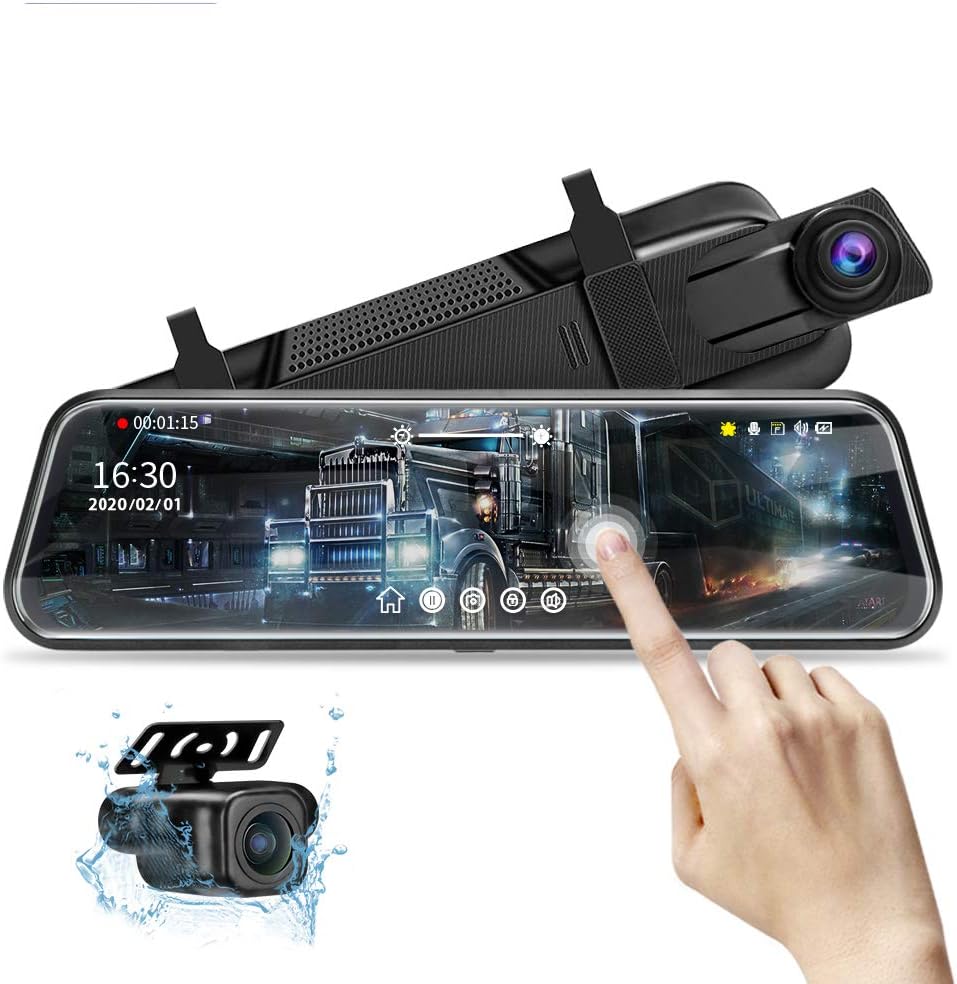
The WOLFBOX G900 PRO targets drivers who want the best possible image fidelity from a mirror-mounted dash camera. It records 4K at 30 frames per second through an 8MP front camera and 2.5K at 30 frames per second from the rear. A STARVIS 2 IMX678 sensor and seven-glass lens are particularly valuable at night, when conventional dash cameras often produce grainy or poorly balanced footage.
We may earn a commission when you buy through this link, at no additional cost to you.
Its resolution advantage extends to the rear channel, making this one of the strongest choices for documenting vehicles approaching from behind or activity around the car while parked. The STARVIS sensor is designed to perform better in low light, while the upgraded lens helps preserve fine detail. The package also includes a 128GB memory card and supports cards up to 512GB, giving users generous storage for long journeys and extensive loop recording.
Wireless management is handled through the upgraded 5.8GHz WiFi and WOLFBOX app, allowing users to download and share footage more efficiently. Voice commands provide another way to operate essential functions without touching the unit. Its 4.2 rating is slightly below several alternatives, but the specifications position it as a premium imaging product rather than an entry-level recorder.
A separate hardware kit is required to use the advertised 24-hour parking monitor. Buyers should also consider whether their priorities justify spending more for premium image quality when the G850 PRO offers richer ADAS functionality. Still, the G900 PRO is the best selection here for night driving, rear-traffic documentation, and users who prioritize sensor and resolution quality above driver alerts.
The STARVIS 2 IMX678 is the key reason to consider this premium model. Its low-light orientation can improve visibility on dark roads, dim streets, and poorly illuminated parking areas, where extra resolution alone may not compensate for a weak sensor.
With a 128GB card included and support for up to 512GB, this system reduces the need for frequent card management. That makes it particularly attractive for commuters, road-trip drivers, and anyone who wants dependable loop recording capacity.
We may earn a commission when you buy through this link, at no additional cost to you.
The WOLFBOX G840S combines a 12-inch 2.5D curved display with 4K front recording, a 1080p rear camera, wide viewing angles, GPS, and 5.8GHz WiFi. It earns a 4.3 rating and is especially attractive for drivers who want the largest screen in the group without moving to the four-channel configuration.
We may earn a commission when you buy through this link, at no additional cost to you.
The display provides approximately 1.5 times the viewing area of a standard mirror, according to the product information. A low-reflectivity LCD is intended to reduce daytime glare, while WDR, HDR, and a professional-grade sensor help balance exposure. The front camera uses a 170-degree lens and the rear uses a 140-degree lens, creating a broad perspective around the vehicle.
GPS data can appear directly on the display after the external antenna is connected, and the WOLFBOX app supports live viewing, playback, and quick sharing over 5.8GHz WiFi. Loop recording covers standard driving needs, while time-lapse parking mode can continuously monitor the vehicle when connected to a suitable hardwire kit.
Its most significant limitation is the need for additional hardware to activate parking monitoring. Buyers also should not expect premium ADAS alerts from this model. Even so, the combination of a 12-inch display, generous field of view, GPS, and 4K front capture makes the G840S a strong fit for drivers who prioritize visual coverage and navigation metadata.
The oversized curved screen and 170-degree front lens create a more expansive view than a conventional mirror. It can make lane positioning and surrounding traffic easier to assess, while the split-screen layout keeps both camera feeds available.
The external GPS antenna adds location and direction information to recordings, while the app provides convenient wireless access. A 32GB card is included, so basic setup does not require purchasing storage separately.
We may earn a commission when you buy through this link, at no additional cost to you.
The AZDOME 12-Inch stands out for combining high-resolution recording with ADAS, blind-spot detection, lane-change assistance, and AI-enhanced playback. It records 4K from the front camera and 2.5K from the rear, then provides a bright 12-inch touchscreen for viewing, configuration, and reverse assistance.
We may earn a commission when you buy through this link, at no additional cost to you.
Its safety tools are designed to improve awareness when merging, changing lanes, or driving among multiple traffic lanes. The app adds an unusual layer of post-incident analysis through augmented-reality overlays that can identify license plates, vehicle distance, speed, and lane guidance. Timeline playback and in-app customer support make recorded footage easier to review without transferring everything to a computer.
Ten English voice commands cover tasks such as taking a picture, locking video, changing camera views, and adjusting audio, WiFi, or the screen. The rear camera automatically appears with parking guide lines when the vehicle enters reverse. Time-lapse and collision-detection parking modes are also supported, although a separate three-lead Type-C hardwire kit is required.
The product's 4.2 rating is balanced by a long feature list and a 64GB included card. The principal trade-off is that some of the most advanced features add complexity, and the parking kit is an extra purchase. It is an excellent choice for drivers who want detailed road analysis and modern safety prompts in a single mirror unit.
Recognized plates, speed data, distance estimates, and lane guidance can make important recordings easier to understand. This is especially helpful after an incident, when a driver may need to locate a specific vehicle or event across several clips.
The 12-inch touchscreen is large enough to make guide lines and the rear image easy to inspect. Automatic reverse switching reduces the need to navigate menus manually while backing into a space or driveway.
We may earn a commission when you buy through this link, at no additional cost to you.
The Hufdic 10-Inch is a practical budget-oriented choice for drivers who want front and rear 1080p recording, a large touchscreen, and parking functions without a more complex safety-alert system. It carries a 4.1 rating and includes a 32GB card, allowing buyers to begin using the camera without purchasing storage separately.
We may earn a commission when you buy through this link, at no additional cost to you.
Core operation is handled through a responsive full-screen touchscreen. Users can record, review footage, adjust exposure and brightness, and change date or time settings directly. The front and rear cameras provide a 170-degree front view, while loop recording overwrites the earliest clips when the card reaches capacity.
A built-in G-sensor locks footage when a collision is detected, protecting important recordings from the loop process. The parking monitor supports low-frame-rate time-lapse recording, but continuous parking operation requires a hardwire kit. Installation accessories and step-by-step instructions are included, and the mirror-style unit is designed to integrate over the factory mirror.
There are no ADAS, BSD, voice-control, or app-based analysis features, so this is primarily a straightforward recording and visibility product. Its 1080p channels also trail the newest 4K and 2.5K combinations. For a buyer who prioritizes a large display, dual cameras, included storage, and parking basics, however, it delivers a useful feature set without unnecessary complexity.
The system focuses on familiar dash-camera functions: continuous recording, playback, exposure control, and collision locking. That simplicity makes it approachable for first-time owners and drivers who do not want to manage advanced menus.
A 32GB card is included, and older unlocked clips are replaced automatically as storage fills. This makes routine maintenance less demanding, while locked collision footage remains protected.
We may earn a commission when you buy through this link, at no additional cost to you.
The Jansite 10-Inch is especially compelling for drivers who prioritize parking assistance. Its rear camera automatically fills the display when reverse is selected, offers six guide-line height positions, and includes a one-key adjustment for the backup camera's viewing angle. These controls make it one of the most parking-focused products in the guide.
We may earn a commission when you buy through this link, at no additional cost to you.
Both cameras record at 1080p, and the rear camera has an IP68 waterproof rating. A six-layer glass lens, improved night exposure, and intelligent noise reduction support clearer low-light documentation. The 10-inch IPS touchscreen provides a wider view than a traditional mirror and allows direct control of camera selection, exposure, brightness, playback, and date and time settings.
Loop recording protects the system from gaps in coverage by overwriting older files, while the G-sensor locks footage following a collision. Storage can reach 128GB, although a card is not included. Parking monitoring and time-lapse mode require a compatible hardwire kit, and the listing identifies a separate kit and replacement rear-camera options for specialized installations.
Buyers should carefully measure their original mirror because the unit weighs about 0.72 pounds and has a tapered shape. It also cannot serve as a reflective mirror when powered off. These considerations aside, the Jansite offers rich parking controls, a waterproof rear camera, and flexible mounting options at a practical midrange level.
Six guide-line heights and manual display-range adjustment make the reverse view more adaptable than a simple fixed-line system. These controls are particularly useful for larger vehicles, changing loads, or owners who want to refine the camera angle.
The IP68 waterproof rear camera is suitable for exposed installation where moisture and dust may be concerns. Its six-layer lens and revised night-exposure processing improve usefulness when reversing after dark.
We may earn a commission when you buy through this link, at no additional cost to you.
The WOLFBOX G930 is a well-rounded model for drivers who want 4K front recording, a 10-inch touchscreen, GPS, fast wireless access, and generous included storage. It shares a 4.3 rating with the G840S but adopts a more compact 10-inch format and places greater emphasis on simple navigation and app-based file management.
We may earn a commission when you buy through this link, at no additional cost to you.
The front camera records at 4K, while the rear records at 1080p. Low-reflectivity screen treatment, WDR, a six-glass lens, and a premium sensor help produce balanced images in bright daylight and difficult low-light settings. A split-screen mode lets users monitor both directions, and sliding controls make it easy to change views or adjust the screen's angle.
The included 64GB card offers considerably more starting storage than many competing systems. The 5.8GHz WiFi system provides smoother app-based downloads and sharing, while GPS displays real-time speed and direction on the screen and adds location information to recordings. Loop recording can be configured in one-, two-, or three-minute intervals, and the G-sensor automatically locks collision footage.
This model does not include the extensive ADAS alerts found in the G850 PRO, nor the elaborate parking guide adjustments offered by the Jansite. Even so, the G930 avoids unnecessary complexity while covering the features most daily drivers use. It is a strong recommendation for users who want 4K front footage, wireless access, and substantial storage in a conventional mirror format.
The G930 includes 4K front capture, GPS, WiFi, loop recording, and collision locking without turning every function into a separate purchase. This balance makes it a versatile option for commuting and long-distance travel.
A 64GB card is included, reducing setup friction and extending recording time before older clips must be overwritten. GPS metadata can help establish the context and location of a recorded event.
We may earn a commission when you buy through this link, at no additional cost to you.
The unnamed 4K 10-Inch Mirror combines a 4K front camera, 1080p rear camera, 10-inch IPS display, WiFi, night vision, parking assistance, and an included 32GB card. Its 4.5 rating is the highest among the ten products, although that figure should be considered alongside the comparatively limited information about the brand and feature set.
We may earn a commission when you buy through this link, at no additional cost to you.
An F1.8 aperture on the front camera supports improved low-light capture, while the front and rear wide-angle lenses are listed at 130 and 145 degrees. The display automatically switches to the rear perspective when reverse is selected. WiFi connectivity allows the user to download and share recordings through an app, reducing the need to remove the memory card.
The parking monitor can be accessed through an OBD connection, offering continuous monitoring without treating the parking-mode description as a completely standalone feature. A G-sensor detects collisions and locks the relevant clip so it is not overwritten by the loop-recording process.
The trade-offs are a reliance on OBD for the stated parking mode and the absence of ADAS, BSD, GPS, or sophisticated voice commands. Some buyers may also prefer a more established brand ecosystem. Nevertheless, the combination of a high rating, 4K front recording, wide display, and wireless access makes this a compelling feature-value option for everyday use.
The F1.8 aperture helps the front camera gather light in darker conditions, while 130-degree and 145-degree lenses preserve broad road context. Together, they support both documentation and a broad live view.
The WiFi app gives users a quicker way to retrieve and share clips than physically transferring files. Automatic reverse switching and included 32GB storage cover common daily requirements with little setup.
We may earn a commission when you buy through this link, at no additional cost to you.
The 4K CarPlay Mirror is the most smart-display-oriented product in the guide, combining dash-camera recording with CarPlay, Android Auto, Bluetooth, voice control, and a 12-inch curved touchscreen. Its 4.6 rating is the highest listed here, and it is a strong choice for drivers who want navigation and communication features in the same unit as their camera.
We may earn a commission when you buy through this link, at no additional cost to you.
The 1920-by-480 curved display offers a wider horizontal field than 10- or 11-inch alternatives and supports smooth touch navigation. Once Bluetooth is connected, drivers can use CarPlay or Android Auto for maps, music, calls, navigation, and supported video applications. Voice controls further reduce the need to interact with the screen while moving.
Recording quality is solid for the category, with a 4K front camera and 1080p rear camera covering road and rear traffic. Front and rear viewing angles are listed at 170 and 140 degrees. The system also provides loop recording, collision locking, reverse assistance, and 24-hour parking monitoring when the appropriate hardwire kit is installed.
The installation requirements deserve careful attention. The original mirror must be longer than 6.3 inches, the unit weighs approximately 1.3 pounds, and it cannot act as a conventional reflective rearview mirror. It also cannot replace the factory mirror. For compatible vehicles, however, the combination of navigation integration and reliable recording makes this a distinctive, capable option.
The 12-inch curved panel provides more side-to-side visibility than smaller mirror cameras and doubles as a familiar phone-projection interface. It is particularly useful for drivers who regularly use navigation in the vehicle.
The 4K front camera, 1080p rear camera, and wide viewing angles provide the essential recording package, while Bluetooth expands the unit beyond a standalone dash camera. Voice and touch controls cover both driving and camera functions.
We may earn a commission when you buy through this link, at no additional cost to you.
The 360-Degree Four-Channel Mirror is the only product in this guide to add dedicated left and right cameras. Together with front and rear cameras, these detachable side modules create an around-the-vehicle monitoring solution on a 12-inch display. It is the most comprehensive option for blind-spot reduction and multi-direction evidence.
We may earn a commission when you buy through this link, at no additional cost to you.
All four channels record at 1080p. The side lenses extend coverage to 360 degrees, while the front camera's F1.8 aperture is designed to improve nighttime image performance. A 150-degree wide-angle lens and the large display help maintain a useful view even in the system's more expansive multi-camera configuration.
Dual-band WiFi connects through the GFG Drive app for live viewing, downloads, sharing, and settings. The external GPS module supplies location, speed, time, and route information for playback. Time-lapse parking mode records at one frame per second to conserve capacity, while collision detection creates and locks a ten-second clip when an emergency event occurs.
Both parking modes require a separately purchased hardwire kit, and four simultaneous channels naturally demand more memory than a conventional two-camera system. The strap-based installation avoids drilling, but routing and securing the side camera cables requires care. Despite these considerations, it is the strongest choice for drivers who value 360-degree awareness more than high-resolution 4K front footage.
Dedicated left and right cameras are the defining advantage of this system. They can reveal vehicles or incidents in the mirror's usual blind areas, making the setup more useful for parking, crowded streets, and lane-change monitoring.
The external GPS module records the vehicle's path and displays location, speed, and time information. That context can be valuable when reviewing a drive or identifying the position of an incident.
We may earn a commission when you buy through this link, at no additional cost to you.
The right mirror dash camera balances recording quality, viewing coverage, installation constraints, parking support, and everyday usability. Comparing these factors before buying helps prevent a costly mismatch between the product and your vehicle.
Resolution determines how much fine detail a camera can preserve, particularly when license plates, road signs, or vehicle details need to be identified later. A 4K front camera provides the highest pixel density in this group, while 1080p front footage can still be adequate for ordinary incident documentation. The rear channel also matters: 2.5K rear recording offers more detail than a standard 1080p rear camera.
Choose 4K front and 2.5K rear when fine detail is important. For balanced coverage, 4K front and 1080p rear is the common target.
Night driving exposes weaknesses that daytime resolution specifications can hide. Aperture, sensor size, HDR or WDR processing, lens construction, and display reflectivity all influence whether a scene remains readable. The WOLFBOX G900 PRO is the clearest premium example in this guide because its STARVIS 2 IMX678 sensor is specifically oriented toward low-light performance.
Prioritize a modern low-light sensor and balanced exposure over resolution alone. Test the night footage when possible.
A larger display can make split-screen views, reverse guidance, and side-to-side traffic easier to inspect. Ten-inch models are common, while 12-inch products provide a more expansive picture that may cover the factory mirror more fully. Curved 2.5D screens can look polished and may reduce perceived distortion, although the digital unit cannot be treated as a conventional reflective mirror when powered off.
Choose 10 inches for a balanced footprint or 12 inches for maximum visibility. Always check mirror dimensions and weight capacity.
Wide lenses capture more of the road, but the advertised angle does not tell the whole story because distortion, camera placement, and screen cropping also affect the view. Front lenses in this guide range from 130 to 170 degrees, while rear lenses reach as high as 145 degrees. The four-channel model is the clearest option when coverage of the left and right sides is the priority.
Prioritize wide front and rear coverage, but inspect installation examples. Excessive distortion can reduce the usefulness of recorded evidence.
Most parking monitors require a hardwire kit because the vehicle's accessory socket is usually switched off with the ignition. Some products instead use an OBD connection. The accessories mentioned in the listings are generally sold separately, so parking surveillance should be considered alongside the base camera cost and installation effort. Time-lapse mode conserves storage, while collision detection preserves shorter event recordings.
Check which connection method the model requires and whether a suitable kit is included. Hardwiring offers continuous operation but requires careful installation.
WiFi makes it convenient to view live footage, download clips, change settings, and share recordings without removing the memory card. The WOLFBOX models use 5.8GHz WiFi, while the four-channel product uses dual-band connectivity. Higher-frequency 5.8GHz systems are positioned for smoother transfer, although real-world speed also depends on the phone, app, signal conditions, and file size.
Choose WiFi if you often review or share incidents. Check app compatibility and whether live viewing supports your phone.
ADAS, blind-spot detection, lane-change assistance, collision warnings, and parking guide lines can add useful awareness, but they are prompts rather than substitutes for attention. Voice control may reduce menu interaction, while automatic rear-view switching and adjustable guide lines can make reversing more convenient. Buyers should distinguish between core recording functions and optional alerts that may produce false positives or require frequent calibration.
Prioritize parking guidance if it solves a daily problem. Treat ADAS as a supporting tool, not a guarantee of safety.
Storage capacity affects how much footage can be retained before loop recording overwrites older files. Some products include 32GB, 64GB, or 128GB cards, while others require separate storage. Maximum supported capacity is not the same as included capacity. Installation also matters because mirror cameras can be broad, heavy, and sensitive to an original mirror that is too short or unable to support the added mass.
Verify included card size, maximum card support, cable routing, and original mirror dimensions. Do not assume all vehicles are compatible.
Begin by checking the original rearview mirror dimensions, available clearance around the mount, and the position of the rear camera cable. Install the unit during daylight, follow the wiring guide, and confirm that the screen and camera angles do not obstruct vents, controls, or the driver's forward view. Tighten the mounting straps evenly and route cables away from sharp edges and moving components.
After mounting, insert a compatible memory card, set the date and time, choose the recording mode, and adjust exposure, brightness, and camera angles. Test both front and rear images while parked, then verify automatic reverse switching and parking guide lines. If using WiFi, connect to the appropriate app and confirm that live viewing, downloads, and settings controls work before relying on them after an incident.
Care for the system by cleaning the front lens and display with a soft microfiber cloth, avoiding harsh cleaners, and keeping connectors dry. Review storage and lock important collision clips regularly. Check the parking connection, cable condition, and mount tension periodically, and update the app or firmware when the manufacturer provides a legitimate update.
A mirror dash camera combines recording with a large rearview display, making it convenient for reversing and viewing both front and rear feeds. A conventional dash cam is usually smaller and may leave more of the original mirror visible. The best choice depends on whether you value screen area, ease of installation, parking visibility, or a less noticeable dashboard arrangement.
Many mirror dash cameras include a microphone and can record sound from the cabin, but the supplied product details do not clearly specify audio behavior for every model. Check the listing and user manual for microphone controls, mute settings, and any legal requirements related to recording conversations in your location.
Most of the parking modes described require a separate hardwire kit because the vehicle's accessory outlet turns off with the ignition. The 10-inch model using OBD access follows a different connection method, and the four-channel model also requires a compatible hardwire kit. Verify the required accessory before installation to avoid buying an unsuitable connection.
4K recording can preserve more detail, especially around license plates and distant road users, but it also creates larger files and places greater demands on storage. A good sensor, lens, and exposure processing matter alongside resolution. For general driving, 1080p with strong night performance may be sufficient, while frequent incident review can justify 4K front recording.
No. These products mount over the original mirror and provide a digital display, but they do not provide the reflective surface required for a legal backup when the unit is unpowered. Some listings explicitly warn that the screen cannot be used as a standard mirror when turned off, so retain and operate the factory mirror as required.
The appropriate capacity depends on recording length, resolution, and how often footage is transferred. A 32GB card is a practical starting point for 1080p use, while 64GB or 128GB provides more room for 4K recordings and frequent driving. Check the maximum supported card size, format the card as instructed, and transfer important clips before loop recording overwrites them.
No. The product may be wider or heavier than the original mirror, and some vehicles have unusually short, curved, or sensor-equipped mirrors. Check the stated width, length, and weight requirements, then compare them with your vehicle. Also confirm that the replacement camera and cable can be mounted without obstructing visibility or interfering with heating elements.
Time-lapse mode records low-frame-rate footage for extended periods, conserving storage while providing continuous surveillance. Collision-detection mode instead records an event when the sensor detects an impact and locks the relevant clip. Some products support both approaches, and a hardwire or OBD connection is normally needed to keep the system powered while parked.
The WOLFBOX G850 PRO is the strongest all-around choice because it combines 4K front recording, 1080p rear coverage, a responsive IPS display, fast 5.8GHz WiFi, voice control, and comprehensive ADAS and blind-spot alerts. The WOLFBOX G900 PRO takes the lead for premium image quality with its STARVIS 2 sensor, 4K and 2.5K channels, and large included memory card.
For buyers seeking a simpler and more economical setup, the Hufdic 10-Inch provides dual 1080p cameras, a large touch interface, an included 32GB card, collision locking, and time-lapse parking mode. Drivers who need the widest physical coverage should consider the four-channel model, while those focused on parking can look closely at the Jansite and AZDOME options.
Before buying, verify the original mirror dimensions, memory-card situation, required parking connection, app compatibility, and local recording rules. Product prices, bundles, and included accessories can change, so review the current listing carefully. Choose the model that solves your most frequent driving or parking need rather than selecting solely by screen size or headline resolution.