
Brother P-Touch Pro PTH111
4.6Editor score
Four TZe tape widths supported
Workspace-focused one-touch keys
Graphical two-line label preview
Discover the best handheld label maker options for home, office, school, travel, and workshops, comparing features, compatibility, portability, and performance.
A handheld label maker turns organization from a time-consuming chore into a quick, satisfying process. The right model should offer a comfortable keyboard, clear text previews, convenient cutting, and tapes suited to everything from pantry jars to travel gear. Portability matters too, especially for students, crafters, and field technicians.
This guide compares ten label makers using the supplied specifications, ratings, included accessories, tape formats, display features, and intended uses. It covers compact personal devices, more versatile keyboard models, and rugged workspace options, while also examining Bluetooth editing, rechargeable batteries, print styling, label compatibility, and memory functions.
Each numbered review shows where a product excels, who is most likely to appreciate it, and where its workflow may be less convenient. The Top Picks highlight the strongest options for different priorities, while the comparison table makes the main differences easier to scan. Prices and promotions can change, so confirm current listings before buying.
4.6Editor score

4.7Editor score

4.6Editor score
The table below compares all ten label makers by their core design, display, tape system, and intended labeling environment, making it easier to identify the model that matches your priorities.




The Brother P-Touch PT-N10 is a personal handheld label maker built for colorful, expressive organization, and it carries a 4.3 rating. Its defining advantage is compatibility with 12mm Brother Btag tape offered in 17 color options. The split backing, easy-peel design, and damage-free removal make it especially useful for dorm rooms, travel, school supplies, and belongings that need a more personal visual treatment.
We may earn a commission when you buy through this link, at no additional cost to you.
Typing happens on a full QWERTY keyboard, while a 12-character display lets users preview text and estimate the tape length before printing. The device provides three fonts in six styles, including underline and italic, along with 10 frames and 200 symbols. It can print up to two lines with a combined height of 7mm, creating enough flexibility for concise names, reminders, and decorative messages without turning the label into a text-heavy sign.
The main limitation is its specialized tape platform. The PT-N10 works exclusively with Brother Btag tapes measuring 12mm wide and 4m long, so buyers should confirm that this narrower, color-oriented format suits their needs before committing. It also lacks Bluetooth app editing, relying instead on its physical keyboard and onboard styling tools. Those limitations are reasonable for users who value simplicity and color over open-ended software customization.
This model is best for students, travelers, dorm residents, crafters, and anyone who wants inexpensive-looking, colorful identifiers rather than strictly utilitarian markers. It also suits people who prefer direct label creation without connecting a phone. Those needing narrow durable technical labels, multiple tape widths, or workspace shortcut keys should choose a Brother TZe model instead, but for personalized everyday labels, the PT-N10 is a distinctive and capable option.
The 17 Btag color choices separate this model from conventional black-on-white tape. That makes it useful for name tags, gift tags, dorm organization, and travel where visual recognition is as important as written identification.
The display shows label content and length before printing, helping users catch mistakes and avoid producing labels they cannot use. Ten saved designs also make recurring labels quicker to reproduce.
We may earn a commission when you buy through this link, at no additional cost to you.
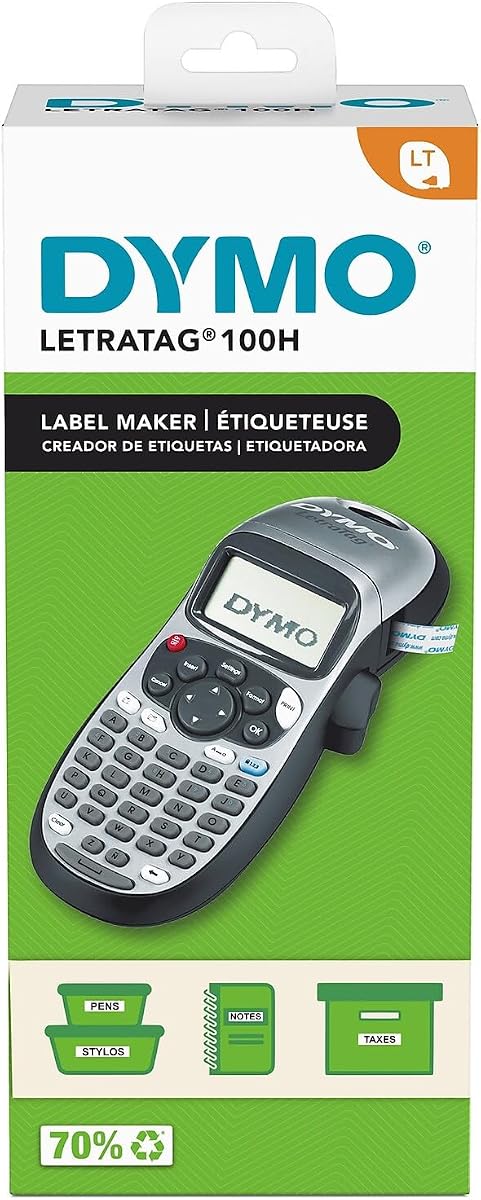
The DYMO LetraTag 100H Plus is a compact, lightweight label maker with a 4.6 rating and a useful selection of included supplies. It is designed for labeling in offices, homes, and other everyday environments without requiring a complicated setup. The graphical display provides an immediate view of text effects, helping users make confident formatting choices before committing a label to tape.
We may earn a commission when you buy through this link, at no additional cost to you.
Customization is handled through five font sizes, seven print styles, and eight box styles. The unit works with 1/2-inch DYMO LetraTag LT labels, and the bundle includes a black-on-white paper cassette, a black-on-clear plastic cassette, and a magnetic holder. That assortment expands the range of tasks the device can handle, from identifying files and household containers to marking removable or frequently changing items.
The trade-offs center on its older, more limited design. It has no Bluetooth connection, no app-based graphics, and no broad compatibility with modern D1 or TZe tape families. The fixed half-inch format also means it is less adaptable to very narrow technical identifiers. Nevertheless, the direct controls, preview screen, auto-off function, and included magnetic holder make the core workflow uncomplicated for users who just want dependable text labels.
Choose the LetraTag 100H Plus if you need a straightforward home or office labeler, want to begin with more than one type of label, and do not need a modern app. It is particularly helpful for file organization, classroom supplies, household bins, and portable labeling projects. Users who regularly work with narrow durable tapes, icons, or custom graphics will find one of the more advanced Brother, DYMO, or SUPVAN models a better fit.
Including both paper and plastic tapes allows buyers to test different surfaces without immediately sourcing compatible media. The magnetic holder adds another practical option for items that are moved or rearranged frequently.
Five font sizes, seven styles, and eight border choices provide enough variety for practical organization. The display preview reduces guesswork while keeping the selection process approachable.
We may earn a commission when you buy through this link, at no additional cost to you.
The DYMO LabelManager 160 is a portable handheld bundle that combines a QWERTY keyboard, one-touch smart keys, and a large display, earning a 4.4 rating. It is designed as an approachable upgrade for home and office users who want efficient text entry without moving into a large desktop labeler. The display gives useful visual guidance, while the smart keys streamline common editing actions.
We may earn a commission when you buy through this link, at no additional cost to you.
The machine offers more than 20 text formats and more than 200 symbols, providing adequate visual variety for storage bins, office files, cables, pantry goods, and classroom materials. Three 1/2-inch, 23-foot D1 cassettes in black-on-white are included, so users can begin labeling immediately. It also supports compatible DYMO tapes in quarter-inch, three-eighth-inch, and half-inch widths, giving buyers room to vary label dimensions later.
This is a text-first device rather than a design-first one. The included cassettes use black print on white, and the supplied specifications do not indicate color printing, app connectivity, icon libraries, or advanced Bluetooth functions. Its narrow fixed half-inch cassette format also differs from the broader TZe widths available on some Brother models. These are meaningful restrictions for users with complex visual or technical requirements.
The LabelManager 160 is best for students, home organizers, and office workers who value a full QWERTY keyboard, a large display, and several included tapes in one package. It makes sense when text identification is the goal and a simple D1 cassette system is acceptable. Those who want mobile app editing, full-color designs, narrow technical identification, or laminated outdoor durability should compare the PT-N10, SUPVAN E12, and Brother P-Touch Pro options.
The included half-inch cassettes are long enough for a substantial starting inventory. They are particularly useful for labeling several rooms, a shared office, or a large collection of storage containers from the outset.
One-touch smart keys reduce repeated menu navigation, while the QWERTY layout supports faster text entry than a numerical keypad. The large display further improves visibility during frequent labeling sessions.
We may earn a commission when you buy through this link, at no additional cost to you.
The Brother P-Touch PTH110BP is the strongest all-around choice in this group, combining the highest listed rating of 4.7 with a balanced feature set. Its intuitive QWERTY keyboard, preview display, one-touch keys, and internal memory make it suitable for both quick personal tasks and sustained organization projects. Four included TZe tapes also give users enough material to begin labeling immediately.
We may earn a commission when you buy through this link, at no additional cost to you.
The device offers three professional fonts, 14 decorative frames, and more than 250 symbols. Those choices are sufficient for attractive file-folder labels, storage-bin identifiers, cable organization, and small-business systems. Its greatest practical strength is the TZe tape platform: the included tapes are laminated and water-resistant, with construction designed to resist fading, peeling, and harsh indoor or outdoor conditions.
Memory can store up to 15 labels for fast reprinting, which is valuable when a household or office has recurring names, categories, or bin assignments. Power can come from six AAA batteries, and an AC adapter is an optional separate purchase for continuous use. The omissions are meaningful but limited: there is no Bluetooth editing, and the model does not offer the four-width TZe flexibility of the Brother P-Touch Pro PTH111.
This is the most broadly satisfying recommendation for users who want durable labels, a comfortable keyboard, a clear preview, and useful onboard customization. It works particularly well for school, office, household, and small-business organization. Choose the PTH111 instead if precise workspace shortcuts or several narrow tape widths are essential, or select a SUPVAN model if app-based graphics and Bluetooth control matter more than laminated stock.
The laminated, water-resistant tape construction is a major advantage over basic paper labels. It makes the bundled system more dependable for storage areas, workshops, shared offices, and other locations where moisture, handling, or changing conditions could damage less durable media.
The preview display helps users correct content before wasting tape, and one-touch keys reduce the work required for routine edits. Saving up to 15 labels is particularly helpful when repeated names or organizational categories need to be recreated consistently.
We may earn a commission when you buy through this link, at no additional cost to you.
The SUPVAN E11 combines direct keyboard entry with Bluetooth app editing, giving it a flexible 4.5 rating and a clear appeal to users who want graphics without abandoning a physical keyboard. It can create labels for home organization, garage tools, pantry items, office files, and school supplies, making it a broadly useful companion for anyone who alternates between rapid text labels and more elaborate custom designs.
We may earn a commission when you buy through this link, at no additional cost to you.
The app provides more than 30 fonts, over 50 frames, and more than 660 icons, along with support for 17 languages. Templates can be saved locally, and the editing features are described as free to use. A distinctive minimal-margin feature prints with a 0.2-inch margin, reducing unused material compared with typical outputs, while compatibility with both continuous and die-cut labels broadens the range of possible projects.
The rechargeable 1200mAh battery is rated for up to one month of use per charge, and the body weighs 0.5 pound. Its compact 5.7-by-2.9-by-1.3-inch dimensions suit mobile use, although the E11 itself does not have the E12's physical backlit LCD. The app-first design also means users must connect a compatible phone for full design functions, which may be inconvenient for users who prefer a completely independent device.
The E11 is an excellent choice for students, renters, crafters, and home organizers who want icons, multilingual support, and efficient app-assisted labels. It also suits users who value long continuous labels for extended content. Buyers seeking a readable screen in low-light conditions should look to the SUPVAN E12, while those prioritizing durable laminated Brother media should consider a P-Touch model instead.
The library of fonts, frames, icons, and multilingual options is substantially more flexible than a basic onboard character set. Local template storage helps users recreate useful designs without rebuilding them for every batch.
A 0.2-inch margin means less unused tape sits outside the printed area. That can reduce material consumption during frequent or batch labeling while preserving the convenience of cutting finished labels to size.
We may earn a commission when you buy through this link, at no additional cost to you.
The DYMO LetraTag 100H Silver is a straightforward thermal label maker with a 4.6 rating. It targets home and office users who need an uncomplicated way to identify files, containers, supplies, and everyday belongings. Its compact, lightweight construction makes it easy to carry between rooms or pack for travel, while the graphical display allows users to see the effect of their formatting choices before printing.
We may earn a commission when you buy through this link, at no additional cost to you.
Users can select from five font sizes, seven print styles, and eight box styles. Thermal printing removes the need for ink or toner, and automatic power-off helps conserve energy when the device is not being used. The model operates with 1/2-inch LetraTag LT labels, providing a straightforward media system for standard home and office identification.
The bundle is less comprehensive than the DYMO LetraTag 100H Plus because it includes only one 1/2-inch black-on-white paper cassette. It does not offer the plastic tape or magnetic holder found in that package, nor does it include Bluetooth editing, app graphics, or multiple tape widths. For buyers who only need a basic, dedicated label maker, those omissions may be unimportant, but they reduce flexibility for specialized projects.
Choose this model for straightforward household or office labeling, particularly if you want a compact device with visible effects and no learning curve beyond a basic text workflow. It is less suitable for people who want custom icons, technical narrow labels, or durable laminated tape. Those seeking a broader starter package can choose the 100H Plus, while app-oriented users may prefer the SUPVAN E10.
The small set of formatting choices keeps the device approachable. A visible screen gives new users feedback without requiring them to learn a complex menu system or separate design application.
Automatic shutoff helps avoid wasted power when the unit is left idle. That feature complements the lightweight design and makes the model convenient for occasional labeling around the home or office.
We may earn a commission when you buy through this link, at no additional cost to you.
The SUPVAN E12 stands out with a physical LCD backlit display while also supporting Bluetooth app editing, earning a 4.4 rating. The screen is easier to read in bright rooms and low-light conditions, giving it a practical advantage over models whose functions are visible primarily through a phone. Direct keyboard printing remains available for quick, frequent labeling without opening the app.
We may earn a commission when you buy through this link, at no additional cost to you.
The app includes more than 30 fonts, over 50 frames, and more than 660 icons, with 17 supported languages. Local template saving and free editing functions make it possible to prepare recurring labels for later use. The rechargeable 1200mAh battery is rated for up to one month of use per charge, while the 0.2-inch printing margin helps users minimize waste and improve overall tape efficiency.
The E12 shares the strengths and compromises of the app-connected SUPVAN range. It is very flexible for icons, fonts, and multilingual labels, but full editing depends on a compatible phone and the associated application. It also does not have the explicitly laminated, water-resistant TZe construction advertised for the Brother P-Touch PTH110BP. Buyers must also account for the fact that the stated battery duration represents a maximum-use estimate rather than a guarantee for every workload.
This model is best for people who want physical-screen convenience without giving up app-based graphics. It is particularly appealing for pantry labels, multilingual households, school projects, office files, and low-light workspaces. Choose it over the E11 when screen visibility is a priority, and choose a Brother P-Touch model when long-term resistance to moisture, fading, and peeling matters more than extensive icon libraries.
The LCD backlight makes text easier to inspect in dim closets, evening craft areas, and shadowed storage spaces. It also provides a reassuring visual check before labels are printed through the physical keyboard.
Use the keyboard for names, categories, and other straightforward text that needs to be produced quickly. The app becomes useful when icons, multilingual content, frames, or saved templates are required.
We may earn a commission when you buy through this link, at no additional cost to you.
The SUPVAN E10 is an app-connected label maker that emphasizes accessible design and useful included media, earning a 4.3 rating. It is suitable for home, office, school, and device identification, including storage boxes, food containers, daycare items, controllers, switches, cables, name tags, and folders. Its appeal comes from making custom labels quickly without requiring paid software or an account.
We may earn a commission when you buy through this link, at no additional cost to you.
The app provides 40 fonts, 30 frames, and more than 450 icons, giving users ample decorative flexibility. It works with continuous labels, where users can customize length for longer content, and die-cut labels for batch printing. The included laminated stock is described as waterproof, oil-proof, scratch-resistant, and heat-resistant, with no residue left after removal, making it suitable for kitchens and bathrooms as well as ordinary office spaces.
A built-in cutter handles separation of finished labels, while a rechargeable battery is rated to last up to one month on a single charge. The three included tapes offer a practical starting supply. As with the other app-driven models, however, the rich design features require a compatible phone, and the stated battery duration is not a fixed promise across all usage levels. Some buyers may also prefer the more durable, clearly specified TZe platform offered by Brother.
The E10 is a good option for users who value no-fee app access, removable laminated labels, and flexible tape formats. It is especially useful for kitchens, bathrooms, family organization, and classroom identification. Those who need a large physical display should consider the SUPVAN E12, while buyers who need four durable TZe widths and workspace shortcuts should look to the Brother P-Touch Pro.
Continuous labels are useful when text length varies, while die-cut labels make standardized batches easier. Supporting both formats allows the machine to handle short identifiers and longer descriptions without switching to a different device.
Waterproof, oil-proof, scratch-resistant, and heat-resistant properties make the included labels more appropriate for kitchens and bathrooms than ordinary paper. Clean removal without residue also helps when temporary identification is needed.
We may earn a commission when you buy through this link, at no additional cost to you.
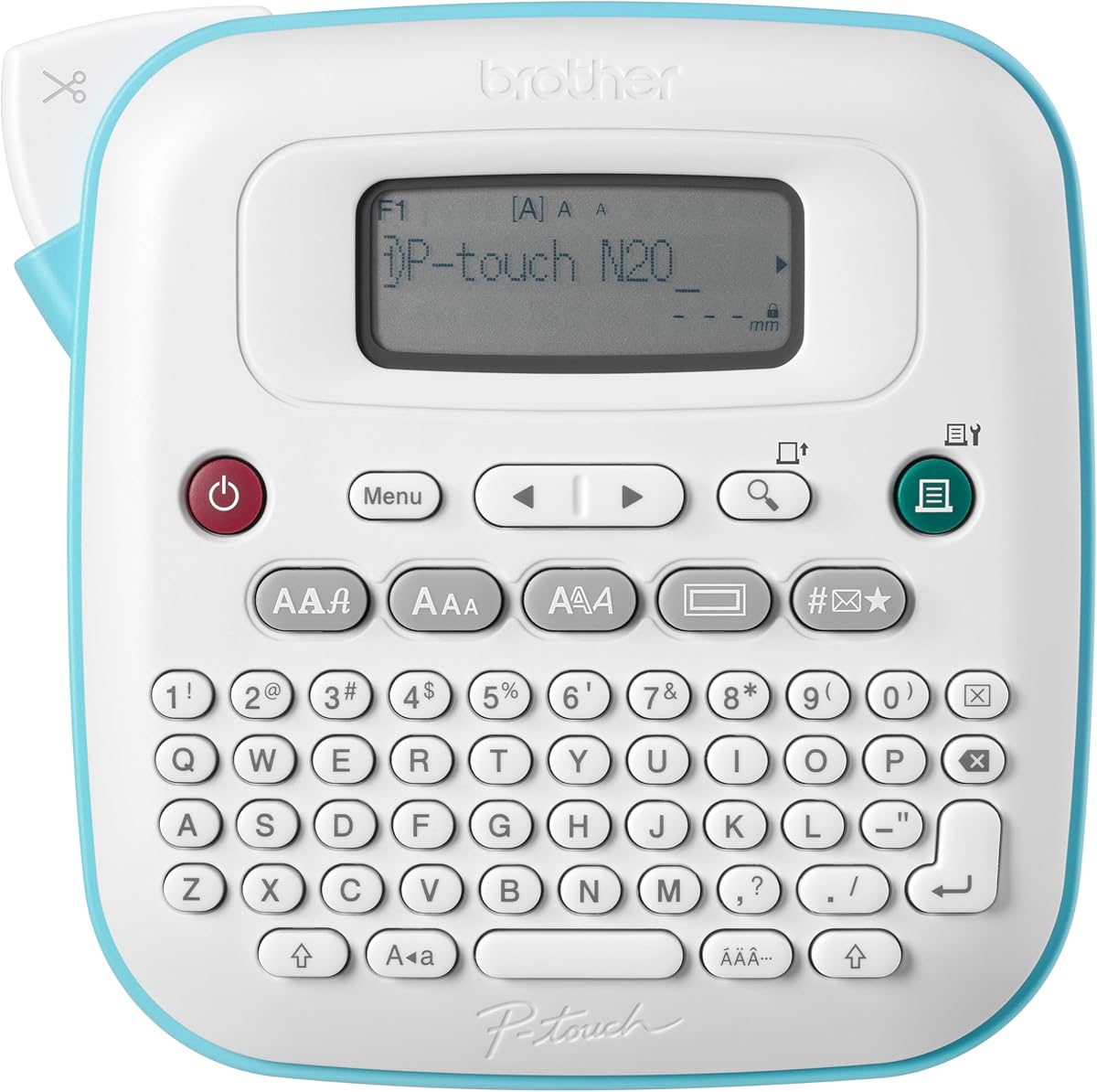
The Brother P-Touch PT-N20 is a portable personal label maker with a 4.3 rating and an emphasis on expressive customization. It is intended for homes, dorm rooms, studios, and workshops where belongings, reminders, and creative identifiers benefit from color. Compatibility with 12mm Btag tapes in 17 options gives it a noticeably wider visual palette than a conventional monochrome label maker.
We may earn a commission when you buy through this link, at no additional cost to you.
The PT-N20 provides three fonts, seven font styles, 15 frames, and more than 250 symbols. It can print two lines with a combined height of 9mm, giving users more vertical space than the PT-N10. Its 16-character display previews label content and helps reduce mistakes and wasted tape. A full QWERTY keyboard supports direct text entry, and ten frequently used labels can be saved for quick reprinting.
Like the PT-N10, it is limited to Brother Btag media measuring 12mm wide and 4m long. Those tapes use split, easy-peel backings and support damage-free removal, which is useful for portable and temporary organization. The PT-N20 lacks Bluetooth editing, so the 250-symbol library and other styling options represent the full extent of its on-device creative toolkit. It also provides fewer frames than some competing models while offering more than the PT-N10.
Buy the PT-N20 for colorful, removable labels and a roomier two-line layout. It is a sensible choice for students, travelers, crafters, and creative workspaces where personality matters. Users who need rugged laminated technical labels or several narrow widths should choose a TZe-based Brother P-Touch, while those who want app-based graphics and multilingual design should consider the SUPVAN E12.
The larger two-line print area and 16-character display provide more breathing room than the PT-N10. This helps when labels need a short title and a secondary description rather than only a brief identifier.
Seventeen Btag color options, removable backing, and damage-free removal combine practical application with visual variety. The result is especially useful for temporary travel labels, dorm belongings, and gift organization.
We may earn a commission when you buy through this link, at no additional cost to you.
The Brother P-Touch Pro PTH111 is a premium workspace label maker with a 4.6 rating and specialized features for technical organization. It is designed to produce durable laminated labels for electrical panels, cables, basements, garages, sports equipment, hobbies, and outdoor gear. The device combines a lightweight, durable body with a detachable wrist strap, allowing it to move easily between storage areas and active work sites.
We may earn a commission when you buy through this link, at no additional cost to you.
Its one-touch Cable Wrap, Cable Flag, Faceplate, and Serialize keys streamline formats commonly needed for electrical identification. Users also gain three fonts and more than 300 symbols, while the graphical LCD screen previews labels before printing. It prints up to two lines, which is enough for a cable name, panel number, destination, or short warning without requiring multiple adjacent identifiers.
The broad TZe platform is the model’s biggest strength. It supports tapes in 3.5, 6, 9, and 12mm widths across a variety of adhesives and styles. That range makes it much more adaptable than half-inch-only systems and allows narrow identifiers where space is tight or broader labels where durability and readability matter. Power comes from six AAA batteries or an optional AC adapter, which is sold separately.
The PTH111 is best for technicians, crafters, builders, maintenance workers, and serious hobbyists who need durable labels across multiple widths. It is less suitable for buyers who want a phone app, icons, or multilingual graphics, and its shortcut-heavy design is less relevant for basic pantry labeling. Even so, its tape flexibility, technical keys, preview display, and portable construction make it the strongest premium technical choice here.
Supporting 3.5, 6, 9, and 12mm TZe tapes allows users to match label size to the available surface. Narrow widths help in crowded panels, while broader tapes provide more room for highly visible durable identifiers.
Cable Wrap, Cable Flag, Faceplate, and Serialize one-touch keys remove much of the setup associated with common identification formats. These controls are especially valuable for repeated workshop and electrical labeling tasks.
We may earn a commission when you buy through this link, at no additional cost to you.
The most useful handheld label maker is the one that fits your surfaces, labeling volume, creative needs, and preferred workflow. Tape compatibility, display quality, keyboard design, power source, and storage should be considered before choosing a model.
Tape compatibility determines where a label maker can be used and how long its labels will last. The Brother P-Touch PTH110BP and PTH111 use laminated, water-resistant TZe tapes, making them suitable for demanding environments such as workshops, garages, storage areas, and outdoor equipment. The PT-N10 and PT-N20 instead use removable Brother Btag tapes in multiple colors, which are more visually expressive and convenient for personal belongings. DYMO LetraTag models use half-inch LT media, while the LabelManager 160 uses D1 cassettes that are available in several widths.
Consider the surfaces you actually label. Paper works for drawers and files but is less resilient in kitchens, bathrooms, garages, or outdoor areas. Laminated stock is a better choice where labels may encounter moisture, oils, abrasion, heat, or frequent handling. Also check tape width and length before purchasing, because proprietary platforms are not interchangeable.
A comfortable text-entry method determines how quickly labels can be produced. Full QWERTY keyboards on the Brother PT-N10, PT-N20, PTH110BP, PTH111, and DYMO LabelManager 160 are generally easier for frequent words and phrases than numeric keypads. One-touch smart or shortcut keys can further reduce menu navigation on supported models. Graphical displays also help users review text, font effects, frames, and symbols before committing tape.
If you create mostly short names, a simpler interface may be sufficient. If you repeatedly enter longer descriptions, prioritize a familiar keyboard layout, clear backtracking, and efficient editing. Buyers who want icons, multilingual text, and more elaborate visual layouts should consider Bluetooth app editing, while accepting that phone-based design adds a separate step to the process.
A useful display is more than a small status indicator: it should let you read the intended wording and formatting without guessing. The SUPVAN E12 is notable for its backlit LCD, which improves visibility in dim closets and low-light workspaces. The Brother PTH110BP and PTH111 use graphical screens to preview complete labels, while the PT-N20 provides a 16-character view. Smaller displays such as the PT-N10's 12-character screen are sufficient for short identifiers but less convenient for checking longer phrases.
Consider both character count and screen visibility. Larger text can reduce squinting, while a graphical preview gives more confidence about frames, symbols, and line breaks. If your labels are long or you often work in poorly lit areas, screen quality should carry more weight than other minor convenience features.
Bluetooth app editing adds fonts, frames, icons, multilingual support, and template storage to the label-making process. The SUPVAN E10, E11, and E12 provide access to substantial graphics libraries, with the E11 and E12 offering more than 660 icons and 30-plus fonts. Their app workflows do not require registration or fees according to the supplied details. The Brother and DYMO models in this list prioritize direct onboard control instead.
App connectivity is valuable for decorative labels, multilingual households, and visually complex projects. However, it creates a dependency on a compatible phone and can make simple labels slower if the editing process is more elaborate than needed. A physical keyboard remains useful for rapid recurring labels, which is why the SUPVAN models support both direct and app-based creation.
A genuinely portable label maker should be easy to carry and should not require frequent battery changes. The SUPVAN E10, E11, and E12 use rechargeable 1200mAh batteries rated for up to one month of use per charge. The E11 weighs 0.5 pound and measures 5.7 by 2.9 by 1.3 inches, making it particularly compact. The Brother P-Touch Pro PTH111 also prioritizes portability with a lightweight, durable body and detachable wrist strap.
Models that use AAA batteries offer simple, familiar power management and are easy to keep ready for occasional use. The PTH110BP and PTH111 can also operate continuously with an optional AC adapter, although that adapter is a separate purchase. When choosing between compact models, consider not only dimensions but also the need to carry tape, spare batteries, or a charging cable.
Print capacity matters when labels need more than a single word. The Brother PT-N10 and PT-N20 print up to two lines, as do the PTH110BP and PTH111, allowing concise titles and supporting details to share a label. The SUPVAN range emphasizes material efficiency through a 0.2-inch minimal margin and supports continuous or die-cut formats. The E10, E11, and E12 also include a built-in cutter, while the Brother models combine printing with integrated cutting.
If you plan to make large batches, inspect the supported media format and margin behavior. Continuous labels allow length to follow the content, while die-cut labels suit repeated standardized sizes. Built-in cutters improve convenience, but users should still follow the included instructions for safe blade handling and proper tape threading.
Memory and shortcut features can save substantial time in environments where labels repeat. The Brother PT-N10 and PT-N20 each store 10 labels, while the PTH110BP stores up to 15. The PTH111 adds one-touch keys for cable wrapping, cable flags, faceplates, and serial numbering, making it efficient for technical labeling sequences. The DYMO LabelManager 160 also uses one-touch smart keys to reduce editing friction.
These features matter most when a home has many similarly labeled bins, an office labels files repeatedly, or a technician processes a batch of similar components. For occasional, one-off labels, they matter less. Consider the exact labels you create repeatedly and whether the device offers a shortcut or memory function that matches your workflow.
The included tape can determine how quickly a new label maker becomes useful. The DYMO LabelManager 160 includes three D1 cassettes, the Brother PTH110BP bundle includes four TZe tapes, and the SUPVAN E10, E11, and E12 bundles include three or four tapes. The DYMO LetraTag 100H Plus includes paper tape, plastic tape, and a magnetic holder, while the 100H Silver includes one paper cassette. These bundles provide different starting points depending on whether you want volume, material variety, or a simple introduction.
Check whether the included media matches your surface needs and whether the accessory set offers genuine value for your projects. Remember that compatible refill media may be a separate future expense. A larger initial supply can be convenient, but the correct tape platform is more important than the number of rolls when choosing a durable model.
Begin by reading the model-specific instructions and confirming that the installed tape is compatible with the machine. Load the cassette or roll according to the manufacturer's diagram, paying attention to the direction of travel and the cutter path. Turn on the device, select a fresh or sufficiently long label format, and make a test label before committing to an entire batch. On app-connected models, connect through Bluetooth and confirm that the application can access the printer before designing a large project.
Type directly for short, repetitive labels or use the app when you need icons, frames, multilingual text, templates, or specialized sizing. Use the preview screen to confirm spelling, capitalization, line breaks, and estimated tape length. Leave a little extra space at the beginning and end so text does not sit too close to an edge. If a margin setting is available, understand how it affects the finished label before printing a large batch.
For care, keep the print head and cutter free of adhesive residue, and follow the included instructions for cleaning. Store tapes in a cool, dry place, and avoid exposing the device to moisture or excessive heat unless the manual says it is safe. Remove batteries from models that use disposable cells when they will remain idle for an extended period, and fully recharge rechargeable models before long projects. Periodically test a blank label to confirm that the print remains clear and the cut remains clean.
Handheld label makers are designed to be carried, held in one hand, and used across multiple rooms or work areas. They are convenient for travel, school, quick household projects, and tool organization. Desktop models generally offer larger screens, keyboards, or broader production-oriented features, so the best choice depends on the size and complexity of your labeling projects.
Compatibility is generally limited to the tape system designed for each device. Brother TZe, Brother Btag, DYMO LT, DYMO D1, and SUPVAN-supported media are separate formats with different dimensions and loading methods. Using incompatible tape can cause incorrect printing, feeding problems, or damage, so check the model specifications and follow the manufacturer's compatibility guidance.
It depends on the tape and the environment. The Brother PTH110BP and PTH111 are described as using laminated, water-resistant TZe tapes, while the SUPVAN E10's included laminated labels are described as waterproof, oil-proof, scratch-resistant, and heat-resistant. Ordinary DYMO paper tapes are better suited to indoor, lower-moisture uses, so outdoor projects require careful tape selection.
A smartphone is generally needed for the full app editing experience, including icons, many fonts, frames, templates, and multilingual design. The SUPVAN E10, E11, and E12 also support direct keyboard printing, so basic labels can be created without the app. Confirm that your phone is compatible with the printer before relying on Bluetooth workflows.
The Brother P-Touch Pro PTH111 is the strongest fit among these choices. It includes one-touch Cable Wrap, Cable Flag, Faceplate, and Serialize keys, supports four TZe tape widths, and can preview two-line labels before printing. Its durable laminated tape support is also appropriate for electrical panels, workshop equipment, and other demanding identification tasks.
The Brother PT-N10 and PT-N20 are especially suitable for students because they offer colorful removable Btag labels in 17 options. The split backing helps with quick application, while the compact format and full QWERTY keyboard support portable use. The PTH110BP is a more durable alternative when laminated, water-resistant labels are needed for shared or changing environments.
Choose a text-focused model when you mainly need names, categories, file identifiers, and repeated short labels. Choose an app-enabled model when icons, multilingual text, decorative frames, saved templates, or custom length adjustment are important. App models provide more creative freedom, but a direct keyboard and onboard preview can be faster for routine labeling.
Keep the tape path and cutter clean, and follow the manual's instructions for removing adhesive buildup or cleaning the print head. Use the correct compatible tape, avoid pulling labels sideways out of the cutter, and store the device in a dry environment. A test label every few months can reveal whether the battery, print head, or tape feed needs attention.
The Brother P-Touch PTH110BP is the strongest overall pick because it combines a 4.7 rating, a QWERTY keyboard, preview display, useful memory, and durable water-resistant TZe tapes. The Brother P-Touch Pro PTH111 is the premium option for technical work, offering four tape widths and specialized cable and faceplate shortcuts. The DYMO LetraTag 100H Plus is the budget selection, providing a compact device with a 4.6 rating and a versatile starter set of paper, plastic, and magnetic accessories.
Prioritize tape compatibility before any other feature. The right display and app tools cannot compensate for unsuitable media. Choose a Btag model for colorful removable labels, a TZe model for durable technical or outdoor use, a D1 or LT model for straightforward text organization, and a SUPVAN model for Bluetooth graphics, multilingual options, and mobile editing. Then match the screen, keyboard, memory, and power system to the volume of labeling you expect.
Before making a final purchase, verify the current product listing, included accessories, and availability of compatible refill tape. Promotions and prices can change, and bundle contents may vary, so the current listing remains the best source for final purchasing details. With those checks in place, the right handheld label maker can turn a cluttered drawer, busy workspace, school project, or travel bag into a system that is easier to understand and maintain.