
Tengchi RCA to HDMI Converter
4.4Editor score
Composite video to HDMI
Up to 1080p output
Simple USB-powered setup
Our PlayStation HDMI Upscaler guide compares ten converters for PS1, PS2, PS3, PSP, and modern displays, highlighting signal types, latency, resolution, and
A PlayStation HDMI upscaler can make classic console games look considerably better on a modern television, but the right converter depends on the console, original signal type, and display. The most useful choices support clean RGB or component video, provide a stable HDMI connection, and avoid adding noticeable input lag.
This guide compares ten PlayStation HDMI upscalers and related converters using their documented specifications, supported systems, output capabilities, compatibility requirements, and customer ratings. It covers dedicated PS1 and PS2 adapters, universal component converters, a PSP converter, a broader 4K device, and an AV-to-HDMI recording solution.
Each review explains what the product does best, where its limitations matter, and which type of player is most likely to appreciate it. Award labels identify three standout options for different priorities, while the comparison table makes signal support and display requirements easy to check. Product availability and prices can change.
4.4Editor score

4.4Editor score

3.8Editor score
The comparison below covers ten converters with very different roles, from dedicated PS1 and PS2 adapters to component, composite, PSP, and 4K HDMI solutions. Input type, supported resolutions, aspect-ratio control, power requirements, and display limits are the most important distinctions.



The LEVELHIKE HDMI Cable is a dedicated solution for connecting classic PlayStation hardware to a modern television or monitor. It converts and upscales analog RGB signals into digital HDMI output, and its 4.4 customer rating reflects a generally favorable reception. The strongest selling point is its focus on getting the most appropriate signal from a PS1, original PlayStation, fat PS2, or slim PS2 rather than treating every console as a generic composite source.
We may earn a commission when you buy through this link, at no additional cost to you.
Its signal processing is described as precise, with attention to color, resolution, and visible detail. A physical toggle switches between 4:3 and 16:9 output, which is particularly valuable for older games whose native compositions were designed around a standard-definition television. The detachable arrangement also allows the included prepared cables to be replaced with a higher-quality or longer HDMI lead, giving users some flexibility when a television sits away from the console.
The product is not a universal solution, however. It is intended for classic PlayStation systems rather than PS3, PSP, PS4, or PS5, and its compatibility depends on the console producing the expected analog RGB output. Compatibility with every regional console revision is not established by the supplied specifications, so buyers should verify their model and understand that the aspect-ratio switch does not transform the original frame of a game.
This is the strongest recommendation for a player who wants a dedicated, low-latency adapter for PS1 or PS2 and values RGB quality and convenient aspect-ratio control. It is easier to justify than a generic RCA converter because its signal path and controls are tailored to the classic PlayStation experience. A modern display with proper HDMI support completes the setup, while the included one-year warranty adds a modest layer of confidence.
The aspect-ratio control is one of this converter's most practical features. Older games often look stretched or incorrectly cropped on a widescreen television, and a hardware switch makes it easy to compare the intended shape with a full-screen presentation.
We may earn a commission when you buy through this link, at no additional cost to you.
This 4K Gaming Upscaler and Enhancer is designed for devices that already output 1080p through HDMI, making it different from the classic PlayStation adapters that accept analog video. Its specifications list broad support for the Nintendo Switch, original Xbox, PlayStation, GameCube, PS2, Wii, Dreamcast, PS3, Xbox 360, Wii U, and selected adapter devices. No customer rating is supplied, so the documented capabilities and restrictions are the most useful basis for evaluating it.
We may earn a commission when you buy through this link, at no additional cost to you.
The core function is 1080p-to-4K conversion at 60 frames per second. According to the product information, processing includes image sharpening, color tuning, and enhanced depth of field, with no advertised frame drops or screen lag. This makes the device more appropriate for a player who already owns a console capable of producing a clean 1080p HDMI signal than for someone trying to connect an analog-only PS1 directly.
Compatibility is precise and unforgiving. The product only accepts 1080p input, requires HDMI 2.0a or newer cables, and must connect to a display supporting 4K at 60Hz. It is not compatible with an original HDMI 1.4 cable, and the product's built-in HDMI extension cable is recommended for the console connection. A 1440p monitor or a 4K display limited to 30Hz may produce a black screen or otherwise fail to display correctly.
The broad console list is impressive, but buyers should distinguish console compatibility from signal compatibility. Older systems such as PS2 still need a source capable of delivering the required 1080p HDMI output, often through another converter. The product should therefore be considered a 4K enhancement stage, not a universal solution for every PlayStation output standard. Checking the source resolution and display refresh rate before buying is essential.
This is a compelling choice for owners of a 1080p source and a proper 4K 60Hz television who want sharpening and a higher output resolution. It is less suitable for classic-console collectors whose hardware produces only analog signals. The lack of a published rating does not make the specifications unusable, but it does mean a buyer should place more weight on the stated compatibility boundaries.
The device's one-touch operating concept suits modern living-room setups. It avoids the need for a computer or complicated menu system, although the user still has to verify source resolution, cable standard, and display capability before expecting a stable image.
We may earn a commission when you buy through this link, at no additional cost to you.
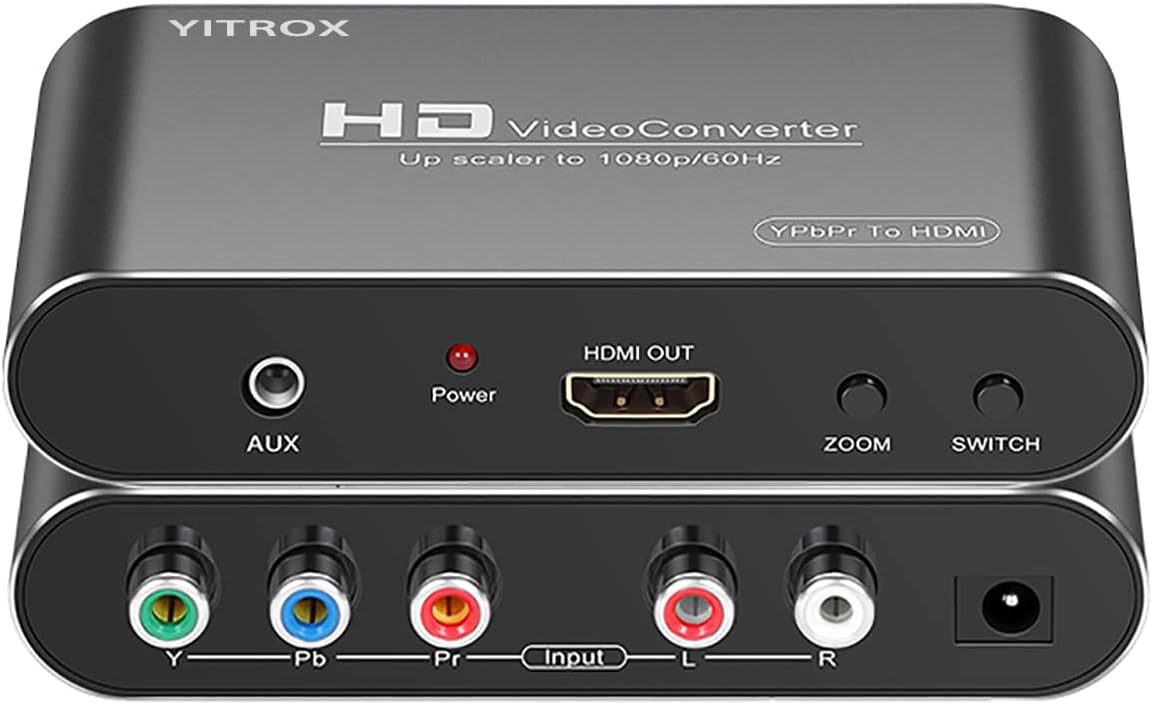
The Component to HDMI Converter is aimed at legacy devices that can output analog YPbPr video and right and left audio through RCA connections. It converts that signal to HDMI for modern televisions, monitors, and projectors. Its 4.1 rating places it among the stronger-rated products in this group, though the extensive controls also require more thought than a basic cable.
We may earn a commission when you buy through this link, at no additional cost to you.
Five output resolutions are available: 800×600, 1024×768, 1280×720, 1280×1024, and 1920×1080. Seven picture-zoom modes add three gradual enlargement options, three gradual reduction options, and automatic adaptation. This makes the converter useful when a source produces a resolution that does not match a particular television, although it also means the user may need to experiment to find the most natural image.
Signal processing is designed to improve picture stability and clarity. The supplied information describes three-dimensional compensation, motion optimization, color optimization, and digital noise reduction intended to reduce shaking and trailing. It also supports a broad range of component input and HDMI output standards, covering common 480, 576, 720, and 1080 modes. Audio and video are described as synchronized, and an AUX audio port is included.
The key limitation is that this is a one-way component-to-HDMI path. It cannot convert HDMI into component, and it requires the correct YPbPr cable. For a PS2, the console must be configured to output YPbPr or the result may be a black screen. Using an S-video cable with this converter can produce a black-and-white image because the converter is not using the required component signal.
This is a strong recommendation for someone with a PS2, PS3, Xbox 360, Wii, disc player, or other component-equipped source who wants deliberate scaling controls and broad format support. It is less convenient than a dedicated plug-and-play PlayStation cable, but the resolution and zoom menus provide useful flexibility. Correct source configuration is the most important installation requirement.
The converter's compatibility with several standards makes it useful beyond PlayStation. Older disc players, set-top boxes, and game systems can share the same adapter, making it a practical household conversion box rather than a single-console accessory.
We may earn a commission when you buy through this link, at no additional cost to you.
The PSP2000/3000 HDMI Converter is a focused accessory for two specific PlayStation Portable models. It converts and upscales their YPbPr output to digital HDMI, with simultaneous audio and video. Its 3.9 rating suggests that buyers generally find it useful, while the product's narrow model support makes model verification the most important buying consideration.
We may earn a commission when you buy through this link, at no additional cost to you.
The converter supports 1080p and 720p output and provides four screen-ratio magnification modes. This gives the user some control over how a handheld-oriented image appears on a larger display. Signal processing is described as amplifying accuracy, color, resolution, and detail, which should make the output more suitable for a television than the portable's original low-resolution screen.
Installation is straightforward because the product is driver-free and operates as a plug-and-play device. The main limitations come from the nature of the hardware and signal rather than unnecessary complexity. The listed supported models are PSP2000 and PSP3000, and the specification does not claim support for every later PSP variant. Its 1080p label describes the converter's processing and output mode, not native 4K support.
The four ratio modes may be particularly important because PSP games were originally framed for a small widescreen handheld. Users can compare different presentations instead of accepting a single stretched or cropped result. As with other upscalers, the device cannot restore visual information that was never present in the source, but a clean HDMI output can still make the picture more comfortable on a modern television.
This is the right choice for a PSP2000 or PSP3000 owner who wants a straightforward way to view games on a larger HDMI display. It is not appropriate for a full PlayStation console collection, and buyers should not interpret the 1080p specification as native high-definition rendering from the handheld. Overall, it is a specialized but uncomplicated way to modernize two particular PSP models.
Its dedicated design reduces guesswork compared with a general converter. A PSP owner knows exactly which hardware and signal are involved, while the product handles conversion, resolution selection, and output in one compact path.
We may earn a commission when you buy through this link, at no additional cost to you.
The Hyperkin HDTV Cable provides a relatively simple route to connect a PS1 or PS2 to a modern HDTV. Its stated goal is crisp 720p presentation without requiring software or a complicated setup process. The 4.3 rating is among the stronger results in this comparison and supports its positioning as an accessible option for retro PlayStation collections.
We may earn a commission when you buy through this link, at no additional cost to you.
PS1 and PS2 are both supported, including fat and slim PS2 configurations. PS2 owners can take advantage of component signal output for improved picture clarity and color accuracy. The product also carries clear stereo audio, creating a complete AV connection rather than an image-only solution. A seven-foot AV-to-HDMI cable and six-foot Micro USB power cable are included.
The tradeoff is that component support is explicitly limited to PS2. The PS1 therefore does not benefit from the same enhanced component pathway and should be evaluated on the converter's standard PlayStation handling. There is also no documented physical aspect-ratio switch. Players who care strongly about preserving a 4:3 presentation may need to correct the image using television settings instead.
Ease of use is the main advantage. There are no drivers, no computer, and no advanced menus described in the product information. That makes this a sensible option for someone who wants a familiar console-and-cable experience rather than a configurable conversion box. The included cable lengths are also designed to support a practical couch-friendly arrangement without requiring an immediate trip to another cable.
This is a good recommendation for a PS2 owner who values component video and simple setup, particularly if fat and slim console support matters. PS1 owners should confirm that the product's standard output quality meets their expectations. It may not be the ideal choice for enthusiasts seeking true RGB, extensive scaling controls, or a built-in aspect-ratio toggle.
The included Micro USB power lead adds one important detail to the purchase decision. It confirms that the cable is not entirely passive, giving the converter a dedicated power route while keeping the console connection straightforward.
We may earn a commission when you buy through this link, at no additional cost to you.
The SoundBeast AV to HDMI Converter and Recorder 2.0 handles analog RCA video and carries it to a modern display through HDMI. It can also record the same source to a PC or Mac, a feature that distinguishes it from the simple PlayStation cables on this list. Its 4.4 rating ties the highest customer score among the products that have published ratings.
We may earn a commission when you buy through this link, at no additional cost to you.
For ordinary viewing, the device converts and upscales composite input to either 720p or 1080p. It works with PAL and NTSC sources and is compatible with gaming systems, VCRs, camcorders, Hi8 equipment, and other RCA composite devices. No computer or driver is required for normal display use, so the converter can function as a straightforward box between an old source and a television.
Aspect-ratio control is a major benefit. The 4:3 option preserves the original shape and adds black bars at the sides rather than stretching the image horizontally, while a 16:9 option fills the screen. This is valuable for old games and home videos created before widescreen formats became standard. The selection makes it easier to decide between historical accuracy and maximum screen coverage.
The USB capture feature records to a computer at 640×480, and capture software is included. This is convenient for making clips, but the resolution should not be confused with the converter's 1080p display output. The device does not convert HDMI back to RCA, so its operation is strictly one-way. A one-year warranty and technical support are included, with the manual also describing an optional extension.
This converter is best for someone whose collection extends beyond PlayStation and who wants one box for viewing and recording multiple analog sources. For competitive or detail-focused gaming, a dedicated PlayStation RGB adapter may be more appropriate. For nostalgia, archiving, and straightforward display conversion, however, the capture function gives the SoundBeast unusual versatility.
The converter's ability to work without a computer during normal viewing keeps it approachable. The computer becomes an optional addition for recording rather than a requirement for everyday use.
We may earn a commission when you buy through this link, at no additional cost to you.
The Tengchi RCA to HDMI Adapter is an inexpensive way to connect devices with standard composite output to an HDMI television or monitor. Its 4.4 rating matches the best published customer score in this group, even though its capabilities are intentionally basic. It supports PS2, PS3, Xbox, Nintendo 64, set-top boxes, VHS, VCR, DVD players, and other composite sources.
We may earn a commission when you buy through this link, at no additional cost to you.
The adapter accepts yellow, white, and red RCA connections and produces HDMI 1.3 output at up to 1080p. It does not support 3D, 4K, or reverse HDMI-to-AV conversion. That limitation is important for modern PlayStation owners because the PS4 and PS5 already output digital HDMI video and therefore do not need this type of legacy converter.
Operation is easy to understand. The adapter is powered by an included USB cable connected to a 5V 1A source, and it operates as a plug-and-play converter without complex configuration. A single external power connection is all that stands between the RCA source and HDMI display, making it suitable for a simple media-console arrangement.
The package includes the RCA female-to-HDMI converter, an HDMI cable, a USB cable, and a user manual. A one-year warranty is also stated. These inclusions reduce the chance that the buyer will need to locate compatible leads immediately, although a suitable 5V USB power source is not included.
This is the best budget choice for a player using a PS2, PS3, Xbox, or Nintendo 64 through composite output, especially when RGB or component quality is not the priority. It is not appropriate for a PS4, PS5, or other modern console with native HDMI. Those seeking a sharper classic signal or more control over scaling should choose a dedicated RGB or component solution instead.
Composite video carries less detail than RGB or component. The adapter can convert that source to a modern HDMI connection, but it cannot reconstruct information that was never captured in the original composite signal.
We may earn a commission when you buy through this link, at no additional cost to you.
The Kaico PS1 HDMI and PS2 AV Cable is a dedicated converter for Sony PlayStation and PlayStation 2 systems. It supports all PlayStation output resolutions according to the product information and provides HDMI output for modern HD televisions. Its 4.2 rating indicates a generally positive response, while the built-in RGB and component switch gives it more flexibility than many basic adapters.
We may earn a commission when you buy through this link, at no additional cost to you.
RGB and component modes serve different console generations and signal capabilities. A built-in switch lets the user move between the two and select the correct setting for the connected hardware or game. This is a significant advantage over a converter that accepts only composite video, since it provides a path to cleaner classic console output when the supported console and title permit it.
Installation is described as a plug-and-play process using a durable PlayStation-specific cable design. The product is positioned as an AV cable rather than a complex scaler with menus and multiple inputs. This can make the setup visually tidier and easier to manage, although choosing the correct signal mode remains an essential part of the process.
The principal trade-off is that the product is specialized for PlayStation hardware. It does not claim broad compatibility with unrelated consoles, and its supplied specifications do not describe detailed 4K conversion, a physical aspect-ratio switch, or a wide range of output resolutions. Buyers should judge it as a focused classic-PlayStation solution instead of a universal media converter.
This is a good option for someone who owns both PS1 and PS2 hardware and wants a single adapter that can select between RGB and component output. The twelve-month support, repair, or replacement warranty adds reassurance, while the dedicated design reduces compatibility ambiguity. It is especially attractive to players who want a direct console cable rather than a separate box.
The RGB-to-YPbPr switch should be matched carefully to the connected system. Using the appropriate mode is the key to obtaining the intended color and image quality from supported PlayStation hardware.
We may earn a commission when you buy through this link, at no additional cost to you.
The PS2 to HDMI YPbPr Converter is built for owners of a PlayStation 2 or PlayStation 3 who want HDMI output from a component source. It has a 4.1 rating and uses signal processing intended to produce precise colors, strong detail, smooth visuals, and no lag. Unlike many low-cost adapters, it explicitly focuses on true YPbPr input rather than accepting every possible analog format.
We may earn a commission when you buy through this link, at no additional cost to you.
The converter supports the PS2's 480i, 576i, and 480p display modes and works without drivers, an installed HDMI cable, or software. It converts PS2 and PS3 component video to HDMI for a television, monitor, or projector. The package contains the converter and a user manual, giving the buyer a compact central accessory rather than a large separate control unit.
The most important installation requirement is the PS2's output mode. The product only supports YPbPr or YCbCr and does not accept CVBS, also commonly called composite video. If the PS2 is not configured correctly, the display can show an out-of-range message or otherwise fail to present the expected image. This means the adapter is less forgiving than a general RCA converter.
Its strength is a more deliberate approach to signal quality for supported PS2 and PS3 hardware. The documented processing and support for progressive 480p can offer a better result than a composite-only path, although the adapter does not advertise true 4K output or the extensive resolution controls found on some component scalers.
This is a focused recommendation for a PS2 owner who can use YPbPr output or a PS3 owner seeking a compact component-to-HDMI adapter. It is not the right choice for someone who wants broad source compatibility or automatic handling of composite and component signals through the same input. Careful console configuration is an acceptable trade-off for a cleaner intended signal path.
Its lack of drivers makes the product convenient once the correct console output is selected. The setup is simple in physical terms, but the signal-mode requirement makes prior knowledge of PS2 settings important.
We may earn a commission when you buy through this link, at no additional cost to you.
The Mcbazel PhotoFast 4K Gamer+ is a dedicated HDMI upscaler for modern 1080p sources and 4K 60Hz displays. Its 3.8 rating is the lowest published customer score among the rated products, but the product's narrowly defined feature set and explicit compatibility warnings make it more of a specialized premium accessory than a general classic-console converter.
We may earn a commission when you buy through this link, at no additional cost to you.
Its main capability is rebuilding a 1080p signal at 4K 60Hz with image sharpening, color processing, and added depth of field. This is an upconversion rather than native 4K rendering by the source console. The device does not reduce the source frame rate, so a 60 frames-per-second 1080p feed remains 60 frames per second at the output while the resolution is increased.
The display requirements are strict. The output side must be a 4K screen that accepts 60Hz, while the input side must provide 1080p. A 1920×1080 television or monitor will not show a picture, and 4K at 30Hz or 1440p displays are outside the supported range. The Switch must be in dock mode because handheld mode does not send an HDMI signal.
Although named for the Switch OLED, the upscaler also supports Wii U, PS4, Chromecast, Apple TV, and other 1080p HDMI sources. The PS5 and Xbox Series X are unnecessary candidates because they already provide 4K output. Setup involves connecting the supplied short HDMI extender to the console or dock, attaching the included USB-A to Type-C power lead, connecting the display, and pressing the power button.
This is the premium choice for a player with a 1080p Nintendo Switch, Switch OLED, PS4, or similar source and a proper 4K 60Hz television. The compact enclosure can remain behind the television or fit into a travel dock. It is a poor fit for a 1080p-only display, undocked Switch, or 1440p monitor, and the need to source a compatible HDMI 2.0a data cable should be considered before purchase.
The package includes the upscaler, a 27-centimeter HDMI extender, and a 150-centimeter USB-A to Type-C power lead, but no full HDMI cable. A 4K 60Hz television is therefore only one part of the required setup.
We may earn a commission when you buy through this link, at no additional cost to you.
The correct PlayStation HDMI upscaler depends first on the console's output signal, followed by the display's capabilities and the features that matter to the player. Signal quality, resolution, latency, aspect-ratio handling, and installation requirements should be evaluated before choosing a product.
Begin by identifying the exact PlayStation model and its available video output. PS1 and PS2 systems commonly expose RGB, component, or composite signals through different console ports, while PSP2000 and PSP3000 use a dedicated YPbPr-based connection. PS3, PS4, and PS5 already provide native HDMI, so they do not need an analog-to-HDMI converter. A product that accepts only YPbPr is not interchangeable with one designed for RCA composite, and a native-HDMI console cannot benefit from an adapter built to process an old analog signal.
Signal type has a major influence on the final image. RGB generally offers a direct, high-quality representation of classic console graphics, while component video divides the picture into color and brightness channels and can also provide a strong result. Composite combines more information into fewer channels and generally preserves less detail. Dedicated RGB adapters, such as the LEVELHIKE and Kaico options, are attractive for compatible classic systems, while the Tengchi and SoundBeast products focus on the broader accessibility of composite RCA connections.
Check both the converter's input and output limits. An upscaler cannot create a higher-resolution source from a console that does not provide one, and terms such as 1080p output may describe the converter's processing rather than the console's native rendering. The Component to HDMI Converter offers several selectable output resolutions, the PSP adapter supports 1080p and 720p, and the Mcbazel device converts a 1080p input to 4K 60Hz. Each requires a display capable of accepting the selected format.
A high output resolution is of limited value if the television cannot accept the required refresh rate. The 4K Gaming Upscaler and Mcbazel PhotoFast 4K Gamer+ both require 4K 60Hz displays, and both products advertise no-delay processing. Dedicated PlayStation cables also emphasize low latency. Even when a converter introduces little visible delay, players should use a television game mode and matching refresh settings to minimize the total input lag of the complete setup.
Classic games were often composed for 4:3 displays, so correct proportions matter more than simply filling a modern widescreen screen. The LEVELHIKE adapter includes a 4:3 and 16:9 switch, and the SoundBeast converter provides 4:3 and full-screen 16:9 modes. The Component to HDMI Converter adds several zoom methods and an automatic option. More controls can improve compatibility, but they also make setup less immediate, so a physical switch may be preferable for a single-console installation.
Some adapters draw power from the console, while others require an external USB connection. The Tengchi adapter needs a 5V 1A source, the Hyperkin cable includes a Micro USB power lead, and the Mcbazel upscaler includes a USB-A to Type-C lead. Check the package contents before ordering because a missing power cable or data-capable HDMI lead can prevent setup. The Tengchi package includes both HDMI and USB cables, while the Mcbazel package does not include a full HDMI cable.
Modern output specifications can be restrictive. The 4K Gaming Upscaler requires HDMI 2.0a or newer and explicitly rejects an original HDMI 1.4 cable. The Mcbazel also requires an HDMI 2.0a data-capable lead. A 1080p television may show no picture from a 4K-only device, while a 1440p or 30Hz display is outside the stated range of the 4K Gaming Upscaler. Check the television's manual before purchasing rather than relying only on its screen size or marketing name.
Extra features can make one converter more useful than another. The SoundBeast model includes USB video capture at 640×480, turning it into a two-way workflow for viewing and recording RCA sources. The Component to HDMI Converter provides zoom, resolution, and audio controls, while the dedicated PS1, PS2, and PSP products focus on a simpler console-specific path. Additional features are useful only when they match the intended setup; capture software, for example, adds little value to someone who only wants faster gameplay.
Start by inspecting the console, cable, converter, and display. Identify the original PlayStation's output port and confirm whether the product requires RGB, YPbPr component, RCA composite, or HDMI input. Connect the console to the converter with the specified cable, connect the converter or prepared HDMI lead to the television or monitor, and supply any required USB power before turning on the display. This prevents avoidable problems such as black screens, missing color, or an unsupported resolution.
Configure the source before judging the image. A PS2 using a YPbPr-only adapter must be changed to its component output setting, while a converter that accepts component video should not be connected with an S-video cable. On devices with multiple output modes, select the mode specified by the converter. A modern television may also offer aspect-ratio, overscan, image, and game-mode controls that can improve the final presentation after the signal has been converted.
For regular care, keep the converter and cables dry, avoid sharply bending connectors, and provide ventilation around any powered box. Do not hot-plug connections unless the manufacturer expressly permits it. When troubleshooting, test the source directly if possible, confirm the television's input selection, check the required refresh rate, and substitute a known-compatible HDMI cable before assuming the converter has failed. Regular cleaning and careful storage help preserve a stable connection.
No. The PS4 and PS5 already output digital HDMI video, and modern televisions can display that signal directly. An analog-to-HDMI converter is intended for older PlayStation hardware such as the PS1, PS2, PSP2000, and PSP3000. A 1080p-to-4K device may technically process the HDMI output of a PS4, but it upconverts the image rather than unlocking additional native resolution.
RGB generally preserves more picture detail than composite, making it preferable when both the console model and adapter support it. Component video is another strong option, particularly for PS2 hardware. A composite converter remains useful for broad compatibility, but it cannot restore detail lost in the original composite signal. Check the exact console and game output before choosing.
Several of the listed products advertise low-latency or no-delay processing, but the complete system matters. Television processing modes, game mode, cable quality, and the original signal path can all affect perceived input lag. A modern display with a low-latency game mode provides the best environment. Users should also check whether their chosen converter supports the console mode they intend to use.
A YPbPr adapter requires the PS2 to be configured for component output and connected with a proper component cable. Some adapters explicitly do not accept composite or CVBS video, so using the wrong cable can result in no image or an out-of-range message. Test the console directly on a component- or composite-capable display and review the adapter's supported input before changing other settings.
It depends on the specific device. The 4K Gaming Upscaler and Mcbazel PhotoFast 4K Gamer+ require a 4K 60Hz output display, and the supplied Mcbazel specifications state that a 1920×1080 screen will not show a picture. A 1440p or 4K 30Hz display is also outside the Mcbazel's supported range. Check the converter's output limitations before connecting it to a non-4K television.
It is helpful but not mandatory. Many classic games were designed for a 4:3 screen, and presenting them on a 16:9 television can stretch characters or crop parts of the image. The LEVELHIKE adapter provides a physical 4:3 and 16:9 switch, while the SoundBeast model offers software-controlled display modes. If the television has reliable aspect-ratio settings, a simpler converter can also produce a correct image.
The dedicated PSP2000/3000 HDMI Converter is designed specifically for those two models. It converts their YPbPr output to HDMI, supports 1080p and 720p selection, and provides four screen-ratio magnification modes. A general RCA converter is not the same solution because the PSP connection and signal requirements differ from standard home-video equipment.
Most products in this guide are designed only to convert and display video. The SoundBeast AV to HDMI Converter and Recorder 2.0 includes a USB video capture feature that can record RCA composite sources to a PC or Mac at 640×480, with capture software included. The recordable source and supported console connections should be confirmed before purchase, because HDMI-only sources require a different capture path.
The LEVELHIKE adapter stands out as the most balanced dedicated choice for classic PS1 and PS2 systems because it emphasizes true RGB output, a physical aspect-ratio switch, low latency, and broad support for fat and slim PS2 hardware. For a simpler composite-based connection, the Tengchi adapter offers an approachable and budget-conscious route, while the Mcbazel PhotoFast 4K Gamer+ provides the strongest dedicated 4K 60Hz processing for modern 1080p sources.
The most important buying priority is compatibility. Confirm the console model, original output type, required cable, power arrangement, television resolution, and refresh rate before making a final choice. Players with analog-only hardware should seek RGB or component support when possible, while owners of native-HDMI consoles should consider whether a 1080p-to-4K processor adds meaningful value or simply introduces another component into the chain.
Product availability, ratings, and prices can change, so review the current listing and technical details before purchasing. Comparing the current console settings with the converter's supported input and output specifications is the surest way to avoid a black screen, incorrect colors, or an aspect ratio that does not suit the game.

