
Microsoft Surface Thunderbolt 4 Dock
4.4Editor score
Thunderbolt 4 performance
Dual 4K monitor support
2.5G Ethernet connectivity
Rapid device charging
Our expert guide compares 10 docking stations for Surface Pro, including display options, ports, charging, compatibility, network support, and ease of setup.
A docking station can transform a Surface Pro from a portable touchscreen computer into a practical desktop workstation. The best model should add the displays, network connection, charging, and peripheral support needed for a fixed workspace without introducing unnecessary complexity or cable clutter.
This guide compares ten Surface Pro docking stations using the specifications supplied for each product. The evaluation considers display resolution and monitor count, USB connectivity, wired networking, power delivery, Surface compatibility, included accessories, and the number of useful ports available in a compact package.
Each pick highlights a different reason to consider an upgrade, from a straightforward first-generation Surface Connect dock to feature-rich Thunderbolt 4 and triple-display models. Product ratings and availability can change over time, and prices fluctuate, so readers should confirm the current listing details before purchasing.
4.4Editor score

4.8Editor score

4.5Editor score
The comparison below places all ten docks side by side, showing their strongest distinctions in display support, USB expansion, wired networking, and power delivery. It is intended to make it easier to identify the model that matches a particular Surface Pro generation and intended workspace.



The Microsoft Surface Thunderbolt 4 Docking Station is the premium-oriented choice in this guide, earning a 4.4 rating from the supplied listing data. Its defining feature is the inclusion of three USB-C and three USB-A ports alongside 2.5G Ethernet, a 3.5mm audio jack, and a security lock slot. That combination gives it a broader expansion profile than most dedicated Surface Connect docks.
We may earn a commission when you buy through this link, at no additional cost to you.
Thunderbolt 4 serves as the centerpiece for data transfer, media streaming, and device connection, while the dock can drive up to two 4K monitors. Its rapid charging capability is reported to charge a compatible laptop in approximately 2.5 hours. For users who move large files or regularly connect demanding accessories, the mix of high-speed USB and faster wired Ethernet is especially useful.
Raised tactile indicators on the ports improve the experience of connecting peripherals in a dim office or after dark. The enclosure also incorporates 20% recycled ocean-bound plastic, giving environmentally conscious buyers an additional reason to consider it. The main trade-off is that this is a premium feature set, and the actual benefits of Thunderbolt 4 and 2.5G Ethernet depend on compatible devices, networks, and storage accessories.
This dock is a strong recommendation for a Surface Pro owner who expects to connect multiple high-speed peripherals, two displays, and a fast wired network. It is less compelling when the goal is simply to add a keyboard, mouse, and one monitor, because simpler Surface Connect docks can cover that role with fewer advanced requirements. Confirm that the specific Surface Pro model supports the dock and verify display compatibility before ordering.
The Thunderbolt 4 connection is the main reason to choose this dock over a basic display adapter. It provides a modern high-speed pathway for storage, media, and other compatible peripherals, while the USB-A ports preserve support for accessories that do not use USB-C.
Support for up to two 4K monitors makes the dock a good fit for control panels, research windows, and productivity layouts. The raised tactile port markers also help maintain a tidy setup by making each connection easier to identify.
We may earn a commission when you buy through this link, at no additional cost to you.
The original Microsoft Surface Dock is a straightforward expansion solution for compatible Surface devices, including several Surface Pro generations. It has a 4.5 rating in the supplied product data and uses the magnetic Surface Connect cable to transform a supported tablet or laptop into a desktop-style setup.
We may earn a commission when you buy through this link, at no additional cost to you.
Its two Mini DisplayPort outputs, four USB 3.0 ports, Gigabit Ethernet, and 3.5mm audio output cover the most common desk accessories. External power is supplied, and the magnetic connector makes daily docking less disruptive than plugging several separate accessories directly into the tablet.
The principal limitation is its age. It lacks USB-C and newer high-speed features such as 2.5G Ethernet, making it less attractive for newer accessories and demanding workflows. Its listed compatibility is also more limited than several newer third-party docks that cover a broad range of Surface Pro, Surface Laptop, Surface Go, and Surface Book models.
Best for owners of an older, compatible Surface Pro who want a practical two-display desk setup with a keyboard, mouse, wired internet, and audio. It remains a sensible option for basic office work because the port selection is easy to understand and the magnetic Surface Connect design is still convenient. Check the model list carefully before buying, especially when using newer Surface hardware.
The magnetic Surface Connect cable carries power, display, network, and peripheral connections through a single attachment. That convenience makes the dock well suited to a desk where the tablet is moved on and off frequently.
Two Mini DisplayPort outputs, four USB 3.0 ports, Gigabit Ethernet, and audio cover common office needs. The missing USB-C support is the clearest reason to choose a newer alternative for a recently purchased tablet.
We may earn a commission when you buy through this link, at no additional cost to you.
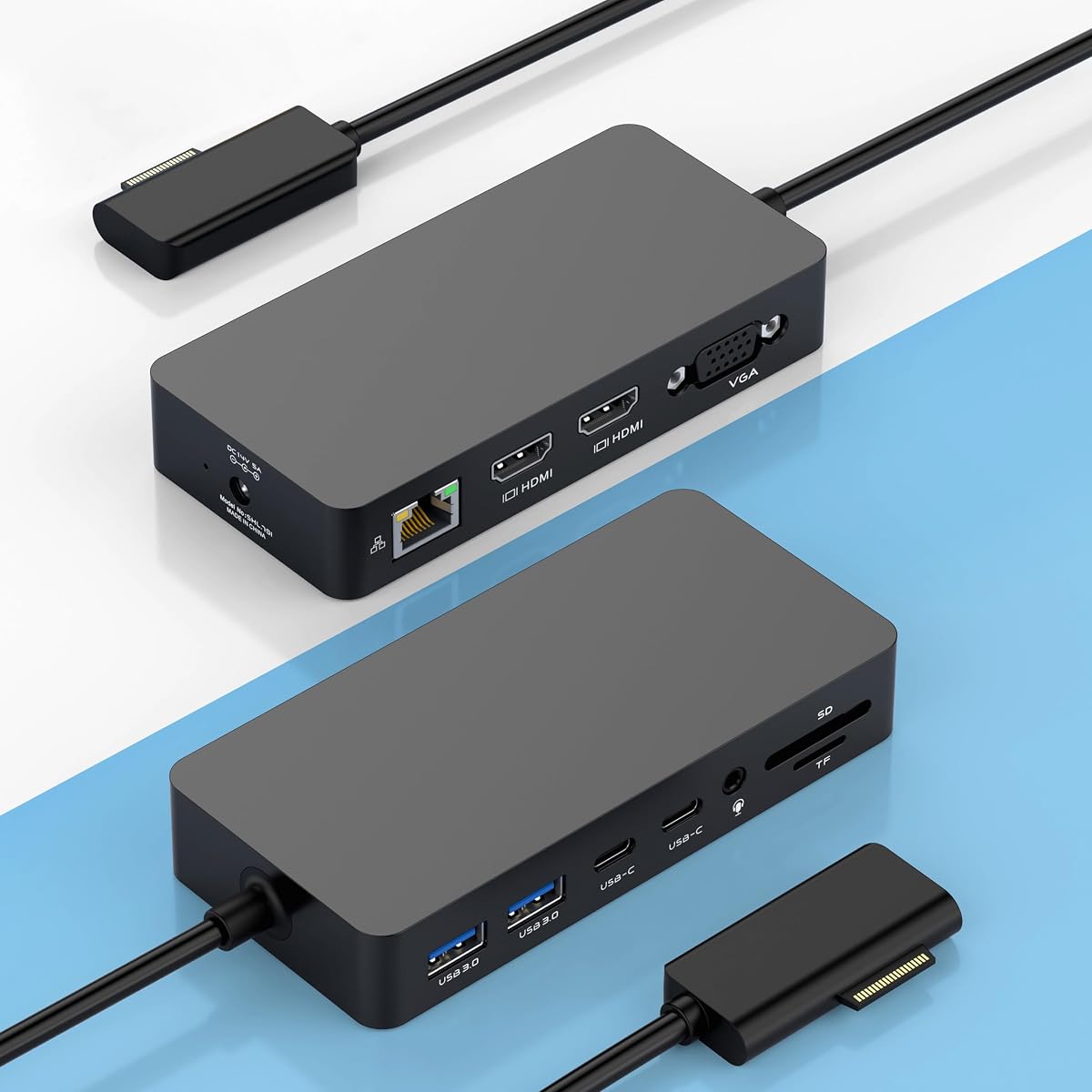
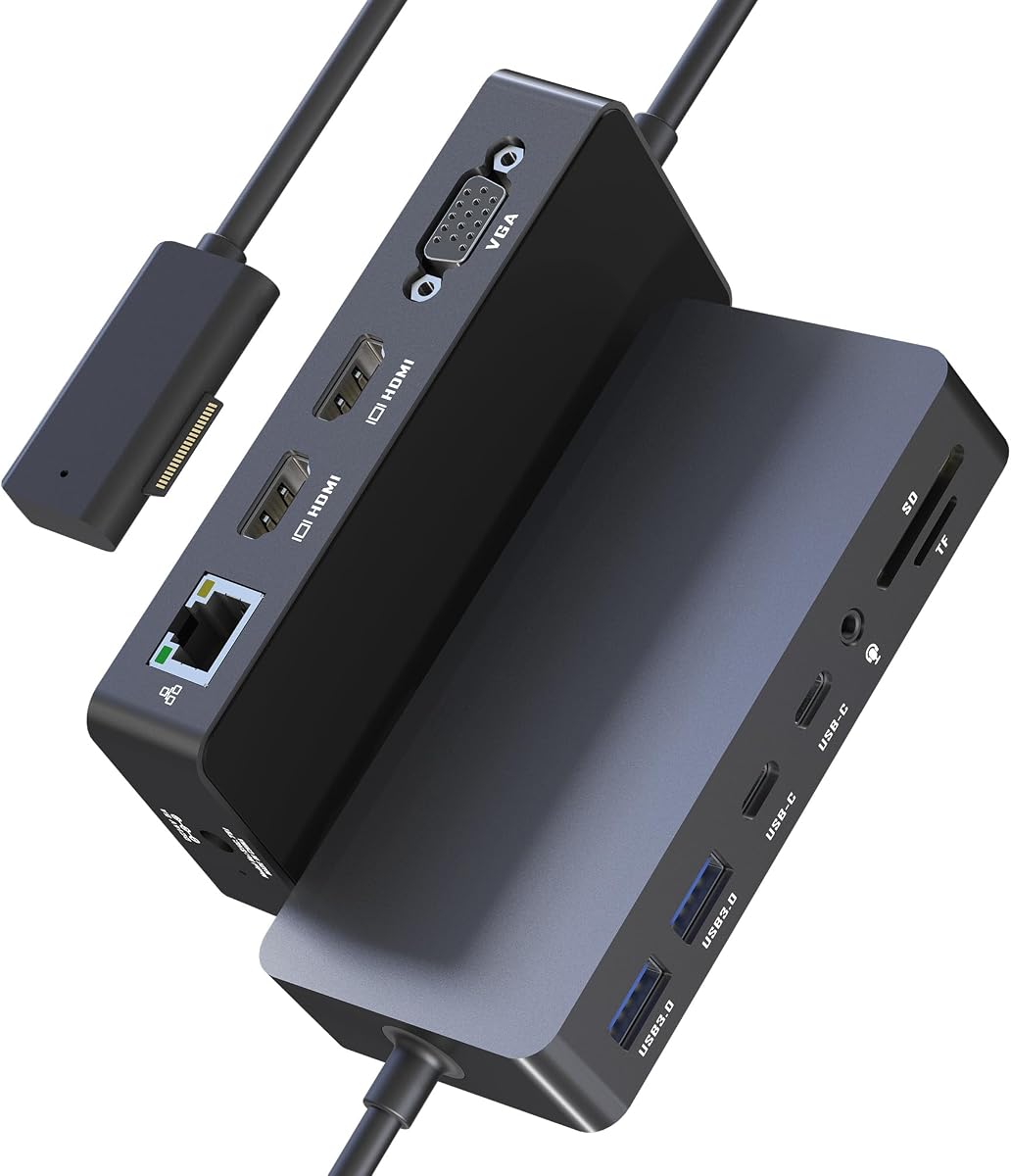
This 12-in-1 Surface dock is designed for users who want to expand a compatible Surface Pro into a multi-screen workstation. It has a 4.1 rating in the supplied data and offers two HDMI ports, one VGA connection, wired Ethernet, four USB data ports, card readers, audio, and a dedicated power input.
We may earn a commission when you buy through this link, at no additional cost to you.
The standout feature is the choice of three external video outputs. The HDMI outputs support 4K at 30Hz, while VGA supports 1080p at 60Hz. The product description notes that the Surface's own display must be turned off when all three external displays are active alongside the tablet screen.
Two USB-A 3.0 and two USB-C data ports are listed at speeds of up to 5Gbps, and the SD and TF slots are described as supporting transfers of up to 104MB/s. Its Ethernet port is only 10/100Mbps, however, which is modest for large transfers or modern high-speed networks and lags behind docks offering Gigabit or 2.5G connections.
The dock suits a user with older VGA equipment or a need for three external screens. Its broad compatibility list covers many Surface Pro, Surface Laptop, Surface Go, and Surface Book models, but buyers should verify the exact device and confirm display behavior. The included adapter, manual, and stated 12-month service coverage also make it a more complete package than a bare adapter.
Dual HDMI plus VGA gives users options for modern flat panels and legacy displays. The maximum-resolution video modes are modest, but the variety of outputs is useful for control rooms, classrooms, and shared workspaces.
Integrated SD and TF readers let photographers and video editors move media without relying on a separate adapter. The listed USB data ports add convenient access to external drives and everyday peripherals.
We may earn a commission when you buy through this link, at no additional cost to you.
The Surface 12-in-1 Dock combines a strong 4.8 rating with extensive display and peripheral support, making it one of the most balanced options here. It includes dual HDMI, VGA, a 10/100Mbps Ethernet connection, two USB-A 3.0 ports, two USB-C data ports, SD and TF card slots, a 3.5mm jack, and a 72W power adapter.
We may earn a commission when you buy through this link, at no additional cost to you.
Its main appeal is a three-external-display layout. Both HDMI ports support 4K at 30Hz, and VGA supports 1080p at 60Hz. As with the other triple-screen docks in this guide, the product information advises turning off the Surface display when using all three external outputs. That limitation is worth accounting for if the built-in touchscreen is important to the workflow.
The 72W adapter represents an upgrade over the commonly associated 45W Surface charger and can keep the tablet powered while connected accessories remain in use. USB data transfers are listed at up to 5Gbps, while the card readers support up to 104MB/s. The comparatively slow 10/100Mbps Ethernet connection is the main technical compromise, especially for users working with large files.
This is a strong recommendation for a compatible Surface Pro owner who wants three displays, extensive ports, and a bundled power adapter. The stated device list spans many generations of Surface Pro, Surface Laptop, Surface Laptop Go, Surface Go, and Surface Book products. It also includes a 12-month warranty and plug-and-play positioning, making it particularly attractive for office and classroom deployment.
Dual HDMI and VGA provide enough outputs for a three-screen workspace. This is useful for financial monitoring, media editing, teaching, or collaborative work where a single tablet display is insufficient.
The included 72W adapter supports connected use while reducing the need for a separate charger. USB-A, USB-C, card readers, audio, and Ethernet cover a wide range of common desk accessories.
We may earn a commission when you buy through this link, at no additional cost to you.
This Surface Triple Display 12-in-1 dock is especially relevant to creative users who want to move large media files and work across several screens. It carries a 4.2 rating and combines dual 4K HDMI output, a 1080p VGA port, USB connectivity, card readers, Ethernet, audio, and a 72W adapter.
We may earn a commission when you buy through this link, at no additional cost to you.
The dock can extend or mirror a display across up to three external monitors. Its two HDMI ports operate at 4K and 30Hz, while the VGA port supports 1080p at 60Hz. For photographers, editors, and designers, the card readers can be especially valuable, with listed transfer speeds of up to 104MB/s and support for cards up to 2TB.
The two USB-A 3.0 and two USB-C data ports are described as supporting up to 5Gbps each. A 100Mbps Ethernet connection is suitable for ordinary browsing, calls, and downloads but does not match the faster networking offered by premium Thunderbolt models. The included 72W power supply is appropriate for sustained desk use.
This model is a good recommendation for content creators and office professionals who value display count and media-card access more than top-tier Ethernet performance. Its broad compatibility includes numerous Surface Pro, Surface Laptop, Surface Go, Surface Book, and Surface Laptop Studio models. The stated 18-month warranty and included manual further improve the package, subject to the exact terms in the listing.
Integrated SD and TF readers remove a common source of friction when importing photos and video. High-speed USB data connections make the dock useful with external SSDs and other production accessories.
Two HDMI outputs support modern displays, while VGA preserves compatibility with older or specialized screens. Users can extend or mirror their workspace depending on the task and device configuration.
We may earn a commission when you buy through this link, at no additional cost to you.
The Microsoft Surface Dock 2 is a polished native option for users who want a one-cable Surface desktop without the complexity of a third-party multi-display adapter. It has a 4.5 rating, and its 199W power supply and 80-centimeter Surface Connect cable make it well suited to a permanent desk.
We may earn a commission when you buy through this link, at no additional cost to you.
Display support includes dual 4K monitors at 60Hz, while the port selection consists of two front-facing USB-C ports, two rear-facing USB-C Gen 2 ports, two rear-facing USB-A ports, a 3.5mm audio input/output jack, Gigabit Ethernet, and a Kensington-compatible security lock slot.
The magnetic Surface Connect cable provides power, video, networking, and peripheral connectivity in a neat single attachment. Compared with a generic USB-C hub, that native approach can simplify the setup for supported devices. It also reduces the number of adapters needed for a fixed office or shared workstation.
The main trade-off is dependence on Surface Connect and the particular Surface models supported by the platform. It does not offer the same broad display-output variety as a triple-screen HDMI-and-VGA dock, but it provides a more streamlined experience for two displays. This is a strong pick for a compatible Surface Pro owner who prioritizes native integration, charging, security, and clean cable management.
Surface Connect consolidates charging, display, network, and USB connections through the magnetic cable. The result is a tidier desk and a quick transition between tablet and workstation modes.
A Kensington-compatible lock slot is useful in a shared office, while Gigabit Ethernet provides a dependable wired connection. The 199W supply also gives the dock ample power for a typical connected workstation.
We may earn a commission when you buy through this link, at no additional cost to you.
The Microsoft Surface Dock 2 shown here is one of the strongest all-round picks because it combines a 4.8 rating with a capable native port layout and broad compatibility among newer Surface products. The included package contains the dock, a 199W power supply, and an extended 80-centimeter Surface Connect cable.
We may earn a commission when you buy through this link, at no additional cost to you.
Its headline display capability is support for two 4K monitors at 60Hz. The dock also includes two front USB-C ports, two rear USB-C Gen 2 ports, two rear USB-A ports, a 3.5mm audio jack, Gigabit Ethernet, and a Kensington-compatible security lock support. That mix is sufficient for nearly any conventional desktop peripheral set.
The product is positioned for a simple transition from mobile use to desktop use. One magnetic cable connects the supported Surface device to the dock, allowing displays, charging, networking, keyboard, mouse, and other accessories to remain organized. The 199W power supply is particularly useful for users who keep their Surface Pro connected throughout the day.
This dock is a strong recommendation for owners of a supported newer Surface Pro, Surface Book, Surface Go, or Surface Studio who want two high-resolution displays without assembling a collection of separate adapters. The listed compatibility includes Surface Pro 4, 5, 6, and 7; Surface Book 2 and 3; Surface Go 2, 3, and 4; and Surface Studio. Buyers should still confirm the exact model and required connection method.
Dual 4K support at 60Hz is a meaningful upgrade for productivity, financial analysis, and creative work. The Surface Connect design keeps display and power connections under a single magnetic cable.
The 199W power supply, Gigabit Ethernet, security support, and mixed USB connectivity cover most desktop requirements. The longer cable also makes placement easier when the dock sits behind a monitor.
We may earn a commission when you buy through this link, at no additional cost to you.
This 12-in-1 Thunderbolt 4 dock is the most connectivity-heavy model in the guide, with a 4.3 rating and a broad port roster. It offers dual 4K at 60Hz HDMI, 1080p VGA, Gigabit Ethernet, two USB-A 3.0 ports, two USB-C 3.0 data ports, SD and TF 3.0 readers, and a combined audio and microphone jack.
We may earn a commission when you buy through this link, at no additional cost to you.
Its display configuration supports extending or mirroring across three external monitors through MST. This makes the dock appealing to traders, designers, programmers, and analysts who want to keep multiple information streams visible. Unlike several competing triple-display models, the HDMI outputs here are listed at 60Hz rather than 30Hz.
A 100W DC charging input keeps the connected device powered while accessories operate. Gigabit Ethernet offers a faster wired connection than the 10/100Mbps ports found on some competing docks. The card readers are listed at speeds of up to 104MB/s with capacity support up to 2TB, while the USB data connections support up to 5Gbps.
This dock is best for a compatible Surface Pro user with demanding multi-screen and peripheral requirements. It provides broad stated support across Surface Pro, Surface Laptop, Surface Go, and Surface Book families, with no extra drivers required according to the product description. The hardware configuration is impressive, but users should verify their exact Surface model, adapter requirements, and whether the included power equipment meets their setup.
Dual 4K at 60Hz HDMI output provides smoother motion and more visual detail than the 30Hz triple-display alternatives. Adding VGA broadens compatibility with older displays and specialized equipment.
Gigabit Ethernet, 5Gbps USB data, and high-speed card readers make this a capable hub for storage-heavy work. The 100W power input is designed to support an active desktop environment.
We may earn a commission when you buy through this link, at no additional cost to you.
This renewed Microsoft Surface Dock 2 offers a high-rated native option for buyers willing to accept refurbished hardware. It has a 4.7 rating and includes the dock, an original 199W power supply, and a USB-C cable, making it a more complete package than many basic docks.
We may earn a commission when you buy through this link, at no additional cost to you.
The listed port expansion includes two USB-C ports, two USB-A ports, two video-capable USB-C ports, a 3.5mm audio input/output connection, and Gigabit Ethernet. Display output through Surface Connect supports dual 4K monitors at 60Hz, while the product information lists 10Gbps data transfer and 199W power delivery.
As a renewed product, its physical condition may differ from a new unit. That distinction matters because scratches, light wear, or replacement packaging may be present even when the dock is fully functional. The listing also includes a one-year limited hardware warranty, and its product information mentions integrated thermal management and durability testing.
This is a good recommendation for a compatible Surface Pro owner who wants a capable native dock and a complete accessory bundle. It may appeal particularly to builders, students, and office users who need dual high-resolution displays, Ethernet, and generous power delivery. Confirm the specific Surface model, inspect the condition description, and understand the warranty terms before buying.
The original 199W adapter and included USB-C cable reduce the need for separate purchases. This makes the package convenient for assembling a new desk around a compatible Surface.
Dual 4K at 60Hz, 10Gbps data transfer, and Gigabit Ethernet create a capable workstation profile. Renewed status means buyers should assess cosmetic condition and warranty details carefully.
We may earn a commission when you buy through this link, at no additional cost to you.
The Surface Dock 10-in-1 is a balanced expansion option for compatible Surface Pro devices, with a 4.2 rating. It uses the familiar Surface Connect arrangement and includes a 90W power supply, power cable, instruction manual, and a stated one-year replacement warranty.
We may earn a commission when you buy through this link, at no additional cost to you.
Video connectivity consists of two Mini DisplayPort outputs. When one display is connected, the listed maximum resolution is 4K at 60Hz. When both outputs are used together, the specification changes to one 4K display at 30Hz and one 1080p display at 60Hz, a pattern worth checking against the intended monitor arrangement.
The remaining expansion includes four USB 3.0 ports, a 3.5mm audio connection, and Gigabit Ethernet. Ten interfaces can be used simultaneously according to the product description. This is enough for a keyboard, mouse, network, audio, and several storage or accessory connections without requiring a large collection of hubs.
The dock is a practical recommendation for an owner of an older compatible Surface Pro who values a traditional Surface Connect workflow and dual displays. It is less suitable for newer USB-C-heavy accessory setups because no USB-C ports are listed, and its 90W adapter is lower-powered than the 199W supplies offered with Microsoft Surface Dock 2 products. Device compatibility should be confirmed before purchase.
Two Mini DisplayPort outputs, four USB 3.0 ports, Ethernet, and audio cover common office needs. The design avoids the complexity of a larger multi-format display hub.
A single display can run at 4K and 60Hz, while simultaneous dual-display operation uses different maximum resolutions. Checking those limits avoids disappointment with a planned two-monitor layout.
We may earn a commission when you buy through this link, at no additional cost to you.
The right Surface Pro dock depends on the tablet generation, number of displays, peripheral ecosystem, and preferred connection method. Use the following factors to narrow the field before comparing the final models.
Surface Connect and USB-C docking behavior can differ across Surface Pro generations, and some listings combine broad compatibility claims with specific model numbers. Check the exact model of the tablet or laptop, including its generation, and compare that information with the dock's supported-device list. A dock that includes the right physical connector is not automatically able to drive every display or peripheral configuration.
A two-monitor dock is usually the simplest way to create a productive desk, while three-output models can support specialized trading, media, or classroom layouts. Check whether the native tablet display remains active, what maximum resolution applies to each output, and whether the refresh rate changes when several screens are connected. HDMI, Mini DisplayPort, and VGA also determine which physical monitors can be used.
Native Surface Connect docks provide a magnetic, one-cable path to compatible devices and may include a substantial power supply. USB-C-oriented docks can offer more port variety and display formats, but may require an adapter and careful confirmation of video support. Consider the accessories already in the workspace rather than choosing a connector type solely on its label.
The included power adapter must adequately support the Surface Pro while the dock also powers attached accessories. Options range from 72W and 90W packages to 100W DC inputs and 199W Microsoft power supplies. More power can provide additional headroom for demanding setups, but a higher-wattage adapter does not automatically make a dock faster; its main benefit is charging and peripheral capacity.
A 12-in-1 label can sound impressive, but the useful number depends on whether a port is a data connection, display output, charging input, card reader, or audio jack. Prioritize the connectors used by a keyboard, mouse, webcam, external storage, wired network, and audio system. Avoid paying for a large port count when several included connections duplicate one another or are not supported by the target device.
The available Ethernet options range from 10/100Mbps to Gigabit and 2.5G. A basic 100Mbps connection is sufficient for common office browsing and calls, while Gigabit or 2.5G can reduce delays when moving large files. Wireless speeds can vary by environment, so a wired connection remains valuable for stable conferencing and downloads in a fixed office.
SD and TF card readers are valuable for photographers, filmmakers, and students who import media frequently. USB-A and USB-C data ports provide access to external drives, cameras, and other accessories. Check the listed transfer speeds and supported card capacities, then compare them with the devices actually used in the workflow to avoid paying for unused card slots or outdated connector types.
New, renewed, and general-purpose marketplace listings may have different assurance terms. A stated warranty can be useful for a desk-based accessory, while renewed hardware deserves additional attention to cosmetic condition and included components. Check whether the power adapter, cable, manual, and advertised warranty are included rather than assuming every listing offers the same package.
Begin by placing the dock in a stable position near the monitors and other equipment. Connect the displays, Ethernet cable, keyboard, mouse, and storage devices first, and route longer cables behind the desk where possible. For a Surface Connect model, attach the magnetic connector to the supported port and allow the tablet to establish the desktop connection. For a USB-C dock, use the appropriate video-capable cable or adapter and confirm that the selected output mode is active.
Check the display arrangement in the operating system's display settings after connecting every monitor. If an expected screen is missing, verify the cable, input source, refresh rate, and whether the Surface's internal display must be disabled for the intended multi-monitor configuration. Connect the listed power adapter when the dock requires dedicated power, especially for sustained operation or multiple attached accessories.
To care for the dock, keep it away from liquids, excessive heat, and crowded spaces where cables may be pulled sharply. Clean the enclosure with a soft, dry cloth rather than spraying liquid directly onto the ports. Periodically inspect the power connector, magnetic cable, and peripheral sockets for damage, and avoid inserting unfamiliar adapters that could damage the enclosure. Always disconnect power before moving the dock or changing a substantial number of connections.
No. Compatibility depends on the Surface Pro generation, connector type, display capabilities, and the specific dock design. The listings in this guide list different supported models, ranging from older Surface Connect models to recent Surface Pro, Surface Laptop, Surface Go, and Surface Book families. Check the exact model number of the device and confirm compatibility with the seller before purchasing.
Several docks in this roundup include three external video outputs through two HDMI ports and one VGA port. However, achieving the full three-display arrangement may require disabling the Surface's internal screen, as stated in the relevant product descriptions. The maximum resolution and refresh rate can also vary depending on the number of active displays, so each monitor's requirements should be checked in advance.
Yes, particularly for fixed workspaces where a stable wired connection is preferred. Gigabit Ethernet is a meaningful improvement over the 10/100Mbps option found on some triple-display docks and is well suited to ordinary office traffic, large downloads, and video calls. A premium dock with 2.5G Ethernet can offer still more headroom, although the benefit depends on the network, switch, and internet service.
The included accessories vary by product. The Microsoft Surface Dock 2 listings include a 199W power supply, while several 12-in-1 models include 72W, 90W, or 100W charging arrangements. The original Microsoft Surface Dock uses an external power supply. Use the specified adapter for the dock to ensure that the connected Surface and peripherals receive appropriate power.
Mini DisplayPort and HDMI are the most practical choices for modern computer monitors, while VGA mainly provides backward compatibility with older displays and specialized equipment. A dock with both HDMI and VGA gives more placement flexibility but may have lower maximum modes than a dock focused entirely on digital video. Check the physical connectors on both the dock and monitor before selecting a model.
Usually, but the dock must include a compatible USB-C data port and the accessories must use the appropriate USB-C standard and protocol. Older docks built around USB-A can require a suitable adapter. Native Surface Connect docks with multiple USB-A ports usually handle conventional keyboard and mouse accessories without additional equipment, while USB-C users should check the port specification carefully.
A renewed dock can be a practical choice, provided its condition and warranty terms are acceptable. Renewed products may show light cosmetic wear, but the listing indicates testing for durability and includes a one-year limited hardware warranty. Review the condition description, confirm that the power adapter and required cable are included, and test the full display and peripheral setup soon after delivery.
Most products in this roundup advertise plug-and-play operation without additional drivers. The Surface itself supplies the necessary system support for compatible docks, and the operating system provides display and peripheral settings. Compatibility, firmware behavior, and display limitations can still vary by model, so the official device requirements and the listing's compatibility notes remain the best sources for confirmation.
The Microsoft Surface Dock 2 stands out as the most polished native choice, especially for owners who value dual 4K displays, a magnetic one-cable setup, Gigabit Ethernet, and a bundled high-capacity power supply. The feature-focused Surface 12-in-1 dock and the Thunderbolt 4 model offer broader port and display possibilities for users who need more specialized expansion.
Prioritize compatibility first, then match the dock to the intended number of displays and the accessories already in the workspace. A dual-display Surface Connect dock is usually the most straightforward choice for conventional productivity, while a triple-output HDMI-and-VGA model is more useful for legacy screens, media workflows, or specialized monitoring. Faster Ethernet and USB standards are valuable only when connected equipment can take advantage of them.
Ratings, stock, bundle contents, and prices can change, so review the current product listing before making a final decision. Confirm the exact Surface Pro model, supported display resolutions, power supply, included cables, warranty, and compatibility notes at the time of purchase. That final check helps ensure the chosen dock supports the planned workspace rather than merely offering a long specification list.