
C4 SE Mini PC
4.6Editor score
Ryzen 5 3500U processor
Expandable 32GB memory
Triple 4K display support
Our guide compares the best cheap mini PC for gaming, evaluating processors, graphics, memory, storage, connectivity, and overall value for shoppers.
A compact mini PC can provide an affordable, space-saving alternative to a traditional gaming tower, especially for casual games, retro titles, indie releases, and lighter modern games. The strongest options balance processor capability, integrated graphics, usable memory, fast storage, cooling, and enough ports for the way you actually play.
This guide compares ten mini PCs using their supplied specifications, including processor architecture, core and thread counts, integrated graphics, memory, storage expansion, display support, networking, cooling, dimensions, and warranty coverage. The list ranges from budget-oriented systems for everyday gaming to more powerful models aimed at creators who also want a capable compact gaming computer.
Each review explains the strongest reasons to consider the model, along with the compromises that can affect gaming, productivity, or future upgrades. The top three picks represent the clearest options for different priorities, but pricing, bundled software, storage configuration, and availability can change. Always check the current listing before buying.
4.6Editor score

4.6Editor score

4.3Editor score
The table below compares all ten systems by processor, graphics, memory, and storage, making it easier to identify the mini PC that matches your gaming priorities, display needs, and upgrade plans.




The KAMRUI Pinova P2 combines an AMD Ryzen 7 7330U processor with 16GB of LPDDR4X memory in a remarkably small enclosure. Its 4.4 rating reflects a balanced specification list, particularly attractive for buyers who want a mini PC that can handle games while also serving as a daily office, media, or productivity system.
We may earn a commission when you buy through this link, at no additional cost to you.
Its eight-thread Zen 3 processor has a maximum boost of 4.3GHz and 8MB of L3 cache. The integrated Radeon graphics use six compute units and can reach a stated graphics clock of 1.8GHz, making the P2 better suited to casual and light gaming than bare-bones systems. Two M.2 expansion slots add flexibility, while HDMI 2.0, DisplayPort 1.4, and DisplayPort Alt Mode over USB-C support three simultaneous 4K displays.
The main limitation is its starting storage of 256GB, which is modest for a modern game library. Memory is also soldered rather than presented as user-upgradable, so the 16GB configuration is fixed. These are meaningful constraints for buyers expecting to install several large games or regularly replace components, though the P2 remains flexible enough for smaller libraries and external storage.
Choose the Pinova P2 if you want a compact, quiet-looking system for casual gaming, remote work, and a multi-monitor setup without moving to a full-sized desktop. It is not the right choice for intensive 3D gaming, but it offers one of the strongest combinations of processing power, memory, display support, and expandability in this guide.
The Ryzen 7 7330U provides enough processing muscle for browser-heavy sessions, light content work, and casual games, while 16GB of memory helps prevent the slowdown that commonly accompanies 8GB systems.
Triple 4K output is unusual at this level, and the additional M.2 slots provide room for more local storage. The included VESA mount also helps recover desk space by placing the system behind a monitor.
We may earn a commission when you buy through this link, at no additional cost to you.
The C4 SE Mini PC earns the Best Budget label because it combines a 4.6 rating with an unusually useful set of expansion and connectivity features. Its Ryzen 5 3500U offers four cores, eight threads, and boost speeds up to 3.7GHz, which makes it suitable for casual gaming, 4K media playback, office tasks, and lightweight creative work.
We may earn a commission when you buy through this link, at no additional cost to you.
Unlike many competitors with fixed memory, the C4 SE has two SO-DIMM slots and supports expansion to 32GB. It also includes a 256GB PCIe 3.0 NVMe SSD and a second M.2 slot for another PCIe 3.0 drive. Dual Gigabit Ethernet, WiFi 5, Bluetooth 5.0, and three-display output through HDMI, DisplayPort, and USB-C broaden its usefulness well beyond gaming.
The primary compromise is its 8GB starting memory. Although the processor supports eight threads, 8GB can become restrictive in modern games, heavy browser use, and multitasking, so buyers should strongly consider adding memory. Radeon Vega 8 integrated graphics also make the system better for light titles, emulation, and casual gaming than demanding 3D releases.
The C4 SE is ideal for budget-conscious buyers who want easy RAM and storage upgrades rather than the highest possible graphics performance. Its strong rating, dual network ports, and three-monitor support make it especially useful as a small office, home server, digital-signage, or light gaming system. For its intended tier, it is remarkably flexible.
The two memory slots and second NVMe position are the most valuable features for long-term ownership. They make it possible to correct the initial 8GB memory limitation and assemble a larger game library without replacing the entire mini PC.
Two Gigabit Ethernet ports allow the system to be used for network monitoring, soft routing, or a home server. That makes the C4 SE useful for buyers who want one compact system to serve several roles.
We may earn a commission when you buy through this link, at no additional cost to you.
The ACEMAGICIAN S3A is the strongest overall option in this guide for buyers who want serious mini PC gaming performance in a compact enclosure. It combines an eight-core, 16-thread Ryzen 7 H 255 processor with Radeon 780M graphics, 16GB of fast LPDDR5 memory, and a 512GB PCIe 4.0 SSD. Its 4.6 rating supports its reputation as a well-rounded performance machine.
We may earn a commission when you buy through this link, at no additional cost to you.
Radeon 780M is the centerpiece for gaming because its twelve compute units and RDNA 3 architecture represent a substantial step up from older Vega-based integrated graphics. The S3A is suited to more demanding modern titles as well as content creation, programming, streaming, and 3D work. Its tool-free removable storage design can accommodate expansion to 4TB, while USB4, HDMI 2.0, and DisplayPort 2.0 support three 4K displays.
The S3A uses onboard LPDDR5 rather than replaceable DIMMs. Although 16GB is a strong amount for many games and applications, buyers who need 32GB or more cannot upgrade the memory through a conventional slot. Another consideration is that the higher specification level puts it near the premium end of this roundup rather than in the strict entry tier.
Three power modes give users meaningful control: Silent Mode for quiet work, Auto Mode for balanced performance, and Performance Mode for demanding workloads and casual gaming. With Radeon 780M, fast memory, expandable storage, and a dual-fan cooling system, the S3A is the best fit for gamers who want the strongest graphics without a large tower.
The twelve-core Radeon 780M GPU gives the S3A a clear advantage over systems using older Vega graphics. That makes it the most attractive choice in the group for buyers who want to explore current games without a separate graphics card.
Silent, Auto, and Performance modes let users trade energy use and noise against speed. This flexibility is useful for shared rooms, daytime productivity, and evening gaming sessions.
We may earn a commission when you buy through this link, at no additional cost to you.
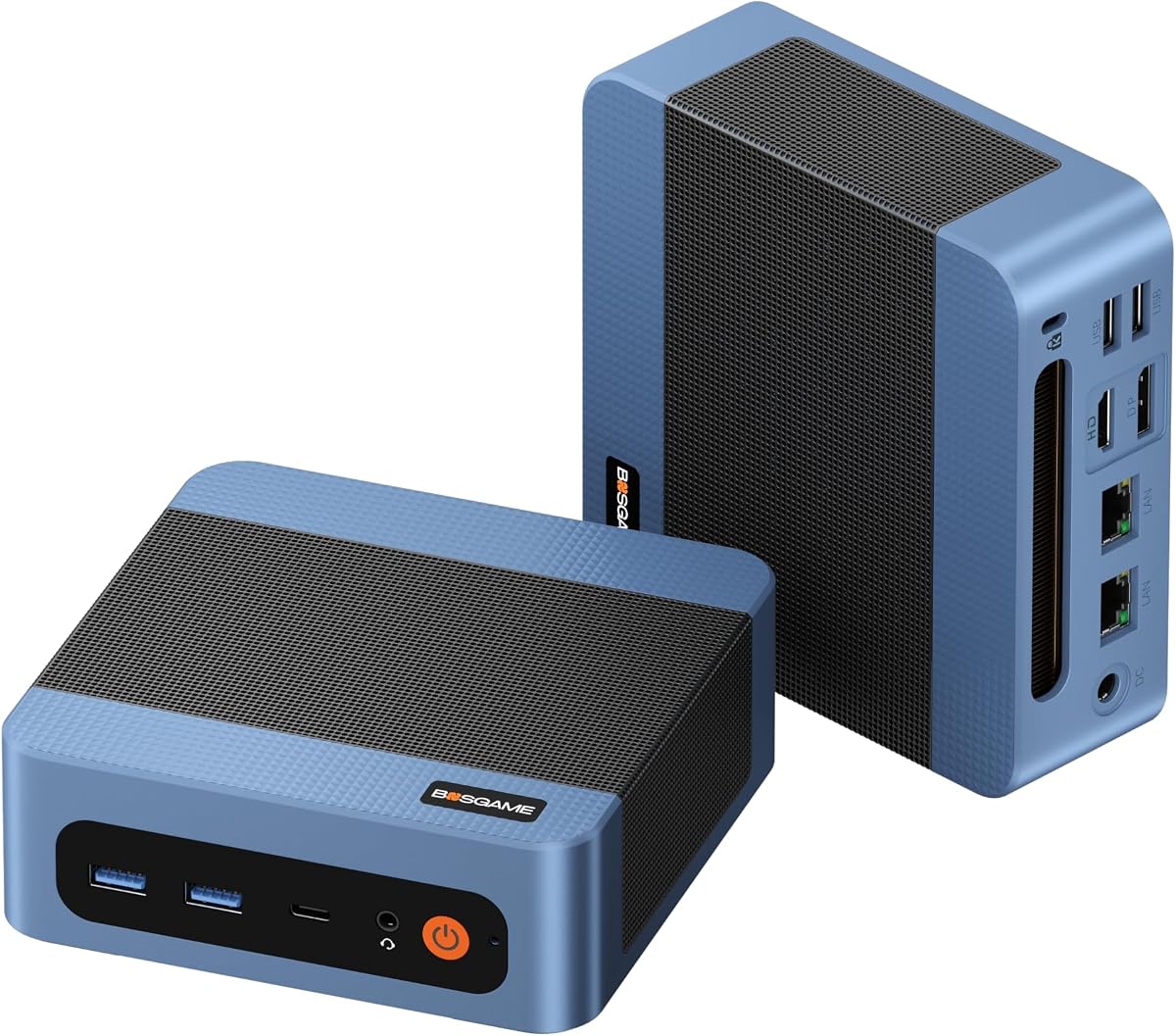
The BOSGAME E5 11 Pro is a compact Ryzen 3 5300U system designed primarily for business and home-office use while offering support for casual gaming. Its four-core, eight-thread processor boosts to 3.8GHz, and the 4.3 rating reflects a practical balance of features rather than enthusiast-level gaming performance.
We may earn a commission when you buy through this link, at no additional cost to you.
Its two SO-DIMM slots can accept up to 64GB of memory, while the installed 256GB M.2 SSD can be joined by a second PCIe 3.0 NVMe drive of up to 2TB. Front USB-C supports data, display output, and PD 3.0 power delivery. Two 2.5GbE Ethernet ports, a VESA mount, and a stated operating noise below 25dB make it particularly interesting for a tidy, quiet office installation.
The Radeon graphics have six cores and a stated 1.5GHz frequency, making them suitable for casual games, media decoding, and light photo work rather than demanding modern titles. The included 8GB memory and 256GB drive are also modest, although unlike soldered configurations, both can be addressed with user-installed components.
Buy the E5 11 Pro if gaming is a secondary activity alongside office work, conferencing, and browsing. It is especially suitable for a compact system behind a monitor, a dual-LAN network project, or a home lab. The product-specific Windows 11 Pro installation and long parts warranty add value, but dedicated gamers should look toward newer Radeon graphics.
The Ryzen 3 5300U, expandable memory, fast wired networking, and 4K display support create a capable daily-driver mini PC. The system's strongest appeal is how many office functions it combines in a small, tidy form factor.
Supporting 64GB of RAM and a second NVMe drive makes the E5 adaptable to heavier multitasking later. A buyer can start with the included components and expand only when real workloads demand it.
We may earn a commission when you buy through this link, at no additional cost to you.
The BOSGAME E5 Plus uses a Ryzen 3 5400U with four cores, eight threads, a 2.6GHz base clock, and boost speeds up to 4.0GHz. It is a competent general-purpose mini PC for office work, browsing, communication, and entertainment, with a 4.4 rating and ample expansion options.
We may earn a commission when you buy through this link, at no additional cost to you.
Two SODIMM slots support up to 64GB of DDR4 memory. The included 256GB M.2 SATA SSD can be complemented by a PCIe 3.0 NVMe slot, allowing buyers to add considerably faster storage when desired. Dual 2.5GbE ports, WiFi 5, Bluetooth 5.0, full-function USB-C, and three 4K display outputs make the E5 Plus particularly well connected for a compact work system.
The most important limitation for a gaming guide is the Radeon integrated graphics, which operate at up to 1.6GHz and are intended for smooth everyday visuals rather than advanced gaming. The primary drive is also SATA, so boot and loading performance will not equal the S3A's PCIe 4.0 configuration. Its 8GB starting memory is another potential bottleneck in modern games.
The E5 Plus makes sense for someone building an affordable, expandable office mini PC who also wants light gaming. It supports Windows 11 and Ubuntu, includes Windows 11 Pro according to the supplied listing, and carries a one-year machine warranty with three years of parts coverage. It is a better productivity platform than most similarly positioned gaming mini PCs.
The E5 Plus is not limited to its original 8GB of memory or 256GB drive. Dual memory slots and a secondary NVMe position let owners improve the system without replacing the mini PC itself.
Dual 2.5GbE ports, WiFi 5, Bluetooth 5.0, USB-C display output, and three-display support cover many professional and home-office arrangements.
We may earn a commission when you buy through this link, at no additional cost to you.
The GMKtec M5S is a Ryzen 3 5400U mini desktop with 16GB of DDR4 memory and a 512GB PCIe solid-state drive. Those are generous specifications for an entry-level gaming build, and the 4.3 rating reflects a system capable of handling office work, browsing, video, and lighter games in a compact package.
We may earn a commission when you buy through this link, at no additional cost to you.
Its Radeon graphics contain six cores running at 1600MHz. The supplied listing specifically highlights console emulation through Batocera, indie games, and older Steam favorites rather than modern demanding titles. That makes the M5S an appealing choice for retro libraries, emulation, indie games, and older titles where the older GPU remains adequate.
Storage is another strength. The main 512GB PCIe 3.0 drive is joined by dual-slot expansion supporting up to an 8TB PCIe 4.0 SSD according to the product information. Memory can also expand to 128GB. Display connectivity includes HDMI 2.0, DisplayPort, and USB4, with support for three simultaneous displays and up to 8K at 60Hz through USB4.
Choose the M5S for retro gaming, emulation, indie titles, and a compact all-purpose PC that needs more memory and storage than the typical entry model. It is not the right recommendation for high-settings modern gaming, and buyers should confirm game-specific requirements before purchase. Its generous configuration and extensive ports make it especially versatile.
The combination of 16GB memory and a Ryzen 3 5400U gives older and independent games comfortable headroom. Its Radeon graphics are clearly oriented toward light, classic, and retro-style gaming rather than intensive 3D graphics.
A 512GB starting SSD gives games more room immediately, while dual storage expansion supports a larger library. USB4 adds high-speed peripherals and an 8K display option for compatible setups.
We may earn a commission when you buy through this link, at no additional cost to you.
The KAMRUI E3B combines an AMD Ryzen 7 7730U with 16GB of LPDDR4X memory, a 512GB M.2 SSD, and Radeon graphics with eight cores. Its 4.5 rating makes it one of the strongest balanced choices for gamers who also need substantial multitasking, media, and office performance.
We may earn a commission when you buy through this link, at no additional cost to you.
The processor provides eight cores, 16 threads, boost speeds up to 4.5GHz, and 16MB of L3 cache. At a default 15W TDP and maximum 28W, it is designed to deliver useful performance in a small enclosure. The eight-core Radeon graphics run at a stated 2GHz, offering more capability than the six-core arrangements found in several lower-ranked systems.
Its 512GB drive is more useful for games than a 256GB configuration, and two M.2 positions allow total storage to reach 4TB according to the supplied information. Triple 4K output is supported through HDMI 2.0, DisplayPort 1.4, and USB-C. The included VESA bracket and dimensions of 5.04 by 5.04 by 1.63 inches suit a clean desk or monitor-mounted installation.
The principal trade-off is fixed LPDDR4X memory. Buyers who need more than 16GB cannot simply replace the modules, so demanding creative workloads may be constrained. Still, for gaming mixed with productivity, the E3B offers a compelling combination of CPU threads, graphics capability, storage, wireless standards, and compact size.
Sixteen CPU threads make the E3B useful for streaming utilities, communication apps, browser windows, and background tasks. This makes it more versatile for a real gaming setup than a bare mini PC focused only on launch speed.
WiFi 6, Bluetooth 5.2, a gigabit LAN connection, and a wide collection of USB ports cover common gaming peripherals. The VESA bracket allows the enclosure to disappear behind a compatible display.
We may earn a commission when you buy through this link, at no additional cost to you.
The ACEMAGIC K1 pairs a Ryzen 7 7735HS processor with Radeon 680M graphics, 24GB of LPDDR5 memory, and a 512GB SSD. It is the Best Premium option because its CPU, generous memory, faster graphics, and refined cooling arrangement create a capable system for light gaming and demanding productivity.
We may earn a commission when you buy through this link, at no additional cost to you.
The eight-core, 16-thread processor reaches up to 4.75GHz and includes 16MB of cache. Radeon 680M graphics operate at a stated 2.2GHz and are suitable for the casual games highlighted in the product information, including DOTA 2. At the same time, 24GB of 5500MT/s LPDDR5 memory gives the system a comfortable margin for gaming, office applications, media tools, and virtual machines.
Two M.2 2280 positions allow additional NVMe storage and expansion up to 4TB. The 5 by 5 by 1.6-inch chassis includes a dual-outlet cooling structure, large heatsink, and high-speed silent fan. HDMI, DisplayPort, and Type-C provide triple-display output, while the package includes an HDMI cable, power adapter, and VESA bracket.
The K1 is most appropriate for a buyer willing to spend more for a stronger processor, later-generation integrated graphics, and abundant memory without using a full desktop. It remains unsuitable for high-end gaming without a discrete graphics card, but it is a premium mini PC for light gaming and mixed workloads. Its 4.3 rating makes it a sound choice rather than a flawless one.
The Ryzen 7 7735HS and Radeon 680M combination provides a meaningful step over older 7330U-class systems. It favors responsiveness in lightly graphical games and multitasking over a purely entry-level experience.
Twenty-four gigabytes is unusually generous in a compact PC and can help when a game, browser, and several background applications are active. Its limitation is that the memory is onboard rather than replaceable.
We may earn a commission when you buy through this link, at no additional cost to you.
The KAMRUI E3B 1TB stands out for storage rather than processor novelty. It retains the Ryzen 7 7730U's eight cores, 16 threads, and boost speed up to 4.5GHz, but pairs them with 16GB of LPDDR4X memory and a generous 1TB M.2 SSD for buyers who want fewer storage constraints.
We may earn a commission when you buy through this link, at no additional cost to you.
The large starting drive is especially helpful for a gaming PC because modern titles consume substantial space. Two M.2 slots permit total storage of up to 4TB, with one supporting SATA or PCIe NVMe and the other supporting SATA. Radeon graphics with eight cores at 2000MHz support triple 4K output over HDMI, DisplayPort, and USB-C.
As with other systems using this processor family, the memory is soldered, so the 16GB capacity is fixed. The integrated GPU is appropriate for casual and lighter games but is not a solution for graphically intensive modern titles. The listing also highlights a 2.5Gbps-capable RJ45 connection, which is useful for online gaming and local network functions.
Choose this E3B if you want a substantial amount of storage from the first boot and expect to install several games, media files, and applications without immediately adding a drive. It is also attractive for creators who need local capacity. For competitive 3D performance, however, the S3A's Radeon 780M remains the stronger gaming-focused recommendation.
One terabyte removes the need to add a second drive immediately. That convenience makes this model attractive for users who want a ready-to-use compact gaming and media system.
Eight Zen 3 cores and 16 threads provide strong background performance for streaming, browsing, creation, and communication. The mini PC is more versatile than a dedicated low-power entertainment box.
We may earn a commission when you buy through this link, at no additional cost to you.
The Glorlin Mini PC is a Ryzen 5 3501U compact computer with 16GB of DDR4 memory and a 512GB SSD. Its perfect 5.0 rating is the highest in this guide, although ratings alone cannot substitute for checking whether the specifications suit a particular game or workload.
We may earn a commission when you buy through this link, at no additional cost to you.
The four-core, eight-thread processor boosts to 3.7GHz and is designed for office work, browsing, study, communication, and multitasking. Integrated AMD graphics, triple-display support through HDMI and USB-C, and WiFi 6 with Bluetooth 5.3 create a practical everyday setup. The included storage is more generous than the 256GB drives commonly found on entry mini PCs.
The main limitation is that the older Ryzen 5 3501U platform and unspecified integrated graphics are not aimed at demanding modern gaming. The system is better suited to casual games, emulators, media playback, and titles with modest graphics requirements. The supplied product information also gives less detail about memory and storage expandability than it does for several competitors.
This Glorlin model suits buyers who primarily want a small, tidy computer for work or study but also want enough capacity to play casual games. The 16GB memory helps with multiple applications, and 512GB reduces storage pressure. It is a strong general-purpose option, though dedicated gamers should prioritize the newer graphics offered by the S3A or K1.
Sixteen gigabytes of memory and a 512GB SSD form a practical foundation for browsing, office work, communication, and entertainment. The specification avoids the small-memory constraint that can make compact PCs feel dated.
WiFi 6 and Bluetooth 5.3 make it easier to connect compatible controllers, keyboards, headsets, and other accessories without occupying a wired port.
We may earn a commission when you buy through this link, at no additional cost to you.
The most useful cheap gaming mini PC is not necessarily the one with the longest feature list. Processor and graphics capability matter most, but memory, storage, cooling, display outputs, networking, and upgradeability determine how comfortably the system handles games and everything else running alongside them.
Integrated graphics are the central constraint in nearly every budget mini PC because the processor contains the GPU and most models do not offer a discrete graphics card. Older Vega-based chips, such as the Radeon Vega 8 in the C4 SE, are best for casual games and older titles. The eight-core Radeon graphics in the KAMRUI E3B provide more capability, while Radeon 680M and Radeon 780M in the ACEMAGIC models represent the strongest gaming choices in this roundup. Check the graphics model and its stated clock speed rather than relying on a generic gaming label.
A four-core, eight-thread processor can run many mainstream activities, but eight cores and 16 threads provide more breathing room for games, background applications, streaming, and content creation. The Ryzen 7 7730U, 7735HS, and H 255 models in this guide provide the largest thread counts, while the Ryzen 3 5300U and 5400U options prioritize efficiency and affordability. Maximum boost speed helps short bursts of performance, but sustained gaming also depends on cooling and power limits.
Eight gigabytes is increasingly tight for current games and heavy multitasking, while 16GB is a more comfortable baseline. The C4 SE, E5 11 Pro, and E5 Plus use replaceable DDR4 memory and support meaningful expansion. By contrast, systems with LPDDR4X or LPDDR5 generally provide faster, efficient memory but cannot be upgraded after purchase. The K1's 24GB and the S3A's 16GB are generous configurations, but buyers should not assume onboard memory can later be replaced.
A 256GB drive fills quickly with modern games, operating systems, updates, and media, so 512GB or 1TB is preferable for gaming. NVMe storage provides faster transfers and application loading than SATA, making the PCIe drives in the C4 SE, M5S, and S3A more attractive for immediate use. M.2 expansion slots are another major advantage, allowing users to add storage without replacing the primary drive. Always verify the interface of each slot, since a listing may support SATA, NVMe, or both.
Compact systems generate heat because their processors and cooling hardware occupy little space. The E5 11 Pro advertises operation below 25dB, while the S3A uses a dual-fan system and offers Silent, Auto, and Performance modes. Adjustable power modes are particularly useful for gaming because they allow a user to emphasize quiet operation while working and stronger performance when playing. A VESA-mounted system also benefits from improved airflow around its enclosure.
Gaming setups often need more than a monitor, keyboard, and mouse. Multiple display outputs can separate the game from chat, inventory tools, or streaming applications. Every product here supports multiple displays, but the S3A adds USB4 and the M5S offers 8K output through that connection. USB-A ports remain useful for controllers, external drives, and inexpensive accessories, while full-function USB-C can provide video, data, and sometimes power delivery.
Low-latency Ethernet is valuable for online games, while dual ports allow advanced network configurations. The E5 11 Pro and E5 Plus include dual 2.5GbE connections, the C4 SE includes dual Gigabit Ethernet, and the M5S pairs 2.5GbE with WiFi 6. Bluetooth versions range from 5.0 to 5.3. Warranty length and technical support also differ, so buyers should consider the included operating system, certification, and service terms alongside hardware.
Start by confirming that the system includes the operating system you expect and completing the initial setup, account configuration, security updates, and driver installation. Connect the display through the intended HDMI, DisplayPort, or USB-C output, then set the operating system resolution and refresh rate to match the monitor. For online gaming, use Ethernet where possible and test the network before blaming the mini PC for latency. Create separate user accounts for family members or guests if the machine will be shared.
Install games and launch them with both the operating system and GPU control software updated. Use the available performance or power mode to select a suitable balance for your environment: Silent Mode is useful for shared spaces, while Performance Mode can provide stronger performance during play. Keep the enclosure clear of fabric or clutter, particularly if it is mounted behind a monitor, because airflow around the vents is essential for stable temperatures and sustained performance.
Check available storage regularly and maintain free space for system updates and temporary files. If the model has replaceable memory or SSD positions, consult the product documentation and compatible component specifications before opening it. Use the included VESA bracket when a clean setup is important, and avoid placing the system where accumulated dust can block its cooling path. For any upgrade, system change, or unusual hardware behavior, consult the manufacturer's support service and applicable warranty terms.
It depends heavily on the integrated graphics. Models with Radeon 780M or Radeon 680M have the strongest potential in this guide, while older Vega graphics are better suited to casual, indie, retro, and older games. Check each game's recommended settings and system requirements, and expect to use lower resolutions or reduced graphical settings. A mini PC can be an excellent gaming machine, but it does not replace the performance of a high-end gaming PC with a dedicated graphics card.
Yes, 16GB is a comfortable amount for many current games and general multitasking. Eight gigabytes can work for lighter titles, but it becomes restrictive when games, browsers, voice chat, and background applications run together. Memory capacity is separate from graphics performance, so adding RAM cannot transform an older integrated GPU into a high-end gaming solution. Systems with replaceable memory offer the easiest route to more capacity.
The KAMRUI E3B models offer eight-core Ryzen 7 7730U processors and eight-core Radeon graphics, making them stronger choices for gaming than the four-core Pinova P2. The E3B configuration with 1TB storage is especially convenient for a larger game library. The Pinova P2 remains useful for casual gaming and productivity, but buyers prioritizing graphics capability should focus on the E3B's more capable processor and GPU.
The ACEMAGICIAN S3A has the strongest gaming-oriented specification combination in the guide, with an eight-core, 16-thread Ryzen 7 H 255 and Radeon 780M graphics. The ACEMAGIC K1 also stands out with a Ryzen 7 7735HS, Radeon 680M, and 24GB of fast memory. For office-heavy use, the KAMRUI E3B models offer eight cores, 16 threads, and 16GB of memory in compact enclosures.
None of the listed systems has a dedicated graphics card, and the supplied specifications do not describe a PCIe graphics expansion option. They are designed to use integrated Radeon graphics. If you need high-resolution modern gaming, ray tracing, or intensive 3D performance, look for a small-form-factor desktop with explicit discrete graphics support instead. These mini PCs are best matched to lighter gaming and mixed productivity workloads.
A mini PC can be smaller, easier to connect to external displays, and potentially easier to upgrade because several models use replaceable memory and storage. A gaming laptop remains more self-contained and includes a built-in screen, keyboard, battery, and dedicated graphics in suitable configurations. Among the systems here, the mini PCs provide value for desk-based use, while laptops offer mobility that a compact desktop cannot.
Yes, every listed mini PC supports multiple displays. Most use HDMI, DisplayPort, and USB-C for three 4K outputs, while the S3A adds USB4 and the M5S supports 8K output through its USB4 connection. Confirm the exact resolution, refresh rate, and adapter requirements for your monitors. For gaming, a single high-refresh display is usually the simplest arrangement, while additional screens can be useful for chat and system monitoring.
512GB is the more practical choice for a gaming mini PC because operating systems, updates, media, and modern games can consume a 256GB drive quickly. A larger drive also reduces the need for constant file management. If the included storage is smaller, an additional M.2 drive is often the simplest upgrade, but verify whether the system supports SATA, PCIe NVMe, or both in the available slot.
The C4 SE Mini PC is the clearest budget choice because it combines a strong rating with replaceable memory, a second NVMe slot, dual Gigabit Ethernet, and triple-display support. The ACEMAGICIAN S3A is the overall performance leader thanks to Radeon 780M graphics, a Ryzen 7 H 255, fast memory, and storage expansion. For a premium light-gaming build with abundant memory, the ACEMAGIC K1 stands out with its Ryzen 7 7735HS, Radeon 680M, and 24GB of LPDDR5.
Prioritize integrated graphics first, then processor threads, memory capacity, and storage according to the games you plan to play. The KAMRUI E3B models are particularly balanced for gaming and productivity, the GMKtec M5S targets retro and indie play, and the BOSGAME systems serve buyers who value office performance and upgradeable business-oriented construction. Whichever model you choose, ensure its display outputs, wireless standards, and storage interfaces fit your setup.
Current prices and configurations can change, so verify the CPU, graphics, memory, storage type, operating system, included accessories, and warranty on the live listing before purchasing. Also check the dimensions and port placement against your desk, monitor, and peripherals. With that final check, you can select the best cheap mini PC for gaming without paying for hardware features that your favorite games will never use.