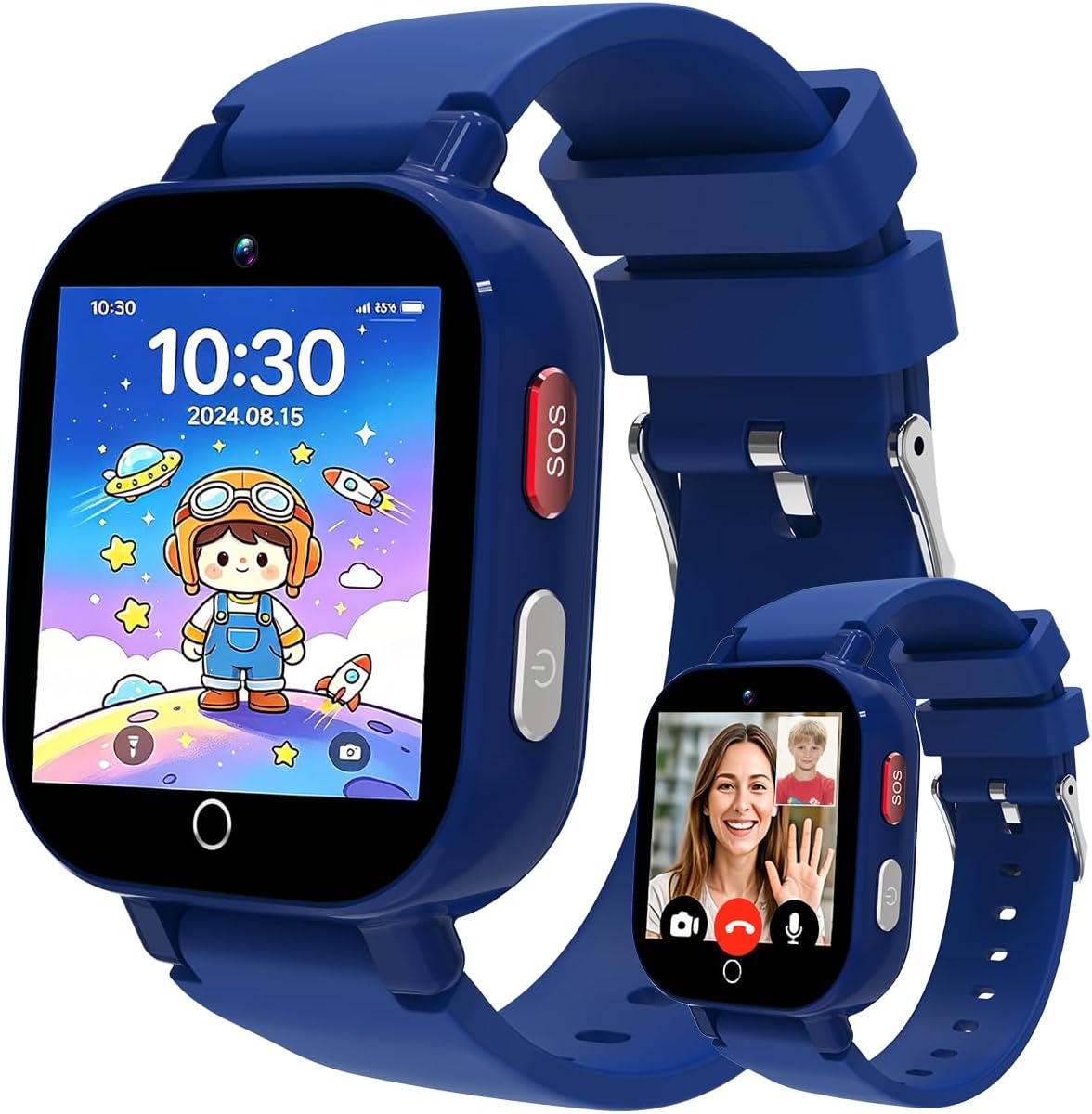
4G Kids Smart Watch with GPS Tracker, Video & Voice Call
4.1Editor score
Real-time GPS location tracking
Two-way video calling
Remote monitoring controls
Our Communication Watches for Kids guide compares ten GPS smartwatches for calling, messaging, location tracking, school controls, safety alerts, and daily
Communication watches give children a practical way to reach family without carrying a full smartphone. The strongest models combine approved-contact calling, two-way messaging, location tracking, SOS tools, school controls, and durable construction, while limiting exposure to open internet access and unfamiliar contacts.
We compared all ten watches using the supplied feature details, customer ratings, connectivity information, age guidance, parental controls, and physical design. The list covers budget models, established family brands, GPS-focused options, watches with video calling, and premium alternatives for children who need more communication features.
Each review explains the product's strongest benefits, meaningful limitations, and ideal buyer, helping families distinguish basic location devices from full communication systems. Product ratings and availability can change, and current prices, subscription requirements, coverage, and activation terms should be confirmed before purchase.
4.1Editor score
3.6Editor score

3.5Editor score
The table below compares the ten featured communication watches by core capabilities, age range, connectivity, and safety tools, making it easier to identify the model that matches your child's routines and your family's priorities.


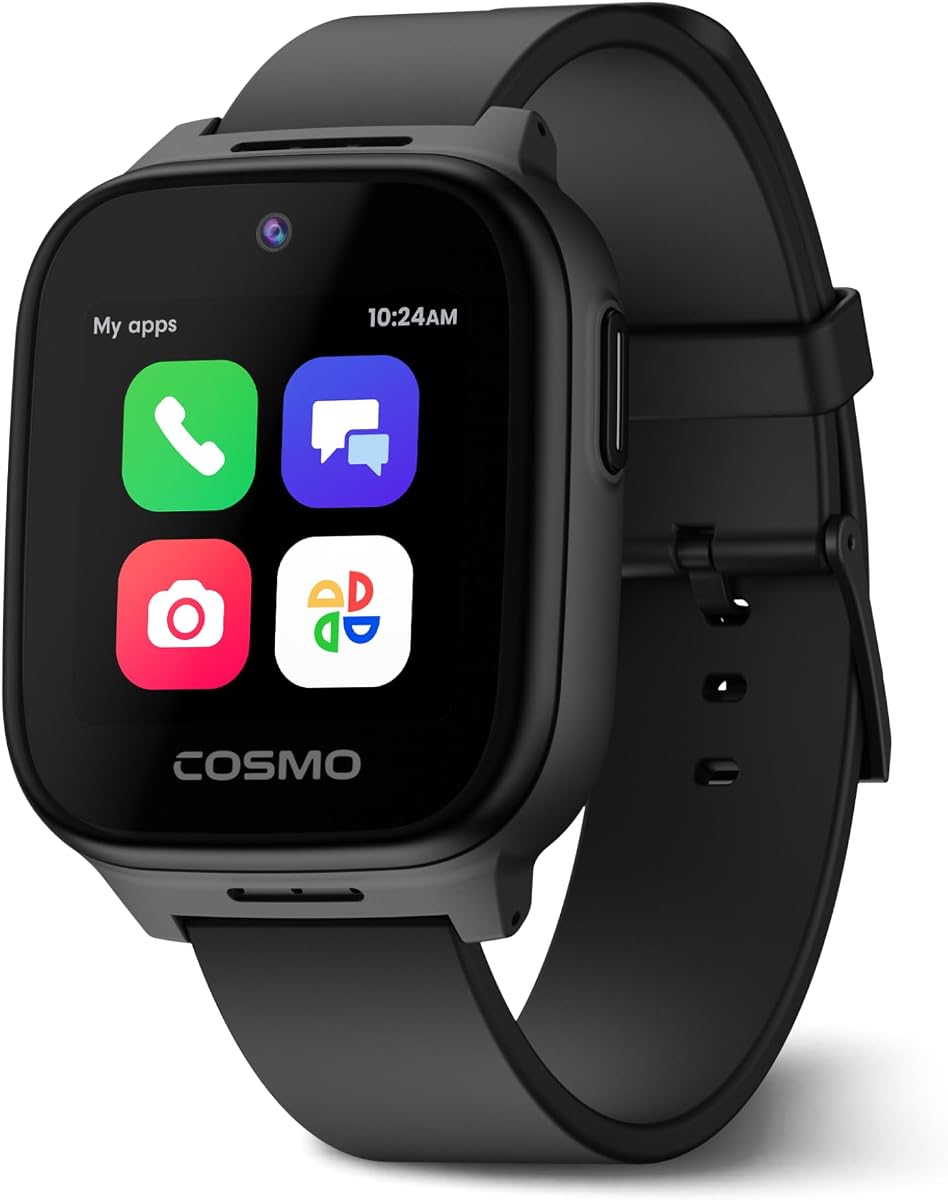
The JrTrack 5 is Cosmo's feature-oriented phone watch for children ages six and up, combining real-time GPS, secure calling, text messaging, school controls, activity tools, and emergency features. Its 3.6 customer rating is the lowest among the ten products, but the supplied specifications show one of the most complete kid-safe ecosystems in this comparison. It is particularly attractive to families that want more than basic location updates and want children to communicate without browsing the open internet.
We may earn a commission when you buy through this link, at no additional cost to you.
HaloGPS provides real-time location tracking, while SafeZone notifications can alert parents when a child enters or leaves a designated area. Calling and messaging are restricted to parent-approved contacts, and parents can monitor text conversations, manage apps, set time limits, and configure Focus Mode. The watch supports text, pictures, audio, and short video messages, making it more expressive than a device limited to voice calls. SafeCore adds SOS alerts, GPS SafeZone notifications, and optional emergency calling.
The main trade-off is dependence on Cosmo Mobile Family-Safe service, including its eSIM and cellular activation. Spotify and Spotify Kids can be enabled only with a separate family subscription, so families should not assume music access is included. The 3.6 rating also deserves attention: it suggests the real-world experience has not matched every expectation, even though the documented feature set is extensive. Coverage is listed for the US, Canada, and Mexico, but users must confirm current service availability and compatibility before relying on it.
Choose the JrTrack 5 when supervised communication, location confidence, and granular parental control are more important than a high customer rating. It offers the most mature combination of messaging, safety tools, school-friendly focus functions, and child-approved entertainment in this list. For younger buyers who need an even simpler and more rugged device, TickTalk 5 may be easier to consider, but older children can get more value from JrTrack 5's richer communication suite.
Real-time GPS, SafeZone alerts, SOS, optional emergency calling, and parent message monitoring form a connected safety system. These tools are most useful when family contacts, school boundaries, and emergency procedures are configured together.
Parent-approved contacts, internet blocking, Focus Mode, and app controls keep communication open without making the watch an unrestricted internet device. Age-appropriate music can also be added through the optional Spotify integration.
We may earn a commission when you buy through this link, at no additional cost to you.
This 4G GPS video call watch targets children ages four through 12 and combines location tracking, communication, entertainment, and remote monitoring in one device. Its 4.1 rating places it among the stronger-reviewed products in the list, while the documented specification makes it a compelling budget-oriented alternative to premium family-watch brands. A front camera, two-way video calls, group chat, and one-tap calling are especially useful for younger children who may need visual reassurance.
We may earn a commission when you buy through this link, at no additional cost to you.
Its positioning system supports GPS, GLONASS, Galileo, BeiDou, QZSS, and NavIC, alongside Wi-Fi and LBS data. Parents can inspect location history, establish multiple geofences, request a current location, and remotely ring the watch. The app supports contact approval, unknown-call blocking, dial-pad restrictions, Class Mode, scheduled power controls, and remote restart. A remote listening function adds another safety layer, although it should be introduced to children in advance and used responsibly.
The watch also includes an AI voice assistant, translation, image recognition, a camera, games, a calculator, alarms, and sports modes. That makes it entertaining and versatile, but it is more feature-heavy than some parents may desire. Its IP68 rating and claimed battery figures are useful for daily use, yet real battery life will depend on cellular activity, Wi-Fi use, video calling, and location frequency. The product supports only US operation, and an active SIM or suitable cellular plan is required.
This is a strong choice for families seeking video calls, detailed location data, and school controls without choosing one of the premium models. It may be less appropriate for households outside the United States or for parents seeking a carefully simplified ecosystem with fewer entertainment tools. Verify carrier requirements and app permissions before activation.
Multi-satellite positioning, route history, and multiple geofences provide a more detailed location picture than a basic tracker. These features help families establish practical boundaries around home, school, and regular activities.
Two-way video, voice messages, text, emojis, and a family group chat offer several easy ways to connect. Parent-managed contacts and the ability to disable the dial pad keep that communication within a defined circle.
We may earn a commission when you buy through this link, at no additional cost to you.
The 4G GPS School Mode Watch is designed for boys and girls ages four through 12 and emphasizes straightforward communication and school-time limits. Its 4.4 rating is the second highest in the group, giving it a strong customer-feedback signal despite the more limited specification summary. It supports calling, voice chat, text, two-way HD video calls, and a one-key SOS function, giving children more than one method of reaching family.
We may earn a commission when you buy through this link, at no additional cost to you.
Location combines GPS and LBS positioning, while the parent application supports electronic safety fences, full-day track history, and current-location checks. The YQT Smart app is used for pairing and management, including contact lists, rejection of unknown calls, and remote control of usage periods. Class Mode can help limit distracting activity during school without removing the watch entirely. The 1.54-inch curved IPS display, silicone strap, and woven strap make it easy to wear in different settings.
Families should note that the included Speedtalk SIM is currently valid only in the United States and must be activated on the provider's website. A data plan is also required. The supplied information does not offer the same extensive safety architecture as JrTrack 5, and there is no open-internet restriction comparable to Gabb Watch 3e. Nevertheless, approved-contact management and Class Mode provide useful boundaries for a child's everyday routine.
This watch is most suitable for families in the US who want an approachable combination of calls, video chat, location history, and Class Mode. It is a particularly compelling option for school-age children who need controlled communication without a large device on the wrist. Confirm Speedtalk activation details and watch the child's data usage before regular video-call use.
Class Mode is a practical middle ground between unrestricted access and removing the watch. Parents can remotely adjust permitted use periods while retaining core communication functions.
The app-based contact list and unknown-call rejection make it easier to decide who can reach the watch. This focused approach is helpful for younger children who may answer unfamiliar calls without understanding the implications.
We may earn a commission when you buy through this link, at no additional cost to you.
The 4G Kids Smart Watch Phone is a blue, unisex communication watch for children ages four through 12. Its 4.2 rating is solid, and the feature set covers two-way HD video, text chat, voice calls, SOS, camera functions, and location history. The defining benefit is the Junicare app, which centralizes contact approval, unknown-call blocking, real-time location, geofences, Class Mode, and route playback in one parental interface.
We may earn a commission when you buy through this link, at no additional cost to you.
Pairing is straightforward: a parent downloads the Junicare app and scans the QR code built into the watch. GPS and LBS positioning support current-location checks, while electronic geofences can surround home, school, or other familiar locations. Parents can also review a 24-hour route. In Class Mode, games, the calculator, pedometer, and stopwatch are disabled, leaving location and emergency calling available when the feature is configured as described.
The 1.7-inch curved HD IPS display is larger than the screen listed for the preceding School Mode model, and the package includes a breathable silicone strap and a woven strap. That flexibility may help with fit and style. The main limitation is service: the included complimentary Speedtalk SIM is only usable in the United States, must be activated separately, and requires a data plan. The watch also offers more entertainment than some parents may want, even though Class Mode can restrict it.
This is a good fit for families that want a familiar app-controlled watch with video calls and detailed location history. It is less compelling for families seeking a deliberately internet-free experience or international cellular support. Confirm the Speedtalk terms and understand the app's permissions before handing the watch to a child.
The Junicare app puts contacts, calls, location, geofences, route playback, and school restrictions in one place. This makes it easier to maintain consistent rules as a child's activities and approved contacts change.
A curved display and two strap choices help balance screen size, comfort, and fit. The removable straps may also make it easier to clean the watch or adapt it for different outfits.
We may earn a commission when you buy through this link, at no additional cost to you.
TickTalk 5 is a communication watch made for ages three through 12, combining calls, texts, SOS access, and GPS tracking in a rugged design. Its 4.1 rating aligns with several other well-reviewed models in the list. What stands out is the physical construction: the watch is described as IP67 water-resistant, shockproof, dustproof, and equipped with ScreenSafe design intended to reduce screen damage.
We may earn a commission when you buy through this link, at no additional cost to you.
The broad age range makes it relevant to families looking for a first communication watch for a young child. Core tools are easy to understand—calling, texting, location tracking, and emergency activation—without requiring a full smartphone. The supplied description also highlights regular updates and customer support, which matters for a connected device intended to remain in service as the child grows.
The available product data is much more concise than for the other watches, so buyers should examine the current listing for details about cellular service, parental app controls, watch dimensions, battery expectations, and account requirements. Its IP67 rating means it can handle rain and handwashing, but it is not as fully waterproof as the IP68 models in the comparison. The supplied listing does not mention video calling, geofencing, or no-internet architecture.
TickTalk 5 is best for families prioritizing durability, a low-age starting point, and conventional calling and texting over entertainment or advanced media. It is a sensible choice for an active child who may be rough with devices. If video calls, richer school controls, or detailed geofence history are essential, one of the feature-expanded models may be a better match.
Shockproof and dustproof construction addresses common realities of children's devices. ScreenSafe design adds another layer of protection for a watch likely to encounter drops and bumps.
Calls, texts, GPS, and SOS form the core experience. For parents who want a manageable introduction to wearable communication, this straightforward feature set can be easier to introduce than a more entertainment-heavy watch.
We may earn a commission when you buy through this link, at no additional cost to you.
The Kids Safe First Phone Watch is a blue 4G LTE watch for children, and it has the highest customer rating in this comparison at 4.5. Its strongest themes are controlled access and dependable family communication: no open internet, no social media, no unknown callers, and a parent app for managing contacts, messages, location, alerts, remote listening, and Classroom Mode. That combination makes it a strong candidate for parents who want strict communication boundaries.
We may earn a commission when you buy through this link, at no additional cost to you.
Live GPS tracking appears on a map in the parent app, and custom geofences can cover home, school, or other expected locations. Arrival and departure alerts are available without continually checking the map. The SOS button must be held for three seconds, after which the watch automatically dials the first emergency contact and moves to the next if nobody answers. Parents can also add 911 to the emergency list, subject to the account configuration and current availability.
Classroom Mode can silence calls and distractions during custom school hours while retaining SOS and live GPS tracking. Approved contacts are the only callers, and the dial pad can be enabled or disabled from the app. The tradeoff is an ongoing subscription requirement for nationwide connectivity, live tracking, video calling, parental controls, and safety functions. As with the other network-dependent watches, current service coverage and plan terms should be confirmed before purchase.
This model is ideal for families that place a high priority on contact screening and location-boundary notifications. It also has the strongest listed rating, although ratings should not be treated as a substitute for confirming the app experience and service reliability. Choose it when controlled access matters more than optional entertainment or music.
Custom Safe Zones can cover the places a child visits regularly, such as school and home. Arrival and departure notifications provide timely awareness without requiring parents to refresh the live map constantly.
A sustained SOS press begins a contact sequence rather than relying on one attempt. Moving to the next contact if the first person does not answer provides useful redundancy during emergencies.
We may earn a commission when you buy through this link, at no additional cost to you.
Gabb Watch 3e is a premium silver kids watch for children ages five and up, built around a deliberately simple communication model. Instead of a browser, social media, or an app store, it runs Gabb OS and gives children their own number for parent-approved contacts. Calls, texts, group chat, speech-to-text, and multiple keyboard options provide meaningful communication without exposing young users to unrestricted apps.
We may earn a commission when you buy through this link, at no additional cost to you.
The MyGabb app controls real-time GPS, Safe Zones, SOS alerts, Focus Time, and approved contacts. A single SOS press alerts a designated parent contact immediately. For everyday movement, Gabb Go rewards activity and completed chores, giving families a way to motivate routines without filling the watch with games. Magnetic wireless charging also removes the need to attach a charging cable, which can simplify bedtime charging for younger children.
Physical durability is a major strength. The watch is IP68 water-resistant, uses Gorilla Glass 3 scratch protection, and is intended for neighborhoods, parks, and school. The service is US-only and requires an activation fee plus a monthly phone plan, with optional contract-term plans that carry an early termination fee. The 3.5 rating is the lowest in the group, so prospective buyers should investigate recent customer feedback and confirm which features are included in the current package.
Gabb Watch 3e is the strongest choice for parents seeking a premium watch with an intentionally restricted digital environment. Its durability, rewards, and wireless charging make it particularly suitable for active children and established family routines. It may not suit families wanting video calls, third-party apps, or international service.
Gabb OS removes the browser, social media, and app store from the child's experience. This creates a narrower and easier-to-manage communication environment than many general-purpose smartwatches.
IP68 protection, Gorilla Glass 3, and a rugged intended use make the watch suited to active days. Magnetic wireless charging removes cable fiddling, which is especially useful during a nightly routine.
We may earn a commission when you buy through this link, at no additional cost to you.
Kipywatch is a kids GPS watch centered on voice, video, photos, and SOS communication for parent-approved contacts. Its 3.8 rating places it in the middle of the field, and the supplied information presents a balanced combination of location, school controls, rewards, and physical comfort. Unknown numbers are blocked by default, reducing the risk that a child will accept a call from someone outside the approved list.
We may earn a commission when you buy through this link, at no additional cost to you.
The Parental App displays live location, records location history, and supports geofences around school, bus stops, or activities. Parents receive arrival and departure alerts. Communication includes voice calls, video calls, instant voice messages, and photos. School Mode silences calls and notifications during class, while the reward system allows parents to send hearts when a child reaches stated goals, offering a gentle way to reinforce routines and healthy habits.
The watch is IP67 water-resistant, has rounded edges, and includes a screen protector. A pre-installed AT&T SIM and Kipy Parent App make setup appear straightforward, but nationwide connectivity and the watch's functions are limited to the United States and require a subscription. Compared with the Gabb Watch 3e, Kipywatch explicitly supports photo exchange and video calling, although it does not provide the same clearly documented no-internet design.
This is a good option for families that want communication limited to trusted contacts plus geofence alerts and manageable school controls. It may particularly appeal to buyers looking for a straightforward, giftable watch with a supplied screen protector. Parents should compare the live subscription plan with similar options and confirm the current parent app experience.
Geofencing around school, transport points, and activities turns familiar locations into automatic monitoring points. Arrival and departure alerts help families track routines without constant manual checks.
Rounded edges, a soft strap, and a pre-installed screen protector make the watch more child-friendly. The included protection also helps reduce the risk of scratches during everyday use.
We may earn a commission when you buy through this link, at no additional cost to you.
Garmin Bounce is a lilac floral kids smartwatch designed to encourage an active lifestyle while providing two-way text and voice messaging. Its 4.1 customer rating is favorable, and the watch stands out for its bright color touchscreen, swim-friendly construction, and stated battery life of up to two days. It offers a more lifestyle-oriented alternative to the games, camera, and translation tools found on many competing models.
We may earn a commission when you buy through this link, at no additional cost to you.
Parents can send text and voice messages from the Garmin Jr. app on a compatible smartphone and receive messages from the child. Real-time location tracking shows current whereabouts, while notifications can indicate when the child enters or leaves parent-defined boundaries. The Assistance feature lets a child trigger a message containing live location to family contacts after the appropriate setup and network coverage are available.
The watch requires both an active subscription and LTE connectivity, and actual battery duration will vary significantly with connected features and network conditions. While the two-day claim is useful compared with watches that may need daily charging, it is not unconditional. The lilac floral styling and bright display also make this model visually distinct from rugged, dark-colored tracker options.
Garmin Bounce is a strong fit for families that want communication to support an active routine rather than adding entertainment. It is especially relevant for children who already enjoy swim-friendly wearables and sports routines. Buyers should verify service availability, app compatibility, and current battery behavior before making the decision.
Real-time tracking and boundary notifications provide routine awareness. The Assistance workflow adds live location to a family message when a child needs help, assuming setup and coverage are in place.
Swim-friendly construction and a bright touchscreen suit an active lifestyle. The stated two-day battery target is practical for travel and sleepovers, although connected use can shorten it.
We may earn a commission when you buy through this link, at no additional cost to you.
The 4G GPS Waterproof Watch has the highest customer rating in this comparison at 4.9, making it an attention-grabbing option for families seeking strong feedback alongside a broad feature set. It supports one-tap voice calling, HD video chat, real-time GPS, route history, Safe Zone alerts, SOS activation, and app-based Class Mode. The listing also identifies a Transformers brand theme, adding a recognizable visual element for children who like the franchise.
We may earn a commission when you buy through this link, at no additional cost to you.
Location information can be checked through the associated app, and safe-zone notifications can report arrivals and departures. Class Mode schedules can automatically block distractions during school periods, balancing connectivity with attention. A one-tap SOS feature gives children a simple emergency action without navigating through multiple menus. These functions make the watch suitable for school, travel, and ordinary after-school routines.
Full functionality requires an active Nano SIM, meaning families must handle the card, activation, and ongoing service separately. The watch has an IP68 rating for sweat resistance and water protection, and its lightweight dual-strap design is intended for sports and daily wear. The concise product description does not provide details about the parent app's contact controls, browser restrictions, battery duration, or exact age guidance, so those details should be confirmed.
This model is worth shortlisting for families that prioritize video communication, easy SOS access, and geofence convenience. Its 4.9 rating is compelling, but the service requirements and limited supplied detail make careful listing review essential. It may be a good first watch for a child who values video interaction more than a broad app or activity ecosystem.
HD two-way video calls make it simple to check in beyond a voice conversation. This is useful for short reassurance calls during a school day or while a parent is traveling.
One-tap SOS access reduces the number of steps required in an emergency. Scheduled Class Mode can quiet distractions while location and communication tools remain available.
We may earn a commission when you buy through this link, at no additional cost to you.
The right communication watch depends on the child's age, school needs, activity level, cellular availability, and family tolerance for screen features. Comparing the essential factors below can prevent an expensive mismatch between a sophisticated device and a simple daily tool.
Age guidance should be treated as an important starting point rather than a guarantee. Younger children may benefit from approved-contact-only calling, voice messages, and one-button SOS controls, while older children may manage text, group chats, and richer location tools independently. A watch that is too complex can frustrate its smallest user, whereas a model with too few features may soon feel childish. Check the stated age range alongside screen size, contact workflow, and the amount of supervision the child needs.
A communication watch is useful only when it can connect reliably. Several featured models operate exclusively in the United States, while JrTrack 5 lists coverage in the US, Canada, and Mexico. Some watches arrive with a SIM, others require one, and the Cosmo model uses its own eSIM and is not compatible with other carriers. Check the provider, activation process, coverage map, plan structure, and any contract or early-termination terms before ordering. A lower device cost may be offset by service required over many months.
Location features range from basic GPS updates to multi-satellite positioning, Wi-Fi, LBS, route history, and real-time maps. Geofences can generate useful arrival and departure notifications around home and school, but their value depends on correct boundary configuration and timely updates. Review whether parents can inspect historical routes, request a refreshed location, remotely ring the device, and set multiple zones. Also consider how frequently the watch updates its position, since continuous tracking can affect battery life and cellular usage.
Approved-contact calling is one of the most important boundaries for a child's watch. Look for the ability to block unknown numbers, disable the dial pad, reject unfamiliar calls, and monitor messages where appropriate. Some models, including Gabb Watch 3e, explicitly eliminate browsers, social media, and app stores. Others include AI tools, games, translation, or camera functions, so the right level of restriction depends on family policy. School Mode is useful only if it can be scheduled remotely and reliably limits distractions.
Voice calling is the baseline for most communication watches, but two-way text, voice notes, photos, group chat, and video calling can be more useful as a child grows. JrTrack 5 supports text, pictures, audio, and short video messages to approved contacts. Several lower-cost alternatives also offer video chat. Families should consider whether a camera and video calling are appropriate, how group chats are managed, whether the parent can monitor conversations, and how much cellular data regular use may consume.
Battery life depends heavily on the watch, network, location frequency, and communication features. Garmin Bounce lists up to two days between charges, while one budget model states five days of daily use and seven days on standby, though connected features can materially change results. Video calling and real-time tracking generally consume more power than a quiet watch on school mode. Consider magnetic or wireless charging for younger children, and verify the included charger, charging time, and battery guidance in the current listing.
Children may splash, sweat, wash their hands, and drop devices more often than adults. IP67 and IP68 ratings cover different levels of water exposure, while shockproof, dustproof, and scratch-resistant construction adds further protection. Gabb Watch 3e includes Gorilla Glass 3, and several alternatives use dual straps for comfort and fit. The stated rating should not be treated as permission to swim unless the manufacturer specifically allows it. Check the warranty, replacement process, strap fit, and screen-protection accessories as well.
The parent app is the control center for contacts, locations, alerts, school schedules, and sometimes remote device management. A well-designed app should make approved contacts and geofences easy to maintain, while Class Mode should be configurable by time. Some watches also support remote listening, scheduled power controls, or restart functions. Families should review permissions, notification clarity, and multi-caregiver access, particularly when both parents, grandparents, or school staff may need coordinated access.
Begin by reviewing the watch's compatibility requirements, charging it fully, and downloading the correct parent app before pairing. Connect the watch using its QR code or setup process, activate the specified SIM or eSIM, and confirm that location services and cellular connectivity are working. Add approved contacts, set emergency recipients, configure the child's time zone, and create initial Safe Zones around home, school, and regular activities. Test a voice call, text, video call if supported, and SOS workflow before the child relies on the watch independently.
Set Class Mode or Focus Time before the school day begins, including days when the schedule changes. Explain to the child which contacts are approved, when calls are permitted, how to ask for help, and what to do if a wrong or unwanted call arrives. Geofence alerts should be reviewed without turning every movement into a surveillance exercise. Parents can also use location history to identify routine delays or unexpected routes, but clear communication helps a child understand why location information is being collected.
Care for the watch by following its water-resistance guidance, keeping charging contacts clean, and using the supplied cable or magnetic charger. Inspect the strap for looseness, irritation, or damage, and replace it when it no longer fits securely. Avoid exposing the device to chemicals, extreme heat, or situations beyond its stated rating. Periodically update the app and firmware, review new parental controls, remove contacts who are no longer authorized, and adjust the child's permissions as age and responsibilities change.
A communication watch can offer a narrower and more controlled experience because many models limit calls to approved contacts and block open internet access. It also avoids giving a child unrestricted app installation, messaging, and browser access. The watch is not automatically safer, however; parents still need to configure contacts, geofences, school controls, and permissions. A feature-rich model with games or unrestricted functions may require more active supervision than a simple approved-contact watch.
The featured age ranges vary, with several models intended for children around ages three, four, or five and others designed for ages six and up. The best age depends on the child's ability to follow routines, understand emergency contacts, and use basic features without distracting others. Younger users generally benefit from voice-first tools, while older children may be ready for text, group chat, and more independent location management.
Most cellular models require ongoing service for calls, texts, location, and safety features. Some include a SIM that must be activated, while others use a proprietary eSIM and compatible network service. Gabb Watch 3e also lists an activation fee, and JrTrack 5 requires Cosmo service for full functionality. Review the complete service terms because a low watch cost may be followed by monthly charges, prepaid data requirements, or contract-related fees.
Real-time location is one of the main features of most watches in this guide, with support ranging from current-position maps to route history and arrival or departure alerts. Accuracy and update timing depend on GPS, cellular coverage, Wi-Fi, and the service used. Parents should test location performance around the child's actual school, home, and travel areas. A geofence notification is often more useful than repeatedly checking the map.
The strongest models restrict the watch to parent-approved contacts or allow parents to block unknown calls and disable the dial pad. JrTrack 5, Gabb Watch 3e, and the Kids Safe First Phone Watch emphasize approved-contact access. Other models also offer call restrictions, but families should configure them immediately after pairing. It is also important to explain to children that they should tell a parent if they receive an unexpected call or message.
An IP68 rating indicates strong resistance to dust and water under specified conditions, but it does not automatically mean the watch is suitable for swimming. Pool chemicals, hot water, high-pressure jets, and prolonged submersion can create risks even for water-resistant devices. Check the manufacturer's care instructions and warranty terms. A swim-specific watch, such as Garmin Bounce, is the clearer option when swimming is an intended activity.
The best school watch should offer reliable approved-contact calling, scheduled Class Mode or Focus Time, geofences around school, and a quiet way to request help. JrTrack 5, Gabb Watch 3e, and several video-call models include these controls, but the ideal choice depends on whether the family prioritizes simple communication, no-internet access, or video interaction. Test Class Mode and location alerts before the school year begins.
A GPS tracker is usually simpler and focused on location, while a communication watch adds calling, messaging, SOS tools, and parental controls. If the main goal is to know when a child arrives at school or leaves an activity, a dedicated tracker may reduce complexity and charging demands. If the child needs to contact family independently, a communication watch provides a safer middle ground between a tracker and a full smartphone.
The JrTrack 5 stands out as the most feature-rich overall option, combining approved-contact communication, rich location tools, safety alerts, school controls, and optional music. The 4G GPS Video Call Watch delivers a particularly broad budget feature set, while Gabb Watch 3e is the strongest premium choice for families seeking a restricted, app-free experience with rugged construction and wireless charging.
Before buying, prioritize the features your child will use most: reliable calling, simple approved contacts, accurate location, effective school controls, water resistance, and a parent app the adults can comfortably manage. A simpler watch may be better for a young child, while an older child may benefit from richer messaging, group chat, and location history. Check US-only limitations, cellular plans, activation steps, and the difference between IP67 and IP68 protection.
Ratings provide useful context but do not replace checking current service availability, parental app permissions, and recent customer feedback. Prices and plan terms can change, so confirm the current watch price, subscription, activation charge, coverage, and contract conditions before purchasing. Those checks are essential for choosing a communication watch that remains practical and dependable in real family use.