
VEVOR 6U Wall Mount Network Server Cabinet
4.2Editor score
Compact wall-mounted enclosure
Locking tempered glass door
Adjustable square-hole rails
Top and rear cable openings
An enclosed server rack protects networking, server, audiovisual, and security equipment while keeping cables organized and active hardware less visible. The right cabinet balances usable rack units, mounting style, depth, cooling, physical security, and service access. Those factors matter more than appearance once equipment is installed and maintained.
This guide compares ten racks using the supplied specifications, including capacity, dimensions, ventilation, doors, included hardware, and installation features. It covers compact wall-mounted cabinets, larger professional enclosures, mobile floor-standing designs, and open-frame alternatives. Two open-frame products are included because their mobility and load capacity may suit buyers seeking a different kind of rack.
Each review explains where a product stands out, where compromises appear, and which installations it best supports. Ratings reflect the listed customer feedback, while a missing rating is shown as zero rather than invented. Product configurations and availability can change, and current prices should always be checked before making a purchase.
4.2Editor score

4.4Editor score

4.2Editor score
As an Amazon Associate we earn from qualifying purchases.
The table below compares rack capacity, mounting approach, enclosure features, and load specifications, making it easier to identify the right format for a compact office, installation project, or mobile equipment setup.




The NavePoint 12U Server Rack Enclosure is a balanced wall-mounted choice for buyers who want meaningful capacity, physical protection, and straightforward service access in one package. Its listed rating is 4.4, and the combination of a welded cold-rolled steel frame, tempered glass door, cooling fan, security locks, and removable side panels makes it particularly versatile.
We may earn a commission when you buy through this link, at no additional cost to you.
The cabinet is designed around standard 19-inch networking equipment and offers 12U of usable rack space. Its 17.72-inch depth helps conserve room while still accommodating common switches, patch panels, and other shallow rack devices. A reinforced, heat-treated glass front door allows status lights to remain visible, while the lock helps protect equipment in offices and shared technical areas.
Cooling is handled through a built-in fan and flow-through ventilation, which is more useful in an enclosed cabinet than in a bare open frame. The removable side panels make installation, cable routing, and maintenance considerably easier. The main tradeoff is depth: equipment approaching the cabinet's full depth may need careful measurement, particularly when cables need to bend behind mounted hardware.
This NavePoint enclosure is best for small businesses, branch offices, classrooms, and home labs that need more than six rack units but do not require a full floor-standing cabinet. It is also a strong choice for buyers who value serviceability and a clean enclosed appearance. Verify equipment depth, mounting patterns, and the number of additional cooling requirements before finalizing the installation.
Removable side panels give technicians room to reach equipment and manage cables without dismantling the front of the cabinet. This design is especially helpful when adding, moving, or replacing network hardware.
The lockable tempered glass door secures the equipment while preserving a clear view of operating lights. That balance makes the enclosure practical for daily monitoring in offices and shared spaces.
We may earn a commission when you buy through this link, at no additional cost to you.
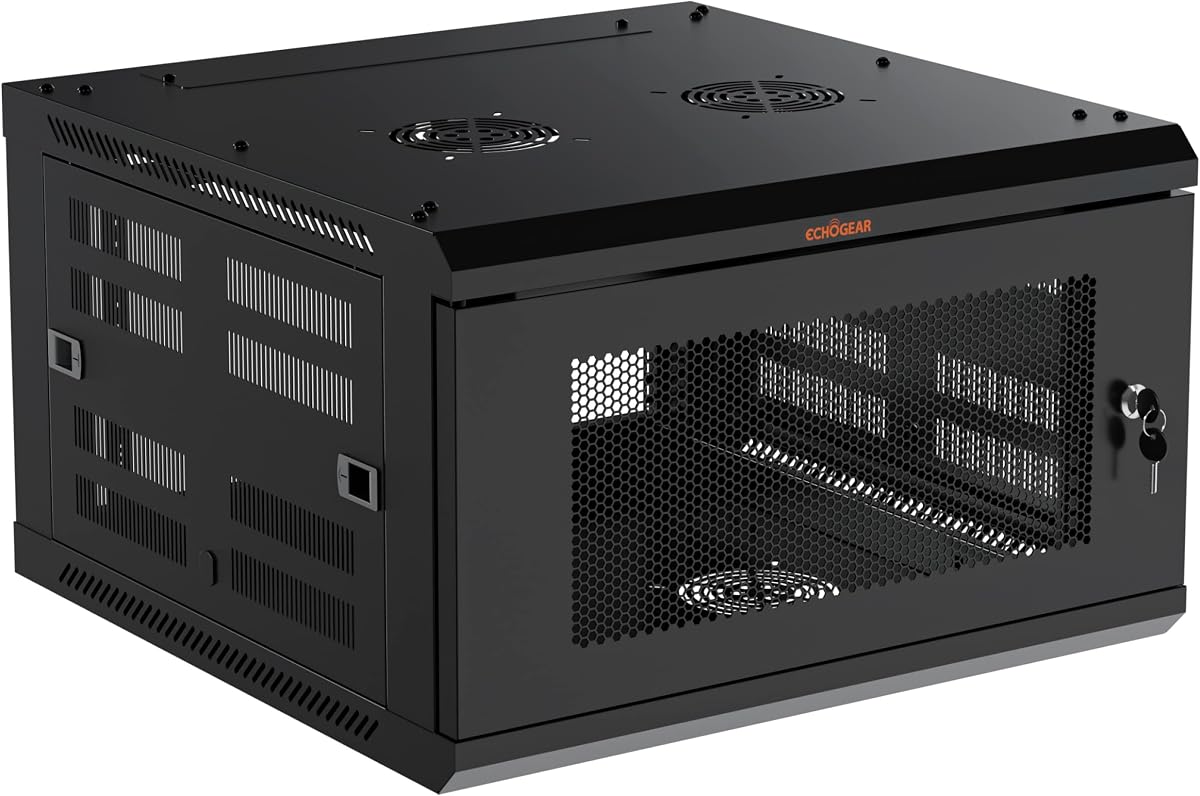
The ECHOGEAR 12U Network Rack is a professional-style enclosure with a deeper 600mm interior than most compact wall cabinets in this guide. Its 4.2 rating reflects a generally positive market response, while the steel construction, pre-mounted fans, included hardware, and locking front door support organized commercial installations.
We may earn a commission when you buy through this link, at no additional cost to you.
Depth is the model's defining advantage. A 600mm cabinet gives installers more room for cable routing, front-to-back airflow planning, and equipment that extends deeper than a shallow wall enclosure can accept. Its intended applications include structured wiring, telecommunications, surveillance, conference technology, offices, schools, healthcare administration areas, retail back rooms, and commercial audiovisual projects.
The supplied package is designed to reduce accessory shopping. Rack hardware and wall-mounting hardware are included, and vented shelves support the installation. The removable side panels ease future additions and changes, while the steel shell and locking door create a clean and secure finished appearance. The trade-off is that the deeper enclosure occupies more wall depth and requires accurate placement to preserve service clearance.
The ECHOGEAR 12U is ideal for integrators, managed service providers, facilities teams, and technically inclined buyers assembling a centralized installation. It may be excessive for a handful of small network devices, but its depth and deployment-oriented design make it a strong premium enclosure. Confirm the available wall space, mounting surface, and individual device depths before installation.
The 600mm depth supports more flexible equipment layouts and provides useful space for rear cable management. It is a more practical choice when installed equipment needs meaningful clearance behind the mounting rails.
Pre-mounted fans, included rack hardware, wall hardware, and vented shelves reduce the number of separate purchases required for a professional installation.
We may earn a commission when you buy through this link, at no additional cost to you.
The VEVOR 6U Wall Mount Network Server Cabinet delivers the basic protection and organized mounting many small installations need without occupying a large footprint. It has a 4.2 rating and a compact 6U format, making it a practical option for a few patch panels, switches, control units, or lightweight audiovisual devices.
We may earn a commission when you buy through this link, at no additional cost to you.
The welded frame supports a listed 100 pounds in a wall-mounted configuration, while its maximum depth of 14.8 inches suits shallow rack equipment. Adjustable square-hole rails help with device positioning, and openings in the top, bottom, and rear panels create routes for cables while also helping release heat. The lockable glass door improves security and keeps the installation visually tidy.
This model does not include cooling fans, so buyers should not treat its ventilation openings as a substitute for a purpose-built cooling system. Six units is also a modest amount of space, and a patch panel, switch, blank panel, and power distribution unit can consume much of that capacity. The shallow depth further restricts which server or storage devices can be used.
The VEVOR 6U is best for a small office closet, retail location, classroom, or residential network where the equipment is shallow and the goal is a secure, tidy, space-saving enclosure. It offers an approachable starting point for a managed rack installation. Buyers should inventory their equipment and calculate both rack-unit and depth requirements before ordering.
Wall mounting and the shallow maximum depth help preserve floor space in crowded offices, classrooms, and back rooms. Six units keep the overall installation compact when only a small amount of rack equipment is needed.
A welded frame, locking glass door, and cable openings provide the core benefits of an enclosure without requiring a large cabinet. Ventilation openings also assist passive heat dissipation.
We may earn a commission when you buy through this link, at no additional cost to you.
The GlobalRack 27U Server Cabinet is designed for installations that need a large amount of equipment capacity in a floor-standing enclosure. It accommodates standard 19-inch IT and audiovisual equipment, includes two temperature-control fans, and provides a substantial listed load capacity of 1,500 pounds for a robust project-oriented housing.
We may earn a commission when you buy through this link, at no additional cost to you.
Its dimensions are listed as 55 inches high, 23.5 inches wide, and 24 inches deep, with adjustable installation depth designed to accommodate different server and switch depths. A removable door, removable side panels, and a vented top support airflow and maintenance. The lockable tempered glass front door combines physical security with visible access to equipment status indicators.
The product ships flat-packed with assembly instructions and an online video, while the package includes mounting hardware, cage nuts and screws, keys, fans, casters, and rack assembly hardware. These inclusions help, but assembly is still required. The large size and caster-equipped floor-standing format also make it less suitable for tight spaces where a wall cabinet would be more efficient.
This cabinet is best for server rooms, telecommunications closets, AV studios, and facilities with enough floor area to accommodate a 27U enclosure. Its capacity, adjustable depth, and high load rating make it appropriate for planned, long-term installations. Because no customer rating is listed, buyers should evaluate current customer feedback and the included assembly guidance before purchasing.
Twenty-seven rack units leave considerably more expansion room than compact wall cabinets. This makes the enclosure useful for organizations expecting to add switches, patch panels, servers, and AV equipment over time.
Adjustable mounting depth allows different equipment sizes to sit more naturally within the cabinet. That flexibility is valuable when a single rack will contain equipment with varying chassis depths.
We may earn a commission when you buy through this link, at no additional cost to you.
The MT-VIKI 12U Server Cabinet combines a standard 19-inch format with a 600mm depth and a listed capacity of 132 pounds. Its 3.3 rating is the lowest numerical score among the products with customer feedback, so buyers should examine current reviews carefully, although the core specifications are suitable for many network installations.
We may earn a commission when you buy through this link, at no additional cost to you.
SPCC cold-rolled steel and a stated 0.8mm thickness provide the cabinet's structural basis. The locking front door and side panel help protect equipment, while the quick-opening side panel improves access during installation and maintenance. A 12-inch-depth rack shelf is included, offering a useful starting point for supporting equipment that does not mount directly to the rails.
The product title mentions a moving wheel, while the listed feature set describes a wall-mount cabinet. That inconsistency warrants attention, especially for buyers who require a specific floor-standing format. Its 600mm depth is beneficial for deeper equipment and cable routing, but it requires substantially more wall clearance than a shallow wall enclosure. Additional shelves and accessories may also be needed.
The MT-VIKI is best for buyers who prioritize 12U capacity, deeper dimensions, and quick side access over having the highest customer rating. It can suit telecom, network, and compact server installations when the mounting method and included components are confirmed. Checking recent buyer feedback and verifying the final package contents can prevent avoidable installation surprises.
The quick-opening side panel reduces the effort required to reach internal equipment and cables. It is valuable for installations that will receive frequent maintenance or component changes.
The included 12-inch shelf can support compatible equipment without requiring an immediate shelf purchase. Additional shelves may be necessary for a fully populated cabinet.
We may earn a commission when you buy through this link, at no additional cost to you.
The AxcessAbles 12U Network Rack is an open-frame AV and network rack rather than a fully enclosed cabinet. Its 4.5 rating indicates strong customer reception, and its sturdy steel construction, mobile base, and substantial capacity make it a good option for equipment that benefits from unrestricted airflow.
We may earn a commission when you buy through this link, at no additional cost to you.
The rack uses 19-inch mounting compatibility and can hold up to 500 pounds, with different product descriptions within the supplied information referring to both 500-pound and 550-pound capacities. Its 1.5mm steel frame and 36-pound cabinet weight are intended to provide stability, while preinstalled three-inch industrial-grade casters make the unit easier to reposition.
The open construction gives equipment excellent access from multiple sides and avoids the heat buildup risk associated with a poorly ventilated enclosure. It also includes 34 rack screws, a 1U blank spacer, and an assembly tool. However, it has no side panels, front door, or integrated fan, so it does not provide the dust protection, visual concealment, or physical security available from a true enclosed server rack.
This rack is best for studios, production rooms, workshops, and temporary event installations where mobile access and passive cooling outweigh enclosure security. It can also be a useful starting point for a network installation that will receive its own protective cabinet later. Buyers should confirm the current load rating and ensure the open frame meets their specific security requirements.
The open frame exposes equipment from the front, rear, and sides, making installation and cable work straightforward. It is particularly useful in temporary or frequently changing AV environments.
The rigid steel frame and locking industrial casters help keep the rack stable while allowing it to be moved for service. The casters are more useful than fixed feet in production and workshop settings.
We may earn a commission when you buy through this link, at no additional cost to you.
The VIVO 25U Freestanding Server Rack Cart has the highest listed customer rating in the group at 4.7. Its open steel frame, four casters, 1,200-pound load capacity, and generous depth adjustment make it a strong choice for mobile or expandable server, network, and audiovisual installations.
We may earn a commission when you buy through this link, at no additional cost to you.
Four vertical support rails can hold servers, UPS units, patch panels, switches, and related equipment. The frame adjusts from 22 to 40 inches in one-inch increments, providing far more flexibility than a fixed-depth cabinet. This range accommodates different chassis sizes and gives installers room to organize rear cables. A listed cabinet length of 23.5 inches and height of 51 inches should still be checked against the intended equipment and doorway dimensions.
The open structure provides ample passive airflow and makes the equipment straightforward to reach. It does not have an integrated fan, enclosure, or locking door, so it cannot provide the security and visual tidiness of a true cabinet. Its high capacity and wide footprint also mean it is better suited to controlled rooms and work areas than narrow hallways or crowded retail spaces.
The VIVO cart is best for IT departments, AV teams, studios, labs, and businesses that need a movable rack for staged deployment or temporary maintenance. Optional leveling feet are included for a stationary setup, while the casters provide quick repositioning. It is a particularly compelling choice when equipment depth varies or when a mobile configuration is essential.
The 22-to-40-inch adjustment range accommodates substantially different equipment depths. Installers can position the rails to reduce wasted space and improve rear cable routing.
A listed load capacity of 1,200 pounds and four durable casters make the cart practical for serious equipment loads. The included leveling feet provide a stable alternative when the rack is not being moved.
We may earn a commission when you buy through this link, at no additional cost to you.
The ECHOGEAR 6U Network Rack combines a small six-unit capacity with the useful depth of a 600mm enclosure. Its 4.2 rating and extensive accessory package make it an appealing option for compact AV, networking, DVR, and surveillance installations that need more depth than a shallow wall cabinet can offer.
We may earn a commission when you buy through this link, at no additional cost to you.
The enclosure includes two 1U shelves, pre-mounted fans, a lockable front door, mounting hardware, and other installation accessories. A heavy-duty steel structure is listed with a 132-pound capacity, and vented construction works alongside the fans to manage heat. The removable side panels do not require tools, simplifying periodic access and cable organization.
Six units is the main limitation. A single switch, patch panel, cable manager, and UPS or recorder can occupy a meaningful portion of the available space, so a larger cabinet may be necessary for a full network. The 600mm depth also needs clear space behind the wall mounting, and the supplied description states that installation can be completed in under 30 minutes in suitable conditions.
The ECHOGEAR 6U is best for a back closet, small retail location, classroom, or residential AV room where shallow cabinets have caused installation problems. Its included fans and shelves make it a convenient starting point for buyers who prefer a complete package. Confirm that all necessary devices fit within six units and that the mounting location provides proper service clearance.
Two shelves, pre-installed fans, rack hardware, wall hardware, and a locking door cover several common installation needs. Buyers can assemble a functional enclosed setup with fewer separate accessory purchases.
Vented panels and two pre-mounted fans encourage airflow while the removable sides provide direct maintenance access. These features are especially helpful in a compact enclosed cabinet.
We may earn a commission when you buy through this link, at no additional cost to you.
The VEVOR 9U Wall Mount Network Server Cabinet occupies a useful middle ground between compact six-unit and larger twelve-unit wall enclosures. Its 3.9 rating is positive but lower than most alternatives, so current customer feedback deserves attention. The basic construction remains suitable for networks, AV systems, and light equipment collections.
We may earn a commission when you buy through this link, at no additional cost to you.
The cabinet has a 14.8-inch maximum depth and a listed 100-pound wall-mounted capacity, with 200 pounds specified for ground-mounted use. Heat-dissipation openings appear in the top, bottom, and rear panels, while wiring holes provide several routes for cables. Fully adjustable square-hole mounting rails help position equipment within the enclosure.
Its locking glass door adds security and gives installed devices a clean appearance. However, no fans are listed among the features, so passive openings may be insufficient for high-density or high-power equipment. The 9U capacity is also restrictive, and the shallow depth is less suitable for deep servers, large UPS units, or extensive rear cable management.
The VEVOR 9U is best for small offices, classrooms, retail back rooms, and residential systems that need a secure wall-mounted location but do not require heavy-duty rack space. It is a sensible middle-capacity option between the 6U and 12U VEVOR models. Buyers should verify device depth, thermal demands, and the latest customer feedback before ordering.
Nine units provides more flexibility than a six-unit cabinet while remaining smaller than many 12U designs. It can suit a moderate collection of switches, patch panels, and control equipment.
Top, bottom, and rear wiring holes give installers several paths for network, power, and control cables. The openings make it easier to keep the compact enclosure orderly.
We may earn a commission when you buy through this link, at no additional cost to you.
The VEVOR 12U Wall Mount Network Cabinet offers a larger equipment capacity than the 6U and 9U versions while retaining a compact, shallow wall-mounted format. Its 4.2 rating indicates generally favorable customer feedback, and the locking glass door, adjustable rails, and ventilation openings make it a practical choice for organized network or AV installations.
We may earn a commission when you buy through this link, at no additional cost to you.
Twelve rack units provide room for switches, patch panels, cable managers, and a selection of other shallow devices. The maximum depth of 14.8 inches is central to its space-saving design. Its welded frame supports up to 100 pounds in a wall-mounted arrangement, with a 200-pound limit stated for ground-mounted use.
Ventilation and heat-dissipation openings are placed in the top, bottom, and rear panels. These openings improve passive airflow, but the cabinet does not list built-in fans. Buyers installing power-hungry equipment may therefore need a more active cooling plan. The shallow depth can also restrict server selection and make rear cable routing less forgiving.
The VEVOR 12U is best for offices, classrooms, retail locations, back rooms, and compact server areas where wall space is limited but twelve rack units are needed. It offers a useful capacity-to-size balance within the VEVOR range. Before ordering, compare the depth of every intended device and ensure the wall surface can support the installation safely.
Twelve units offer a useful amount of installation capacity within a relatively shallow cabinet. This makes the model practical for organized network and AV equipment that does not require deep server chassis.
The lockable glass door protects equipment and retains visual monitoring access. Strategically placed panel openings promote airflow, although additional active cooling may be needed for demanding loads.
We may earn a commission when you buy through this link, at no additional cost to you.
Choosing an enclosed server rack starts with the equipment and installation site. Capacity, usable depth, cooling, security, and access must all align with the available space and the devices that will be mounted.
Rack capacity is measured in units, commonly abbreviated as U, with one U representing 1.75 inches of vertical mounting space. Start by recording the rack height of every switch, server, patch panel, UPS, blank panel, and cable manager. Equipment dimensions alone do not always reveal the full vertical space required, and thick power adapters or connectors can add further obstruction. An enclosure with some spare capacity is usually more useful than one filled to the final available unit.
Choose a cabinet with enough room for the current equipment plus planned expansion. Six units suits a small installation, while nine or twelve units offers more flexibility. Larger 25U and 27U models suit organizations expecting several devices or future growth.
Depth is the distance from the front to the back of the cabinet and determines which equipment can actually be installed. Measure the deepest chassis, the length of attached power cords, and the space needed for cable bends behind the equipment. A nominal 14.8-inch model is most appropriate for shallow network and AV devices, while a 600mm cabinet offers greater clearance for deeper servers and more flexible cable routing.
Do not rely only on the marketing depth. Some product descriptions list overall cabinet depth while others refer to usable installation depth. Measure the mounting rails and available internal space against the equipment manufacturer's dimensions before ordering.
Wall-mounted cabinets preserve valuable floor space and are especially effective in offices, classrooms, retail environments, and small server closets. Their installation depends on suitable wall structure, adequate clearance, and safe handling of the populated cabinet during mounting. Freestanding racks are easier to reposition, generally offer greater capacity, and suit rooms with sufficient floor area.
Consider how equipment will be added or serviced. A very high wall cabinet can be difficult to reach, while a freestanding cabinet may need to be moved. Mobile open-frame racks provide flexibility but sacrifice enclosure security and visual tidiness.
Enclosures restrict passive airflow, so ventilation openings should be complemented with fans or an external cooling solution when equipment produces meaningful heat. Built-in fans are most useful in compact cabinets with switches, routers, and AV equipment. Larger systems may require a more deliberate airflow plan that draws cool air through one side and expels warm air through another.
Check the number and placement of fans, the presence of perforated or vented panels, and the amount of open area around each device. Do not block cabinet vents with cable bundles. Equipment power requirements and the manufacturer's recommended operating temperatures should guide the final cooling decision.
A locking door helps prevent unauthorized access, accidental changes, and casual tampering. Tempered glass provides security while allowing status lights and screen displays to remain visible. Solid doors may offer better concealment and can reduce visual distraction, but they require opening for routine monitoring. For shared offices, schools, and public-facing installations, a strong frame and reliable lock deserve particular attention.
Assess the environment rather than assuming every rack requires a lock. Controlled data closets may prioritize airflow and access, while retail and office installations may value both appearance and protection. Open-frame racks offer almost no physical enclosure and should not be treated as secured cabinets.
Load capacity indicates how much weight the frame and mounting system can support, but installation conditions matter. Wall-mounted cabinets must be attached to suitable structure, while freestanding racks must stand level and move smoothly. Heavier equipment, such as multiple UPS systems or dense servers, benefits from a frame with robust steel construction and a high listed capacity.
Compare both the stated limit and the mounting method. Specifications sometimes describe different limits for wall-mounted and ground-mounted use. Buyers should also account for future equipment, accessories, power-distribution units, and any added shelves rather than evaluating only the current device weight.
Removable side panels, open back sections, top and bottom wiring holes, and adjustable mounting rails make installation and maintenance easier. A quick-opening side panel is valuable in tight installations, while a glass front door allows quick visual checks. Internal cable managers and rear space can determine whether large power cords and patch leads can be routed without blocking equipment.
Plan cable paths before mounting devices. Leave service loops, avoid sharp bends, keep power and data wiring organized, and make sure the rack opens far enough for technicians to remove hardware. Fasteners, cage nuts, screws, and shelf support should also be considered when planning the installation.
The package can materially affect the total work required. ECHOGEAR cabinets list pre-mounted fans, shelves, rack hardware, and wall-mounting accessories, while the GlobalRack product includes mounting hardware, keys, fans, and casters. Other models may provide a smaller selection, requiring separate purchases of cage nuts, screws, shelves, fans, or leveling feet.
Look for clear assembly documentation and an understandable set of included parts. A flat-packed cabinet should include a complete tool or hardware set, while a wall cabinet should include appropriate anchors or clearly state that fasteners must be selected for the wall material. Support access is also useful when planning professional deployments.
Before assembly, inventory the equipment and confirm that every chassis fits the cabinet's rack-unit and depth limits. Mark the intended position of each device, identify power and network connections, and plan cable routes through the rear or top openings. For a wall-mounted model, confirm that the wall can support the listed load and that the cabinet can be safely lifted into position before equipment is installed.
Assemble the rack on a level surface, install any required feet or casters, and check that doors and side panels operate correctly. Mount heavier equipment near the center of the enclosure and keep the center of gravity balanced. Attach equipment to the square-hole rails with the correct rack screws, leaving working clearance around connections and avoiding blocked vents.
After installation, test cooling with the intended equipment operating, organize power cords separately from network cables where practical, and inspect the cabinet periodically for loose screws, damaged cables, blocked airflow, or accumulated dust. Keep the door closed when physical security matters, but service the rack only when appropriate. For mobile racks, engage the caster brakes whenever the equipment is stationary and use the leveling feet for a stable final position.
An enclosed rack uses doors and panels to protect equipment, improve visual organization, and restrict physical access. It can also retain heat, making ventilation or fans more important. An open rack provides excellent airflow and straightforward access but offers little physical security or visual concealment. Choose an enclosure for security and tidiness, or an open frame for mobility, flexibility, and passive cooling.
The cabinet should be deeper than the installed equipment, with additional room for plugs and cable bends. Shallow models with a maximum depth near 14.8 inches generally fit network switches and compact AV devices. A 600mm or 23.6-inch cabinet offers more flexibility for deeper equipment and rear cable management. Measure the actual chassis and connector clearances before choosing.
Add the rack-unit height of every mounted device, including switches, servers, patch panels, UPS units, cable managers, and blank panels. One rack unit equals 1.75 inches. Leave some unused space for future expansion and account for power adapters that may occupy additional vertical room. A simple inventory sheet prevents an under-sized cabinet from being installed.
They often benefit from active cooling because panels restrict natural airflow. The VEVOR wall cabinets in this guide rely primarily on passive vents, while the NavePoint and ECHOGEAR models list built-in or pre-mounted fans. Fans are still not automatically sufficient for every high-density installation, so equipment power draw and recommended operating temperatures should be considered.
The cabinet may be light enough to lift, but mounting it safely can be difficult without a second person or a lift. Bracing and managing a partially loaded cabinet during installation also requires care. Professional installers should assess the wall structure, fasteners, electrical requirements, and local safety rules rather than relying on product instructions alone.
Select a rack with a listed capacity comfortably above the combined weight of the cabinet, mounted equipment, shelves, power distribution units, and planned additions. Pay attention to the stated limit for the intended mounting method, since some products list different wall-mounted and ground-mounted values. A heavier installation also requires suitable anchors and a structurally capable mounting surface.
A locking tempered glass door deters casual access and reduces visible disruption, but it is not a substitute for a locked room or controlled facility. The surrounding security environment, frame quality, door hinges, and lock mechanism all affect protection. Sensitive equipment in a public or shared area should be kept in a controlled room even when placed in a locking enclosure.
Choose a wall-mounted model when floor space is limited and the available wall structure is suitable. Choose a freestanding cabinet for greater capacity, easier equipment access, and more flexible placement. Open-frame carts offer mobility and passive airflow but do not provide enclosure security. The best choice depends on the room, equipment load, maintenance frequency, and required level of physical protection.
The NavePoint 12U enclosure is the strongest all-around choice in this guide, combining a 12U format, welded steel construction, a tempered glass door, cooling, and removable side panels. The ECHOGEAR 12U stands out for professional installations that benefit from deeper 600mm dimensions and a broad set of included hardware. The VEVOR 6U offers the most compact enclosed format for shallow equipment.
Prioritize the dimensions that cannot easily be changed: rack-unit capacity, usable depth, mounting method, and load requirements. Cooling, locks, removable panels, and included accessories determine how convenient the rack will be after installation. Also distinguish between a true enclosure and an open-frame product; the latter may be ideal for mobility and airflow but should not be purchased when physical security is essential.
Customer ratings provide useful context, but they do not replace checking the specifications and current customer feedback for the exact model. Product configurations, included accessories, and pricing can change, so confirm current details and the latest price directly on the product page before making a final purchasing decision.