
Anker Prime 160W
4.6Editor score
140W single-port laptop charging
Three-port intelligent power sharing
App-enabled AnkerSense display
Our Gan Charger with Display guide compares 10 models across power, ports, screen controls, portability, compatibility, and safety for everyday charging needs.
A GaN charger with display combines efficient power delivery with the useful visibility of a built-in screen. The best models show charging status, port allocation, temperature, and power output, helping you understand whether connected devices are receiving the power they need while reducing cable clutter.
We compared all ten products by examining total and single-port output, USB-C and USB-A port counts, display functionality, charging protocols, safety features, included accessories, portability, and device compatibility. The guide covers desktop charging stations, travel-ready wall chargers, compact phone chargers, and models designed around laptops, tablets, and DJI equipment.
Each review explains the product's strongest features, practical limitations, and ideal owner, while the comparison table provides a quick reference. Rankings reflect the supplied specifications and customer ratings rather than personal testing, and current prices, promotions, and availability can change at any time.
4.6Editor score

4.7Editor score

4.7Editor score
The table below compares the key power, port, display, and portability characteristics of every charger in this guide, making it easier to identify the right model for laptops, phones, tablets, travel, or a multi-device desktop.



The UGREEN Nexode Pro 160W is the strongest all-around option in this guide, earning a 4.7 customer rating for its balance of power, port selection, and detailed screen controls. It combines a 160W total output with four USB-C ports and one USB-A port, allowing a laptop, phone, tablet, and smaller accessories to share one compact charger.
We may earn a commission when you buy through this link, at no additional cost to you.
Its standout feature is the rotatable touch display, which presents total wattage, per-port power data, the active charging protocol, and internal temperature status. This is more informative than a simple indicator light and makes the charger easier to manage when several devices are connected. The two primary USB-C ports can each support up to 140W under suitable conditions, giving demanding notebooks substantial charging headroom.
The main tradeoff is that five-port flexibility does not mean every device receives maximum power simultaneously. Intelligent allocation is essential when a high-wattage laptop and multiple smaller devices draw from the same adapter. This model also lacks a bundled cable, which is worth considering if you do not already own a suitable USB-C charging cable. Despite those qualifications, its combination of capacity, information, and travel-friendly construction is unusually complete.
Choose the UGREEN Nexode Pro if you want one charger for a broad mix of devices and prefer a touchscreen that reveals more than a basic status indicator. It is particularly attractive for travelers, hybrid workers, and families who regularly alternate between a high-power notebook and several mobile devices. For those needs, it offers the most versatile feature set in this comparison.
The rotating touch panel is useful because it turns internal charging decisions into visible information. Seeing total output, individual port performance, protocol, and temperature can help identify whether a cable, device, or power demand is affecting the charging setup.
Four USB-C ports and one USB-A port make this adapter easier to use across recent and older accessories. The USB-A connection remains handy for devices and peripherals that have not moved entirely to USB-C.
We may earn a commission when you buy through this link, at no additional cost to you.
The Anker Prime 160W is a premium charger for users who want laptop-class output without accepting a bulky desktop adapter. It carries a 4.6 customer rating and provides three ports, intelligent power distribution, and the AnkerSense View display. The included 24-month warranty also makes it a well-supported option for regular professional use.
We may earn a commission when you buy through this link, at no additional cost to you.
Its most important specification is the ability to sustain 140W from a single port without derating during long sessions. That makes the charger well suited to a 16-inch MacBook Pro, demanding gaming notebooks, and other USB-C systems that benefit from high charging power. PowerIQ 5.0 divides the available capacity among a laptop, phone, and tablet, with a stated combination of 140W, 35W, and 35W.
The app expands the display beyond passive monitoring. It allows users to switch modes immediately and unlock custom modes through Bluetooth, which is valuable for experimenting with power profiles or understanding charging behavior. The limitation is that this richer functionality requires more setup than a simple button-controlled screen. With three ports, it also offers fewer connections than the five-port UGREEN option, although its focus on sustained high-power output makes that less significant for many buyers.
Pick the Anker Prime if your priority is maximum laptop charging in a compact, premium package and you value app customization. It is a natural choice for content creators, developers, and mobile professionals who alternate between a notebook and two smaller devices rather than maintaining a large collection of simultaneous connections.
Maintaining 140W on one port is valuable for high-power laptops that charge faster and more consistently when their adapter can continue supplying the negotiated rate. It also reduces the need to depend on a smaller multiport wall charger.
AnkerSense View shows live power information while Bluetooth app access adds mode switching and custom profiles. This turns the display from a monitoring feature into a more interactive charging-management system.
We may earn a commission when you buy through this link, at no additional cost to you.
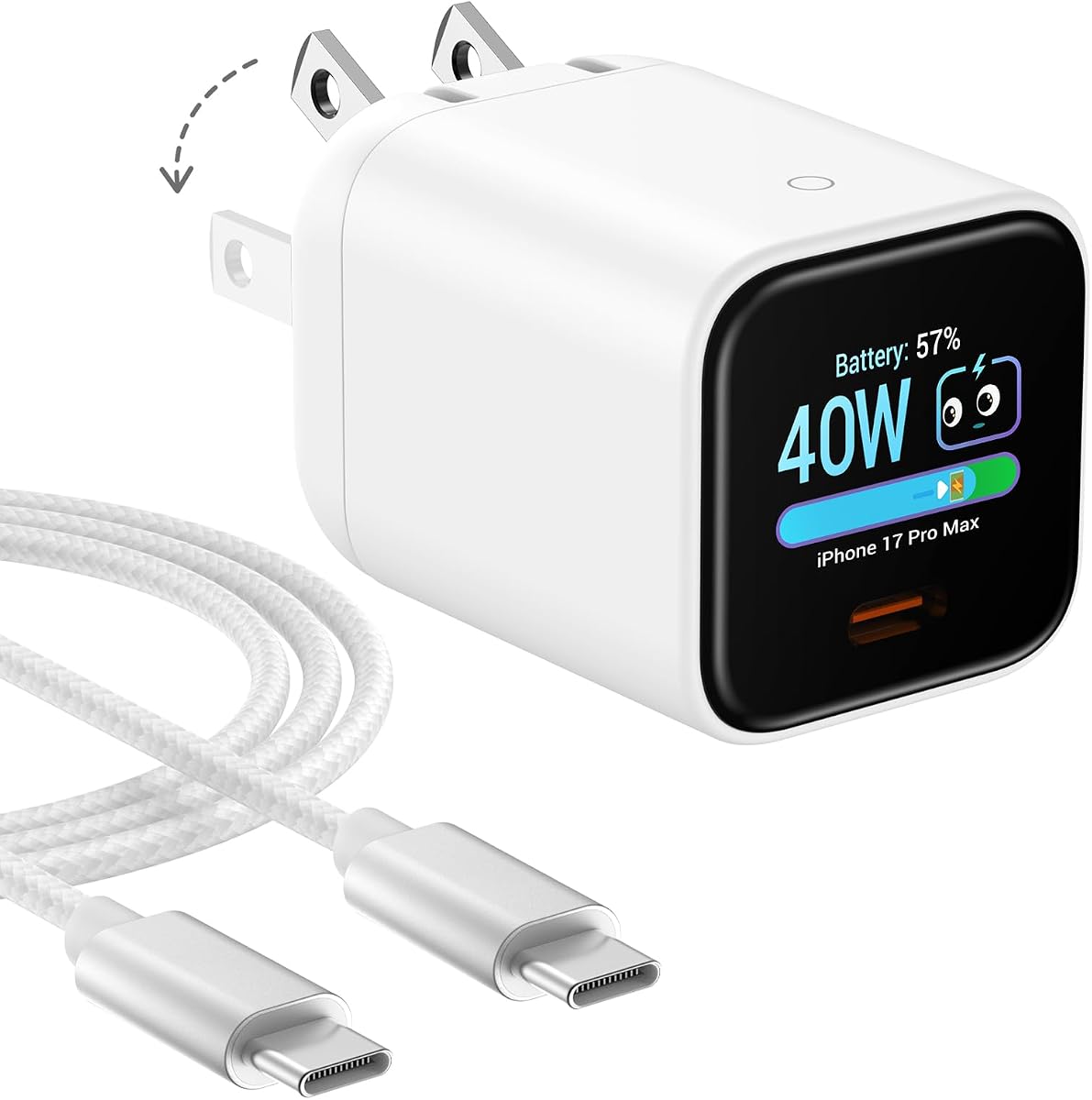
The Anker Nano 45W is the most compact model in the guide and a practical choice for users who mainly charge an iPhone or compatible tablet. Its 4.7 rating reflects a feature set that goes beyond a basic nano charger, including smart device recognition, a rotatable display, and a 45W maximum output.
We may earn a commission when you buy through this link, at no additional cost to you.
The screen can be operated with a tap to view charging status, a double-tap to change modes, and a two-second press to rotate the image. Care Mode is designed to reduce charging temperature by as much as 9°F compared with standard 45W chargers, making overnight charging a central selling point. The charger also automatically recognizes supported iPhone 15, 16, and 17 series devices, along with several listed iPad Pro models.
Its limitations are clear but easy to understand. There is only one USB-C port, so it cannot charge a phone and laptop at the same time. The display rotates 180 degrees rather than 90 degrees, and it is not a touchscreen, so buyers should not expect MOKiN-style tap menus. These are acceptable limitations for a charger whose main advantage is a pocket-friendly footprint and focused phone-charging experience.
Choose the Anker Nano when your daily routine revolves around a phone, you travel frequently, and you value a display without carrying a large multiport brick. It also suits buyers who want a charger with cooler overnight charging and smart recognition. For a laptop-and-phone setup, move up to a higher-capacity multiport model.
Automatically identifying supported devices lets the charger adjust its behavior without extensive setup. The display and charging profile are tailored primarily for compatible iPhone and iPad models, making it especially relevant to Apple-centered device collections.
Care Mode is intended to lower charging temperature when the device is full or charging for extended periods. That focus makes the Nano more appealing for bedside use than a basic compact adapter.
We may earn a commission when you buy through this link, at no additional cost to you.
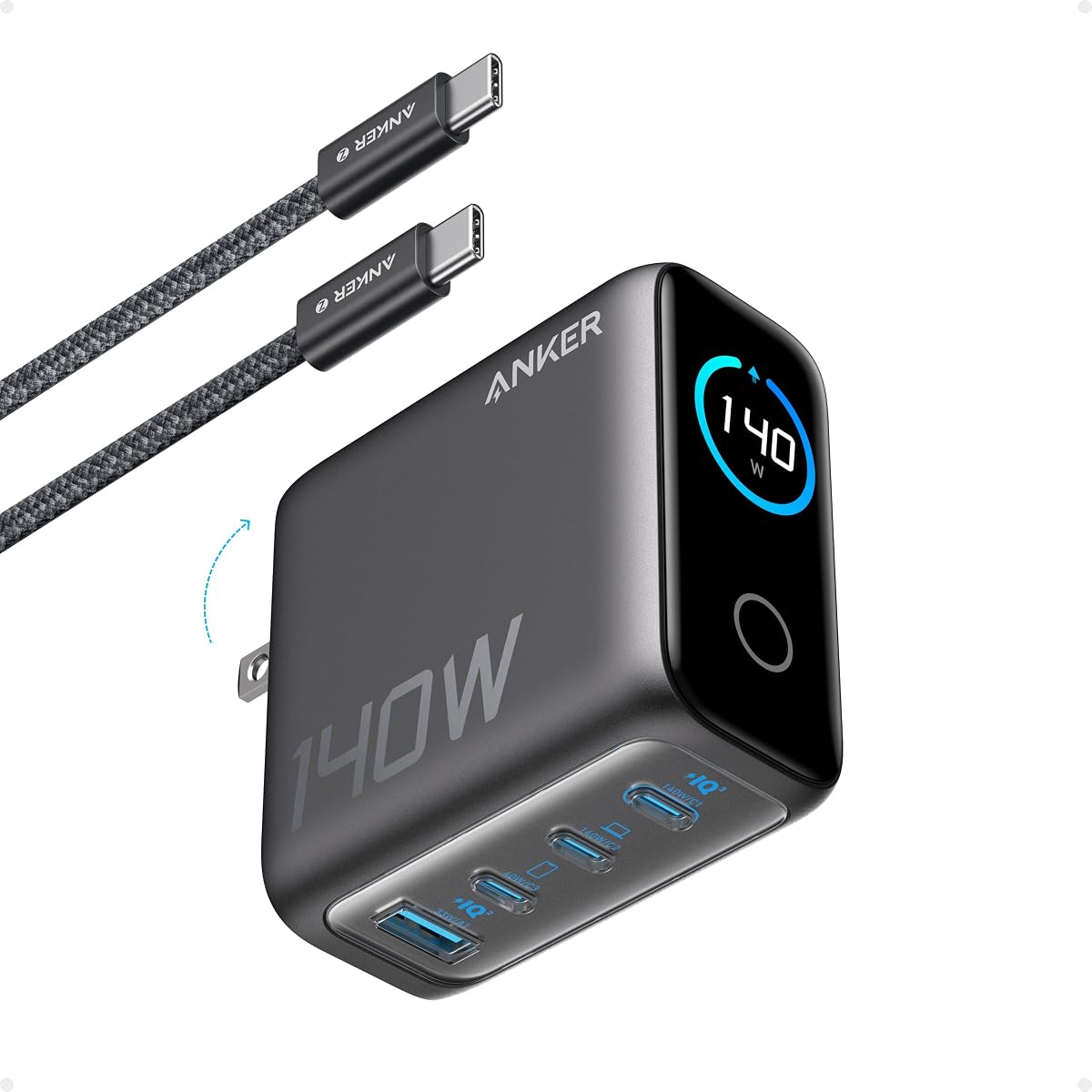
The Anker 140W Four-Port charger is designed for people who need several connected devices and want more visual information than a basic LED can provide. Its 4.4 rating reflects a capable four-port design, a high-definition color display, and ActiveShield 4.0 temperature monitoring.
We may earn a commission when you buy through this link, at no additional cost to you.
Two of its USB-C ports can deliver up to 140W individually, making the block suitable for a 15-inch MacBook Air and other high-power USB-C notebooks. The display reports charging status, temperature, and port details. A five-foot 240W USB-C cable is included, eliminating the need to find a separate cable for the first setup, and an 18-month warranty provides standard support.
The charger has less total headroom than the 160W models and is not as small as the 100W three-port option. The distinction matters if you plan to run a large notebook and several demanding devices simultaneously. Even so, the combination of four ports, two strong USB-C connections, and an easy-to-read color display is well balanced. Its safety system, which monitors device temperatures more than ten million times per day, reinforces its suitability for a shared charging station.
Choose this Anker model for a home or office setup that regularly serves multiple devices and includes a MacBook-class notebook. It offers a practical middle ground between compact single-device chargers and larger desktop charging stations. The included cable and four-port layout make it particularly convenient as a shared everyday hub.
The ability to provide up to 140W from either primary USB-C port gives the charger flexibility when moving a high-power laptop between connections. It is a useful advantage in multi-device homes and shared workspaces.
Showing charging status, temperature, and port details on a color screen makes the adapter easier to check at a glance. The information is particularly useful when several devices are charging and users need to understand how power is being distributed.
We may earn a commission when you buy through this link, at no additional cost to you.
The Anker 100W Three-Port charger offers a practical middle ground for users who need laptop-capable power without the size of a higher-output premium adapter. It earns a 4.7 customer rating and provides three ports, a smart display, and a stated ability to deliver 100W on a USB-C connection.
We may earn a commission when you buy through this link, at no additional cost to you.
GaN technology supports a steady maximum output, while the display reports charging status, temperature, and port performance. Its automatic low-current mode is a thoughtful addition: when output remains at or below 5W for one minute, USB-C2 or USB-A can switch to a 95W plus 5W low-current arrangement for earbuds and other small devices.
The main limitation is capacity compared with the 160W and 250W chargers. A demanding notebook plus several other high-power devices may require more intelligent allocation than this model offers. The dimensions of 2.72 by 2.17 by 1.34 inches and foldable plug help offset that limitation, while the included 4.9-foot USB-C cable makes setup convenient.
Choose the Anker 100W when you want one compact charger for a notebook, phone, and accessory, particularly when you travel. It is also a sound option for a home office where three devices are the typical maximum. Users who routinely charge several large electronics at once should prioritize a higher total output.
The automatic low-current mode is designed for earbuds and other devices that may benefit from gentler power delivery. It adds a layer of flexibility that is often missing from chargers that only optimize for phones and laptops.
A foldable plug and small rectangular body make the charger convenient for backpacks, shoulder bags, and even coat pockets. It offers a practical way to carry one charging hub instead of separate laptop and phone adapters.
We may earn a commission when you buy through this link, at no additional cost to you.
The Smart Charging Butler 45W stands out through its emphasis on battery care and unusually approachable display controls. It has a 4.5 customer rating, supports up to 45W, and includes a six-foot braided USB-C cable. Its stated AI behavior monitors battery temperature, level, and health, then adjusts charging speed as conditions change.
We may earn a commission when you buy through this link, at no additional cost to you.
For overnight use, Care Mode is intended to lower temperature further and support long-term battery health. The charger is TÜV-certified and is claimed to keep a battery up to 9°F cooler than a standard 45W charger. A single tap switches display modes, a two-second long press rotates the screen, and three taps change the language, making the interface simple to learn.
Its limitations begin with maximum output. A 45W charger may suit many phones, tablets, and smaller computers, but it cannot match the high-power laptop performance of the 100W, 140W, and 160W models. Device recognition also varies: supported iPhone 15, 16, and 17 series, iPad Pro models, eBook readers, and Mac computers can be identified, while many Samsung, Google Pixel, and other models will not display their names even though power adjustment still occurs.
Choose the Smart Charging Butler if overnight phone charging, display simplicity, and a bundled braided cable are your priorities. It is especially interesting for users who want more battery-aware behavior than a conventional compact charger. For heavy notebooks or a shared multi-device station, a higher-wattage model would be more appropriate.
Care Mode changes the charging approach as the battery fills and temperature changes. Its goal is not simply faster charging but a cooler, more controlled overnight session intended to reduce stress on the connected device's battery.
Single taps, a long press, and a three-tap sequence provide access to mode changes, rotation, and language settings. The uncomplicated interaction model is a practical alternative to denser touch interfaces.
We may earn a commission when you buy through this link, at no additional cost to you.
The Anker Prime 250W is the highest-output charging station in this guide and the natural choice for a busy desk. Its 4.6 rating reflects a substantial 250W total capacity, six ports, a 2.26-inch LCD, and a physical smart control dial for immediate output adjustments.
We may earn a commission when you buy through this link, at no additional cost to you.
Four USB-C and two USB-A ports can charge numerous devices simultaneously. The first USB-C connection supplies up to 140W, supporting fast charging for a 16-inch MacBook Pro and other demanding systems. Real-time feedback on the LCD shows charging status and speed, while the dial allows users to adjust energy output directly rather than navigating a small touchscreen.
This is deliberately a desktop product. It measures 4.18 by 1.58 by 3.64 inches, weighs 22.58 ounces, and is not recommended for travel. Full IoT functionality also depends on registration with the Anker application and a 2.4GHz Wi-Fi network, because 5GHz Wi-Fi is not supported. Those limitations are reasonable for a fixed workstation but less attractive for someone who needs a portable adapter.
Choose the Anker Prime 250W when a desk serves as the central charging location for a notebook, phone, tablet, accessories, and other USB devices. It offers the strongest combination of total capacity, port count, screen size, and physical controls in the list. Users who need a travel-first design should instead consider a compact foldable-prong model.
Six ports and 250W total output allow the station to serve a broad collection of electronics without forcing users to cycle adapters. It is well suited to desks where several devices accumulate throughout the day.
The 2.26-inch LCD is easier to read than many small charger displays, and the control dial makes output adjustment direct and tactile. Together, they offer an interface suited to a stationary setup.
We may earn a commission when you buy through this link, at no additional cost to you.
The MOKiN 70W Mini is the smallest charger in the guide to include a touch display, and that distinction makes it appealing for users who enjoy direct control over charging information. It holds a 4.4 rating, offers three ports, and can supply up to 70W from either USB-C port.
We may earn a commission when you buy through this link, at no additional cost to you.
Its HD touchscreen shows cable capability, total output, port-by-port charging details, temperature data, iPhone status, and a charging summary. Users can tap to switch views or hold to rotate the display 90 degrees. After the charger has been connected for more than five minutes, it also presents a summary when a device is disconnected, adding a useful record of the latest charging session.
The body measures 2.15 by 1.71 by 1.36 inches and uses foldable prongs, making it highly portable for a compact three-port charger. However, 70W is sufficient for many phones and tablets and some smaller notebooks, not for demanding 14-inch MacBook Pro charging at full speed. The product also does not include a USB charging cable, so users should confirm they have an appropriate one available.
Choose the MOKiN 70W Mini for travel, compact workspaces, or a device mix centered on phones, tablets, Steam Deck, Nintendo Switch, earbuds, and smaller laptops. Its touchscreen and charging summary are the main attractions. Those who need to charge a larger notebook quickly should consider the 140W MOKiN instead.
The display does more than show a single charging number. Cable capability, port allocation, temperature, device status, and session summaries give it a broader monitoring role than most compact wall chargers.
The combination of two USB-C ports, one USB-A port, a small body, and foldable prongs means the charger can cover several device types while remaining easy to pack. It is a better multi-device travel option than a single-port nano block.
We may earn a commission when you buy through this link, at no additional cost to you.
The MOKiN 140W Four-Port combines high-power laptop charging with a detailed color display and a useful number of connections. It has a 4.4 customer rating, includes three USB-C ports and one USB-A port, and is designed for users who need more flexibility than a compact two-port wall charger.
We may earn a commission when you buy through this link, at no additional cost to you.
Two USB-C ports can each deliver up to 140W, allowing the charger to serve a MacBook Pro, Dell XPS, or another performance notebook through either connection. The built-in HD color display presents real-time charging status, individual port output, and temperature information. The package also includes a 140W USB-C to USB-C cable, so users can begin charging a compatible device without sourcing a separate lead.
As with every finite multiport charger, performance depends on the combined draw of connected devices. A 140W laptop and several smaller devices can still push the system toward its shared limits, so buyers should not interpret the headline output as 140W available to every port simultaneously. The safety system continually monitors temperature, which adds confidence for regular use.
Choose the MOKiN 140W if you want a high-definition screen, four ports, and strong laptop performance in one block. It is well matched to owners of USB-C notebooks who also need to charge phones and accessories at the same time. It may be especially appealing to shoppers who want more screen detail than a compact model without moving to a large desktop station.
Two connections capable of 140W make it easier to reserve a high-output port for a notebook and use the remaining connections for smaller electronics. That flexibility is useful when a charging setup changes throughout the day.
Per-port output, charging status, and temperature are easy to distinguish on a high-definition color display. The information helps users verify that a connected device is receiving power and identify unbalanced charging demands.
We may earn a commission when you buy through this link, at no additional cost to you.
The DJI Power 140W GaN Charging Combo delivers the highest customer rating in the guide at 4.9. It combines a three-port wall charger with a one-meter USB-C cable that incorporates a digital display, creating a distinct approach to showing real-time charging information.
We may earn a commission when you buy through this link, at no additional cost to you.
The wall adapter provides two USB-C ports and one USB-A port, with total output up to 140W and support for PD 3.1. The included seven-amp cable displays charging status immediately and uses high-density braided material for flexibility and resistance to wear, lint, and tangling. An integrated DJI logo indicator provides a separate visual confirmation of connection status through solid and blinking patterns.
Its most distinctive advantage is tight integration with DJI equipment. Dynamic power allocation can prioritize DJI devices, and the charger can quickly charge up to three DJI batteries at once. That focus may be ideal for drone creators but less relevant to buyers whose device collection contains no DJI products. Also, the numerical display belongs to the included cable rather than the charger body, so buyers who replace the cable may lose that readout.
Choose this combo if you own compatible DJI devices and want an integrated 140W charger with a live cable display. It is also a strong option for travelers who want one included high-current cable rather than a separate accessory. Users seeking a screen directly on the wall plug should favor one of the touchscreen models instead.
Putting the digital readout on the USB-C cable places the charging information close to the connected device. The screen is immediately visible while the wall charger itself remains out of sight in a bag, outlet, or behind furniture.
Dynamic allocation prioritizes DJI devices and supports charging several DJI batteries efficiently. The combination is especially relevant to drone operators and filmmakers who regularly manage multiple compatible batteries.
We may earn a commission when you buy through this link, at no additional cost to you.
The right GaN charger with display depends on the devices you charge, the number of connections you need, and how much you value portability versus detailed power information. Use the following factors to narrow the category before comparing final features.
Choose enough total wattage and a sufficiently powerful single port for your largest device.
Match the port count to simultaneous devices and preserve USB-A if needed.
Choose a touchscreen for detailed navigation or a simple display for easy status checks.
Verify PD 3.1, PPS, device support, and sustained single-port output.
Prefer a small body with folding prongs for travel and a stable desktop form for workstations.
Prioritize active temperature monitoring, protection circuitry, and battery-care modes.
Confirm whether a suitable high-current cable is included or must be purchased separately.
Check device recognition, app requirements, and network support before buying.
Begin by reading the included guide and identifying the display controls, supported protocols, and port ratings. Connect the charger to a properly grounded wall outlet, then attach the device with the highest power requirement before adding smaller accessories. This helps the charger allocate power according to the connected load and prevents a collection of minor devices from consuming capacity that the notebook needs.
Use the display to verify the charging status, port output, and temperature after connecting each device. If a model has a touchscreen, explore its pages before placing it where it will be difficult to reach. On button-operated or cable-display models, learn the tap, press, or rotation sequences. Update any relevant Anker application and keep its Bluetooth or Wi-Fi functions aligned with the features you intend to use.
Keep the charger unobstructed, away from excessive heat, moisture, and heavy impact. Use undamaged cables rated for the intended output, and avoid bending the prongs or display beyond their supported movement. Clean the charger with a dry, soft material rather than immersing it or spraying liquids into it. For overnight charging, use an appropriate care mode when available and disconnect cables if you notice unusual heat, odor, flickering, or unstable display information.
The display gives you visibility into charging status, port output, temperature, and power distribution. This can make it easier to confirm that a laptop is receiving its expected power and identify whether multiple devices are exceeding the charger's available capacity. A touchscreen adds navigation, while simpler displays focus on essential charging information.
It depends on the charger's wattage, protocol support, and the specific MacBook model. Models providing 70W to 100W may suit smaller systems, while 140W and 160W chargers are better suited to larger notebooks. You should also use a compatible USB-C cable capable of carrying the required power and check the display for the negotiated charging rate.
No. The advertised wattage is generally the charger's total maximum output, while a single port may have a lower ceiling. When several devices are connected, smart power allocation divides capacity according to each device's demand. The display on many models is useful for seeing exactly how much power is being delivered to each port.
A touchscreen is better when you want to explore detailed port data, temperatures, protocols, and charging summaries without consulting an app. A non-touch display is simpler and can be more convenient for quick status checks. The best option depends on how much you expect to interact with the charger and whether the additional controls are useful in your setup.
Models with temperature control and a dedicated care mode are designed with extended charging sessions in mind. The Anker Nano and Smart Charging Butler, for example, advertise care features intended to lower charging temperature. Even with these protections, use a sound wall outlet and compatible cable, and disconnect the charger if abnormal behavior occurs.
At least two USB-C ports are generally enough for one laptop and one phone. Three or more ports become useful when you also charge a tablet, earbuds, watch, or older USB-A accessory. For a shared household or desktop, four to six ports reduce cable and adapter clutter, although higher output may be needed to support all devices simultaneously.
Depending on the model, the display may show total output, per-port wattage, temperature, protocol, and charging status. Some also recognize compatible devices or provide a charging summary. The exact information and real-time accuracy depend on the charger and the connected device, so the screen is best treated as an informative monitoring tool rather than a laboratory measurement.
Choose a travel charger if portability, a folding plug, and a small footprint are your priorities. Choose a desktop station if you need many ports, sustained high total output, a larger display, and controls designed to remain accessible at a desk. The 250W Anker Prime is specifically positioned as a desktop product and is not recommended for travel.
The UGREEN Nexode Pro 160W is the strongest overall choice because it combines five ports, 160W total output, a detailed rotatable touchscreen, and a compact foldable-plug design. The Anker Prime 160W stands out for sustained 140W single-port output and app-based control, while the Anker Nano 45W is the most convenient option for travelers who mainly charge a compatible phone.
Before buying, prioritize the power required by your largest device, then confirm the number and type of ports you need. Decide whether a simple status display is enough or whether you value touch navigation, per-port details, battery-care modes, and ecosystem recognition. The 250W desktop station, 140W four-port models, and 70W travel option serve very different workflows despite sharing the same core display-equipped format.
Ratings and specifications provide a useful starting point, but current prices, promotions, cable inclusions, and availability can change. Check the final listing, supported-device list, and included accessories before ordering, and choose the model whose capacity and display features best match the devices you actually plan to charge.
