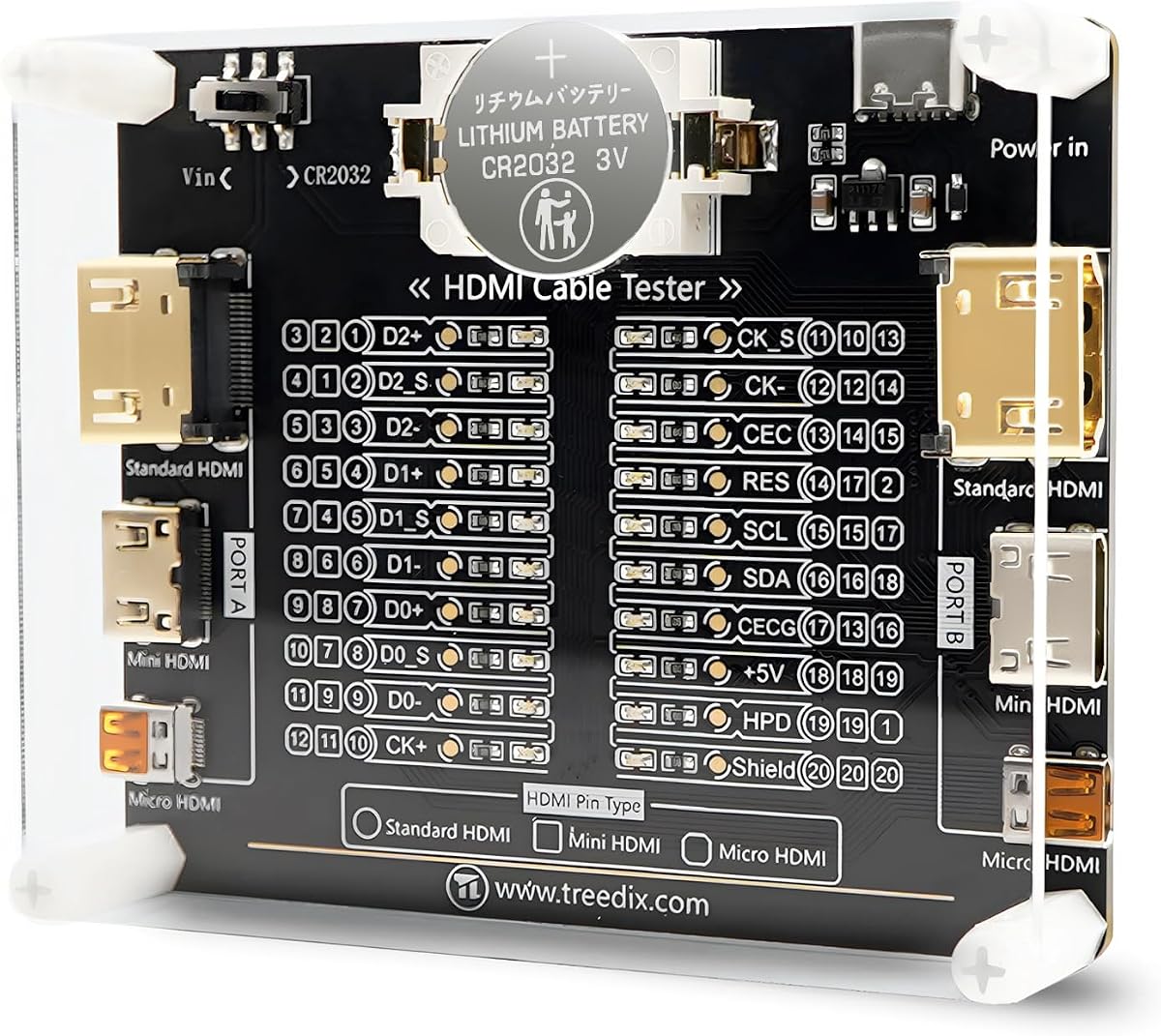
Treedix Cable Tester Board
4.6Editor score
Tests HDMI continuity and faults
Supports three connector types
Twenty individual pin indicators
Flexible battery or external power
Discover the best HDMI signal tester options for cable diagnostics, signal generation, 4K and 8K validation, display testing, and dependable installation work.
An HDMI signal tester helps distinguish a faulty cable, incompatible resolution, HDCP problem, or failing display from a setup that only appears to malfunction. The right unit may simply test wire continuity, while more advanced instruments generate controlled signals, analyze HDMI traffic, and verify high-resolution formats.
The products in this guide were compared by examining their stated testing capabilities, supported connectors and HDMI versions, display options, power requirements, portability, and intended diagnostic tasks. The list covers basic cable checkers, combined network-cable tools, display testers, and professional signal generators and analyzers.
Each review explains what the tester is best suited to, its most useful features, and any practical limitations. Ratings reflect the available customer feedback, while product capabilities come from the supplied manufacturer or retailer information. Current prices and availability can change, so compare the latest listing details before buying.
4.6Editor score

4.4Editor score

The following comparison shows which tools focus on cable continuity, full signal analysis, display verification, or advanced format generation. The right choice depends on the equipment you need to test and the level of diagnostic detail required.


The Monoprice HDMI Signal Generator and Display Analyzer is a versatile option for technicians and advanced users who need to produce a known HDMI output and evaluate a display or downstream device. Its customer rating is 4.0, and its defining advantage is the ability to operate in either a signal-generator role or as a display emulator and signal analyzer.
We may earn a commission when you buy through this link, at no additional cost to you.
The unit supports 4K at 60Hz in both 4:4:4 and 4:2:0 chroma formats, along with 4K at 30Hz in 4:4:4 and 1080p at 60Hz. A four-position DIP switch controls the output resolution and HDCP setting. HDCP can be disabled or configured for version 1.4 or 2.2, while four test patterns are available for supported HDCP versions.
Its main trade-off is the physical configuration method. DIP switches are dependable and unambiguous once their positions are understood, but they are not as approachable as a touchscreen, rotary controls, or clearly labeled software menus. The available 4.0 rating also suggests it is not as universally well regarded as several simpler cable testers in this guide.
This is a strong choice for installers, integrators, and enthusiasts who need repeatable 4K and HDCP test signals rather than merely checking continuity. It is especially useful when troubleshooting a display, receiver, switch, or cable that produces a picture but behaves incorrectly at particular settings.
The combination of 4K output options and selectable HDCP modes makes this device useful for reproducing format-specific problems. Rather than relying on a computer or media player, a technician can present a controlled signal and observe how the connected equipment responds.
Using the unit as either a generator or an analyzer broadens its value beyond a dedicated cable checker. It can support bench testing, installation setup, and display troubleshooting without requiring a second specialized instrument.
We may earn a commission when you buy through this link, at no additional cost to you.
The Parts Express HDMI Cable Signal Tester is a focused cable diagnostic tool for users who need to identify missing video, color-shift symptoms, sparkle, or other component-level faults. It has a 4.3 customer rating and emphasizes straightforward operation rather than complex signal generation or advanced protocol analysis.
We may earn a commission when you buy through this link, at no additional cost to you.
Its DVI-F and HDMI-F connectors accept the test leads, and the tester displays the status of each HDMI signal component. The unit can sit at either the source or display end, giving installers flexibility when a cable is already routed through walls, furniture, or other inaccessible spaces.
The limitation is its narrow scope. It does not list broad 4K format support, EDID management, HDCP configuration, detailed timing analysis, or a wide selection of test patterns. It is therefore most valuable as a quick physical-layer diagnostic tool rather than a complete installation certification instrument.
Home users, cable installers, and repair technicians will appreciate how little setup is required. It is a practical choice when a cable produces intermittent or degraded visuals and you need to narrow the problem down before replacing expensive components.
Showing the status of each HDMI signal component makes it easier to determine whether the fault lies in a particular conductor or signal path. That direct feedback can prevent unnecessary replacement of a display or source device.
The ability to place the tester at the source or display end is especially helpful for permanently routed systems. It reduces the need to disconnect and reroute a long installation simply to perform a basic continuity test.
We may earn a commission when you buy through this link, at no additional cost to you.
The HDMI Tester Portable High Definition Network Cable Tester Checker combines two common installation diagnostics in one device. Its 4.4 rating reflects a well-regarded general-purpose tool for checking HDMI cables and RJ45 network cables, with support for standard HDMI Type A and HDMI Mini Type C connectors.
We may earn a commission when you buy through this link, at no additional cost to you.
The remote unit can scan up to 19 wires and identify short circuits, open circuits, or incorrect wire order. For RJ45 cables, rotating LEDs indicate whether the connections are correct. The remote conveniently stores alongside the main unit, and the main unit can operate from a single AAA battery or a phone USB charger.
The absence of an included battery is worth noting for buyers who do not already have one. Its diagnostic scope is also limited to physical cable faults: there are no stated options for EDID handling, HDCP, CEC, timing analysis, or controlled high-resolution picture generation.
This tester is best for IT installers, network administrators, and home users who maintain both HDMI and Ethernet wiring. It offers a convenient way to identify common conductor problems without carrying separate tools for each cable type.
Combining HDMI and RJ45 testing makes this a practical companion for installers who service both media and network connections. The same case and remote system can be used for common desktop, office, and home-av wiring tasks.
The tester uses LEDs to indicate proper rotation or identify a failed conductor. This makes it well suited to quick checks before moving, patching, or terminating a cable.
We may earn a commission when you buy through this link, at no additional cost to you.
The STEREN Handheld Portable HDMI Tester is designed for technicians who need to confirm that a source, cable, and display path is producing a usable image. It carries a 4.5 rating and is distinctive for providing a full-color LCD preview rather than only showing continuity LEDs.
We may earn a commission when you buy through this link, at no additional cost to you.
The screen displays both audio and video and supports auto-scaling of resolutions. A 19-pin continuity check can identify wiring issues, while the tester can also be connected to a set-top box to verify installation and inspect a channel lineup. This makes it possible to perform source checks without taking a television to the job site.
Its enclosure uses a tempered-glass display described as resistant to scratches, shattering, dirt, water, and shock. The stated battery provides roughly three to four hours of use, and three HDMI ports support both input and output continuity tests plus a dedicated source connection.
The primary constraint is format coverage: the product information emphasizes 1080p full-color assurance rather than 4K or 8K testing. It is best for service work involving set-top boxes, conventional residential installations, and field confirmation of picture and sound.
The built-in color LCD gives a technician immediate visual confirmation of a source output. That advantage can shorten setup time when a television is unavailable, mounted awkwardly, or not yet installed.
A shock-resistant, water-resistant, scratch-resistant screen and a rechargeable battery support mobile use. The three-port layout supports both source verification and cable continuity checks in a compact enclosure.
We may earn a commission when you buy through this link, at no additional cost to you.
The JTECH-40GA is the most advanced signal generator and analyzer in this guide, offering 8K at 60Hz output, 40Gbps bandwidth, HDR support, and extensive analysis tools. No customer rating is supplied, so its evaluation here depends on the stated technical capabilities rather than a numerical feedback score.
We may earn a commission when you buy through this link, at no additional cost to you.
Sixty-four video resolutions and 33 built-in patterns make it possible to reproduce many source and display conditions systematically. It supports HDMI 2.1, HDCP 2.3 and 1.4, RGB and YCbCr color formats, LPCM 2CH audio, and external S/PDIF input. EDID read and write, CEC control, timing and format analysis, and InfoFrame analysis extend its utility beyond simple signal output.
Despite its advanced feature set, the unit remains portable. Front-panel control and a rechargeable 2910mAh battery help it move between installations, while the manufacturer includes free lifetime technical support and a one-year replacement warranty. The breadth of features also creates a steeper learning curve than a simple continuity checker.
This is the premier choice for high-end integrators, calibration-oriented users, and developers working with 8K or high-bandwidth HDMI systems. It is less appropriate for a homeowner who only needs to know whether a loose cable has failed.
The combination of 8K at 60Hz, 40Gbps bandwidth, HDR, and ten-bit 4:2:0 output addresses demanding next-generation display workflows. Test patterns and numerous resolution options allow a controlled signal to be selected rather than relying on consumer-source behavior.
EDID tools, CEC control, timing and format analysis, and InfoFrame inspection make the JTECH-40GA useful when the visible picture is normal but interoperability is not. It can isolate problems involving negotiation, metadata, encryption, or timing behavior.
We may earn a commission when you buy through this link, at no additional cost to you.
The 2K/4K HDMI Signal Generator, Analyzer and Cable Tester is a professional-style instrument for users who need more than a pass-or-fail cable diagnostic. Its 4.2 rating accompanies a feature set covering signal generation, analysis, cable testing, and EDID management.
We may earn a commission when you buy through this link, at no additional cost to you.
HDMI input and output operate at 18Gbps, or 600MHz, supporting 2K and 4K UHD signals. The analyzer evaluates source video, audio, and timing, while 4K-to-1080p scaling allows testing across displays with different capabilities. HDCP compliance and EDID management are also included.
The lack of stated 8K support separates it from the JTECH-40GA, but it remains appropriate for many 4K installation and service environments. Its protocol and scaling functions are more useful for professional troubleshooting than for a quick consumer cable check.
Choose this model when you routinely work with 4K sources, displays, switches, or extenders and need to inspect timing, audio, video, EDID, and cable bandwidth. For occasional testing or newer 8K systems, a simpler checker or the JTECH-40GA may fit better.
Combining source, timing, audio, and cable bandwidth tests reduces the need for separate instruments during installation validation. It provides a broader view of whether a link is not only connected but also operating as expected.
The ability to scale 4K signals to 1080p helps technicians test source behavior against different display capabilities. This is useful for evaluating source, display, and intermediate equipment combinations.
We may earn a commission when you buy through this link, at no additional cost to you.
The HDMI Cable Tester Portable High Definition Network Cable Tester Checker is a budget-oriented dual-purpose checker for HDMI and RJ45 wiring. Its 3.9 rating is the lowest among the rated products here, but the stated functionality covers the most common conductor faults encountered in everyday installations.
We may earn a commission when you buy through this link, at no additional cost to you.
The tester can examine up to 19 wires and detect short circuits, open circuits, and incorrect ordering. A fast scan mode offers a quick result, while full display mode provides a broader view of the test. It supports HDMI Type A and RJ45 connectors, and HDMI versions from 1.1 through 2.0 are listed as testable.
Automatic shutdown after 10 minutes of inactivity helps conserve power and adds convenience in a portable tool. However, there is no stated support for display emulation, EDID analysis, HDCP testing, audio checks, or advanced timing inspection.
This product suits home users, network installers, and general repair work where quick wire-level confirmation is enough. Buyers needing reliable display output, high-resolution format generation, or advanced protocol data should choose a more specialized instrument.
Fast scan mode is convenient when checking many cables, while full display mode offers a more complete view of the connections. The choice lets users balance speed against detail without changing tools.
Shutting down after inactivity reduces the chance of flattening a battery during transport or a busy workbench. It is a small feature, but meaningful for a frequently carried tester.
We may earn a commission when you buy through this link, at no additional cost to you.
The Jonard Tools HDMI-100 is a dependable cable tester for detecting shorts, open circuits, and incorrect wire pairings. It has a 4.4 customer rating and stands out for its detachable remote, broad cable-length support, and clear distinction between scan and full-display modes.
We may earn a commission when you buy through this link, at no additional cost to you.
The device supports 1.2V, 1.3V, 1.4V, and 2.0V HDMI cables as well as Mini HDMI. It is advertised as working with cables of any length, with testing performed up to 500 meters. In scan mode, each connection can be observed as it is tested; full display mode shows all tested connections together.
A 9V battery is required for operation, so users should keep a spare available. The HDMI-100 focuses on cable integrity and does not provide the signal generation, EDID, HDCP, audio, or display analysis found in professional instruments.
It is a strong budget choice for cable installers, IT technicians, and home users who need a reliable way to diagnose wiring faults. The removable remote is especially valuable for long or permanently installed HDMI runs.
The detachable remote lets a technician position one unit at each end without needing to route the tester itself through the entire cable path. Support for runs up to 500 meters makes it useful in commercial and structured wiring environments.
The tester evaluates individual wire pairs for shorts, opens, and incorrect connections. Scan mode supports active diagnosis, while full display mode provides a consolidated view for recording the result.
We may earn a commission when you buy through this link, at no additional cost to you.
The UT681 is a compact HDMI cable tester that combines detailed fault location with portability. It carries the highest available customer rating in the guide at 4.8, giving it strong customer feedback, though it remains a wire-level diagnostic tool rather than a full signal analyzer.
We may earn a commission when you buy through this link, at no additional cost to you.
It supports HDMI 1.2V, 1.3V, 1.4V, and 2.0V cable detection across Type A and Type C mini interfaces. The tester scans 19 wires to identify short-circuit disconnection, mis-sequencing, and other faults, with LED zones indicating abnormal points. A boot-state scanning mode and a synchronized full-display mode provide two ways to review the result.
A low-battery warning appears when voltage falls below 7.2V, and the unit shuts down automatically after 10 minutes of inactivity. Its stated weight is about 175 grams, and the operating range is listed from minus 10 to 50 degrees Celsius. The listing also references a USB cable tester, but the clearly documented functions center on HDMI continuity.
This tester is a compelling choice for mobile technicians and cable installers who want fast, visual fault isolation. It is not designed to replace a display emulator or professional analyzer when testing EDID, HDCP, audio, timing, or high-bandwidth signal behavior.
The segmented LED layout helps direct attention to the conductors responsible for a failed connection. That makes the result more useful than a single pass-or-fail indication when repairing or replacing a cable.
The low weight, detachable transceiver, automatic power-off, and wide stated temperature range make the UT681 suitable for field kits. One person can place the two ends and read the diagnostic result.
We may earn a commission when you buy through this link, at no additional cost to you.
The Treedix Cable Tester Board is a compact, open-style diagnostic board with a 4.6 customer rating. It is designed to detect HDMI cable shorts and open circuits, while its 20 LED indicators make the status of individual pins easier to understand during troubleshooting.
We may earn a commission when you buy through this link, at no additional cost to you.
The board supports HDMI versions 1.0 through 2.1 and accommodates standard Type A, Mini Type C, and Micro Type D connectors. It is stated to work with cables of any length, and the individual pin LEDs correspond to individual cable conductors, offering more diagnostic granularity than a single status light.
Power can come from a battery or an external 3–12V Vin supply. The Vin input includes reverse-connection protection, although the power switch must be set to the Vin position when using a Type C power supply. A protective acrylic housing is included, but the exposed board format may not feel as refined as a handheld tester.
This board is ideal for repair benches, electronics education, and technicians who need broad connector compatibility. It is less suitable for field users wanting a rugged enclosure, and it does not perform the advanced signal, audio, HDCP, or EDID checks available in professional analyzers.
Support for Type A, Type C, and Type D connectors makes the board useful across a range of cable standards. Testing through HDMI 2.1 also helps it remain relevant as installed equipment moves toward newer interface versions.
Each of the 20 indicators corresponds to a pin, allowing a technician to see which conductor is behaving incorrectly. A multimeter can also be used to measure line sequence when more detailed confirmation is needed.
We may earn a commission when you buy through this link, at no additional cost to you.
The right HDMI signal tester depends on whether you need to identify a broken conductor, confirm a visible source output, reproduce a resolution problem, or inspect advanced HDMI negotiation. Start with the fault you need to diagnose, then consider connector coverage, power, portability, and the depth of signal analysis.
For basic cable faults, choose a continuity tester. For installation work without access to a television, consider a display tester. Use a generator and analyzer when format, HDCP, timing, or interoperability issues are involved.
Match every connector and HDMI version present in your setup. Do not assume a tool that tests cable continuity also supports 4K, 8K, HDR, or high-bandwidth signal generation.
Choose a generator with documented output formats, not merely a cable checker. Match resolution, refresh rate, chroma, and bandwidth to the display ecosystem you support.
Verify that a device supports the protocol functions your troubleshooting process requires. Cable continuity alone cannot reveal whether HDCP negotiation, EDID data, or CEC commands are failing.
Use LEDs for quick physical-layer checks, a color display for source verification, and detailed analysis screens for professional troubleshooting. Match the interface to the user's experience.
Confirm the required power source and whether batteries are included. Keep spare cells for a simple tester and fully charge a display or analyzer before mobile jobs.
Choose a rugged enclosure for frequent field use and an open board for bench repair. A removable remote is valuable when both cable ends are far apart.
For advanced analysis, look for credible support and replacement protection. For basic testing, prioritize simple indicators, broad connector support, and straightforward operation.
Begin by identifying what needs to be tested and disconnecting power from equipment when connecting or removing leads. For a continuity check, connect the appropriate main and remote units to opposite cable ends, power the tester, select the relevant mode, and read the LED indicators. If more than one conductor is marked, compare the result with the expected pin sequence before condemning the cable.
For a signal generator or analyzer, connect the test output to the display or device under test using a known-good cable. Select a resolution and color format that both devices support, then enable or disable the required HDCP mode. Change one setting at a time so you can associate a visible change with a particular format, encryption state, or test pattern.
After use, remove the leads, switch off the tester, and return any remote unit to its storage position. Keep contacts clean and dry, avoid forcing unfamiliar adapters, and protect open boards from conductive debris. Replace a low battery promptly and store rechargeable units partially charged in a dry environment away from extreme heat.
The capabilities vary by model. Basic HDMI cable testers check conductors for opens, shorts, crossed wires, and incorrect order. More advanced signal generators produce controlled video and audio signals, while analyzers examine timing, color, HDCP, EDID, and other HDMI behavior. Confirm whether the product is a cable checker, display tester, generator, analyzer, or a combination before purchasing.
A simple continuity tester generally confirms whether conductors are connected, but it does not measure the complete data rate or signal integrity of an advanced cable. To assess 4K, 8K, HDR, or high-refresh performance, use a signal generator and analyzer with explicit bandwidth, timing, and format support. Those tools can test the complete path rather than only the cable's basic wiring.
Only if your source equipment, display, switch, extender, and active cable link support 8K. For 1080p installations, a basic continuity tool may be sufficient, while 4K users benefit from a model that explicitly documents the required resolution, refresh rate, chroma format, and bandwidth. More advanced features are useful when troubleshooting compatibility issues rather than a physically damaged cable.
A working continuity test does not guarantee that a cable will support every resolution, refresh rate, color format, or HDCP mode. The display, source, switch, extender, and cable must all agree on a compatible format. A generator and analyzer can help isolate the failed stage, while a display tester can confirm whether a source is producing usable audio and video.
Yes, especially for permanent runs, in-wall routes, or cables that will be difficult to replace. Testing before installation can reveal a basic wiring fault while the ends are still accessible. For a complete professional installation, also validate the complete path at the intended resolution and account for EDID, HDCP, and intermediate device limitations.
A cable tester checks the physical connections inside a cable and may identify individual conductor faults. A signal analyzer observes an active HDMI link, including resolution, timing, color, audio, encryption, metadata, or protocol behavior. A signal generator can provide the controlled input used during that analysis, and some professional products combine both functions.
Some models in this guide also test RJ45 network cables, but that does not make them general-purpose audio or electrical multimeters. For speaker polarity, resistance, or other wiring, use a tool designed for that specific system. The Treedix board can also be used with a multimeter for additional line-sequence measurement, but it remains primarily an HDMI continuity tool.
Keep connector contacts clean, store the tester away from moisture and conductive objects, and avoid pulling cables out by the leads. Replace low or depleted batteries and protect an open-style board with its housing. For rechargeable models, use the specified charger and avoid exposing the device to excessive heat or moisture.
The Treedix Cable Tester Board is the best budget option for broad connector support and individual pin indicators, while the Jonard Tools HDMI-100 is a strong all-around cable checker with a detachable remote. The JTECH-40GA stands apart as the best premium choice, bringing 8K output, 40Gbps bandwidth, extensive patterns, EDID functions, and protocol analysis.
Your priority should match the problem. Choose a continuity checker for damaged or miswired cables, a display tester for confirming source output, and a generator-analyzer for 4K, 8K, HDCP, timing, or interoperability issues. Paying attention to connector format, supported modes, power requirements, and physical layout can prevent an otherwise capable tester from being awkward in your workflow.
Before purchasing, verify the current product listing, included accessories, connector support, power requirements, and stated compatibility. Ratings, promotions, availability, and prices can change over time, so the latest listing details should guide the final purchase decision.