
Adesso AKB-132HB
4.2Editor score
Three built-in USB ports
Multimedia and Windows controls
Quiet membrane switches
Discover the best keyboard with USB port options for every setup, with expert comparisons of hubs, compatibility, layout, lighting, typing feel, build quality
A keyboard with USB ports can turn an otherwise ordinary desk into a more convenient workspace by reducing cable clutter and keeping frequently used connections within reach. The right model may combine a built-in hub with a full-size layout, backlighting, mechanical switches, spill resistance, or broad operating-system support. These features are useful in offices, studios, home workspaces, and shared computers.
This guide compares ten wired keyboards with USB connectivity, focusing on the number and type of hub ports, supported devices, keyboard layout, lighting, switch design, durability, and everyday convenience. The selection ranges from compact membrane models and illuminated office keyboards to premium mechanical boards, allowing readers to identify a product that fits a particular workstation rather than relying on features alone.
Each recommendation highlights the strongest reason to consider that model, along with practical limitations derived from the available specifications. The top picks represent distinct priorities: a budget-friendly hub keyboard, a versatile illuminated model, and a premium mechanical option. Product availability and prices can change, so readers should verify the latest listing and specifications before ordering.
4.2Editor score
4.4Editor score

4.3Editor score
The comparison below places all ten keyboards side by side, emphasizing hub configuration, connection method, layout, illumination, switch type, and platform support. These differences make each model better suited to a particular desk, device mix, or user preference.





The Adesso AKB-132HB is a budget-oriented multimedia keyboard that places three USB ports directly into the keyboard body. It holds a 4.2 rating and stands apart from basic wired keyboards by adding a convenient hub for flash drives, mice, and other input devices. Its combination of accessible controls and a conventional full-size form makes it a practical choice for shared desks and everyday office work.
We may earn a commission when you buy through this link, at no additional cost to you.
The integrated hub is the model's main attraction. Instead of searching around the back of a computer for an open USB port, a user can connect a peripheral directly from the keyboard. Dedicated multimedia hotkeys provide quick access to media playback, while one-touch Windows controls can open applications such as My Computer, Calculator, Mail, or Search. Membrane switches also offer a relatively quiet typing experience and are stated to last for up to five million keystrokes.
The trade-offs are the sort normally associated with a value-focused keyboard. Its three hub ports are described as USB rather than specifically USB-A or USB-C, and it lacks the newer interface mix offered by the Macally models. Its one-touch application controls are also designed primarily around Windows, which may be less useful in a Mac-centered workflow. Nevertheless, for a Windows user who values an accessible hub and multimedia keys more than USB-C, these limitations are reasonable.
This is the recommendation for buyers who want a straightforward keyboard with several USB connections without moving into premium mechanical territory. It is especially suitable for offices where several USB accessories are routinely connected or for users who want fewer loose adapters around the computer. For a more contemporary port selection and adjustable lighting, the Macally USB Hub Keyboard is the stronger alternative, but the Adesso remains a well-equipped budget choice.
Placing the hub ports within easy reach reduces the need to reach behind a monitor or tower. The Adesso can accommodate devices such as flash drives and mice without making a separate hub the central feature of the workspace.
Membrane switches and dedicated media controls make this keyboard suitable for routine office tasks, shared rooms, and extended sessions where a quieter feel and quick playback controls are useful.
We may earn a commission when you buy through this link, at no additional cost to you.
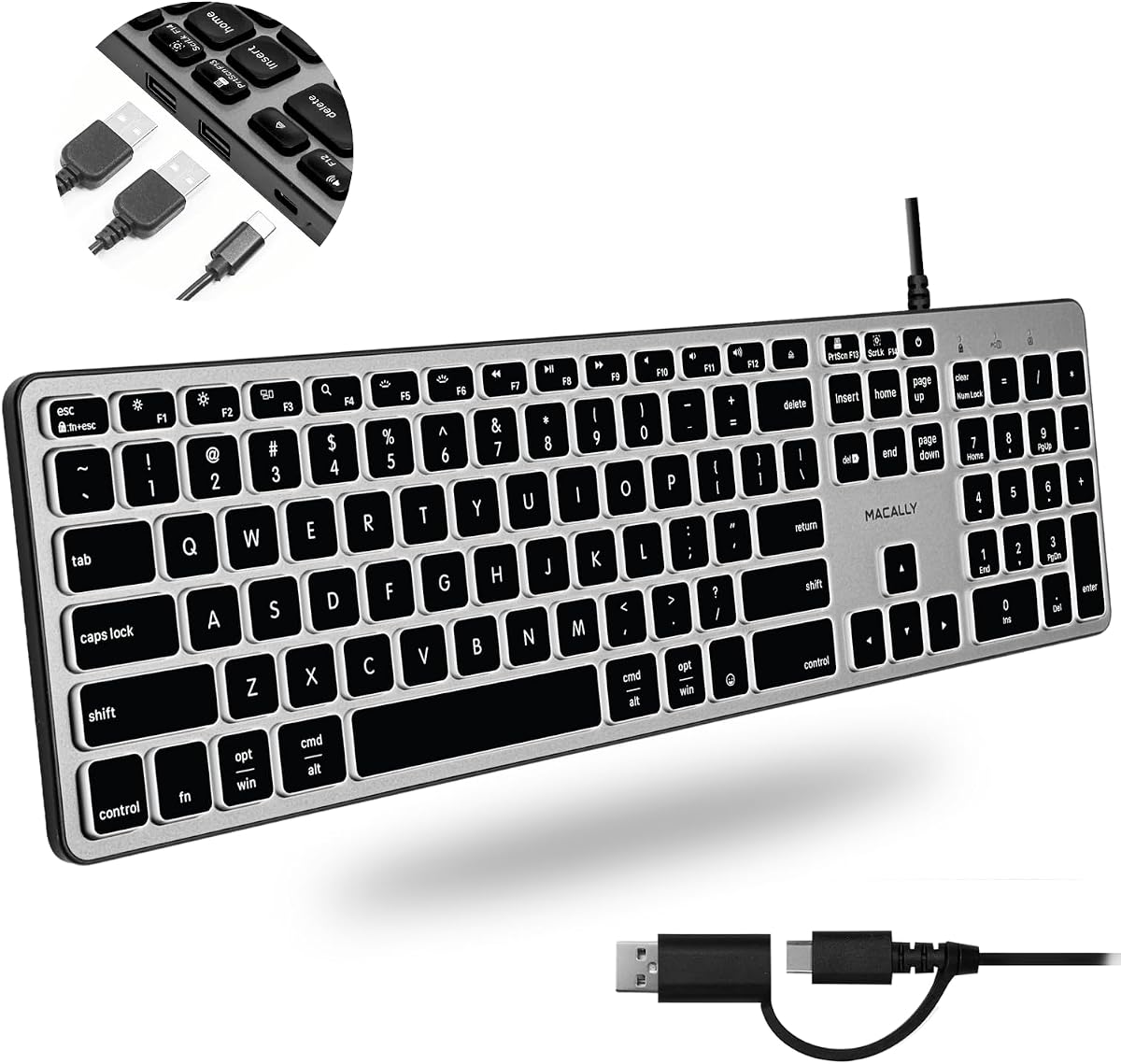
The Macally Wired Keyboard for Mac with USB Hub earns a 4.4 rating by combining a contemporary port selection, full-size layout, and adjustable illumination. It includes two USB-A ports and one USB-C port in the keyboard, making it one of the most versatile options for users who need both legacy and newer connections. The design is marketed primarily toward Mac users but is also listed for Windows, Android, iPad, and iOS devices.
We may earn a commission when you buy through this link, at no additional cost to you.
Its dual-interface plug is a particularly useful detail. Because the connection hardware accommodates USB-C and USB-A, the keyboard can be used with a wider range of laptops and desktops without demanding a separate adapter. Automatic operating-system detection adjusts the 107 keys and 16 shortcuts for the selected platform. For low-light use, white LED backlighting offers three brightness levels, helping users locate keys without forcing maximum brightness throughout the day.
Its limitations are relatively minor. USB-C-equipped computers still need a port capable of carrying the required keyboard data and power, and some platform-specific shortcuts may not behave exactly like native controls. The illumination is also unnecessary for users who work in consistently bright environments or prefer a completely unlit board. The included 2-in-1 connection arrangement and broad compatibility do more to future-proof the product than the backlighting alone.
This keyboard is the strongest all-around choice for a mixed-device desk. Mac users benefit from the platform-specific shortcut adaptation, while PC and Android users gain a modern USB-C option alongside USB-A. It is also a good fit for anyone who wants a full-size illuminated keyboard with a hub. Buyers prioritizing mechanical feel and high-speed data transfers should instead examine the Das Keyboard 4 Professional, but the Macally offers the most balanced feature set for general use.
Two USB-A ports and one USB-C port allow the hub to serve older peripherals and newer devices at the same time. This mixed arrangement is more adaptable than a keyboard offering only legacy-style ports.
Automatic operating-system detection allows the keyboard's full key set and shortcuts to adapt to Mac, Windows, Android, and iPad environments, making it practical for users who alternate between devices.
We may earn a commission when you buy through this link, at no additional cost to you.
The Macally Premium Wired USB C Keyboard is a full-size, low-profile option for modern computers that use USB-C. It carries a 4.2 rating and provides the same useful combination of two USB-A hub ports and one USB-C hub port. Unlike the first Macally model, its primary keyboard connection is explicitly USB-C, creating a streamlined setup for compatible MacBook, iMac, Mac mini, iPad, and PC systems.
We may earn a commission when you buy through this link, at no additional cost to you.
The keyboard supports all 107 standard keys and 16 shortcut keys, retaining a familiar full-size arrangement. Its low-profile scissor switches should appeal to users who want a quieter, thinner alternative to a tall mechanical board. A space-gray finish and integrated typing angle add visual and ergonomic refinement, while the hub provides an accessible way to connect a mouse, flash drive, webcam, or hard drive.
The main trade-off is compatibility. A USB-C connection is convenient for newer devices but cannot be assumed to work with every older computer, and users may need an appropriate adapter if their system lacks the correct port. Unlike the other Macally model in this guide, this keyboard does not advertise adjustable backlighting. It also focuses on streamlined plug-and-play use rather than elaborate one-touch application controls.
This recommendation makes sense for buyers who have a USB-C-centered device and want a polished, full-size keyboard with a low-profile feel. It is particularly relevant to Mac users whose desks need a modern connection without sacrificing a number pad or dedicated shortcuts. Users who want illumination should examine the Macally backlit alternative, while those seeking a stronger tactile response and faster hub transfers should look toward the Das mechanical models.
Scissor switches keep the board visually and physically slimmer than many mechanical keyboards while retaining the complete 107-key arrangement expected from a full-size desktop model.
Three rear-accessible ports support common accessories, reducing reliance on a separate adapter or desktop hub while keeping the primary USB-C connection simple.
We may earn a commission when you buy through this link, at no additional cost to you.
The Logitech K120 is a dependable full-size Windows keyboard with a 4.6 rating, matching the highest rating among the products in this guide. It does not include a built-in USB hub, but it provides an uncomplicated USB connection, familiar deep-profile keys, F-keys, and a number pad. That makes it a useful benchmark for buyers who need a keyboard with USB connectivity but do not require the keyboard itself to serve as a peripheral hub.
We may earn a commission when you buy through this link, at no additional cost to you.
Setup requires no software installation: the keyboard connects through USB and is ready for immediate use. Its compatibility is listed for Windows 7, 8, 10, and later versions, which makes it a natural fit for home and office PCs. The spill-resistant construction, anti-fade keys, and sturdy adjustable tilt legs prioritize longevity, while the design also includes plastic parts made with 51% certified post-consumer recycled material.
Because the K120 has no integrated hub, users who expect to connect phones, flash drives, or additional mice through the keyboard will need a separate USB hub. It is also designed specifically for Windows, so Mac-specific function and media behavior may not be ideal. The standard deep-profile design also lacks the adjustable lighting, mechanical feedback, and more modern USB-C options found elsewhere in the guide.
The K120 is best for Windows users who prioritize simplicity, familiar ergonomics, and everyday durability over accessory connectivity. It is a strong choice for a family computer, a reception desk, or a large office where a full-size layout and plug-and-play operation matter. If the defining requirement is a keyboard with actual USB ports, the Adesso or Dell KB522 would satisfy that need more directly.
Deep-profile keys, a number pad, function keys, and adjustable tilt legs create a conventional layout that should be easy for many Windows users to adopt immediately.
A spill-resistant design, anti-fade keys, and sturdy legs make the K120 appropriate for office desks and shared computers where reliability and simple maintenance matter.
We may earn a commission when you buy through this link, at no additional cost to you.
The Perixx PERIBOARD-409H is a compact wired keyboard with two side-mounted USB ports and a 4.4 rating. Its defining advantage is space efficiency: the mini layout omits the number pad, allowing the keyboard to occupy a smaller footprint on a crowded desk. It is best suited to users who regularly type, browse, and navigate but do not need a dedicated numeric keypad for data entry or accounting.
We may earn a commission when you buy through this link, at no additional cost to you.
The built-in hub provides an accessible place to connect input devices such as a mouse, separate keypad, or USB flash drive. A long 5-foot-9-inch cable adds flexibility when the computer is positioned under a desk or farther from the work surface. Installation is straightforward because the keyboard requires no extra driver or software and works through a USB 2.0 port.
Its responsive membrane switches are listed with a 10-million-keystroke switch-life cycle, while ABS keycaps use a durable UV coating. The compact format is the central compromise: buyers who need to enter numbers frequently will have to reach for a separate numeric keypad, and its listed system requirements focus on Windows 7, 8, and 10. A longer-term consideration is that USB 2.0 is less modern than the USB-C and USB 3.0 options in this guide.
Choose the PERIBOARD-409H when desk space is more important than a full number pad and the hub needs to be available from the side of the keyboard. It is a strong match for compact home offices, reception counters, and travel-oriented setups where simpler physical dimensions and plug-and-play operation are priorities. For extensive number entry, the Adesso or Dell KB522 offers a more conventional full-size alternative.
Removing the number pad significantly reduces the keyboard's footprint, creating room for a mouse, writing pad, notebook, or other frequently used desk accessories.
Placing two USB ports on the edge makes it easy to connect a flash drive or mouse without reaching around the computer or disturbing the keyboard's position.
We may earn a commission when you buy through this link, at no additional cost to you.
The KOPJIPPOM Large Print Backlit Keyboard is built for visibility, combining key legends stated to be four times larger than standard fonts with a bright white LED backlight. It holds a 4.5 rating and retains a full 104-key US QWERTY layout with a numeric keypad. This combination makes it particularly useful for older users, people with low vision, and shared environments such as libraries, schools, and special-needs departments.
We may earn a commission when you buy through this link, at no additional cost to you.
The illumination is evenly distributed across the keys and can be turned on or off, with brightness adjustment available for different ambient conditions. A full-size arrangement means users do not need to relearn a compact typing pattern simply to benefit from the larger legends. Folding rear feet can improve positioning and are intended to reduce fatigue during longer work or gaming sessions. The keyboard also has a spill-resistant design.
The model does not have a built-in USB hub, despite using a standard wired USB connection. Its advertised compatibility covers several Windows versions, Raspberry Pi systems, and Mac OS, but the product information cautions that multimedia keys may not work fully on Mac. The large legends could also feel visually unusual to users accustomed to standard compact printing, although that is precisely the feature that makes this model distinctive.
This keyboard is an excellent recommendation when low-light visibility and readable key labels are the primary requirements. It may be especially useful in evening study, clinical or reception spaces, and homes where users benefit from larger characters. It is not the most direct choice for the literal keyword because the USB connection powers the keyboard rather than providing hub ports, but it remains a well-equipped and accessible typing solution.
Oversized lettering makes the keys easier to locate and identify, reducing visual effort for users who struggle with standard printed legends or work in dim conditions.
Adjustable white LED illumination can be tuned to the room, while the full number pad and fold-out feet preserve a conventional, comfortable working arrangement.
We may earn a commission when you buy through this link, at no additional cost to you.
The Dell KB216 is a compact multimedia keyboard with a 4.6 rating, tied for the highest rating in this selection. It uses a standard USB interface and chiclet-style keys, offering a clean, familiar design for home and office computing. Although it lacks a built-in hub, its small footprint and simple connection make it useful where a full-size number-pad keyboard would crowd the available space.
We may earn a commission when you buy through this link, at no additional cost to you.
The keyboard measures 17.4 by 5 by 1 inches and weighs 17.74 ounces, supporting its description as a compact desk model. Multimedia keys provide convenient access to common controls, while the USB connection allows it to work with compatible computers without emphasizing a specialized host port. Its listed compatibility includes a broad range of Alienware, Inspiron, Latitude, OptiPlex, Precision, Vostro, and XPS systems.
The limited system list means buyers should confirm compatibility rather than assuming it will work with every computer. It also does not provide a hub for flash drives, mice, or other USB peripherals, requiring a separate adapter if those connections are needed. Because the model is primarily associated with Dell systems, buyers seeking broad cross-platform flexibility may find a keyboard with explicit multi-platform support more appropriate.
The KB216 is a sensible pick for a compact Dell workstation or a user who values straightforward operation and multimedia controls. It is particularly useful when a separate number pad is already available or not needed. For a keyboard that explicitly incorporates USB ports, the Dell KB522 would offer two hub connections and a full-size layout, while the Perixx provides a smaller two-port alternative.
The slim profile and separated chiclet keys create a clean visual appearance and can help conserve desk space compared with many full-size office keyboards.
Built-in multimedia functions make common playback and system actions easier to reach, while the standard USB interface keeps setup uncomplicated.
We may earn a commission when you buy through this link, at no additional cost to you.
The Das Keyboard 4 Professional for Mac combines a premium mechanical platform with two USB 3.0 hub ports and a 4.3 rating. It is designed for users who want the responsiveness of Cherry MX Blue switches alongside a more advanced hub than the guide's basic USB options. Its 104-key layout, aluminum top, dedicated media controls, large volume knob, and Mac-specific functions give it a distinctive professional focus.
We may earn a commission when you buy through this link, at no additional cost to you.
The Cherry MX Blue switches provide pronounced tactile feedback and audible keystrokes, making the keyboard well suited to typists who enjoy confirming each press. The switches are factory lubricated at the stabilizers, and the listed lifetime reaches up to 50 million keystrokes. Full N-key rollover over USB supports fast typing by registering multiple simultaneous inputs without severe key conflicts.
The two-port USB 3.0 hub is a meaningful distinction for users moving large files, high-resolution images, or other data-intensive content. It supports transfer speeds stated at up to 5 gigabytes per second and can also handle charging tasks. A six-and-a-half-foot cable and a detachable footbar that raises the keyboard to approximately four degrees round out its practical design. The mechanical feedback and audible response will not suit users who need a nearly silent board, however.
This is the recommendation for a Mac user who wants serious typing feedback, a fast built-in hub, and dedicated hardware controls. It is best suited to a permanent desk where the cable length is useful and the keyboard will remain connected. Windows and Linux users may prefer the standard Das Keyboard 4 Professional, while buyers seeking a modern hub without a mechanical build can choose either Macally model.
Cherry MX Blue switches, factory-lubricated stabilizers, laser-etched keycaps, and a stated 50-million-keystroke lifespan create a durable option for frequent typists.
Two USB 3.0 ports support faster data movement than older USB 2.0 hubs, while Mac-specific functions and the large volume knob complement a dedicated Apple desk.
We may earn a commission when you buy through this link, at no additional cost to you.
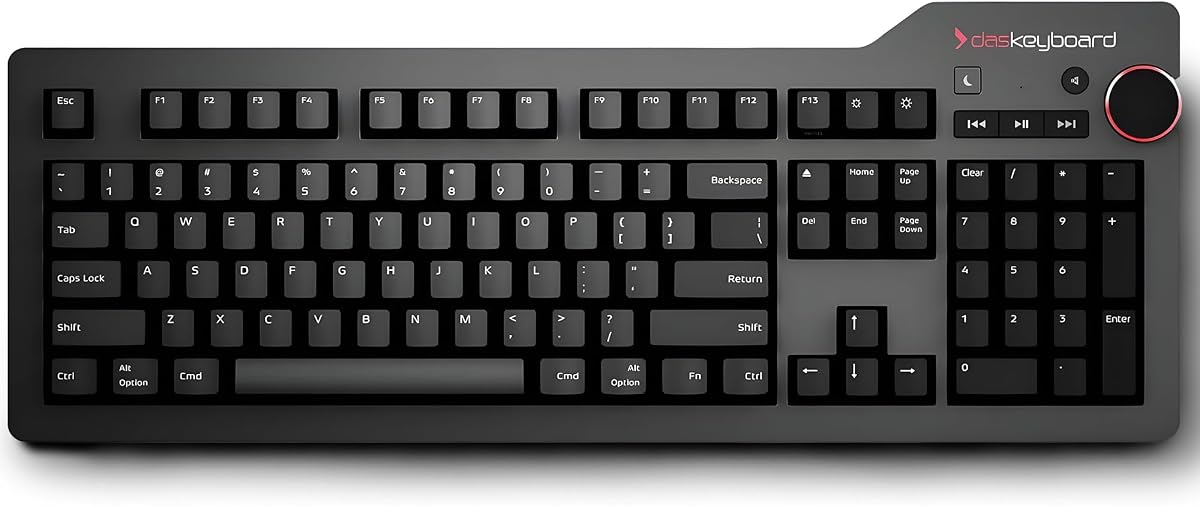
The Das Keyboard 4 Professional is the premium mechanical choice in this guide, pairing a 4.3 rating with two USB 3.0 hub ports, Cherry MX Blue switches, and an aluminum top. It is designed for users who make typing feel central to their workflow and want high-speed peripheral connections in the same footprint. The 104-key format includes a full function row and numeric keypad, giving it the functionality of a complete desktop keyboard.
We may earn a commission when you buy through this link, at no additional cost to you.
Tactile feedback is the defining typing characteristic. The Cherry MX Blue switches are factory lubricated on the larger keys' stabilizers, while bumps on the F and J keys help orient the user's hands. Full N-key rollover can be toggled using Shift and Mute and works with both Windows and Linux, making the board useful for fast typists and power users. The hub's two USB 3.0 ports support transfers stated at up to 5 gigabytes per second.
The premium construction is accompanied by premium-level demands. Cherry MX Blue switches produce more sound than membrane or scissor alternatives, potentially making the keyboard less appropriate for silent offices, shared rooms, or calls. The long, heavy-looking aluminum-top design is also better suited to a fixed desk than frequent travel. Dedicated media controls, a large volume knob, an instant sleep button, and a detachable footbar enhance the permanent-workstation experience.
This recommendation is for buyers who prioritize mechanical response, rapid hub transfers, and robust materials over minimal noise. It is especially appealing to Windows or Linux enthusiasts who want the two USB 3.0 ports without moving to a premium Mac-specific implementation. Those who need a quieter or less specialized board should compare the KOPJIPPOM, Logitech K120, or Macally alternatives based on their preferred typing experience.
The dual USB 3.0 interface is positioned for users who regularly move substantial files, use high-resolution media, or maintain multiple USB peripherals at a permanent workstation.
Full N-key rollover, tactile Cherry MX Blue switches, and oriented key bumps create a keyboard designed for users who value clear feedback and accurate multi-key input.
We may earn a commission when you buy through this link, at no additional cost to you.
The Dell KB522 X20M8 is a business-oriented multimedia keyboard with a 4.6 rating, two integrated USB hub ports, and a full 104-key layout. It offers the largest collection of dedicated hotkeys in this guide, with 14 keys covering functions such as sleep, internet browsing, My Computer, calculator, zoom, email, volume, mute, and playback. The design is positioned for office environments where frequent access to these commands is useful.
We may earn a commission when you buy through this link, at no additional cost to you.
A removable palm rest adds support during extended work sessions, while the spill-resistant construction suits busy desks. The two hub ports can handle additional accessories such as a mouse, storage device, or phone, reducing the need for a separate adapter. Its black-and-silver styling is conventional enough to fit most professional workspaces without drawing attention away from the monitor.
The hub uses older USB technology rather than the USB-C or USB 3.0 connections found in the premium and modern alternatives. It is also associated with specific Dell part numbers—1RW52, KB522, X20M8, 7VHY1, and 7KKPH—so buyers should confirm that the keyboard is the correct replacement for their existing system. It offers no stated backlighting and does not describe an adjustable typing angle.
This keyboard is a compelling choice for a compatible Dell office setup that values hotkeys, a removable palm rest, and a practical two-port hub in a familiar full-size design. Its 4.6 rating reinforces its position as a well-regarded productivity option. For a modern device mix, a Macally model offers USB-C and automatic platform detection, while the Logitech K120 is a simpler option when a hub is unnecessary.
Fourteen hotkeys provide direct access to communication, browsing, calculation, zoom, volume, playback, and sleep functions commonly used during a workday.
A removable palm rest, spill-resistant design, and two-port hub support long work sessions and frequently connected office peripherals in a complete 104-key layout.
We may earn a commission when you buy through this link, at no additional cost to you.
The most useful keyboard depends on how the device is connected, which accessories must remain accessible, and what kind of typing experience suits the user. Port type, layout, platform support, lighting, switch construction, and intended workspace should be considered together rather than separately.
Begin by counting the peripherals that should connect directly to the keyboard. Two ports may be sufficient for a mouse and flash drive, while three provide more flexibility for a webcam, storage device, and phone. USB-A remains useful for many accessories, whereas USB-C offers a more modern connection for compatible equipment. The Das models add two USB 3.0 ports for faster transfer speeds, while the Macally options combine two USB-A ports with one USB-C port.
The keyboard's main connection is separate from its hub. Most models use a standard USB-A plug, while the Macally Premium USB C Keyboard uses USB-C as its primary wired connection. The Macally Editor's Choice model includes a two-in-one USB-C and USB-A plug for broader host-device flexibility. Confirm that the computer has the required port, especially for older desktops that may need an adapter.
Full-size keyboards include a number pad and provide the broadest layout, while mini models reduce desk footprint. The Perixx PERIBOARD-409H omits the number pad and places two ports on its side, making it useful where space is limited. The Dell KB216 is also compact, while the Adesso, Macally, KOPJIPPOM, Dell KB522, and Das keyboards retain more complete arrangements. Frequent number entry generally calls for a dedicated keypad.
Membrane switches prioritize quiet operation and affordability, while scissor switches offer a thinner, quieter profile. Mechanical switches provide more pronounced tactile or audible feedback, and the Das models use Cherry MX Blue switches for a clicky, tactile experience. The Adesso and Perixx use membrane designs, the Macally Premium model uses quiet scissor switches, and the Logitech and Dell office models are conventional alternatives.
Backlighting helps users locate keys in low-light rooms, and the KOPJIPPOM model goes further with large fonts and adjustable white LEDs. The Macally Editor's Choice model also offers three levels of white backlight brightness. Some users may prefer an unlit board for visual simplicity or lower distraction, so illumination should be treated as a workflow benefit rather than a universal requirement.
A keyboard that works on one operating system may have altered or inactive shortcuts on another. The Macally Editor's Choice model provides automatic detection for Mac, Windows, Android, and iPad, while the Premium USB-C model supports Mac, PC, and Chrome. The Logitech K120 and Perixx focus on Windows, and the Dell KB216 lists numerous Dell systems. Checking supported platforms prevents surprises with media or function keys.
Spill resistance, anti-fade printing, and strong switch-life claims are valuable in offices and homes where keyboards are exposed to liquids and frequent use. The Logitech K120, KOPJIPPOM, and Dell KB522 include spill-resistant construction. The Perixx specifies a 10-million-keystroke membrane cycle, while the Das mechanical models are rated for up to 50 million keystrokes. A removable palm rest may improve comfort during long sessions.
Premium models add mechanical switches, aluminum construction, faster USB hub standards, and dedicated controls. The Das Keyboard 4 Professional is best suited to a fixed desk and users who enjoy pronounced feedback. A conventional office keyboard may be more appropriate for shared rooms, light use, or a smaller budget. The best value is not automatically the lowest-cost option; it is the model that provides the needed features without unnecessary complexity.
Connect the keyboard to the appropriate USB port on the computer, then attach any mouse, flash drive, webcam, or other accessory to the built-in hub. Allow the operating system to recognize the device, which may take a few seconds. Models that support multiple platforms should be allowed to complete their automatic key or shortcut adaptation before opening productivity software.
Use the included or prescribed interface correctly and avoid forcing a connector into a port with a different shape. When a USB-C device requires a specific power or data standard, check the computer specifications and any adapter requirements. The hub is intended for compatible peripherals, so users should not treat every port as a universal charging solution unless the manufacturer confirms that capability.
Keep the keyboard clean by unplugging it and using a soft, slightly damp cloth rather than pouring liquid onto the keys. Remove dust from around the hub openings, avoid eating or drinking over the keyboard, and address spills promptly even on spill-resistant models. Mechanical keyboards benefit from occasional careful removal of loose debris, while office membrane models require little more than routine wiping.
A USB keyboard uses a USB connection to communicate with the computer. A keyboard with a USB hub also includes additional ports for peripherals such as mice, flash drives, webcams, and storage devices. The main connection and the hub ports may use different USB standards, so both the computer and attached devices should be compatible.
Only if the keyboard's hub includes a USB-C port. Many older hub keyboards provide USB-A ports only, while the two Macally options and the Macally Premium USB-C model include USB-C. Check the exact hub specification and the connector shape of the device before attempting a connection.
They can be suitable, but the hub is not the primary consideration. Gamers should evaluate switch type, rollover support, response, and anti-ghosting behavior. The Das Keyboard 4 models support full N-key rollover and use tactile Cherry MX Blue switches, while conventional office models are better suited to general computing than competitive gaming.
That depends on the hub's electrical specifications. Some hubs can provide charging, while others are optimized primarily for data transfer. The Das Keyboard 4 listing specifically mentions charging convenience, but users should still check device requirements and host-port power delivery for other models.
Generally, yes. Membrane models tend to produce less sound because the keys press against a flexible membrane, while mechanical switches use moving metal components that create more audible feedback. The Macally Premium model's scissor switches are also positioned as a quieter option. Individual preferences and typing force can still affect perceived noise.
Choose a full-size model if you enter numbers frequently or want dedicated navigation and function keys. A compact model is better for limited desk space, travel, or setups where a separate number pad is acceptable. The Perixx PERIBOARD-409H is the clearest hub-equipped compact option in this guide.
Most USB keyboards work with modern computers, but the primary connector and operating-system shortcuts still matter. A USB-A keyboard may need an adapter on a USB-C-only system, and a USB-C keyboard needs a compatible data-capable port. Media and function keys can also behave differently across Windows, macOS, Linux, and mobile systems.
Most standard wired keyboard models are designed for plug-and-play use and do not require additional software. The Adesso, Perixx, Macally Premium USB-C, and other conventional models are intended to work through standard USB connections. Specialized controls or operating-system integration can still vary, so checking the product documentation is advisable.
The Adesso AKB-132HB is the best budget selection for Windows users who want three accessible hub ports, multimedia controls, and quiet membrane typing. The Macally Wired Keyboard for Mac with USB Hub is the most versatile general choice because it combines USB-A and USB-C hub ports, adjustable backlighting, and automatic operating-system detection. For premium mechanical typing and faster hub transfers, the Das Keyboard 4 Professional leads the group with Cherry MX Blue switches and USB 3.0 connectivity.
Prioritize the details that affect daily work: port standards for attached accessories, full-size versus compact layout, operating-system support, switch feel, illumination, and noise level. A three-port keyboard is not automatically better than a two-port model if the additional port uses an outdated standard or is not needed. Likewise, mechanical construction and premium materials are most valuable when the keyboard will occupy a permanent desk and the user appreciates pronounced feedback.
Before ordering, confirm the primary connector, supported operating system, hub requirements, and intended layout. Product listings and prices can change over time, and current availability should be checked alongside the latest specifications. Choosing a keyboard with the right USB hub and typing characteristics is more likely to produce a convenient, organized, and satisfying workspace than focusing on a single feature alone.
