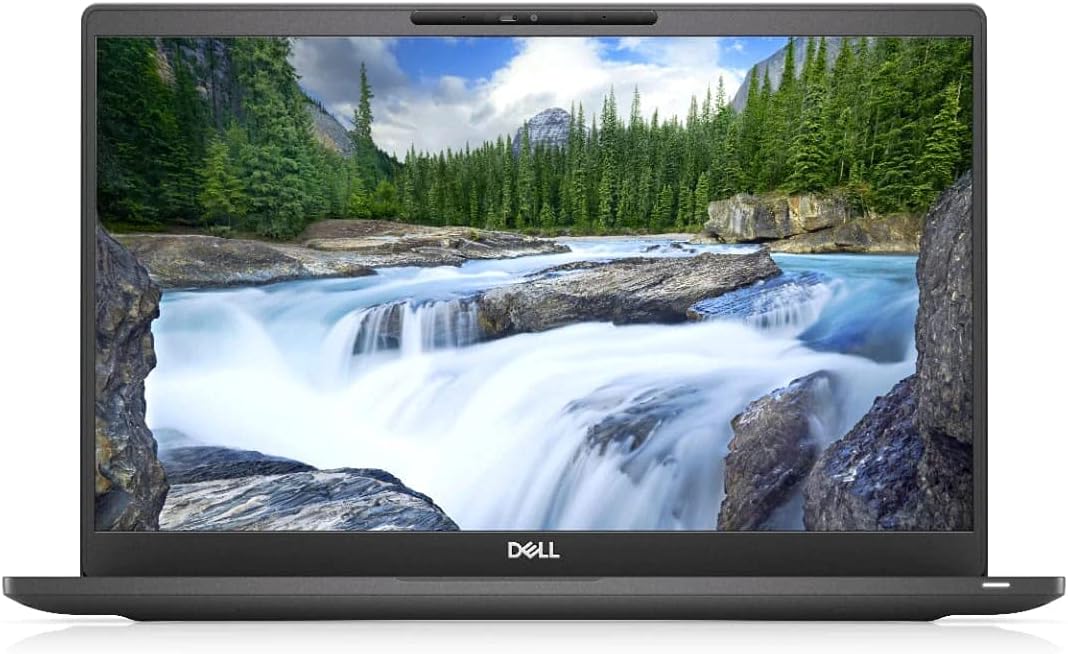
Dell Latitude 7400
4.0Editor score
Quad-core Core i7 processor
32GB installed memory
256GB solid-state storage
Fusion 360 rewards a capable processor, ample memory, fast storage, and a display that makes complex models easy to inspect. However, a laptop merely being marketed for gaming does not guarantee a smooth CAD experience. This guide compares ten options across the specifications that matter most to designers, makers, students, and engineering professionals.
The comparison considers each model's processor, graphics, memory, storage, screen, connectivity, operating system, and likely workflow. It covers renewed Windows systems, conventional performance laptops, and ChromeOS convertibles so readers can distinguish full desktop compatibility from more specialized options without relying on marketing claims alone.
Each numbered review explains where a particular laptop fits, while the summary tables make the differences easier to scan. The selections range from compact touchscreen machines to high-refresh gaming notebooks with dedicated graphics. Product availability and configurations can change, so confirm the current listing and required software support before purchasing.
4.0Editor score

4.5Editor score

4.0Editor score
As an Amazon Associate we earn from qualifying purchases.
This side-by-side comparison highlights processor class, graphics, memory, storage, and display characteristics. The chart also makes the Windows and ChromeOS differences visible, helping buyers assess each machine for Fusion 360 rather than judging by screen size alone.




The HP Victus FHD gaming laptop is the strongest all-around Fusion 360 candidate in this comparison, earning a 4.5 rating. Its eight-core Intel Core i5-13420H processor, NVIDIA GeForce RTX 3050 graphics, 32GB of RAM, and 1TB SSD combine the resources needed for detailed assemblies, browser-based collaboration, rendering, and general productivity. The 15.6-inch 144Hz display also gives a smooth and clear workspace for examining a model as it rotates on screen.
We may earn a commission when you buy through this link, at no additional cost to you.
The dedicated RTX 3050 is the most important reason to shortlist this Victus configuration. CAD applications benefit from a capable graphics processor, particularly when the viewport contains many edges, shaded surfaces, or dense assemblies. Thirty-two gigabytes of DDR4 memory also provides ample room for a demanding model, reference documents, and other software open at the same time. Fast NVMe-style storage further supports responsive project loading and everyday productivity.
There are practical compromises. A gaming laptop with a 15.6-inch display is less convenient to carry than a compact business notebook or convertible, and the supplied details do not specify its weight or battery capacity. The backlit keyboard and numeric keypad are useful extras, but they are not substitutes for adequate screen space, cooling, or GPU memory. Buyers primarily interested in portability should compare the dimensions of the full system before committing.
This is the most convincing recommendation for someone who wants a single computer for Fusion 360, rendering, software development, gaming, and general productivity. The combination of dedicated graphics, abundant memory, and a fast display reduces the likelihood that routine design work will be limited by integrated graphics. It is the easiest choice here for users who value future headroom over a compact, minimalist chassis.
The RTX 3050 gives Fusion 360 a stronger graphics foundation than integrated solutions, particularly with complex assemblies and visually dense scenes. It also makes the laptop more versatile for rendering, simulation, and other graphically intensive work.
Thirty-two gigabytes of RAM is especially useful when working with large assemblies while keeping browser tabs, reference material, and supporting applications open. The 1TB SSD provides comfortable room for local project files, component libraries, and software.
We may earn a commission when you buy through this link, at no additional cost to you.
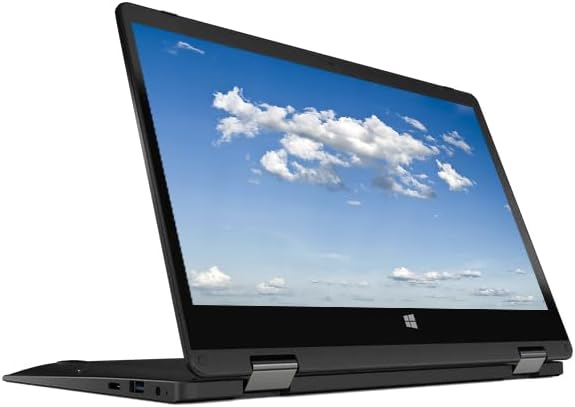
The Acer Gateway convertible is a compact Windows 11 option for light Fusion 360 work, and its 3.1 rating reflects a more limited hardware configuration. It includes an 11.6-inch HD IPS touchscreen that can rotate through multiple positions, making it easier to present a model, work in tight spaces, or switch temporarily into a tablet-like arrangement. The listing describes a 360-degree rotating design.
We may earn a commission when you buy through this link, at no additional cost to you.
Its main attraction is flexibility rather than computational power. The Intel processor reaches up to 2.79GHz and works with Intel UHD Graphics, while 4GB of DDR4 memory and 64GB of storage cover basic learning, viewing, and editing tasks. Two USB Type-A ports, HDMI, and a combined headphone and microphone jack provide a practical selection of connections for a compact device.
The 4GB memory limit is the biggest concern for Fusion 360. Heavy assemblies, multiple browser tabs, and several open programs can quickly place pressure on such a small allocation. The 64GB storage also demands careful file management, and the HD 1366-by-768 display is not especially detailed. These constraints make the Gateway better suited to coursework, simple parts, and occasional edits than to demanding professional assemblies.
Consider this laptop when portability, touchscreen flexibility, and a low-cost starting point matter more than intensive performance. A student learning basic modeling could use it for tutorials and small projects, provided cloud storage and memory-conscious habits are part of the workflow. For regular production work, a machine with at least 16GB of memory and modern solid-state storage would be a more comfortable upgrade.
The rotating touchscreen allows the display to be positioned for typing, viewing, or presenting. That flexibility is useful for showing design work to classmates or clients, even though the modest internal specifications limit advanced workloads.
Small components, introductory assignments, and model review are realistic uses for this Gateway. Larger assemblies benefit from more memory, faster storage, and a more detailed display than the supplied configuration provides.
We may earn a commission when you buy through this link, at no additional cost to you.
This HP Victus configuration is particularly well suited to users who want dedicated graphics and generous working memory. It carries a 4.5 rating and pairs an eight-core Intel Core i5-13420H processor capable of reaching 4.6GHz with an NVIDIA GeForce RTX 3050. For Fusion 360, that graphics hardware provides a more convincing foundation than an integrated GPU when models become visually complicated.
We may earn a commission when you buy through this link, at no additional cost to you.
The 32GB DDR4 configuration can accommodate a serious mix of applications. A designer can keep Fusion 360, a web browser with documentation, a messaging application, and file-management tools open without relying on a very small memory allowance. The 1TB SSD is also useful for large assemblies, local component libraries, screenshots, and multiple revisions. Its 144Hz 15.6-inch display favors smooth viewport interaction and detailed viewing.
The design is clearly oriented toward desktop use. Although the listing mentions long battery life, it does not provide capacity or endurance figures, and no dimensions are supplied. A larger screen also means more desk space than a compact notebook requires. Some users may prefer the business-oriented appearance and potentially restrained design of a conventional laptop, while others will value the backlit keyboard and dedicated GPU.
The recommendation is straightforward: choose this Victus when Fusion 360 is central to your work and you also want strong performance for gaming, rendering, or technical software. It is less compelling for someone whose priority is to carry every design session in a bag. For a stationary workspace, the combination of graphics power, memory, and storage makes it one of the most balanced options listed.
The 144Hz screen can make orbiting, selecting, and inspecting a model feel more responsive. It is particularly useful when high-refresh gaming and detailed visual work are both priorities.
Windows 11 Pro provides the familiar desktop environment required for many professional applications. It is a better fit for conventional Fusion 360 workflows than a ChromeOS-based system.
We may earn a commission when you buy through this link, at no additional cost to you.
The Dell Latitude 7400 is a compelling business-style choice for Fusion 360 users who prioritize a full HD screen, installed memory, and a conventional Windows environment. It has a 4.0 rating, a 14-inch 1920-by-1080 display, 32GB of RAM, and 256GB SSD. The Intel Core i7-8665U is a four-core processor listed at up to 4.8GHz, giving the machine a capable foundation for ordinary design and engineering work.
We may earn a commission when you buy through this link, at no additional cost to you.
Thirty-two gigabytes of memory is the standout specification. It is unusually generous for a business notebook and gives Fusion 360 room to operate alongside browser research, office tools, and communication applications. The 256GB SSD supports faster file access than a mechanical drive, while the 14-inch Full HD panel offers a useful balance between detail and manageable screen size for a mobile workstation.
The main limitation is that no dedicated graphics configuration is listed. Integrated graphics may be sufficient for many parts and moderate assemblies, but users creating very dense scenes, performing frequent rendering, or handling demanding simulation may encounter less graphical headroom. The 256GB drive also fills quickly when local project libraries, exported files, and multiple revisions accumulate.
This Latitude makes sense for an engineering student, educator, or professional who wants a capable everyday Windows laptop and a generous memory allowance without opting into a gaming design. It is also a sensible renewed-machine candidate because the core specifications remain relevant to productivity. Those needing sustained GPU-heavy work should choose a notebook with dedicated graphics instead.
The 1920-by-1080 resolution is more detailed than the HD panels found on two entry-level convertibles in this list. A 14-inch screen also offers a practical workspace without the bulk of a full 16-inch performance notebook.
The 32GB memory allocation is the defining advantage of this Latitude. It supports multitask-heavy engineering workflows and reduces the likelihood of memory pressure when Fusion 360 runs alongside several supporting applications.
We may earn a commission when you buy through this link, at no additional cost to you.
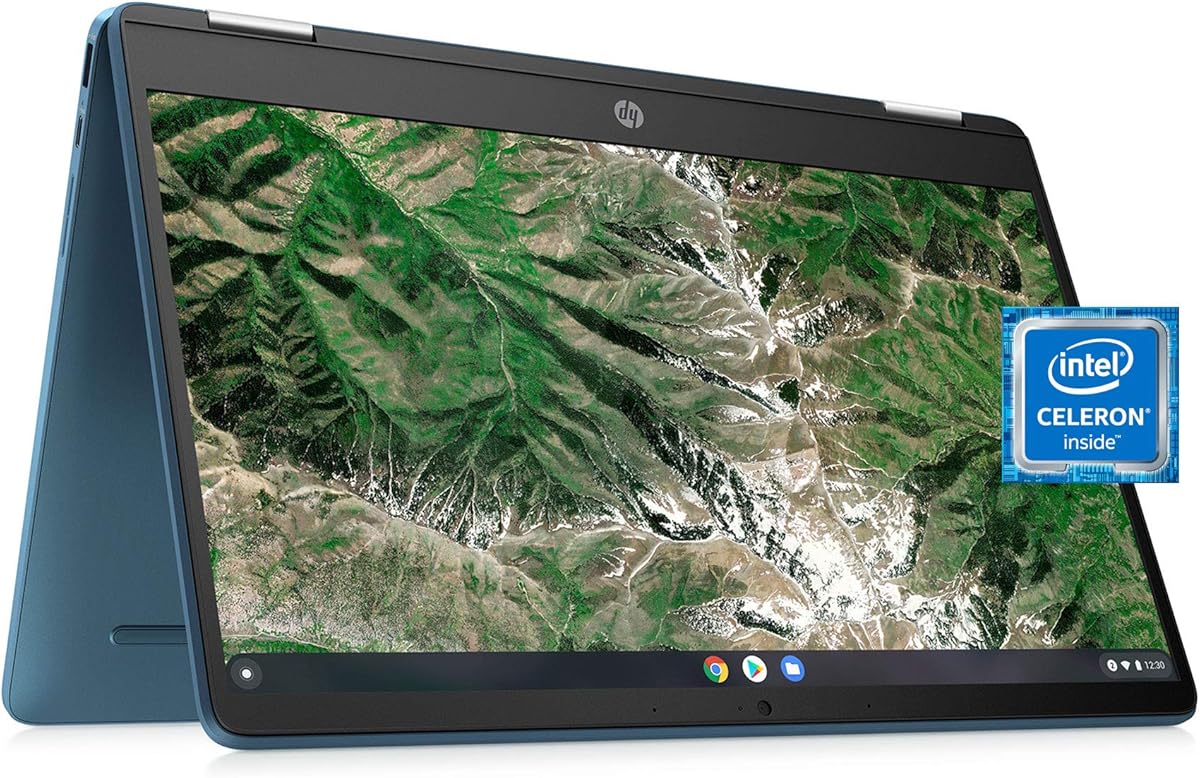
The HP X360 14a Chromebook is best viewed as a complementary device for viewing and presenting Fusion 360 work rather than a dependable production workstation. Its 4.4 rating is encouraging, and the 14-inch touchscreen, convertible form, stereo speakers, webcam, and wireless connectivity make it pleasant for classes, demonstrations, and model review. The title identifies it as a renewed Blue Metallic model.
We may earn a commission when you buy through this link, at no additional cost to you.
Its Intel Celeron N4020 processor has two cores, a listed base frequency of 1.1GHz, and burst performance up to 2.8GHz. Memory consists of 4GB of onboard LPDDR4 and storage is 64GB eMMC. The display is a 1366-by-768 HD touch panel with BrightView and 220-nit brightness, which is adequate for casual viewing but not ideal for judging fine surface details.
The decisive issue is the operating system. This is a Chromebook, and native Fusion 360 is a conventional desktop application rather than a native ChromeOS application. Remote or browser-based access may be possible in some workflows, but a Chromebook should not be purchased as the sole machine for a professional Fusion 360 pipeline. Its limited memory and storage further reduce its suitability for local heavy projects.
Choose this X360 for students who need a flexible secondary screen, people who want to demonstrate designs, or users whose Fusion 360 requirement is limited to occasional remote access. A full Windows laptop remains the safer primary option. Within a Chromebook-oriented guide, the machine offers a nice large-screen touch experience, but its role should be carefully limited.
The large touchscreen and convertible hinge make the X360 useful for reviewing a model, following a tutorial, or sharing a visual reference. It can add value without needing to handle intensive local CAD computation.
Before buying for CAD, verify how the required Fusion 360 workflow will operate on ChromeOS. Browser-based access, remote desktops, and virtualized environments may help, but they do not make this equivalent to a native Windows installation.
We may earn a commission when you buy through this link, at no additional cost to you.
The ASUS TUF F16 RTX 4050 is the most feature-rich premium selection for Fusion 360 in this list, combining a modern Core 5 processor, RTX 4050 graphics, 32GB of DDR5 memory, and a 1TB PCIe NVMe SSD. It carries a 4.0 rating, and its specification sheet is particularly attractive for users who want comfortable headroom for complex assemblies, rendering, and other demanding visual software.
We may earn a commission when you buy through this link, at no additional cost to you.
The eight-core, 12-thread Core 5 210H processor can reach 4.8GHz at maximum turbo. Its RTX 4050 includes 6GB of GDDR6 graphics memory, a meaningful advantage over integrated graphics. The 16-inch FHD+ panel uses a 1920-by-1200 IPS display with a 144Hz refresh rate and anti-glare treatment, providing a large, detailed, and fluid canvas for model inspection.
The trade-off is size and the nature of the hardware. A 16-inch gaming notebook is best used near a desk, and sustained heavy workloads may produce noticeable fan activity. Although the bundle includes a PCO folding radiator, buyers should still allow airflow around the laptop and consider whether the added cooling accessory fits their normal setup. The RGB keyboard and numeric keypad are more useful for gaming than for CAD, while the ports are the more relevant productivity feature.
This TUF is an excellent choice for a professional or advanced student who wants one machine capable of Fusion 360, content creation, software development, and demanding games. It is less appropriate for a user who prioritizes a quiet, ultraportable daily companion. For a fixed workspace, however, the combination of graphics power, DDR5 capacity, fast storage, and a high-quality display makes it a strong premium recommendation.
The 1920-by-1200 IPS display offers more vertical resolution than a conventional 1080p panel and more workspace than a 14-inch notebook. That extra room can make toolbars, modeling palettes, and reference geometry easier to manage.
The included folding radiator is a welcome addition for a gaming notebook, although accessories alone do not replace proper airflow. Keeping the intake area clear and using a stable surface can help maintain performance during extended work.
We may earn a commission when you buy through this link, at no additional cost to you.
The HP Chromebook x360 14b has the highest listed rating in the group at 4.9 and stands out as an excellent general-purpose convertible. Its 14-inch Full HD IPS touchscreen, 360-degree hinge, 8GB of LPDDR5 memory, 128GB of UFS storage, and backlit keyboard create a polished everyday computing package. It is a renewed model running ChromeOS.
We may earn a commission when you buy through this link, at no additional cost to you.
For ordinary browsing, document editing, media consumption, and online meetings, the specifications are well matched. The Intel N200 processor is designed for efficient everyday tasks, while the 8GB memory allocation allows more browser tabs and apps to remain open. The Full HD touchscreen provides a clear canvas, and the 360-degree hinge supports laptop, tablet, tent, and stand positions.
That polish does not change the central limitation for Fusion 360. ChromeOS does not natively run the standard Windows Fusion 360 desktop application, so a buyer would need a suitable remote, virtual, or browser-based arrangement. The N200 is also not intended for demanding local rendering or extensive engineering simulations. It is much more credible as a companion computer for viewing, presenting, and light online work than as the primary CAD station.
Users attracted by the 4.9 rating, touch display, and flexible form should consider this Chromebook for everyday work and model presentation. If Fusion 360 must run locally, choose a Windows machine instead. If remote access is an established part of your workflow, the x360 can be a comfortable secondary or travel device with enough screen quality for reviewing work.
The ability to move among four positions makes the x360 useful at a desk, on a sofa, during presentations, or in a shared workspace. The backlit keyboard and Full HD touch panel add everyday convenience beyond the basic ChromeOS functions.
Customer ratings can reflect value, design, display quality, and overall satisfaction without indicating workstation-class performance. Verify operating-system requirements and expected model complexity before treating a highly rated Chromebook as a Fusion 360 production machine.
We may earn a commission when you buy through this link, at no additional cost to you.
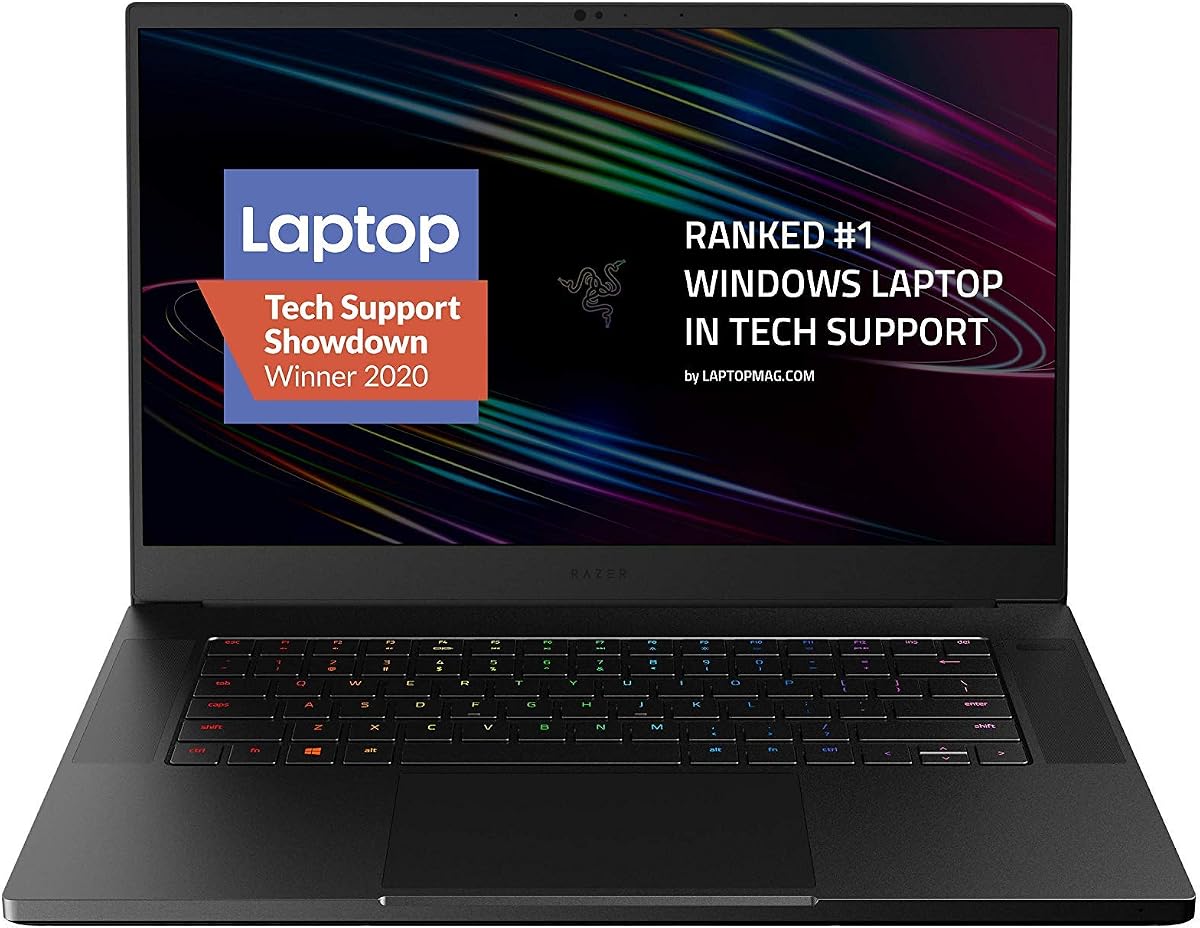
The Razer Blade 15 Advanced is a distinctive high-performance option with a 4.3 rating, an eight-core Intel Core i7-10875H processor, 16GB of RAM, 512GB of SSD storage, and a 15.6-inch Full HD 300Hz display. Its thin CNC aluminum construction and Chroma lighting make it visually distinctive, while the high-refresh screen provides a fluid surface for navigating a 3D model.
We may earn a commission when you buy through this link, at no additional cost to you.
The product title identifies an NVIDIA GeForce RTX 2070 Super with Max-Q design, which is meaningful for graphically intensive work. It also describes an innovative cooling system using a vacuum-sealed, liquid-filled copper vapor chamber to manage heat in a thin chassis. Sixteen gigabytes of memory is sufficient for many Fusion 360 projects, while 512GB of storage provides a reasonable balance for applications and local files.
There is an important ambiguity in the supplied listing information. The title names the RTX 2070 Super, while the descriptive bullet refers to an RTX 2080 Super with Max-Q design. Buyers should verify the exact installed GPU in the current product details and images before purchasing. The machine is also based on a 2020 platform, so newer alternatives may offer a more current CPU generation despite similarly high performance.
The Blade is appealing for users who value a premium, slim chassis and an exceptionally fluid display. It is a strong option for Fusion 360, visualization, and gaming, provided the exact graphics configuration is confirmed. Buyers prioritizing newer processing hardware, greater memory, or a more current platform should compare it with the ASUS TUF F16 listed elsewhere in this guide.
The 300Hz display can make model rotation and selection feel especially responsive. It is a standout feature for interactive 3D work, provided the application and display configuration support a suitably high refresh rate.
The CNC aluminum unibody is listed as only 0.7 inches thick, balancing portability with a rigid construction. The cooling design is especially relevant because capable mobile processors and GPUs need sustained thermal headroom.
We may earn a commission when you buy through this link, at no additional cost to you.
The ASUS TUF FX505GT combines a 4.5 rating with a durable chassis, a dedicated GTX 1650, and a fast 144Hz Full HD display. Its Intel Core i7-9750H processor is a six-core, 8MB-cache chip that can reach 4.5GHz, while 8GB of DDR4 memory and a 512GB PCIe NVMe SSD form the baseline of a capable Windows design workstation.
We may earn a commission when you buy through this link, at no additional cost to you.
The 15.6-inch 1920-by-1080 IPS-type panel provides a detailed and fluid workspace. The GTX 1650 includes 4GB of GDDR5 memory, giving it a meaningful advantage over integrated graphics for Fusion 360 visualization. Durable MIL-STD-810G construction is another distinguishing feature, making the TUF a sensible choice for a student or traveling professional who values physical robustness.
The 8GB memory allocation is the most significant limitation. It may be adequate for one focused Fusion 360 project at a time, but it leaves less room for extensive browser research, rendering tools, and several open applications. The 2019-era processor and Windows 10 Home platform also place this laptop behind more recent systems in processor efficiency and current software support considerations.
This TUF is a good fit for learners and creators who want dedicated graphics, a smooth screen, and a durable machine without moving to the most premium hardware tier. Upgrading memory when possible can make it more comfortable for serious multitasking. Buyers seeking a contemporary processor and abundant RAM should consider one of the 32GB configurations in this comparison instead.
MIL-STD-810G construction gives the TUF a more travel-friendly proposition than many gaming laptops. A durable enclosure can be reassuring for students carrying a computer between classes or labs.
The 144Hz 1080p panel provides responsive cursor movement and model navigation while also serving well for games. It is a useful display for work and entertainment rather than a specialized color-reference panel.
We may earn a commission when you buy through this link, at no additional cost to you.
The Acer Chromebook Spin 513 is a portable, polished Chromebook with a 4.1 rating, a 13.3-inch Full HD IPS touch display, and a 360-degree convertible design. Its Snapdragon 7c compute platform includes an octa-core Kryo 468 processor and Adreno 618 graphics. The device also offers a backlit keyboard, dual-band Wi-Fi 5, Bluetooth 5.0, and a Corning Gorilla Glass display.
We may earn a commission when you buy through this link, at no additional cost to you.
Its portability-oriented design makes the Spin 513 useful for browsing, communication, Google Workspace tasks, and presentations. Two USB Type-C ports support DisplayPort, charging, and USB 3.2 data transfer, while one USB Type-A port is available for accessories. The 13.3-inch format is smaller and easier to carry than the 15- and 16-inch gaming laptops in this guide.
As with the other Chromebooks listed, the operating system is the primary barrier to conventional Fusion 360 use. The listed 4GB of LPDDR4X memory and 64GB of eMMC storage are also modest, and the integrated Adreno graphics do not offer the headroom of a dedicated CAD-oriented GPU. Users must rely on an appropriate remote or virtualized approach for meaningful Fusion 360 access.
Choose the Spin 513 for portable browsing, model viewing, and collaborative work rather than as the primary local CAD machine. It can be a useful travel companion when a full Windows workstation remains available. For students whose entire design curriculum depends on native Fusion 360 installation, one of the Windows laptops in this comparison is the more appropriate purchase.
Corning Gorilla Glass adds useful protection for a frequently portable touchscreen. Its Full HD resolution also provides more modeling detail than the HD panel in the HP X360 14a Chromebook.
DisplayPort over USB-C can make it easier to connect an external monitor, extending the workspace when accurate comparison or presentation is needed. The included USB-A port preserves compatibility with common peripherals.
We may earn a commission when you buy through this link, at no additional cost to you.
The right Fusion 360 laptop depends on model complexity, rendering demands, portability, and operating-system needs. Review the processor, graphics, memory, storage, display, cooling, and connectivity as a connected system rather than treating any single specification as decisive.
Fusion 360 benefits from a processor with several modern cores, particularly when the model contains many features, assemblies are inspected repeatedly, or rendering occurs in the background. The Core i5-13420H, Core 5 210H, Core i7-10875H, and Core i7-9750H options in this guide provide stronger foundations than the Celeron, Snapdragon 7c, and unspecified low-end dual-core processors. Clock speed alone does not tell the whole story, so users should also consider core count, cache, thermal design, and memory support. For regular professional work, a current six-core or eight-core mobile processor offers a sensible balance between responsive modeling, background tasks, and reasonable efficiency.
In short, prioritize a modern multi-core processor, especially for large assemblies, simulations, or rendering.
Graphics performance determines how smoothly a Fusion 360 viewport updates when models contain complex edges, dense surfaces, realistic materials, or multiple bodies. Integrated Intel and Adreno graphics can handle introductory modeling, but dedicated NVIDIA hardware such as the RTX 3050, RTX 4050, RTX 2070 Super, and GTX 1650 offers stronger headroom. Dedicated graphics also open more room for rendering and other GPU-accelerated applications. Buyers should still check the application's current system requirements, especially when considering a previously released or modified configuration.
In short, integrated graphics suit learning, while dedicated graphics are preferable for demanding or professional work.
Memory helps Fusion 360 remain responsive while a design, browser documentation, communication tools, and export utilities are open. The 4GB configurations in the Acer Gateway, HP X360 14a, and Acer Spin 513 are the least comfortable, while the 32GB setups in the HP Victus, Dell Latitude, and ASUS TUF F16 offer much more breathing room. A 16GB machine can be adequate for many assignments, but 32GB is a better target for heavy models, repeated assembly edits, and simultaneous background rendering.
In short, choose at least 16GB for regular work and 32GB when multitasking, complex assemblies, and rendering are priorities.
A solid-state drive is important for responsive application launches, rapid project loading, and comfortable handling of component libraries. The PCIe NVMe and UFS configurations in the ASUS TUF F16, ASUS TUF FX505GT, and HP Chromebook x360 14b provide modern storage foundations. Capacity matters too: 64GB models require careful project management and cloud use, 256GB suits a modest local library, and 512GB or 1TB configurations make it easier to retain revisions, exports, datasets, and educational resources. Large CAD archives should be backed up rather than treated as indefinitely expandable storage.
In short, prioritize SSD performance, then select enough capacity for projects, archives, and regular backups.
Fusion 360 is used by students and professionals through conventional Windows software, and the strongest choices here run Windows 10 or Windows 11. The three Chromebooks provide touch displays and convenient portable form factors, but they should not be mistaken for native Windows workstations. Depending on current software support and a user's account or institutional setup, remote desktop, browser access, or virtualization may provide a workable route. Verify that the specific access method supports the required Fusion 360 features before selecting a Chromebook as the only device.
In short, choose Windows for native local use, and treat Chromebooks mainly as complementary or remote-access devices.
A detailed display makes edges, dimensions, and assembly relationships easier to assess. The 1920-by-1080 Dell Latitude, 1920-by-1200 ASUS TUF F16, 1920-by-1080 Razer Blade 15, and 1920-by-1080 ASUS TUF provide solid detail, while the 1366-by-768 HP X360 14a and Acer Gateway panels are more basic. A 14-inch screen balances workspace and portability; 15- and 16-inch models are easier for complex work but require more room. Touch and convertible hinges can help with presentation and review, although they do not replace precise keyboard-and-mouse operation.
In short, prefer Full HD or higher, then choose the smallest screen that comfortably fits your modeling workspace.
Short benchmark performance is less important than the ability to sustain acceptable performance during a long design session. Dedicated graphics, high-refresh displays, and fast processors can generate heat, particularly in the gaming laptops listed. Look for a substantial chassis, effective airflow, accessible cooling vents, and the ability to use the computer on a hard, level surface. The ASUS TUF F16 includes a folding radiator, while the Razer Blade uses a copper vapor chamber, but accessories and design should still be complemented by sensible airflow and regular maintenance.
In short, ensure the cooling path remains unobstructed, especially during long rendering or simulation tasks.
A good workstation should connect easily to a mouse, external monitor, storage drive, and network without relying on a single adapter. USB-A, USB-C, HDMI, DisplayPort, headphone, and Ethernet options appear across the selections. The ASUS TUF F16 and HP Victus offer broad port selections, while the Razer Blade includes Thunderbolt 3 and the Acer Spin 513 supports DisplayPort over USB-C. Wi-Fi 6 is useful in the HP Victus and ASUS TUF F16, whereas Wi-Fi 5 remains adequate for many environments. A comfortable keyboard, backlighting, and a webcam also matter during extended work and collaboration.
In short, match the port mix to your mouse, display, storage, and network accessories, then prioritize input comfort.
Begin by installing the current Fusion 360 desktop application on a compatible Windows system, then sign in and complete any required updates. Before starting a major project, save a local working copy and configure a separate backup location. Keep component libraries, templates, and reference files organized into clear folders so that a large project does not become difficult to navigate or recover later.
Create a graphics and display setup that matches the work. Connect the laptop to a larger monitor if detailed inspection is important, use a precise mouse for detailed edits, and adjust Fusion 360's graphics settings for the display. For a first project, test how quickly the viewport responds when several bodies and subassemblies are visible, then determine whether more memory, storage, or graphics performance is needed.
Protect both the project and the machine. Save versions at meaningful milestones, keep a separate backup, and avoid placing files solely on a device that could fail. For the laptop, use a stable surface, maintain open vents, clean the screen with a suitable cloth, and keep liquids away from the keyboard. Periodically review software updates, available storage, and thermal behavior, especially if the computer is used for extended rendering sessions.
Prioritize a modern multi-core processor, at least 16GB of memory for regular work, SSD storage, and a detailed display. Dedicated graphics become increasingly useful for complex assemblies, realistic rendering, and demanding professional workflows. A 32GB memory configuration provides additional headroom when Fusion 360 runs alongside browsers and other engineering applications.
A Chromebook can be used with an appropriate browser-based, remote-access, or virtualized workflow when those services support the required features. It is not equivalent to running the native Windows application locally, and the low-memory configurations in this guide are not ideal for demanding local CAD work. Students should confirm their institution's access method before relying on a Chromebook as their only design computer.
It is helpful but not essential for every project. Integrated graphics can handle basic parts, assignments, and moderately simple assemblies, while dedicated NVIDIA graphics provide smoother performance with dense scenes and rendering tasks. If the laptop will also handle games, 3D visualization, or other graphics-intensive software, dedicated hardware is a stronger long-term choice.
Sixteen gigabytes is a reasonable minimum for many students and professionals, particularly when only a few applications are open. Thirty-two gigabytes is more comfortable for large assemblies, rendering, browser research, and multitasking. The 4GB models in this comparison may feel constrained and are better limited to light or educational tasks.
A high-refresh display can make cursor movement, selection, and model rotation feel smoother, but it does not make the underlying model lighter. The processor, graphics, memory, and software still determine how quickly geometry is processed. A high-refresh panel is most valuable when visual responsiveness and gaming are both priorities.
A renewed Windows laptop can be a sensible choice if its specifications are adequate and the seller provides clear condition details. Review the processor, memory, storage, display, ports, battery, warranty, and return terms carefully. The renewed Dell Latitude and HP X360 options may suit general use, but a renewed system intended for serious CAD work should offer enough resources for the intended models.
A 14-inch laptop is easier to carry and can still provide a useful Full HD workspace. A 16-inch display provides more room for toolbars, reference images, and multiple application windows, which can reduce clutter during complex work. The best choice depends on whether the computer is used mainly at a desk or carried between classes, jobsites, and meetings.
Fast storage improves application startup, project loading, temporary-file handling, and overall responsiveness, although processor and graphics performance are equally important. An SSD is strongly preferable to a mechanical drive. Buyers should also consider capacity, since component libraries, project revisions, exports, and rendering results can consume space quickly.
The HP Victus stands out as the best-balanced option in this guide, combining an eight-core Core i5, RTX 3050 graphics, 32GB of memory, a 1TB SSD, and a smooth 144Hz display. The Dell Latitude 7400 provides a more business-focused alternative with 32GB of memory and a Full HD panel, while the ASUS TUF F16 RTX 4050 is the strongest premium choice for dedicated graphics, a large detailed display, and modern DDR5 memory.
Prioritize the combination that matches your actual workload. Students handling introductory assignments may manage with a capable Windows notebook, while professionals working on dense assemblies, visualizations, or simultaneous applications should seek a multi-core processor, 32GB of memory, SSD storage, and dedicated graphics. Portable work also requires attention to display size, cooling, and whether the operating system supports the intended Fusion 360 workflow.
Before purchasing, confirm the current product listing, exact component configuration, operating-system support, warranty terms, and the availability of required accessories. Product details can change between configurations, particularly for renewed and older systems. Checking the current listing and testing a representative project will help ensure that the selected laptop is suitable for the models you actually intend to create.