
Dual-Protocol USB-C Dock
4.5Editor score
10Gbps NVMe transfer
SixGbps SATA transfer
Four M.2 form factors
USB-A and USB-C cable
Compare the best NVME to USB Docking Stations, including speed, SSD compatibility, heat management, cloning, and Mac mini expansion options for work and travel.
NVME to USB docking stations turn an internal solid-state drive into a convenient external storage device without requiring a permanent installation in a computer. The best choices combine broad drive compatibility, quick USB transfer speeds, tool-free operation, and enough heat management to keep demanding workloads stable.
This guide compares ten products using the specifications and compatibility information supplied for each model. It covers conventional single-bay NVMe and SATA adapters, a dual-bay offline cloner, and two purpose-built Mac mini hubs with integrated storage, displays, card readers, and front-facing USB ports.
The top selections illustrate the range of available designs: an aluminum general-purpose adapter, a compact dual-protocol option, and a premium Mac mini expansion platform. Product configurations and availability can change, so confirm the drive type, connector, and host requirements before purchasing.
4.5Editor score

4.6Editor score
4.5Editor score
The comparison below separates general-purpose M.2 adapters, cloning docks, and Mac mini-specific expansion hubs. Ratings reflect the supplied customer feedback, while protocol, speed, capacity, and host-device details help identify the right design for a particular storage workflow.


The ACASIS Gray 10Gbps Dock combines broad M.2 compatibility with a durable aluminum design, making it a strong all-purpose choice for backups, drive testing, and temporary external storage. Its supplied rating is 4.6, and its key strengths are the USB 3.2 Type-C connection, support for both NVMe and SATA drives, and an open toaster-style layout that promotes airflow around the installed SSD.
We may earn a commission when you buy through this link, at no additional cost to you.
The adapter uses USB 3.2 Type-C and advertises transfer rates of up to 10Gbps. That figure represents the interface ceiling rather than guaranteed file-transfer performance, so the host port, SSD itself, cable, and workload all influence real-world results. The enclosure accepts M.2 PCIe NVMe M-Key and B+M Key SSDs as well as compatible SATA drives in 2230, 2242, 2260, and 2280 sizes, giving it more flexibility than an NVMe-only enclosure.
Thermal management is particularly relevant for a bare SSD that must dissipate heat without a full enclosure around it. ACASIS uses an aluminum body, while the horizontal, open-ended design improves exposure to surrounding air. Tool-free installation makes it convenient to swap drives, and no additional driver is required. The listed operating-system support spans Windows versions, Linux, and macOS 10.3 or later.
This is a sensible recommendation for a technician, content creator, or computer enthusiast who wants one adapter to cover both major M.2 protocols. It is less suited to someone who needs to duplicate two drives offline or connect an M.2 SATA AHCI B-Key drive, because the supplied specifications do not promise support for the latter. For most standard NVMe and SATA applications, however, it delivers a balanced mix of compatibility, portability, and passive cooling.
The advertised 8TB capacity provides ample room for large media libraries and workstation backups, although users should still confirm the exact key, protocol, dimensions, and physical appearance of a particular SSD. Because the dock does not include a drive, buyers can choose a capacity and interface that match their own storage needs rather than relying on a bundled SSD.
Supporting both NVMe and SATA removes the need to identify the protocol before shopping for a separate adapter. It also makes the dock useful for testing older SATA M.2 drives alongside newer PCIe storage.
The aluminum body and open toaster-style construction provide passive airflow around the SSD. This design is especially helpful during sustained transfers, when a fully sealed enclosure can allow heat to build up.
We may earn a commission when you buy through this link, at no additional cost to you.
The ACASIS Green 10Gbps Dock is a compact, general-purpose M.2 adapter with a 4.6 supplied rating. Its defining attributes are an aluminum alloy enclosure, a USB 3.2 Type-C connection, and compatibility with M-Key and B+M Key SSDs. The design closely parallels the Gray model while giving buyers a different enclosure color and a distinct product listing.
We may earn a commission when you buy through this link, at no additional cost to you.
Its advertised interface speed reaches 10Gbps, and the supplied information states that an HD movie can be backed up in seconds or multi-gigabyte jobs can be handled more smoothly. Actual performance depends on the source and destination devices. An SSD that cannot sustain the connection speed, a slow host drive, or a USB port with fewer lanes will limit the result.
The housing material and horizontal toaster-style layout are the main physical strengths. Aluminum carries heat away from the drive more effectively than many plastics, and the open layout maintains airflow. Installation requires no tools, and the dock operates without additional drivers, reducing friction when a user needs to inspect, copy, or manage files from an M.2 drive.
Compatibility is broad within the normal M.2 landscape. The dock supports NVMe and SATA drives in 2230, 2242, 2260, and 2280 sizes, with stated capacity support up to 8TB. The operating-system list covers Windows, Linux, and macOS 10.3 or later, making it practical in mixed personal and professional environments.
Choose this model when you want an understated adapter with an aluminum body and broad drive support. It is a good fit for system builders, repair technicians, and users who regularly move between NVMe and SATA media. It does not provide the two-drive offline duplication functionality of a dedicated cloner, and users should still avoid inserting a SATA AHCI B-Key drive unless the seller confirms support.
Aluminum alloy provides a more effective passive heat path than a thin plastic shell. The open layout complements that material by allowing ambient air to circulate around the installed drive.
Plug-and-play operation means the dock can be used without a lengthy driver setup. A USB-C connection and up-to-10Gbps interface make it appropriate for routine backups, file transfers, and legacy drive access.
We may earn a commission when you buy through this link, at no additional cost to you.
The Dual-Protocol USB-C Dock is a compact, value-oriented adapter that supports both NVMe and SATA M.2 drives. It carries a supplied rating of 4.5 and stands out for a two-in-one USB-A-to-USB-C cable, a tool-free installation method, and broad operating-system and host-device support.
We may earn a commission when you buy through this link, at no additional cost to you.
For NVMe drives, the dock advertises transfer speeds of up to 10Gbps. SATA M.2 storage operates at up to 6Gbps, reflecting the lower native interface limit of SATA. It supports the 2230, 2242, 2260, and 2280 sizes across M-Key, B+M Key, SATA/NGFF, and PCIe NVMe configurations. The supplied information also states that it is compatible with Thunderbolt 3.
The included cable improves setup flexibility by offering USB-A and USB-C host connections. The dock is listed as compatible with Windows, macOS, Linux, and Android, along with personal computers, laptops, smartphones, tablets, and smart TVs. Because it uses standard mass-storage protocols and requires no additional driver, setup is straightforward: insert the SSD, connect the appropriate cable, and access it through the host system.
There are important limitations. The specifications specifically exclude M.2 SATA AHCI B-Key SSDs and drives that already have a heat sink attached. The operating SSD may also exceed 60 degrees Celsius, so the drive should not be touched during operation. These caveats make careful pre-purchase drive inspection important.
This dock is a strong pick for a home user, student, or IT technician who needs a versatile adapter without moving into a specialized Mac mini platform. Its compactness, broad device support, and no-driver operation are particularly useful for mobile work. For users with a high-heat or unusually keyed SSD, an enclosure explicitly designed to accept that configuration may be safer.
The two-in-one cable allows the dock to work with both USB-A and USB-C hosts. That makes it easier to carry one adapter between newer laptops, desktops, and systems that expose only legacy USB-A ports.
The dock distinguishes between NVMe and SATA transfer ceilings, reaching up to 10Gbps and 6Gbps respectively. Users should use a host connection capable of delivering the appropriate speed for the drive protocol.
We may earn a commission when you buy through this link, at no additional cost to you.
The Plastic Dual-Protocol Dock is a small, travel-oriented adapter for NVMe and SATA M.2 SSDs. Its supplied rating is 4.4, and the product combines a 10Gbps USB 3.2 Gen 2 interface with a stated maximum capacity of 4TB. At 66 by 51 by 13 millimeters and 61 grams, it is easy to place in a tech pouch or technician's toolkit.
We may earn a commission when you buy through this link, at no additional cost to you.
The dock accepts M-Key and B+M Key NVMe drives along with SATA/NGFF M.2 storage in 2230, 2242, 2260, 2280, and 22110 sizes. NVMe transfers are listed at up to 10Gbps, while SATA reaches up to 6Gbps. The included USB-A-to-USB-C cable and stated Thunderbolt 3 and 4 compatibility broaden the range of host connections that can support fast transfers.
Operating-system support includes Windows 10 and 11, macOS, Linux, Android, and Chrome OS. The listed devices include desktops, laptops, MacBook systems, Chromebooks, smartphones, tablets, smart TVs, and Raspberry Pi. Installation is tool-free, and no software or additional driver is required, so the dock can be used quickly in offices, labs, and homes.
The main trade-off is its plastic shell. The manufacturer describes optimized internal airflow and a non-slip silicone base, but it also warns that the operating SSD may exceed 60 degrees Celsius. The dock also does not support SATA AHCI B-Key SSDs or SSDs with preinstalled heat sinks. Buyers must therefore inspect their drive before use.
This product suits users who prioritize size, host versatility, and simple installation over maximum capacity or an all-metal enclosure. It is a practical selection for a compact 1TB or 2TB travel SSD and can be useful for data recovery, upgrades, and cross-device file access. Users planning to deploy a 4TB drive should check that the capacity is sufficient for the task and pay attention to ventilation during sustained transfers.
The compact dimensions and low listed weight reduce the space required for external storage access. A non-slip base adds stability when the dock is connected to a laptop on a desk.
Plug-and-play access makes the adapter useful for recovering files, moving an operating system, or copying data from an older drive. Broad host support is valuable for technicians working across mixed systems.
We may earn a commission when you buy through this link, at no additional cost to you.
The ACASIS Standard 10Gbps Dock is a straightforward aluminum enclosure for accessing M.2 NVMe and SATA SSDs through USB-C. Its supplied rating is 4.6. The product focuses on core storage functions rather than adding a cloning button, display outputs, or card readers, making it a versatile option for everyday data access and backup.
We may earn a commission when you buy through this link, at no additional cost to you.
The USB 3.2 Type-C interface supports transfer rates up to 10Gbps. The dock accepts M.2 PCIe NVMe M-Key and B+M Key SSDs, as well as compatible SATA drives, across the 2230, 2242, 2260, and 2280 formats. The stated maximum capacity of 8TB gives it enough headroom for large project files, archived media, and local backups.
Its physical design is a toaster-style enclosure that allows easy insertion and removal. The open, horizontal arrangement encourages airflow, while the aluminum body helps conduct heat away from the SSD. Tool-free installation and no required drivers reduce setup time and make swapping between multiple drives straightforward.
The listed operating-system support includes a wide range of Windows releases, Linux, and macOS 10.3 or later. The dock is therefore suitable for mixed environments, including an office that alternates between Windows workstations and a Mac system. Actual transfer speed still depends on the host port and the capabilities of the installed SSD.
This is a good recommendation for someone who wants a dependable-looking, general-purpose M.2 adapter with broad protocol support. It can serve as a temporary OS migration tool, a recovery reader, or a way to access an otherwise unused internal drive. Buyers seeking two-drive cloning or an all-in-one computer hub should choose one of the specialized products later in this guide instead.
The tool-free layout allows a drive to be inserted and removed without a screwdriver. That convenience is valuable for technicians who regularly test several M.2 modules.
Aluminum and the open toaster-style form work together to move heat away from the SSD. The design avoids blocking airflow around the drive during sustained file transfers.
We may earn a commission when you buy through this link, at no additional cost to you.
The ACASIS NVMe SSD Reader is an aluminum M.2-to-USB adapter for users who need to access, back up, or test internal solid-state drives. It has a supplied rating of 4.6 and shares the familiar ACASIS combination of a 10Gbps USB-C interface, tool-free installation, and support for both NVMe and SATA-based M.2 configurations.
We may earn a commission when you buy through this link, at no additional cost to you.
Compatible drives include M.2 PCIe NVMe M-Key and B+M Key SSDs, along with SATA-based modules in 2230, 2242, 2260, and 2280 sizes. Capacity support is stated at up to 8TB. The listed OS coverage includes Windows, Linux, and macOS 10.3 or later, allowing the same adapter to be used across several classes of computer.
The enclosure's aluminum alloy housing is intended to improve heat dissipation. Combined with the horizontal toaster-style arrangement, it provides more passive cooling than a completely enclosed plastic shell. The drive can be inserted or removed without tools, and the dock works without additional drivers, making frequent use uncomplicated.
As with other single-bay adapters, performance depends on the complete connection chain. The host must provide a USB 3.2 Gen 2 or otherwise suitable connection, and the attached SSD must be capable of sustaining a useful transfer rate. The advertised interface speed does not remove those constraints or guarantee the same result for every file set.
This dock is most appropriate for technicians, system builders, and owners of spare laptop SSDs who want a reusable external-access device. It is less compelling for users who need to duplicate drives without a computer or combine storage with monitor outputs. For those requirements, the SSK cloner or the Mac mini-specific hubs provide clearly differentiated functionality.
Because the enclosure accepts multiple common M.2 configurations, users can reuse one adapter across several drives. It is a practical way to connect spare internal storage without installing it permanently.
The aluminum alloy body and open layout are intended to support repeated transfers without trapping heat around the SSD. This passive approach keeps the dock simple and avoids a powered cooling system.
We may earn a commission when you buy through this link, at no additional cost to you.
The Aluminum Dual-Protocol Dock combines a compact metal body with broad M.2 SSD support. Its supplied rating is 4.4. It accepts NVMe and SATA/NGFF drives in 2230, 2242, 2260, 2280, and 22110 sizes, while the USB 3.1 Gen 2 interface supports up to 10Gbps for NVMe and 6Gbps for SATA.
We may earn a commission when you buy through this link, at no additional cost to you.
Its dimensions of 66 by 51 by 13 millimeters and weight of 61 grams make it highly portable. The aluminum alloy shell is described as durable and effective for passive heat dissipation, while a silicone pad provides stability on a desk. A two-in-one USB-A-to-USB-C cable is included, and the product is compatible with Thunderbolt 3.
The dock supports Windows, macOS, Linux, and Android, as well as computers, laptops, smartphones, tablets, smart TVs, and similar devices. Installation is tool-free and no additional driver is needed. The package includes the dock, the 1-foot cable, and a user manual, which makes it a straightforward option for mobile data access and backups.
The specifications contain several limitations that deserve attention. Maximum supported capacity is 4TB, SATA AHCI B-Key drives are excluded, and SSDs with an attached heat sink are not supported. The manufacturer also warns that the drive can exceed 60 degrees Celsius during operation and should not be touched while active.
The product is best suited to users who want a small aluminum adapter with flexible host connections and broad operating-system support. It is particularly useful for technicians, students, and mobile professionals. Those planning to use a higher-capacity SSD should check the stated limit, while anyone working with a specialized key or a preassembled heatsink should choose a more specialized enclosure.
The aluminum shell adds rigidity without making the dock unnecessarily bulky. Its compact footprint and low weight suit travel, while the silicone base helps prevent movement during use.
The dual-protocol controller and two-in-one cable simplify cross-protocol work. Users can select the appropriate host connector and still use the same dock for supported NVMe and SATA media.
We may earn a commission when you buy through this link, at no additional cost to you.
The SSK Dual-Bay Cloner stands apart from ordinary single-drive readers because it can duplicate an M.2 SSD without a computer. It has a supplied rating of 4.4 and uses an RTL9210CDP controller. The product combines a high-speed SSD dock with a standalone cloner, making it useful for preparing replacement media, preserving a working system image, or keeping a spare drive synchronized.
We may earn a commission when you buy through this link, at no additional cost to you.
The USB 3.2 Gen 2 interface supports transfer rates up to 10Gbps and includes UASP support. SATA SSDs remain limited to their native rate of up to 6Gbps. Both NVMe and SATA M.2 drives are supported. Its two-bay arrangement provides a practical workflow: the source and destination can be connected at the same time while the duplication is performed offline.
The one-key cloning function creates a 1:1 duplicate without a host computer. The supplied specifications make an important protocol restriction clear: cloning must occur within the same protocol, so NVMe can be cloned to NVMe and SATA to SATA, but an NVMe source cannot be copied directly to a SATA destination through this function.
For drive maintenance, the dock includes S.M.A.R.T. health checking and adaptive TRIM optimization. Its open-frame construction supports airflow and passive heat dissipation. The manufacturer warns that drives can become hot during use and should be allowed to cool before being handled after operation.
This is the right product for a technician, IT administrator, or advanced user who specifically needs standalone duplication. It is less appropriate for someone who only needs to read an SSD occasionally or wants a Mac mini display and peripheral hub. Its two-bay design and cloning capability justify the extra specialization for the right workflow.
Offline duplication reduces dependence on a host operating system and makes the dock useful for preparing a replacement drive before installation. A single button handles the 1:1 copy process.
Built-in S.M.A.R.T. checking and adaptive TRIM functions add value beyond simple file access. These features focus on monitoring and maintaining drive behavior during supported operations.
We may earn a commission when you buy through this link, at no additional cost to you.
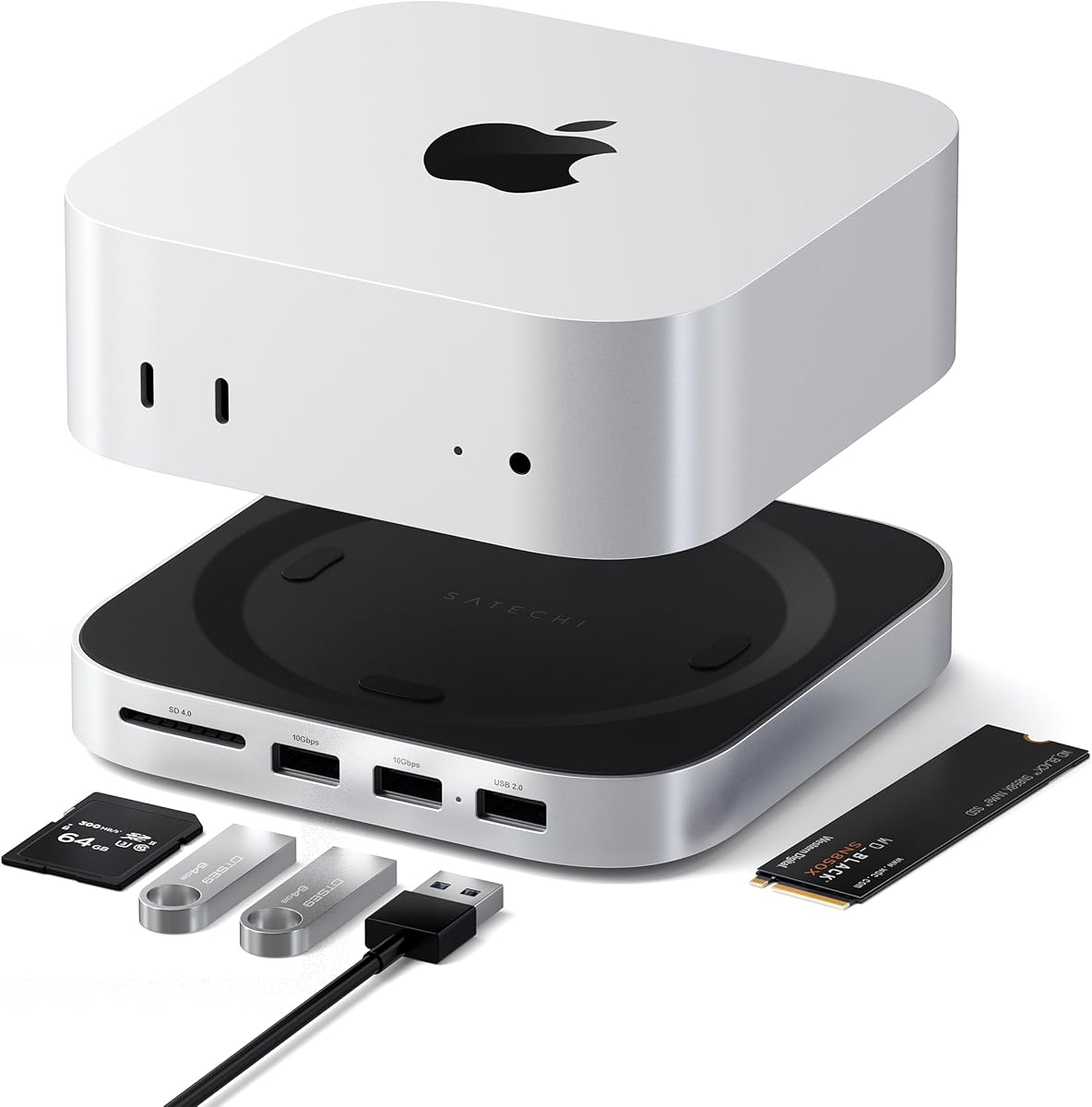
The Satechi Mac mini Hub is a premium, Mac-specific platform that combines a stand, hub, and NVMe enclosure. It has a supplied rating of 4.5 and is designed for Mac mini M4, M5 Pro, and M6 systems. Rather than functioning as a generic USB reader, it integrates storage expansion and front-facing connectivity into a purpose-built desktop accessory.
We may earn a commission when you buy through this link, at no additional cost to you.
The enclosure accepts M.2 NVMe SSDs in 2230, 2242, 2260, and 2280 sizes, supports data transfer at up to 10Gbps, and is stated to work with SSDs up to 4TB. The drive is not included. Compatibility is limited: SSDs with heat sinks and double-sided drives are specifically listed as incompatible, so buyers must inspect the physical design of their intended module.
The front panel offers two USB-A 3.2 ports at up to 10Gbps, one USB-A 2.0 port at 480Mbps, and a UHS-II SD card reader at up to 312MB/s. These are useful for peripherals, removable media, and faster photo or video workflows. The USB-A ports do not support CD readers, Apple SuperDrive, or iPad charging, and only one bus-powered device should be connected at a time.
Constructed from aluminum, the hub measures 12.7 by 12.7 by 2.06 centimeters. Bottom vents and a recessed top are designed to support airflow without obstructing the Mac mini M4 fan. A dedicated power button is accessible in the raised layout, and the product includes a screw, screwdriver, thermal pad, manual, and a two-year limited warranty.
This dock is ideal for a Mac mini owner who wants a tidier desk, additional front-access ports, fast media ingestion, and local NVMe storage. Its value comes from integrating several functions rather than maximizing low-cost storage access. Buyers should verify their exact Mac mini model and choose a compatible bare SSD before installation.
The enclosure adds local NVMe storage while the stand raises the Mac mini for easier access to its front controls. Separate high-speed USB and card-reader connections make it practical as a daily workstation accessory.
Heat-dissipating bottom vents and a recessed top are intended to preserve airflow around the computer. The aluminum body also provides a rigid platform for the installed SSD.
We may earn a commission when you buy through this link, at no additional cost to you.
The Acer Mac mini Dock is a display-focused storage hub for Mac mini M4, M4 Pro, M5 Pro, and M6 systems. It carries the highest supplied rating in the list at 4.9. Its distinguishing combination includes up to 8TB of M.2 storage, HDMI 2.1 output at 4K and 144Hz, 10Gbps USB connectivity, and integrated SD and TF card readers.
We may earn a commission when you buy through this link, at no additional cost to you.
Both M.2 NVMe PCIe and NGFF SATA SSDs are supported in 2230, 2242, 2260, and 2280 sizes with M-Key and B+M Key interfaces. The USB-C and USB-A connections support transfer rates up to 10Gbps, while the card readers are listed at up to 104MB/s. These specifications make the dock relevant to 4K video editing, large media libraries, and demanding creative workflows.
The built-in HDMI 2.1 port supports 4K at 144Hz and HDR, working alongside the Mac mini's native HDMI output to create a dual-display setup. Actual results depend on the monitor, cable, macOS configuration, and host hardware. The dock is therefore better described as a high-capability output option than a guarantee of 144Hz on every display.
Its elevated all-aluminum stand is intended to improve airflow around the Mac mini while acting as a passive heatsink for the storage. The package includes a USB-C cable, screwdriver, two thumb screws, thermal pad, and 5V/3A power adapter. The SSD is not included. Acer recommends connecting the power supply before peripherals to maintain stability with high-capacity drives and attached devices.
This product is a compelling choice for a Mac mini creator who needs both fast storage and high-resolution external display support. Its 8TB stated capacity exceeds that of the other listed Mac mini enclosure, while the card readers streamline media ingestion. It is less versatile outside the supported Mac mini ecosystem and requires attention to the included power and cooling accessories.
The HDMI 2.1 output adds a 4K and 144Hz-capable display path while the native Mac mini port can serve a second screen. Actual refresh rates still depend on the selected monitor, cable, and computer configuration.
Integrated SD and TF readers accelerate card ingestion, while the NVMe enclosure provides high-capacity local storage. The combination reduces the need to swap cables when moving footage, photographs, and project files.
We may earn a commission when you buy through this link, at no additional cost to you.
The right docking station depends on your M.2 drive, host computer, intended workload, and need for additional ports. Protocol compatibility and sustained thermal design matter more than headline speed alone, so use the following factors to narrow the field before purchasing.
In short, verify the protocol, key, and dimensions before buying an adapter.
In short, select a speed the host, cable, and installed SSD can all sustain.
In short, compare the drive's exact length with the adapter's supported sizes.
In short, favor aluminum or open airflow for sustained workloads and let hot drives cool.
In short, check maximum capacity, and choose a two-bay model when offline duplication is essential.
In short, confirm operating-system support and the exact physical port available on your host.
In short, choose extra ports and displays only when they solve a recurring workflow problem.
In short, check exclusions, package contents, and required accessories before ordering.
Begin by disconnecting power before changing an SSD. Identify the drive's protocol, key, and length, then confirm that the dock supports that configuration. Insert the module in the orientation shown by the manufacturer, secure it with the tool-free latch or retaining mechanism, and connect the dock to a suitable host port using the supplied or compatible data cable.
After connection, open the computer's file manager and locate the new storage volume. The operating system may take a moment to detect it, and a new drive may need to be initialized or formatted before use. Always confirm the correct disk identifier before formatting, initializing, erasing, or partitioning anything, especially if the dock contains the only copy of important data.
For longevity, use a short burst of large transfers followed by a pause if the drive becomes hot. Do not touch an operating SSD that a product warns may exceed 60 degrees Celsius. Remove the drive after the system reports that it is safe to do so, keep the adapter away from liquids and impact, and consult the manufacturer's instructions before using cloning or maintenance functions.
No. The dock must support the SSD's protocol, key, dimensions, and capacity. Most products in this guide support common NVMe M-Key or B+M Key drives, but several exclude SATA AHCI B-Key SSDs, and none should be assumed to support a module with an attached heat sink. Check the drive specification before connecting it.
NVMe M.2 SSDs use PCIe and can deliver much higher transfer performance, while SATA M.2 drives use the SATA interface and have a lower native speed. A dual-protocol dock can handle both types, but it cannot make a SATA drive perform like NVMe. The listed SATA ceiling in these products is up to 6Gbps.
No. The 10Gbps figure is an interface maximum, and the installed SSD, host controller, cable, operating system, and individual files also affect results. SATA drives are limited to their native rate, and a host port that cannot supply the required lanes will reduce performance. Using compatible high-speed ports and cables helps achieve the advertised ceiling.
Most of the single-bay adapters are designed primarily for file access, backup, and migration rather than duplication. The SSK Dual-Bay Cloner provides offline 1:1 cloning with one button, but its specifications restrict cloning to matching protocols: NVMe to NVMe or SATA to SATA. It cannot directly clone NVMe to SATA.
Several products in this list explicitly exclude SSDs that already have a heat sink attached. A bare drive is generally easier to fit and benefits from the dock's own passive cooling design. Mac mini enclosures may also have additional restrictions, such as the Satechi model's exclusion of double-sided drives. Verify the exact module and enclosure before purchase.
Choose an aluminum or open-frame design, keep the adapter uncovered, and avoid placing it against a soft or insulating surface. Do not stack heavy objects over the SSD, and allow ventilation around the enclosure. The products that warn of temperatures above 60 degrees Celsius should be left untouched until the drive has cooled.
The general-purpose models in this guide are described as plug-and-play and require no additional drivers. The Mac mini docks include installation hardware for the SSD, and their manuals should be followed for assembly. Operating-system support still depends on using a compatible host system and a recognized USB data connection.
A dedicated dock is usually simpler and more portable, making it suitable for accessing spare drives, backups, and recovery tasks. A Mac mini hub is better when you want storage combined with front-facing USB ports, card readers, and display support in a permanent workstation setup. Choose according to your devices and required workflow rather than maximum port count alone.
The ACASIS Gray 10Gbps Dock stands out as the strongest general-purpose choice because it combines NVMe and SATA support, an aluminum toaster-style enclosure, tool-free installation, and broad operating-system compatibility. The Dual-Protocol USB-C Dock offers a compact and economical alternative, while the Satechi Mac mini Hub provides the most polished dedicated expansion experience for supported Mac mini systems.
Prioritize the details that affect your actual workload: confirm the drive protocol and key, choose a dock with adequate capacity, use a host connection capable of the desired speed, and consider thermal design before beginning long transfers. Users who need offline duplication should choose the SSK two-bay cloner, while display-oriented creators may prefer the Acer Mac mini Dock and its high-resolution output options.
Finally, recheck the current product listing, compatibility notes, package contents, and price before ordering. SSD designs and accessory bundles can change, and the right dock should be judged against the drive and computer you already own. With those checks completed, the ten options cover a broad range of portable storage, maintenance, recovery, and desktop-expansion needs.