
elitehood Adjustable Tablet Floor Stand
4.5Editor score
14-pound circular base
24-inch extended swing arm
22–49-inch height adjustment
Three-axis device positioning
A dependable tablet stand for live streaming should hold a device securely while placing its camera, controls, and display at a useful angle. The right mount can reduce fatigue, improve framing, and keep a creator’s hands available for presenting, monitoring comments, recording demonstrations, or participating in online meetings.
We compared ten stands across the most important streaming variables: base stability, height and angle adjustment, device compatibility, mounting style, portability, lighting support, and the number of screens that can be used at once. The selection includes floor stands, desktop models, overhead arms, a dual-device holder, and a microphone-stand adapter.
Each pick highlights a different practical advantage, from a budget-friendly floor tripod to a premium weighted swing arm and a multifunction desktop rig with a ring light. Ratings and specifications reflect the supplied product information, while product availability and pricing can change, so readers should confirm current listing details before purchasing.
4.5Editor score

4.5Editor score

4.4Editor score
As an Amazon Associate we earn from qualifying purchases.
The table below compares all ten stands by mounting approach, adjustment range, device support, and practical use, making it easier to identify the right option for a desk, bedroom, studio, performance area, or overhead camera setup.



The XXZU 72in Tablet Floor Stand Tripod combines a 4.5 rating with an unusually broad adjustment range, making it the strongest all-purpose choice in this guide. Its aluminum upright extends from 33.07 to 72 inches, while the three-level leg-angle mechanism lets the user move from a conventional tripod shape to a wider stance for low-angle positioning. That flexibility is especially useful when a creator needs to change between a seated presentation, an overhead demonstration, and a higher camera position.
We may earn a commission when you buy through this link, at no additional cost to you.
The 360-degree ball head is another standout feature. It supports vertical, horizontal, and diagonal framing, which means the same stand can carry a tablet for calls, tutorials, music practice, or a live broadcast without requiring a separate mount. The clamp accepts 4.7- to 13-inch devices, including tablets, phones, Kindle devices, and sheet music, while the stated support limit is 5 kg. Reverse folding reduces the unit to a 16.93-inch packed length, and the supplied storage bag makes it practical to move between rooms or locations.
The main compromise is that the tall configuration is not automatically the most stable configuration. A streamer should position the legs carefully, keep the center column aligned, and avoid pushing a fully extended stand near an edge. Because the product does not include illumination, users who need attractive lighting for video will still require a separate light or a more integrated desktop system. Even so, the combination of height range, angle control, compact storage, and broad device support is difficult to match in one floor tripod.
This is the stand to choose for someone who wants one floor-mounted solution for many kinds of live content. It is especially appropriate for home studios, music practice, virtual tutoring, group video calls, and creators filming from above or below a normal eye-level position. For a stable, universally adaptable streaming setup, it is the leading recommendation in this roundup.
The three-level leg adjustment and rotating ball head work together, allowing the tablet to be placed at a low angle, raised for standing use, or turned sideways for a more dynamic composition. This flexibility reduces the need to move furniture or repeatedly reposition the device.
Reverse folding shortens the stand to 16.93 inches, and its 639 g weight keeps it manageable. A creator can pack it away after a desktop broadcast or move it to another room without depending on a large, permanently installed support.
We may earn a commission when you buy through this link, at no additional cost to you.
The SAMHOUSING Metal Floor Stand is a practical option for creators who want a conventional floor pedestal without a folding tripod design. It carries a 4.4 rating and uses carbon steel with a reinforced base, making stability one of its most important selling points. The stand adjusts from 27.5 to 53 inches and places the device on a rotating bracket, giving users useful flexibility for streaming, virtual meetings, gaming, reading, and viewing from a sofa or bed.
We may earn a commission when you buy through this link, at no additional cost to you.
The flat base is a distinctive practical detail. Unlike a narrow tripod leg arrangement, it provides a continuous surface that can support small objects, while the option to place the base partly under furniture can conserve space. The stand also installs or disassembles without tools, according to the supplied instructions. Compatibility extends across 4.7- to 13-inch devices, with case dimensions fitting within the stated width and thickness limits. A double-support structure is retained to strengthen the arm.
Its stability depends on correct assembly. The manufacturer specifically advises keeping the arm and base in the same direction, otherwise the base should be pressed down with a heavy object until the assembly settles correctly. This is not a major inconvenience for most users, but it matters for a live broadcast where movement can shift the screen. The maximum height is also lower than that of the XXZU model, making this a better fit for seated and moderate standing setups than for overhead or room-filling compositions.
Choose the SAMHOUSING stand when durability, a substantial base, and straightforward height adjustment are priorities. It is well suited to living rooms, home offices, bedrooms, and practice spaces where the device may be used for extended periods. Users needing a very tall frame or a low-angle tripod configuration should choose a more specialized model.
Carbon steel components, a reinforced base, and a double-support arm create a more substantial structure than many lightweight plastic stands. That construction is valuable in shared rooms, rehearsal spaces, and locations where the stand may be moved or adjusted frequently.
The continuous base provides stability and can hold small items. It can also slide partly beneath a bed or other furniture when a compact footprint matters, although users should confirm that the arm remains aligned with the base.
We may earn a commission when you buy through this link, at no additional cost to you.
The viozon 3-in-1 Selfie Desktop Live Stand is the most complete lighting-oriented product in the list. Its 4.2 rating reflects a versatile design that combines a tablet and phone holder, an eight-inch LED ring light, and an adjustable desktop arm. The stand accepts devices from 3.5 to 13 inches and supports YouTube, TikTok, recording, streaming, and online meetings, making it particularly appealing to creators who want a compact all-in-one production setup.
We may earn a commission when you buy through this link, at no additional cost to you.
Its adapters can be exchanged to place the devices and light where each task requires. The holder swivels 360 degrees, while the height extends from 0 to 35 inches and the folding arm reaches 14.6 inches when extended. Tension at the arm hinge can be adjusted, helping maintain a chosen position. Beneath the stand is a sturdy round iron base, and the shaft uses an aluminum alloy with an updated hinge mechanism. This structure also creates useful overhead angles for demonstrations, crafting, gaming, or hands-free tutorials.
The ring light operates through USB power and offers adjustable brightness plus three color-temperature settings from 3200K to 6500K. Warm, neutral, and cool tones allow a creator to match different room conditions or camera looks. It does not state a battery capacity, so reliable access to a power source remains important. Compared with a tall floor stand, the desktop design has a smaller footprint but cannot reach across a room, and its many moving parts may require more care during setup and transport.
This is a strong choice for a creator building a dedicated desk studio, learning to stream, or assembling short-form video content. It is less appropriate for someone filming across a large room or moving continuously between locations. For integrated lighting and flexible desktop positioning, however, it provides capabilities that a plain floor stand cannot.
The included ring light removes the need for a separate basic lighting source. Users can adjust brightness and select warm, natural, or cool color temperature while repositioning the light and device adapters to suit the shot.
The extended folding arm and swiveling holder make it possible to look down on a work surface or place the camera above the creator’s hands. Adjustable arm tension helps the stand preserve its selected position.
We may earn a commission when you buy through this link, at no additional cost to you.
The Ipad Tripod Stand with Remote delivers a notable combination of features at the budget end of the guide. It holds a 4.4 rating, adjusts from 16.7 to 65 inches, and rotates the mounted device through 360 degrees. The holder accepts 4.5- to 12.9-inch tablets, phones, and other supported devices, giving it enough range for common iPad, Galaxy Tab, Kindle, Fire, and smartphone streaming setups.
We may earn a commission when you buy through this link, at no additional cost to you.
The included Bluetooth remote is a useful distinction. It allows a creator to trigger supported photo or video functions without returning to the device after positioning it on a tripod, which is particularly helpful for demonstrations, recording, family calls, and online lessons. Aluminum construction keeps the stand relatively light, while its folding size of 17.1 by 4.7 by 3.1 inches makes it easier to store than a full-height pedestal. Four height levels provide a quick way to alter the setup.
The supplied information does not quantify the base weight or describe a locking mechanism for the upper mounting point. That makes it less compelling for heavy tablets, extended arm reaches, or active movement around the stand. Remote operation also depends on the device and app supporting the corresponding Bluetooth commands. The lowest height of 16.7 inches also makes this less suitable for very low, floor-level compositions than a purpose-built overhead tripod.
For students, families, and new streamers who need a simple, portable way to hold a tablet or phone, this model offers strong utility. It is particularly attractive when remote control eliminates repeated trips to the device. Users creating a more permanent production setup with large tablets should prioritize a heavier base and finer arm controls.
The Bluetooth remote can start supported camera actions while the tablet remains outside arm’s reach on the tripod. That convenience makes the stand useful for demonstrations, lessons, and recorded walkthroughs.
The collapsible aluminum frame packs into a relatively compact bundle. Its low weight makes it easier to move between a desk, living room, rehearsal space, or temporary filming area.
We may earn a commission when you buy through this link, at no additional cost to you.
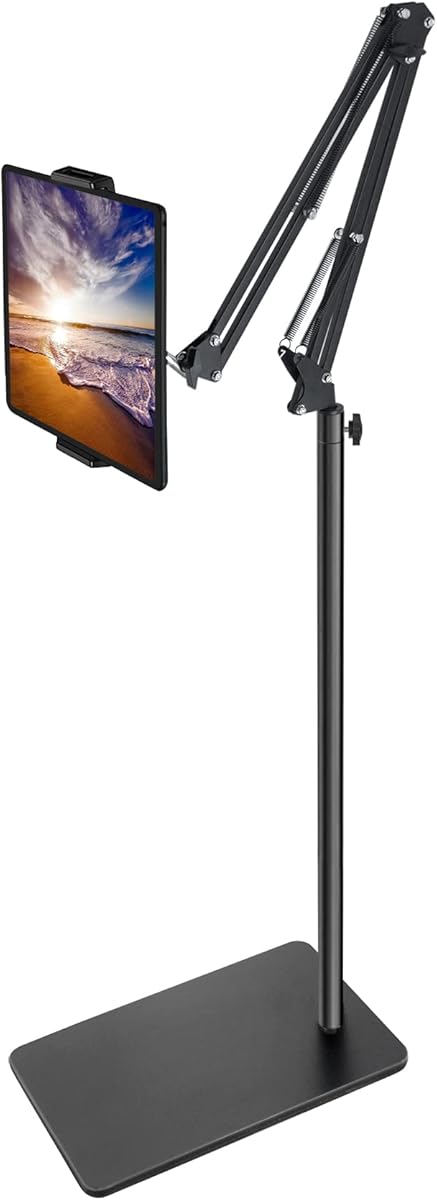
The elitehood Adjustable Tablet Floor Stand is the premium choice because it prioritizes stability and refined positioning. It carries a 4.5 rating and pairs a 14-pound circular base with a reinforced aluminum arm and steel-reinforced joints. Those features are especially valuable when a larger tablet is fully extended or the user may tap and interact with the screen during a stream.
We may earn a commission when you buy through this link, at no additional cost to you.
Its 24-inch arm provides more lateral reach than a typical straight floor stand. The swing arm glides over a bed, couch, or recliner, positioning the display above or beside the user without requiring a separate table. Height adjusts from 22 to 49 inches, while a three-axis pivot hinge supports 135-degree tilt and 360-degree rotation in landscape and portrait orientations. The arm folds for storage and returns to its preset angle, which helps preserve a carefully chosen position.
The universal clamp supports all iPads and iPhones listed in the product information, along with Kindle, Galaxy tablets, Surface devices, and e-readers. The stated width range is 4.6 to 9.7 inches, and it is designed to accommodate cases. As a premium floor system, it naturally requires more floor space and moves less easily than a compact desktop stand. The heavy base is beneficial during a live broadcast, but relocating the stand between locations still takes deliberate effort.
Choose this model for a creator who wants a stable, polished setup in a bedroom, studio, or living room, especially when the tablet must hover over furniture or remain accessible while the user reclines. It is also a strong choice for heavier devices and extended sessions where wobble would be distracting. For people who only need a small desk mount, its capabilities will exceed the requirement.
The 14-pound base, reinforced aluminum arm, and steel-reinforced joints create a reassuringly planted structure. That mass helps the display remain steady while the user taps the screen or a large tablet is extended away from the column.
The 24-inch arm can extend over a bed, couch, or recliner, keeping the screen within a comfortable viewing area. A three-axis hinge provides the tilt, rotation, and directional control needed for varied orientations.
We may earn a commission when you buy through this link, at no additional cost to you.
The Tablet Floor Stand with 5LB Metal Base is a balanced floor option for creators who want an overhead or bedside angle. Its 4.5 rating reflects a solid combination of a weighted base, carbon steel construction, 27.5- to 55-inch height adjustment, and a 360-degree rotating bracket. It is designed for phones and tablets from 4.7 to 11 inches that weigh less than 1.5 lb.
We may earn a commission when you buy through this link, at no additional cost to you.
The broad adjustment range makes it useful for live streaming, video calls, games, music practice, cooking tutorials, and other activities performed while reclining. The arm and bracket can be repositioned to find a comfortable line of sight, while the reinforced base and steel construction support frequent use. Assembly and disassembly require no tools, so the stand can be moved or stored without a complicated setup process.
The product information recommends adding weight to the base when using a heavy tablet or a tablet with a case. That is an important caveat because tapping a screen or extending the arm changes the load distribution. The device and case must also remain within the listed width and thickness limits. Compared with the premium elitehood model, this stand offers a smaller device range and less reach, making it better suited to lighter devices and moderate overhead positions.
This model is a good middle-ground choice for home streaming, bedside tutorials, and overhead demonstrations. It provides a meaningful weight advantage over very light tripods without requiring the space occupied by a large swing-arm system. A creator with a smaller tablet and a modest overhead reach will probably find it especially easy to use.
The five-pound steel base reduces the need for a separate desk or table. Its mass is particularly helpful when the stand is extended toward a bed or positioned above a work area for a demonstration.
The supplied information recommends adding weight for heavier tablets or thicker cases. This helps counterbalance the load and reduces movement as the user reaches toward the display.
We may earn a commission when you buy through this link, at no additional cost to you.
The Dual-Mode Desktop Tablet Stand is the most unusual product in this roundup because it can operate as either a tablet holder or a two-phone stand. Its 3.8 rating is the lowest among the selected products, but the distinctive configuration offers clear value for creators who want to present two camera angles, view comments on a second phone, or keep a chat and broadcast interface visible together.
We may earn a commission when you buy through this link, at no additional cost to you.
In phone mode, two independently movable clamps hold one device each. In tablet mode, those smaller clamps slide into storage positions and the wider spring clamp adjusts from 5.31 to 10.62 inches, allowing a tablet to be fitted without removing its case. The desktop height ranges from 9.84 to 20 inches, and 180-degree flipping plus 360-degree rotation supports quick movement between portrait and landscape. These features are well matched to video calls, live selling, and content creation.
The all-carbon-steel structure, thickened 15-centimeter base, and EVA anti-slip pad are intended to prevent wobble on wood, glass, or a desk. The tablet clamp supports devices up to 0.75 inches thick and is listed as compatible with iPad Pro, iPad Air, iPad mini, Galaxy tablets, Surface Pro, Kindle, and portable monitors. A three-year quality guarantee is also stated, though the product’s lower rating means buyers should carefully review the listing and warranty conditions.
This desktop stand makes the most sense for a creator working at a fixed desk who needs a second phone or wants easy portrait-to-landscape changes. It is not intended to replace a tall floor pedestal for a living-room broadcast. The unique dual mode compensates for the lower rating by offering a function not found in most competing stands.
The independent phone clamps allow a creator to run a second camera, display comments, or keep a reference app open. Converting the stand back to tablet mode is designed to be quick and uncomplicated.
A weighted metal base, low center of gravity, and anti-slip pad help keep the stand planted. The silicone-padded clamp also supports thick cases, removing a common source of frustration during repeated setup.
We may earn a commission when you buy through this link, at no additional cost to you.
The BluuSuuk Tablet Floor Stand earned the highest supplied rating in the guide at 4.6, reflecting a particularly capable combination of reach, stability, and adjustment. Its double-weight base measures 6.6 lb, the claw holder adjusts from 12 to 57 inches off the ground, and the ball head provides 360-degree positioning. Those features make it a natural candidate for overhead recordings, live demonstrations, and streaming from a bed, sofa, or other reclined position.
We may earn a commission when you buy through this link, at no additional cost to you.
The steel construction and retained double-support structure contribute to the stand’s sense of stability. The heavy base is particularly noticeable when the claw reaches away from the center column, helping the device remain planted during a session. Its many listed uses include photography, video calls, online lessons, TikTok livestreams, treadmill training, cooking, gaming, and overhead camera work. This versatility makes it more of a general production accessory than a single-purpose tablet holder.
The device weight limit of less than 1.5 lb is the key limitation. That rating applies to phones, tablets, and other supported devices, so a creator should verify both the dimensions and weight of the exact combination being mounted. The 6.6-pound base also makes the complete system less convenient to carry than a compact desktop model. Despite those considerations, the broad adjustment range and heavy foundation create a compelling option for stationary overhead streaming.
Choose the BluuSuuk model when stability and overhead reach are the leading priorities. It is well suited to a permanent recording corner, bedroom studio, craft station, or workout setup. A lighter mobile device and a fixed location will let the user take full advantage of what this floor stand does best.
The 6.6-pound base counteracts the leverage created when the holder extends over a bed or work surface. That stability is useful for overhead recipes, crafts, gaming, and demonstrations where the camera must remain fixed.
The claw can sit anywhere from 12 to 57 inches above the floor. Combined with the 360-degree ball head, this range supports low, high, side, and diagonal device positions.
We may earn a commission when you buy through this link, at no additional cost to you.
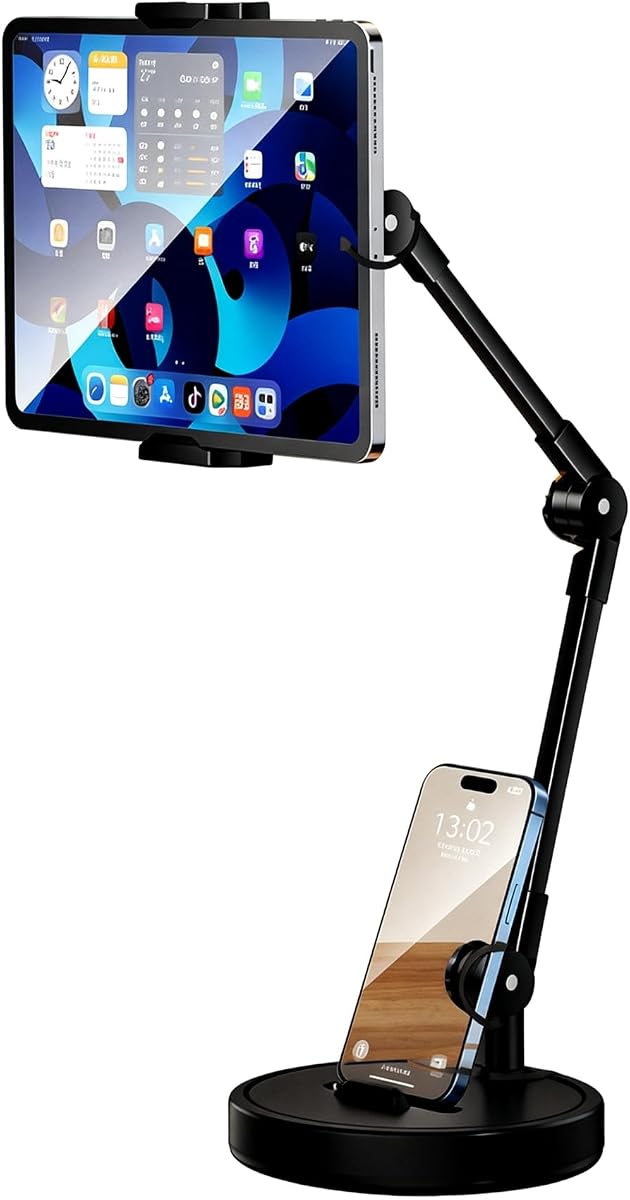
The Rotatable Dual Phone Stand uses a straightforward desktop design to support a tablet and a second smartphone at the same time. Its 4.0 rating places it in the middle of the group, but the two-device arrangement is useful for live streamers who want to monitor comments, keep notes, or display another application without adding a second full stand.
We may earn a commission when you buy through this link, at no additional cost to you.
The upper clamp accommodates 4- to 15-inch tablets, covering iPad, Samsung Galaxy Tab, Microsoft Surface, and similar devices, while a slot in the base holds a smartphone. A 762 g weighted round base with a full-size EVA non-slip pad helps prevent sliding or tipping. The carbon-steel cantilever and multi-joint arm support 360-degree horizontal rotation as well as angular and height adjustment, allowing the tablet to move into an aerial live-streaming or overhead-shooting position.
The main limitation is reach. The arm is 3.74 inches long, so this is better for a compact desk arrangement than for a device suspended far over a table. It also has no integrated lighting, and a 4.0 rating suggests checking recent customer feedback for fit, stiffness, and stability concerns. The broad 4- to 15-inch clamp range is nevertheless broad, and the secondary phone slot avoids the need for a separate small stand.
This product is a good compact choice for office video conferences, online learning, comment monitoring, and small desktop live sessions. It is especially attractive to a creator who wants one upper screen and one phone visible together. For full-room framing or a large overhead reach, a floor stand with a longer arm is the better direction.
The upper clamp provides the main display while the base slot supports a second phone. Creators can keep the broadcast, comments, notes, or a second application visible within a single workspace.
The multi-joint carbon-steel arm changes angle and height while supporting 360-degree horizontal rotation. Its short reach keeps the setup close to the desk, making it practical for smaller workspaces.
We may earn a commission when you buy through this link, at no additional cost to you.
The PLDHPRO Tablet Holder for Mic Stand is a specialized solution for performers who already use microphone, boom, cymbal, or music stands. It carries a 4.4 rating and supports 5.5- to 14.6-inch smartphones and tablets. Rather than adding a separate floor base, it clamps onto an existing pole, making it useful for musicians who need setlists, chords, backing tracks, lyrics, or live controls within reach.
We may earn a commission when you buy through this link, at no additional cost to you.
The short 3.74-inch arm contains three joints with 360-degree adjustment, allowing the device to be tilted and rotated for different performers or sightlines. It fits poles from 0.78 to 1.6 inches in diameter and can also attach to boom and music stands. The device mount works in portrait and landscape, although gadgets under 7.9 inches are restricted to vertical mode. Listed compatibility includes recent iPhone models, iPad families, Galaxy Tab S series, Fire HD, Surface, and Android tablets.
This is a travel-oriented product made from ABS plastic, and the short arm places the device close to the pole. That arrangement is ideal for lyrics and controls but offers less isolated clearance than a long swing arm. Users must already own a compatible stand, and live performers should verify pole diameter and the security of every clamp before performing. The quick, tool-free assembly and light construction make it convenient to pack into a gig bag or backpack.
Choose this holder for musicians, hosts, speakers, teachers, or karaoke performers who want to repurpose existing stage hardware. It is less suitable as a general home streaming stand because it has no independent base and depends on another piece of equipment. Within its intended performance context, however, it is a compact and adaptable solution.
The clamp converts a compatible microphone, boom, cymbal, or music stand into a device support. Creators do not need to carry a separate floor base when stage hardware already provides a stable pole.
Three swivel joints and a short articulated arm allow the screen to move between performers and viewing angles. Tool-free assembly also makes the holder convenient to install before a rehearsal or remove immediately afterward.
We may earn a commission when you buy through this link, at no additional cost to you.
The best stand depends on where the broadcast happens, how the device must be positioned, and how much stability the session requires. Height, reach, weight capacity, mounting style, and screen configuration should be evaluated together rather than as isolated specifications.
A stand that looks rigid at eye level can wobble once the device is extended, tapped, or approached from different directions. Heavier bases, wide tripods, reinforced arms, and double-support structures generally create a steadier foundation. The elitehood and BluuSuuk models emphasize weight with 14-pound and 6.6-pound bases, while the XXZU tripod uses adjustable leg angles to widen its stance. For heavier tablets, a high-capacity arm and a weighted base are more important than a compact footprint.
Choose a substantial base for desktop recording, overhead demonstrations, and long live sessions. A smaller or lighter design is easier to transport, but it should be used with a compatible device that does not exceed the stated load limits.
Height determines whether the camera reaches eye level, table level, or an overhead position. A 65- to 72-inch range provides greater room to frame a seated or standing subject, while a 20-inch desktop model is better for a compact workstation. Reach across furniture is a separate issue: a long swing arm can extend over a bed or couch, whereas a short articulated arm keeps the device close to the pole or desk.
Match maximum height to the intended shot rather than choosing the tallest option. If streaming takes place beside furniture, include lateral reach in the decision. If the device only needs to sit above a keyboard, a desktop stand is simpler and more portable.
Live content often needs changes between portrait and landscape, and a fixed mount can become frustrating as the presentation evolves. A 360-degree ball head, rotating bracket, or multi-axis hinge provides the greatest freedom. Portrait orientation suits vertical video, chat display, and narrow framing, while landscape suits calls, demonstrations, and conventional widescreen broadcasts. Diagonal angles can also make a setup more engaging.
Prioritize a head that locks securely at the chosen angle. Smooth movement is useful during setup, but a live session benefits more from a mount that stays put after adjustment. Check whether the mechanism supports both orientations and whether the device can be turned without removing it from the clamp.
Screen size is only one part of compatibility. A buyer should also compare the clamp’s width range, maximum thickness, supported weight, and ability to grip a device while its case is attached. The selected products range from compact phone holders to a clamp accepting 15-inch tablets, so a particular device may fit one model while exceeding another model’s physical limits.
Measure the device and case before ordering. Verify the listing’s supported dimensions and weight, and check the manufacturer’s model list when possible. A snug silicone-lined clamp is preferable to a loose grip, but it should not be forced beyond its stated range.
Floor stands work near furniture and can reach eye level, but they take up space and may need careful placement. Desktop stands are more discreet and appropriate for a dedicated workstation. Overhead arms suit demonstrations and hands-free activities, while a microphone-stand adapter is ideal for performers who already own stable stage hardware. There is no universally superior mounting style; each simply solves a different spatial problem.
Choose the style that matches the room and workflow. A permanent studio may justify a weighted floor model, while a renter or frequent traveler may prefer a collapsible tripod or compact desktop stand. Musicians should prioritize an existing pole adapter, while a creator filming alone from a bed should consider a long floor arm.
A dual-device arrangement can be highly valuable when one screen carries the live feed and another displays comments, notes, a second camera, or a reference application. The Dual-Mode Desktop Tablet Stand and Rotatable Dual Phone Stand both hold a tablet and phone together. The viozon model uses interchangeable device and ring-light adapters, providing a related way to combine equipment.
Use multiple screens when monitoring is essential or when the content benefits from two camera angles. Choose a dual-device model with independently movable clamps if both screens need different orientations. A single mount remains simpler when the tablet can display everything needed.
Holding a device correctly does not guarantee a polished image. A ring light can improve facial illumination, while a remote can start a recording without returning to the device. The viozon stand includes an adjustable eight-inch LED ring light, and the budget-oriented iPad tripod includes a Bluetooth remote. Neither feature is necessary for every stream, but both can simplify common production tasks.
Prioritize illumination when the recording space is dark or the creator is frequently on camera. A remote is useful for unattended starts and recorded demonstrations. If the chosen stand lacks these features, plan compatible accessories before the first session so setup does not become unnecessarily complicated.
A folding tripod is much easier to store than a weighted swing arm, while a desktop stand sits close to the work area and uses little floor space. Folded dimensions and included carrying accessories provide useful clues. The XXZU model folds to 16.93 inches and includes a storage bag, and the iPad tripod folds to 17.1 by 4.7 by 3.1 inches. By contrast, the elitehood and BluuSuuk models emphasize permanent stability over effortless transport.
Consider how often the stand will move. Portable construction helps creators who stream in several locations, while heavy bases are more appropriate for a stationary studio. Balance the need for transport against the stability required by the device and camera angle.
Begin by assembling the stand on a level surface, following the included instructions and ensuring that the base, arm, and locking mechanisms are fully secured. For a tripod, spread the legs to the desired angle and open the base completely. For a weighted floor stand, place the base on a broad, level surface rather than a rug edge, loose threshold, or uneven board. Attach the device after the stand is stable, and keep protective material between any clamp and the device casing.
Set the composition before going live. Adjust the height to frame the subject without requiring the creator to hunch forward or crane the neck. Turn the mount into portrait or landscape, then tighten every joint one at a time. For a live stream, open the app, confirm the camera preview, test the final framing, and check that cables have enough slack to move with the arm. If two screens are used, arrange the secondary phone for comments or notes without making it the dominant visual focus.
During the session, avoid making rapid height or angle changes while the broadcast is active. Touch the device gently, and do not lean on the stand or hang objects from the arm. After recording, return the arm to its folded position, disconnect the device, and wipe the clamp and metal surfaces with a soft, dry cloth. Check locking screws and spring tension periodically, and store a folding model in its bag away from moisture, direct heat, and heavy objects.
The best type depends on the recording environment. A weighted floor stand offers stability and flexible height, a desktop stand works well for a dedicated workstation, and an overhead arm is useful for hands-free demonstrations. A performer may benefit more from a holder that attaches to an existing microphone stand. Prioritize stability, device fit, and the angle required by the content.
That depends on the stand’s stated clamp width and thickness. Several products in this guide are designed to accommodate cases, but every clamp has a maximum size, and a bulky case may prevent the holder from closing securely. Measure the device and case together and compare both measurements with the product specifications before installing it.
A ring light is not required for every stream, but it can make a creator’s face appear brighter and more even, especially in a dim room. The viozon 3-in-1 stand includes an adjustable eight-inch ring light, while the other stands are designed to work with separate lighting. Consider room lighting, camera exposure, and the color of your background before choosing a light.
No. Height can increase leverage, especially when a device is extended away from the center column. Stability also depends on base weight, leg spread, arm construction, device weight, and center-of-gravity placement. A shorter heavy stand may remain steadier than a tall lightweight model, so evaluate the complete construction rather than height alone.
Some models can. The Dual-Mode Desktop Tablet Stand uses two movable phone clamps or one wide tablet clamp, while the Rotatable Dual Phone Stand supports a tablet above and a phone in a base slot. These designs are useful for monitoring comments, running separate apps, or preparing a second camera view from one desktop setup.
Eye level is a practical target for video calls because it produces a natural view and reduces the need to look down. Overhead positions work well for crafts, cooking, games, and product demonstrations. The best height depends on where the camera must sit relative to the subject, so use the full adjustment range to test both the device and the creator.
A weighted base is advisable when using a larger tablet, extending the arm, or tapping the screen during a live session. Extra mass reduces movement and improves the margin against tipping. Also verify the stand’s device-weight limit, because a heavy base cannot compensate for a device that exceeds the manufacturer’s support specification.
Yes, though the most appropriate model depends on the activity. The PLDHPRO holder is designed to attach to microphone and music stands, while the XXZU model can also hold sheet music. Floor and desktop options work well for lessons, demonstrations, conferencing, and general presentations as long as the device is securely supported.
The XXZU 72in Tablet Floor Stand Tripod is the strongest overall choice because it combines a wide height range, three leg angles, a 360-degree ball head, and compact folding storage. The elitehood Weighted Swing Arm is the premium pick for creators who want maximum stability, extended reach, and refined three-axis positioning, while the Ipad Tripod Stand with Remote is a capable budget option with a useful folding design and included controller.
Prioritize the factors that directly affect your session. Choose a heavy floor base for a large device or an overhead position, a compact desktop mount for a fixed workstation, and a long articulated arm when the device must reach over furniture. Check device dimensions, case thickness, and weight limits before ordering, and ensure the intended viewing angle is available without creating a weak or awkwardly balanced setup.
Product details, customer feedback, availability, and pricing can change over time, so confirm the current listing and specifications before making a final decision. The right tablet stand for live streaming should keep the device secure, preserve the intended framing, and make the production process easier rather than adding another source of movement or setup frustration.