
Creality K1 AI Camera
4.2Editor score
1080P print monitoring
Automatic failure detection
Creality app live viewing
Simple reserved-interface installation
Our Time Lapse Camera for 3D Printer guide compares 10 options for remote viewing, layered recordings, print monitoring, and model-specific installation with
A time-lapse camera for a 3D printer turns a long print into a compact visual record while also helping owners check progress remotely. The most useful models combine live monitoring, automated layer capture, clear images, and printer-specific connections. Compatibility matters as much as resolution because a camera must communicate correctly with the printer, control interface, or cloud platform.
This guide compares ten cameras by examining printer compatibility, monitoring functions, time-lapse automation, image quality, night visibility, installation requirements, and included accessories. The list covers purpose-built Creality and FLASHFORGE systems alongside general-purpose outdoor time-lapse cameras. Because the latter are not designed specifically for 3D printers, their adaptability and practical limitations receive careful attention.
The selections show why dedicated printer cameras usually provide the smoothest experience, while universal cameras can serve unusual installations when a close view and dependable unattended recording matter most. The top picks offer strong combinations of monitoring, automation, and printer support. Prices and availability change frequently, so readers should verify current listings, compatibility details, and accessories before purchasing.
4.2Editor score

4.4Editor score

4.3Editor score
The comparison below separates printer-specific cameras from general-purpose time-lapse models, emphasizing the factors that most affect installation, monitoring quality, and unattended recording.




The Creality Nebula Camera is a purpose-built monitoring accessory with a listed rating of 4.4. It combines real-time viewing, time-lapse photography, and spaghetti detection rather than offering only a static record of the print bed. Its most attractive feature is the combination of remote monitoring and automated failure awareness, which helps owners respond to visible problems without watching every layer continuously.
We may earn a commission when you buy through this link, at no additional cost to you.
The camera connects by USB to compatible Creality equipment and links to the Creality Cloud app over Wi-Fi. That arrangement makes it possible to view progress from a phone or computer, while the time-lapse function compresses the entire build into a shareable visual sequence. Manual focus supports more deliberate framing, and the stated compatibility includes Sonic Pad, Nebula Pad, Ender 3 V3, Ender 3 V3 Plus, Ender 3 KE, CR-10 SE, and HALOT-MAGE/PRO systems. The listing also notes that the Sonic Pad uses Klipper firmware and can connect with many Ender printers.
The principal trade-off is dependence on the stated Creality ecosystem. A buyer using an older or unrelated printer may find that the camera cannot provide the same integrated functions. The spaghetti detection feature is also presented as an automated aid rather than a substitute for inspecting the print. Nevertheless, the combination of live status checks, time-lapse capture, and failure alerts makes this one of the most complete options in the guide for supported machines.
This is the strongest general recommendation for Creality owners who want more than a passive camera. It suits people who regularly print long jobs, value remote visibility, and want automated time-lapse documentation without assembling a separate camera system. Buyers should still confirm the exact printer, pad, firmware, and app requirements before ordering.
Real-time monitoring and spaghetti detection work together as practical safeguards. The live feed makes a print visible, while automated alerts can indicate that intervention may be needed before a failed build consumes more material.
The dedicated time-lapse function records the progression of a build and turns a lengthy print into a concise record. It is especially valuable for sharing a completed model or reviewing how quickly different sections formed.
We may earn a commission when you buy through this link, at no additional cost to you.
This Creality Nebula Camera listing has a 4.4 rating and presents a balanced approach to connected printing. It provides real-time monitoring, time-lapse photography, spaghetti detection, and manual-focus HD imaging. Together, those features make it useful for owners who want both a live operational view and a finished visual summary of a print.
We may earn a commission when you buy through this link, at no additional cost to you.
Setup centers on connecting the camera through USB to the printer or Nebula Pad, downloading the Creality Cloud app, and joining the camera to Wi-Fi. Once configured, the printer can be watched from a phone or computer. The time-lapse function records the build without requiring the owner to operate the camera manually, while the manual-focus lens allows more precise adjustment of the image. Stated compatibility covers Sonic Pad, Nebula Pad, Ender 3 V3, Ender 3 V3 Plus, Ender 3 KE, Ender 3 SE, and CR-10 SE.
Its limitations are practical rather than fundamental. Users outside the supported Creality range should not expect the same level of integration. Users with certain configurations may also need a particular pad to unlock all listed functions. The time-lapse and monitoring tools are most useful when the camera can be positioned consistently and the printer remains within its designed Creality environment.
This camera is well suited to Creality owners who prioritize straightforward remote access and automatic time-lapse capture. It is a particularly compelling option when a user already uses the Creality Cloud app and wants monitoring without assembling an independent camera and storage workflow. Confirm printer and pad compatibility first to avoid a mismatched installation.
After a simple USB connection and Wi-Fi setup, the camera makes print status available through the Creality Cloud app. This is convenient for owners who want to check a long job from another room or location.
Automatic time-lapse photography condenses the print into a shorter visual sequence. It offers a clearer way to inspect the build's progression than waiting for a completed model and judging only the final result.
We may earn a commission when you buy through this link, at no additional cost to you.
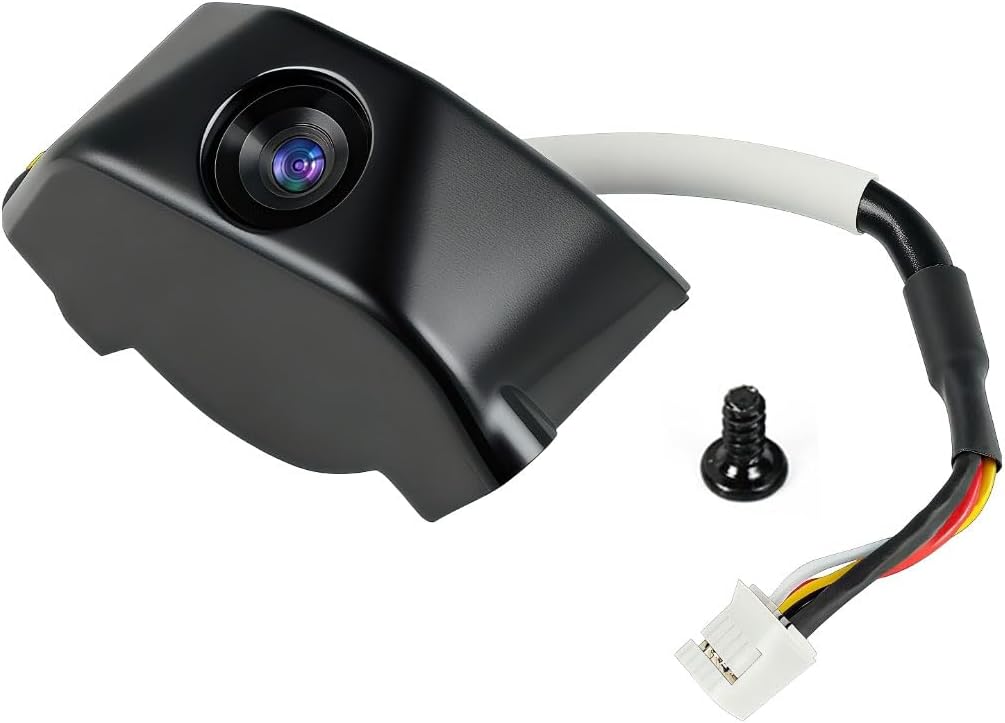
The Creality K1 AI Camera carries a listed rating of 4.6, the highest among the products reviewed here. It is designed specifically for the K1, K1 SE, and K1 Max, and its dedicated camera interface makes installation more direct than building a universal monitoring arrangement. The camera records in 1080P, providing a clear view for following print progress and examining visible surface problems.
We may earn a commission when you buy through this link, at no additional cost to you.
Monitoring works through Creality Cloud or Creality Print, allowing users to keep track of supported printers from a phone. Once a print is complete, users can log into their Creality Cloud account and automatically generate a time-lapse video. That makes the camera particularly useful for documenting a successful build as well as checking it in real time. The package's direct printer compatibility also reduces uncertainty about cables, software, and setup.
The central limitation is its focused compatibility. It is intended for the K1 family rather than Creality's broader printer lineup, and its software functions depend on the relevant Creality platforms. Owners of mixed printer fleets may need a second camera or a more universal solution. Even so, for a K1, K1 SE, or K1 Max owner, the installation path and integrated experience are compelling.
This is the top choice for users of the listed K1 models who want dependable live viewing and automatic time-lapse creation without designing their own camera setup. Its high rating, 1080P capture, and reserved interface offer a focused package. Anyone considering it should verify that the exact printer model has the expected camera interface and that their preferred monitoring software is available.
The reserved camera interface is a major practical advantage. It provides a more direct installation route for supported K1-series printers, reducing the need to improvise connections or mount a separate camera.
Automatic time-lapse generation turns the completed print into an easy-to-share record. This adds value beyond live monitoring because it preserves the progression of the model without requiring separate editing work.
We may earn a commission when you buy through this link, at no additional cost to you.
The Creality Official Nebula Camera has a listed rating of 4.3 and offers one of the most feature-rich monitoring packages in the guide. Its defining capabilities include remote access, automatic time-lapse generation, and 24-hour monitoring with a built-in 940 nm infrared fill light. Those features make it relevant to long prints, overnight jobs, and users who want visibility in a dark room.
We may earn a commission when you buy through this link, at no additional cost to you.
The camera uses an embedded code system to capture an image after each layer finishes. This approach creates a time-lapse video without additional settings, while the live feed can be reached through a PC browser on a local network or the user-friendly app. Remote monitoring also enables the camera to stop a print promptly when a problem is identified, helping avoid further material waste. Its compact, light construction makes positioning easier around different printer setups.
The camera is not a universal solution. It is designed around Creality hardware, and direct PC browser access is specified for the local network rather than unrestricted internet operation. Night vision improves visibility after dark, but the overall experience still depends on app, pad, printer, and firmware compatibility. The listed support includes Sonic Pad, Nebula Pad, Ender 3 V3 KE, CR-10 SE, and HALOT-MAGE.
This is the most comprehensive recommendation for compatible Creality users who want automated layer recording, remote oversight, and nighttime visibility in one accessory. It is particularly attractive for overnight printing and multi-hour jobs where failures are costly. Buyers should check the precise supported configuration and decide whether app-based access, local browser monitoring, or both best matches their routine.
A 940 nm infrared fill light keeps the print visible in darkness, and the camera supports extended monitoring. This is valuable for overnight jobs when a small surface defect or print failure can continue unnoticed for hours.
Capturing the model when each layer finishes produces a natural progression of the build. The automatic video workflow offers a polished record without requiring the owner to remain near the printer and manually trigger images.
We may earn a commission when you buy through this link, at no additional cost to you.
The FLASHFORGE AD5X 3D Printer Retrofittable Accessory Camera Kit has a listed rating of 4.1 and focuses on extending the capabilities of compatible FLASHFORGE machines. Its title identifies real-time monitoring and time-lapse video as core functions, making it a straightforward choice for owners who want visibility without replacing their entire printer setup.
We may earn a commission when you buy through this link, at no additional cost to you.
As a retrofittable accessory, the kit is designed to add camera functionality to an existing system rather than operate as an independent camera. The stated compatibility includes AD5M and AD5M Pro printers, while the product title also references the AD5X category. That model-specific design is beneficial because it can provide a more integrated experience than positioning an unrelated webcam beside the machine.
The supplied information is less detailed than that provided for many Creality cameras. It does not state a specific resolution, lens type, night-vision capability, application, or failure-detection function. Buyers therefore should review the current product page, printer compatibility list, and package contents before assuming features seen on another camera are present. The kit also does not suit unrelated printer brands.
This camera kit is best for FLASHFORGE owners within the supported AD5M, AD5M Pro, and related AD5X ecosystem who want an integrated monitoring and time-lapse upgrade. It is a narrow recommendation compared with the broader Creality choices, but for the correct printer it may be the most natural route to adding useful print visibility.
A retrofittable accessory can be easier to integrate than a generic camera mounted outside the enclosure. The main benefit is a connection designed around compatible FLASHFORGE models rather than an improvised third-party arrangement.
Real-time monitoring covers the operational need, while time-lapse video records the overall build. Using both functions together provides a useful combination of immediate oversight and a lasting visual record.
We may earn a commission when you buy through this link, at no additional cost to you.
This Creality Official Nebula Camera listing has a 4.4 rating and emphasizes image clarity, night visibility, and physical camera adjustment. The stated resolution is 1920 by 1080, while automatic night-vision switching supports monitoring across changing light conditions. It is a compelling option for users who want a clear view of the build and the ability to refine framing after installation.
We may earn a commission when you buy through this link, at no additional cost to you.
The camera uses an adjustable manual-focus lens. According to the product information, the angle can be adjusted in the horizontal and vertical directions, and the lens can be rotated to set the focal length. This physical control is useful because printer layouts, enclosure geometry, and model size can leave a generic fixed-focus camera aimed poorly. A USB connection and the Nebula monitoring experience support real-time viewing, while time-lapse filming records the print's progress.
Compatibility is the main constraint. The listing specifies Creality Sonic Pad, Nebula Pad, Ender 3 V3 KE, Ender 3 V3 Plus, and CR-10 SE, as well as a note referring to HALOT-MAGE Pro. Users should verify the exact printer and pad combination because the product description contains differently formatted model references. The supplied details also do not describe the full app workflow or automatic failure detection.
This camera is best for compatible Creality users who value physical focus and angle control alongside extended monitoring. It is particularly suitable when the print bed is dimly lit or when automatic adjustment between day and night is important. Confirm model support and consider the available Creality software before finalizing the purchase.
Manual angle and focal-length control helps the camera cover the print bed consistently. It is particularly helpful for enclosed printers or setups where a fixed viewing direction would leave part of the model outside the frame.
Automatic night vision keeps the image usable when room lighting changes. A print that begins in daylight and continues overnight does not require the owner to manually alter the camera's viewing mode.
We may earn a commission when you buy through this link, at no additional cost to you.
The Creality K1 AI Camera has a listed rating of 4.2 and delivers several intelligent monitoring functions for supported K1-series machines. It records in 1080P, supports real-time viewing through the Creality Cloud or Creality Print, and can create time-lapse videos through the cloud platform. The result is a feature-rich camera option for owners who want more active supervision than a basic recording device.
We may earn a commission when you buy through this link, at no additional cost to you.
Printing-failure detection is its standout feature. The camera can recognize a failed print and automatically suspend the job, potentially reducing wasted filament. Combined with AI Lidar, it can also identify foreign objects on the platform before printing and pause the process to prevent a collision with the hotend. Pop-up alerts and live viewing give the user the information needed to respond rather than merely reviewing the result afterward.
Installation is straightforward because the K1 series provides a reserved camera interface. The trade-off is model specificity: the product title names K1 Max, K1 SE, and K1C, so owners of other Creality printers should not assume compatibility. The Lidar-related detection is also tied to the relevant hardware and printer environment. Users should verify that their exact model and software configuration support every advertised function.
This is the best value-oriented choice within the K1 family, especially for users who value automatic failure response. It offers a compelling combination of 1080P images, cloud monitoring, time-lapse creation, and print suspension. It is less suitable as a cross-printer solution, but it may be the most practical upgrade for a compatible K1 owner.
Detecting a failure and suspending the print can stop a doomed build before it consumes more material. This active response is more useful than passive monitoring for owners running long or expensive prints.
When used with AI Lidar, the camera can identify foreign objects on the platform before a print begins. A pause at that stage helps protect the hotend and provides another layer of protection beyond visual monitoring.
We may earn a commission when you buy through this link, at no additional cost to you.
The Dsoon TL3000 is a general-purpose 4K time-lapse camera rather than a dedicated 3D-printer accessory. Its listed rating is 4.1, and its defining strengths are long unattended operation, weather resistance, and flexible recording modes. Those qualities can make it useful for documenting a printer from outside its enclosure, especially when a specialized camera is unavailable for the machine in use.
We may earn a commission when you buy through this link, at no additional cost to you.
The camera uses an advanced chip and fill light to capture clear images in challenging low-light conditions. Its IPS display can flip 90 degrees to simplify angle adjustment, while manual macro focus supports both close subjects and distant views. Timed, video time-lapse, and photo time-lapse modes offer different ways to create a sequence, and the included 32 GB TF card provides immediate storage capacity.
Its power system is designed for projects lasting far longer than a typical print. When capturing at five-minute intervals, the stated battery life can reach 180 days. IP66 protection and the included waterproof housing allow indoor or outdoor use, while the suction bracket, circular-tube bracket, and nail bracket provide several installation methods. The major limitation is integration: this camera does not connect to a printer's platform, stop a failed job, or provide the same app-based monitoring as dedicated models.
This is a flexible alternative for owners who need a camera that can move beyond the 3D printer. It may suit a temporary observation arrangement, a shared workshop camera, or a setup where long-term time-lapse recording is more important than failure alerts. It should not be mistaken for a drop-in printer upgrade; positioning, power, and viewing angle require deliberate setup.
A stated runtime of up to 180 days at a five-minute interval is far beyond a normal print's duration. This makes the camera useful for documenting repeated prints or broader workshop activity without frequent charging.
Timed shooting, photo time-lapse, and video time-lapse modes provide flexibility in how the sequence is assembled. Macro focus also allows close observation of small details when the camera is positioned near an active print.
We may earn a commission when you buy through this link, at no additional cost to you.
The 4K Outdoor Construction Time Lapse Camera has a listed rating of 4.5 and is aimed at long-term projects rather than a specific printer platform. Its combination of 4K capture, low-light support, flexible mounts, and extended battery operation can nevertheless be useful for recording 3D prints in a workshop, garage, or other shared space.
We may earn a commission when you buy through this link, at no additional cost to you.
An advanced chip and fill light help the camera capture clear images in low-light conditions, while the flip-up IPS display makes framing easier without moving the entire unit. Manual macro focus can cover both near and distant subjects. Timed shooting, photo time-lapse, and video time-lapse modes offer different output styles, including short video clips and stop-motion-style sequences. The listed video format is AVI, which is worth checking against the user's preferred editing workflow.
The camera can operate for up to 180 days when using a five-minute capture interval. It continues taking shots until the storage card fills, making long unattended recording straightforward. IP66 protection and the included waterproof housing support indoor and outdoor deployment, and the package contains a suction bracket, circular-tube bracket, and nail bracket. Its main drawback is the lack of direct printer integration or a stated app for live print monitoring.
This is a good choice for owners who want a general camera to monitor a printer area over time rather than a dedicated system that controls or protects individual jobs. Its high rating and flexible mounting make it appealing for experimentation. Buyers should format the included memory card before use and confirm that the camera's power arrangement and viewing angle work in the intended location.
Three mounting options make it easier to find a stable viewpoint in different workspaces. A suction bracket can work on a suitable smooth surface, while the tube and nail brackets support more permanent placements.
The stated six-month battery life at a five-minute interval supports monitoring well beyond a single print. It is particularly effective when the camera must document several builds or a continuous workshop process.
We may earn a commission when you buy through this link, at no additional cost to you.
The Dsoon TL3100 WiFi is a general-purpose 4K time-lapse camera with app control and a wide viewing angle. Its listed rating is 4.3, and although it was developed for construction, renovation, garden, and weather documentation, those characteristics can translate to a flexible 3D-printer monitoring arrangement. The ability to control and preview the camera remotely is especially useful when the printer sits away from a computer or phone.
We may earn a commission when you buy through this link, at no additional cost to you.
Built-in 2.4 GHz Wi-Fi allows users to start recording, preview live footage, adjust settings, and download files through the app. The camera records in 4K UHD, uses a 110-degree wide-angle lens, and includes a two-inch HD display for on-site framing. Four modes cover time-lapse video, still photos, scheduled photos, and standard video. Manual focus and partial zoom help users move from broad room views to closer details.
Power and weather protection make this model appropriate for unattended locations. A built-in 3000 mAh rechargeable battery supports extended operation, and an external 6V/1A solar panel can extend runtime in remote areas. The IP66 housing protects against water and dust. Clamp, nail, suction-cup, and strap mounts support placement on walls, poles, fences, scaffolding, and windows. The external solar panel is not included.
This camera is a good fit for a shared studio or remote workshop where wide-angle observation and phone-based control are priorities. It does not know when a print has failed, cannot pause the printer by itself, and requires the camera to be placed where it can see the relevant area. It therefore complements rather than replaces a dedicated printer camera. Buyers should confirm 2.4 GHz network availability and plan power and mounting before installation.
Starting recordings, previewing the live view, changing settings, and downloading files from an app reduces the need to return to the camera. This is useful when the printer is in a separate room, workshop, or less convenient location.
The 110-degree lens can cover a substantial area around a printer, while four included mounting options make it easier to secure the camera. A wide view may show more than the bed, helping a user judge the overall print and surrounding equipment.
We may earn a commission when you buy through this link, at no additional cost to you.
The most important decision is whether the camera must integrate directly with the printer or merely observe it. From there, image quality, automation, night visibility, mounting, and storage determine how useful the camera will be in practice.
A dedicated camera often uses a reserved interface, a compatible control pad, or printer-specific firmware. These integrated arrangements can provide clearer status information, easier installation, and more reliable control than a generic camera placed nearby. Check the exact printer model, pad, firmware, and software named in the listing, because broad brand compatibility does not always mean every function works on every model.
Live monitoring is valuable during long prints because it allows a user to spot a failed layer, an obstructed nozzle, or a problem with the filament. A dedicated camera that connects to the printer's app or cloud platform may also support remote notifications and, in some cases, print suspension. General-purpose cameras with Wi-Fi control can provide a live preview, but they usually cannot communicate with the printer itself.
Automated layer capture is more convenient than manually photographing a build. Some cameras record at set intervals, while others generate a time-lapse after each layer finishes and assemble the sequence in the cloud. Automatic workflows reduce missed frames, preserve the full progression, and make the final video easier to share without extensive editing.
A higher resolution can make small surface defects easier to see, but it is only useful when the lens is correctly aimed and focused. Dedicated K1 and Nebula cameras provide 1080P-class imagery with manual-focus controls, while the general-purpose models offer 4K capture and macro focus. Consider the field of view, minimum focusing distance, enclosure glare, and whether the print bed fills a useful portion of the frame.
A print can continue after normal room lighting has switched off. Automatic night vision or an infrared fill light preserves visibility during overnight work and helps a camera identify problems without forcing the user to turn on a bright lamp. Consider whether the printer sits in an enclosure and whether added light could affect the filament or create reflections in the camera lens.
Spaghetti detection and AI failure recognition can identify a visibly failed build and sometimes pause the print automatically. These capabilities may reduce wasted filament, but they should complement rather than replace inspection of adhesion, layer shifts, nozzle position, and other mechanical issues. Confirm which cameras can suspend a job and which only provide an alert.
Printer cameras normally draw power from the printer or its connected pad, while standalone time-lapse cameras are designed for battery or external power. Long battery ratings make a universal camera useful for repeated monitoring, but the stated interval strongly affects runtime. Solar compatibility can extend outdoor deployments, although the required panel may need to be purchased separately.
Dedicated cameras commonly stream through an app and generate time-lapses in the cloud, while standalone models save directly to TF cards. General-purpose cameras may include substantial storage and several mounts, which helps with unusual workshop layouts. Check supported memory-card capacity, included storage, output formats, and whether the brackets can hold the camera in the intended position.
Begin by confirming that the camera, printer, pad, firmware, and application are compatible. For a dedicated camera, connect the specified cable to the printer or supported control pad, position the lens where it can see the full print bed, and adjust the manual focus if the model provides that control. Keep the lens clean and avoid pointing it directly at bright lights, which can create glare and obscure print details.
For a cloud-connected camera, install the relevant Creality application, join the camera to the required Wi-Fi network, and test the live view before beginning an important print. Confirm that time-lapse recording is enabled and verify whether alerts can appear on the selected phone or computer. For standalone cameras, format the memory card, set the capture interval and recording mode, mount the unit securely, and connect the necessary power source.
Care for the camera by keeping the lens and housing free of dust, filament strands, fingerprints, and oily residue. Check connectors and mounting points before long jobs, and avoid repositioning the camera once a time-lapse begins. If the image becomes dark, review night-vision settings and room lighting. If remote access fails, check the Wi-Fi connection, app status, camera power, and printer compatibility before changing any other settings.
A dedicated camera generally requires a supported printer model, control pad, firmware version, and application. A general-purpose camera can observe almost any printer because it works independently, but it may lack direct print status, failure alerts, and automatic pause functions. Always check the exact compatibility list before ordering.
No. Resolution helps reveal small visual details, but framing, focus, lighting, and camera stability are equally important. A 4K camera positioned poorly may provide less useful evidence than a properly focused 1080P camera aimed at the print bed. Choose the resolution that fits the printer's viewing space and the level of detail you actually need.
Some models can detect a failure, send an alert, and automatically suspend the print. Others only display a live image or create a time-lapse after completion. The exact behavior depends on the product, printer, and software, so the listing should be checked for automatic pause or print-stopping functions.
Yes, if the camera supports reliable low-light or night-vision imaging and can remain connected to power throughout the job. A printer-specific camera with Wi-Fi monitoring is convenient, while a standalone long-runtime camera can also work if its memory and power settings are suitable. Test the setup before relying on it for an overnight print.
A printer camera is designed around a particular printer or control platform and may integrate status, cloud access, failure detection, and time-lapse generation. An ordinary time-lapse camera records a scene at intervals and may offer local storage, longer battery life, and broader placement options, but it cannot directly control the printer.
It depends on the model. Dedicated Creality cameras rely on a compatible app and Wi-Fi for monitoring and cloud-based time-lapse features. Some general-purpose cameras record directly to a memory card without a network, while others add Wi-Fi for live preview, remote settings, and file downloads.
Place it where the full print bed remains visible, the lens can focus clearly, and the camera will not be exposed to moving gantries, filament movement, heat, or accidental knocks. Stable mounts are preferable, and the viewing angle should be checked both before and after a layer is printed.
Use automatic layer or interval capture, keep the camera completely stationary, and verify the first several frames before beginning a long job. Consistent lighting and a clean lens also help the sequence remain smooth. After completion, review the output for missing frames, focus changes, and exposure shifts.
The Creality Nebula Camera stands out as the strongest all-around option for compatible Creality printers because it combines real-time Wi-Fi monitoring, time-lapse photography, and spaghetti detection. The Creality K1 AI Camera is the most focused recommendation for K1, K1 SE, K1 Max, or K1C owners, while the feature-rich Official Nebula Camera is ideal for users who value automatic time-lapse creation, night monitoring, and remote oversight.
When choosing, prioritize confirmed printer compatibility, dependable live viewing, automatic time-lapse capture, and failure alerts over resolution alone. Dedicated cameras offer the most integrated experience, but a general-purpose 4K model can be valuable when a printer lacks a supported accessory or when the camera must document more than one machine. Always check the exact model, required pad, app, power arrangement, and mounting conditions.
Product features, package contents, and current prices can change, and compatibility details may be revised by the manufacturer. Before purchasing, review the latest product listing, confirm that the camera works with the exact printer and firmware, and verify which monitoring and time-lapse features are actually available in your setup.