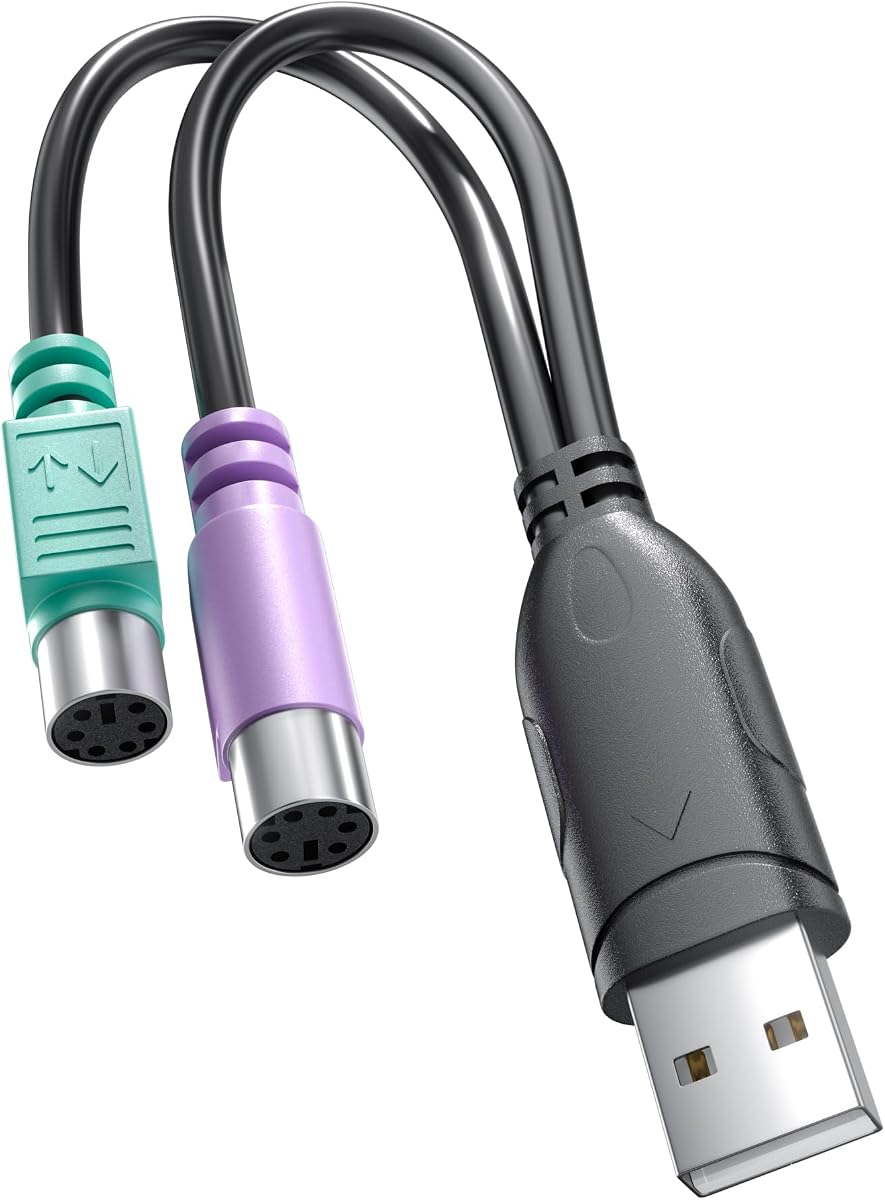
Dual PS/2 Female USB Adapter
4.8Editor score
Dual PS/2 female ports
Single USB male connector
Passive dual-mode requirement
Explore the best PS2 to USB Adapter for Old Keyboard and Mouse, comparing compatibility, connector design, supported systems, key features, and setup.
A PS2 to USB adapter can give a classic keyboard, mouse, trackball, or other legacy input device a useful second life on a modern computer. The right adapter depends on connector direction, active conversion electronics, operating-system support, and whether your original equipment was designed for both PS/2 and USB.
This guide compares ten adapters and cable-based converters by examining their physical design, compatibility requirements, supported devices, installation needs, and practical advantages. It distinguishes genuine PS/2-to-USB solutions from passive adapters that only work with dual-mode peripherals, helping buyers avoid a connector match that appears correct but cannot translate signals.
The rankings show which options are most dependable for everyday use, low-cost ways to reuse one or several peripherals, and specialized choices for KVM setups or particular equipment. Specifications and availability can change, and retail pricing fluctuates, so confirm the current listing and device requirements before ordering.
4.8Editor score

4.5Editor score

4.6Editor score
This side-by-side comparison covers ten solutions with different approaches, including active adapters, passive adapters, compact plug converters, and cable-based splitters. The table emphasizes connector layout, conversion type, device compatibility, and setup requirements so buyers can identify the option that matches their peripherals.




The Perixx PERIPRO-401 is a compact, purpose-built adapter for connecting a PS/2 keyboard and mouse through one USB connection. Its 4.5 rating reflects a generally favorable reception, while its standout feature is the built-in USB controller. That distinction matters because the device is not merely a physical connector change; it includes electronics intended to translate the legacy input signals.
We may earn a commission when you buy through this link, at no additional cost to you.
Two color-coded PS/2 female ports simplify setup. The purple socket corresponds to a keyboard, while the green socket corresponds to a mouse, reducing the chance of reversed connections. A single USB male plug connects the assembly to a desktop or laptop, and the listed specifications place it at USB 2.0. Its support for PS/2 KVM switch connections also broadens its value in control-room, server, and legacy equipment environments.
The main tradeoff is that it addresses a relatively specific need. Buyers need genuine PS/2 peripherals or compatible legacy equipment, and a modern USB-only computer still needs an available USB port. Some computer configurations may also require the user to verify boot-device or BIOS support for the selected keyboard and mouse. Nevertheless, the built-in controller and dual-device design make this a stronger general-purpose choice than a simple passive plug.
This is the most balanced recommendation for a user who wants one adapter for both a classic keyboard and mouse, especially if KVM use is relevant. It is less appropriate for someone searching only for a tiny one-device adapter, but for a complete desktop peripheral conversion, its purposeful design, clear socket coding, and broad application range justify its position as the overall leader.
The dual-socket layout lets a keyboard and mouse share one adapter without requiring two USB ports or two separate conversion boxes. This is especially helpful on laptops, compact desktops, and systems whose available USB connections are limited.
The integrated USB controller is the key technical advantage over a passive plug. It provides an active conversion path for suitable PS/2 input devices instead of relying entirely on signal support built into the peripheral.
We may earn a commission when you buy through this link, at no additional cost to you.
This USB-to-dual-PS/2 adapter is the best budget pick for people who already know that their keyboard and mouse support both connection standards. It carries a 4.8 rating, the highest among the listed products, and presents a straightforward solution: one USB male plug on the computer side and two PS/2 female sockets for peripherals. Purple and green coding identifies the keyboard and mouse connections.
We may earn a commission when you buy through this link, at no additional cost to you.
The adapter is passive, which is both its central advantage and its most important limitation. It does not contain a controller capable of turning an ordinary PS/2-only keyboard into a USB device. Instead, the keyboard or mouse itself must support both USB and PS/2 protocols. That requirement is reasonable for many newer legacy-style peripherals that originally included a detachable PS/2-to-USB adapter, but it makes compatibility checking essential.
When the peripheral has the correct built-in support, the adapter avoids driver installation and works with most systems that recognize standard USB input devices, including Windows and Linux. Its straightforward design also makes it less likely to introduce unnecessary complexity. On the other hand, expecting it to revive every old mouse or keyboard would be a mistake; a purely PS/2 device without dual-mode electronics will not work through this passive path.
The adapter is an excellent choice for a cost-conscious buyer replacing a missing original adapter for compatible equipment. It also serves users who want an easy way to connect keyboard and mouse to a modern computer. Before buying, check the peripheral manual or look for evidence that it originally shipped with a PS/2-to-USB adapter. If that condition is met, this compact option delivers a particularly attractive combination of simplicity and rating.
Because the adapter performs no installation beyond plugging it in, it is convenient for routine desktop setups, shared workstations, and situations where the original manufacturer-supplied converter has been lost.
The passive design works only when the keyboard or mouse can already communicate through both protocols. A genuine PS/2-only peripheral lacks the electronics needed to recognize the USB connection, so an active converter is required.
We may earn a commission when you buy through this link, at no additional cost to you.
The StarTech USBPS2PC is the premium choice in this group for users who value a purpose-designed legacy input adapter from a specialist connectivity brand. It holds a 4.6 rating and converts a PS/2 keyboard and mouse to a single USB interface. The product is particularly relevant to users of specialty peripherals or computers that no longer provide native PS/2 sockets.
We may earn a commission when you buy through this link, at no additional cost to you.
Its software-free setup is a significant convenience. There are no drivers to locate, install, or maintain, so the adapter can be used across compatible systems without a separate configuration process. It also has value in KVM extender situations, where USB KVM equipment may need to accept PS/2 keyboard and mouse signals. That makes it more than a casual desktop accessory and potentially valuable in maintained legacy systems.
As a dedicated adapter, it also offers a clearer proposition than a collection of tiny passive plugs. However, buyers should not mistake the premium positioning for universal compatibility with every PS/2 device. The physical arrangement should be checked against the available USB port and the requirements of the computer, and the device itself must contain the appropriate legacy input electronics for a passive route to work.
The StarTech USBPS2PC is most appropriate for a specialist keyboard, an institutional workstation, or a KVM-related installation where a conventional, dedicated converter is preferable to a loose multi-pack of plugs. It is a particularly attractive recommendation when no software or driver should be introduced into the host environment. For a general user seeking the smallest possible adapter, one of the compact alternatives may be easier to store, but this model is the strongest specialist option in the list.
The absence of special drivers reduces deployment time and makes the adapter practical for systems where installing additional software would be inconvenient or prohibited by policy.
The product description specifically identifies specialty peripherals and USB KVM extenders as practical use cases. Those scenarios benefit from an adapter designed around legacy input conversion rather than an improvised physical connection.
We may earn a commission when you buy through this link, at no additional cost to you.
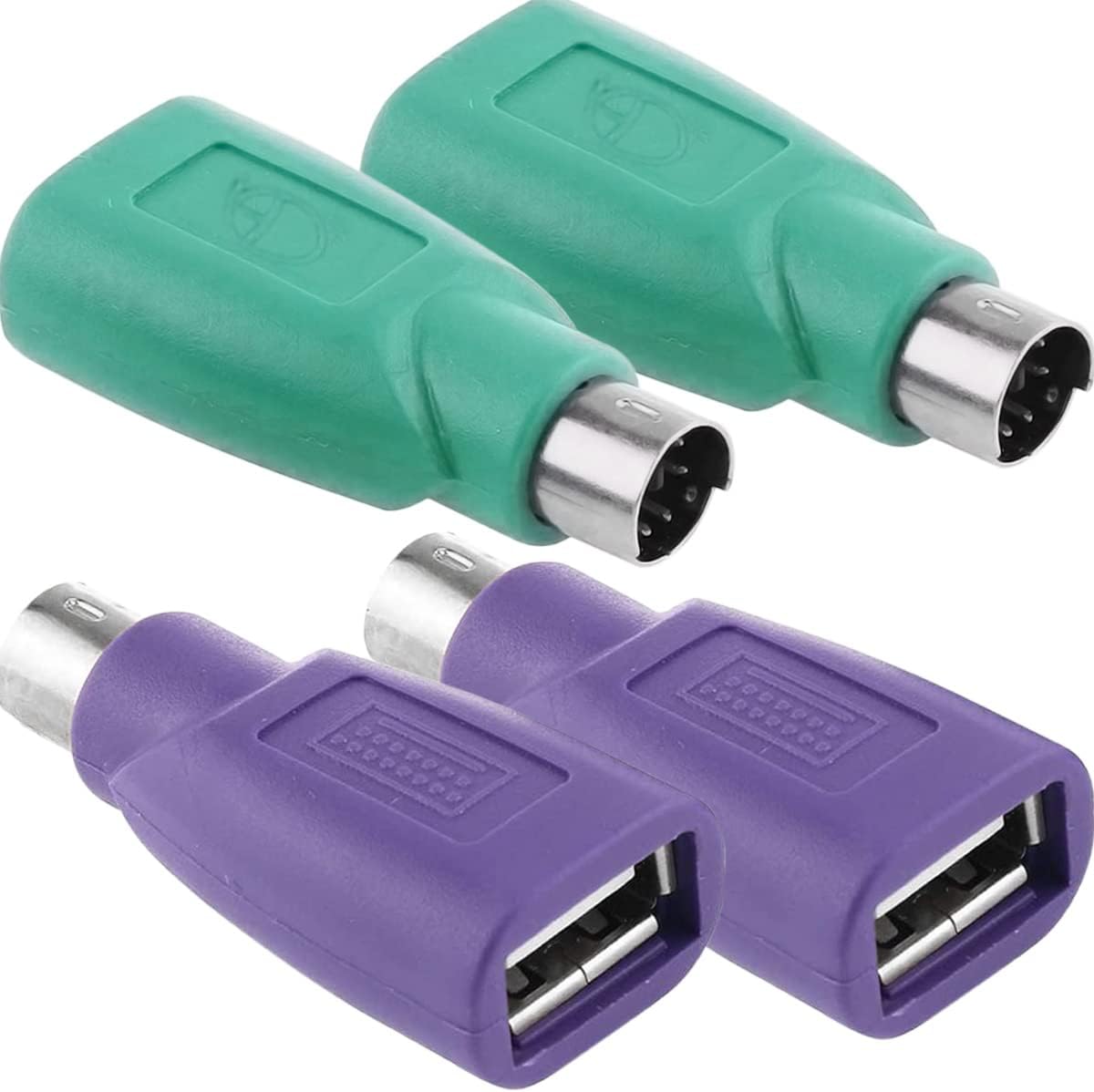
This four-piece set is built for buyers who want several compact adapters available for compatible keyboard or mouse equipment. It earns a 4.0 rating and includes two color choices to help distinguish connections. Each unit is only a few centimeters in size, making the set easy to carry between a desktop, laptop, and service kit without the bulk of a larger converter.
We may earn a commission when you buy through this link, at no additional cost to you.
The adapters are passive and require mice or keyboards with built-in conversion chips. This means they are suitable for devices designed to work with both USB and PS/2, not for every peripheral that physically has a PS/2 plug. The product information also limits the resulting USB connection to input devices such as a mouse or keyboard. It should not be considered a general-purpose USB extension or adapter for drives, storage, or other peripherals.
Installation does not require software, but the instructions recommend powering down the computer before connecting an adapter and restarting afterward. This is particularly relevant when changing mouse or keyboard connections, as a restart can help the system re-identify the input device. The same guidance applies if a middle mouse button is unresponsive following connection.
This set is most useful for technicians, collectors, or users with more than one dual-mode peripheral. Its portability and multiple adapters offer flexibility, while the straightforward installation is convenient. The key limitation remains compatibility: verify that each device has the required built-in converter before ordering. When that condition is satisfied, the four-pack provides a tidy solution for keeping replacements or secondary connections available.
The small dimensions make these adapters easy to keep in a laptop bag, drawer, or technician's toolkit. A spare can also prevent a lost adapter from interrupting a legacy workstation setup.
Because the manufacturer does not recommend hot-swapping these passive adapters, plan to shut down the computer, connect the appropriate peripheral, and restart. This reduces recognition issues and helps establish a stable input configuration.
We may earn a commission when you buy through this link, at no additional cost to you.
The Monoprice PS/2 Keyboard/Mouse to USB Converter is a focused solution for specialist equipment and KVM-related arrangements. It holds a 4.6 rating and addresses a familiar modern-computer problem: a valuable keyboard or mouse has a PS/2 plug, while the replacement computer exposes only USB connections.
We may earn a commission when you buy through this link, at no additional cost to you.
The strongest documented use cases are specialty peripherals and KVM extender situations. A KVM extender may receive input from a USB KVM while a nearby workstation needs a PS/2 keyboard or mouse, and this converter bridges that gap. The absence of required software or special drivers also keeps deployment straightforward, which matters in offices, labs, industrial systems, and homes where installing extra utilities may be undesirable.
Compared with products that emphasize passive compatibility or multiple color-coded sockets, this adapter provides a more general converter concept in a simple black enclosure. Buyers should still examine the physical connector arrangement and confirm that the computer's USB port and legacy peripheral align with the intended keyboard or mouse configuration. The product's concise listing does not provide as many implementation details as some alternatives.
Choose the Monoprice converter when the main goal is preserving a specialty keyboard or mouse and the setup may involve a USB KVM. It is less compelling for a buyer who wants a large multi-pack of ultra-compact replacements, but its clear purpose, no-driver operation, and strong rating make it a solid general recommendation for controlled installations.
Expensive or hard-to-replace keyboards can be worth reusing after a workstation upgrade. A dedicated converter avoids discarding an established peripheral setup when native PS/2 ports are no longer available.
The documented ability to use PS/2 input devices with USB KVMs is especially useful in installations where a remote or extended console must accept traditional keyboard and mouse connections.
We may earn a commission when you buy through this link, at no additional cost to you.
The LEIHONG adapter is a cable-based active converter for bringing older PS/2 keyboards and mice into a USB-only setup. It has a 4.4 rating and includes a USB conversion chip, making it more useful for genuine legacy peripherals than a purely passive adapter. A blue keyboard connection and green mouse connection make the intended assignments easy to distinguish.
We may earn a commission when you buy through this link, at no additional cost to you.
The product is listed as compatible with Windows and Linux and is designed for automatic recognition after connection. Its supplied information describes immediate detection, responsive operation, and use with older keyboards. It also supports a full PS/2 KVM arrangement, an important detail for users who want to preserve an established switching environment while adding USB connectivity to a newer computer.
Its physical design includes a cable and central adapter block. That makes it less pocket-sized than a one-piece plug, but it also provides separation between the computer and legacy devices, reducing strain on the USB socket when a keyboard is moved. The built-in chip is the principal strength, while the fixed cable length may influence placement on a crowded desk or inside a narrow workstation.
This is a practical choice for someone with an older keyboard that lacks modern USB support or for a user restoring a basement or workshop computer setup. It removes the dual-mode restriction associated with passive adapters and supports two legacy device types at once. The tradeoff is bulk and a less modular form, but for a fixed legacy station, the active electronics and immediate recognition make this option highly practical.
The built-in chip is the defining feature. It lets the adapter handle the protocol conversion instead of requiring the keyboard or mouse to contain equivalent electronics, making it more appropriate for genuinely old peripherals.
The cable and central housing provide useful strain relief for a desk that will remain stationary. Color-coded ends also reduce the chance of attaching a mouse and keyboard to the wrong sockets.
We may earn a commission when you buy through this link, at no additional cost to you.
The USB to PS/2 Converter Cable is an 18-centimeter, cable-style solution for a modern computer that lacks a PS/2 port. It has a 4.3 rating and includes a conversion chip, providing a more active path than a simple physical connector adapter. The listing specifically supports PS/2 keyboards, mice, and barcode scanners.
We may earn a commission when you buy through this link, at no additional cost to you.
Its most useful advantage is versatility across PS/2 input equipment. Barcode scanners are especially relevant in retail and warehouse environments, while a keyboard or mouse can be connected for a legacy workstation. The built-in chip is advertised as providing stable signal transmission without lag, and the plug-and-play design eliminates the need to install a driver.
The cable is described as using PVC material with an oxygen-free copper core. Those construction details suggest attention to durability and signal stability, although the short 18-centimeter length is the deciding factor for many setups. It works best when the legacy device is already close to the computer and the goal is an unobtrusive, low-loose cable rather than extended reach.
Choose this cable for a compact workstation involving a single PS/2 input device, particularly a barcode scanner or nearby keyboard. It may be less convenient when both a mouse and keyboard must be connected or when the peripheral sits farther from the computer. Within that narrower role, the conversion chip, driver-free setup, and short, tidy form make it a strong option.
Support for PS/2 barcode scanners broadens the product's appeal in business workflows that still use legacy scanning equipment. An active chip can make such specialized peripherals usable through a modern USB connection.
At 18 centimeters, the cable is best suited to a peripheral positioned close to the computer. The short lead minimizes clutter and avoids the need for an additional extension arrangement.
We may earn a commission when you buy through this link, at no additional cost to you.
This four-piece PS/2-to-USB adapter set is intended for users who need compact replacements for compatible keyboards and mice. Its 4.2 rating reflects a practical product with an important caveat: these are passive adapters without a conversion chip. They can therefore operate only when the attached keyboard or mouse supports both PS/2 and USB modes.
We may earn a commission when you buy through this link, at no additional cost to you.
The passive approach can work well with equipment that was designed to ship with a detachable PS/2-to-USB adapter. The listing specifically notes compatibility with certain Cherry G80-3000 and SteelSeries 6Gv2 keyboards, although buyers should still verify their own model rather than assume it will behave the same way. Many newer wired gaming keyboards and illuminated models do not support PS/2.
Unlike active converters, the adapters do not add substantial cable length or a central electronics block. That makes them easy to store and suitable for mobile computer bags. Their limits are equally clear: they cannot create PS/2 support in a USB-only peripheral, they are not intended for other USB device classes, and the instructions advise turning off the computer before connecting or changing them.
This set is best for owners of confirmed dual-mode equipment who want multiple inexpensive replacements. It is less suitable for the common goal of reviving a keyboard that was originally PS/2-only. Checking the peripheral's manual, original accessories, and supported interfaces before purchase is essential. When compatibility is confirmed, the four adapters provide a simple and highly portable solution.
The absence of a conversion chip means the peripheral itself must handle both protocols. Look for explicit PS/2 support in the manual or evidence that the device originally included a PS/2-to-USB adapter.
Four units allow one adapter to remain with each of several compatible peripherals. Their tiny form also makes it simple to keep a replacement in a laptop case or technical workspace.
We may earn a commission when you buy through this link, at no additional cost to you.
The VizGiz three-pack is designed primarily as a replacement for users whose keyboard or mouse originally shipped with a PS/2-to-USB adapter. It has a 3.2 rating, the lowest in this group, and its listing gives unusually explicit compatibility guidance. The keyboard or mouse must be USB compatible and dual-compatible in a way associated with the original manufacturer-supplied adapter.
We may earn a commission when you buy through this link, at no additional cost to you.
The physical arrangement is direct: a PS/2 female Mini-DIN socket connects to the legacy peripheral, while a Type-A USB male plug enters the computer. There is no software or driver to install, making the connection simple once compatibility is established. The set includes three units, which can cover more than one device or serve as spares.
The main concern is scope. This product is not intended to convert arbitrary PS/2-only equipment, and its compatibility warning is more restrictive than a general active converter. It also notes that PS/2 interfaces do not support hot plugging, so the computer should be turned off before connection. Users should avoid interpreting the USB-compatible requirement as universal support for every USB mouse or keyboard.
This adapter makes the most sense when a known dual-compatible peripheral has lost its original connector and the buyer can identify a matching product history. In that specific replacement scenario, the simple design is useful. For a broad attempt to revive old equipment, an active converter with a built-in chip would be a safer and more versatile recommendation.
The strongest use case is replacing a missing manufacturer adapter for a peripheral that originally supported both interfaces. Matching that hardware history reduces the risk of an unsuccessful connection.
Having three adapters is helpful for spares, but the set's value depends on finding at least one clearly dual-compatible device. Buyers with only PS/2-only equipment should choose an active converter instead.
We may earn a commission when you buy through this link, at no additional cost to you.
The Dual PS/2 Y Cable is a 30-centimeter converter cable for connecting one keyboard and one mouse through a single USB port. It has a 4.6 rating and a notable feature for a legacy adapter: built-in chip processing with support for hot plugging. That means it can be more convenient in an established workstation than passive adapters that require the computer to be powered down.
We may earn a commission when you buy through this link, at no additional cost to you.
The cable uses a USB 1.1 full-speed interface and provides dual PS/2 female outputs for keyboard and mouse. It is advertised as plug-and-play without driver installation and supports a broad list of older Windows releases, including Windows 98, ME, 2000, XP, Vista, 7, 8, and 8.1, along with Linux. This makes it particularly interesting for retro-computing projects and machines assembled from older components.
Its key strength is the combination of dual-device support, active processing, and hot-plugging convenience. The tradeoff is the operating-system focus. While the listed legacy coverage is extensive, a buyer using a different modern environment should not assume the same result without confirmation. The fixed 30-centimeter length also places limits on how far the keyboard and mouse can sit from the computer.
Choose this Y cable for a vintage desktop rebuild, retro-computing setup, or established machine that benefits from both keyboard and mouse connected through one USB port. It is less suitable when a longer cable or a current-system compatibility guarantee is essential. Within its intended legacy environment, it is a well-rounded cable solution with a strong rating and useful hot-plugging support.
Unlike passive plug alternatives that require a shutdown, the built-in processing and listed hot-plugging support make it easier to change input devices while a vintage system is in use.
The Y-style arrangement provides dedicated PS/2 destinations for both input types. It is useful for recreating a familiar legacy desktop setup without occupying multiple modern USB connections.
We may earn a commission when you buy through this link, at no additional cost to you.
The right adapter depends first on the exact connectors and conversion electronics used by your peripherals. After that, consider device support, connection layout, operating system, KVM use, and whether you need one or several adapters.
Choose active conversion for broad legacy compatibility, and choose passive conversion for a known dual-mode peripheral.
Match the plug to the computer and the socket to the peripheral, then choose dual or single-device layouts.
Confirm that the exact peripheral model supports PS/2 before buying a passive adapter.
Choose dual ports for a complete legacy desktop and single ports for one specialized peripheral.
Prefer a driver-free option supported on your specific operating system.
For managed installations, verify KVM direction, connector type, and supported input signals.
Choose a short plug for portability and a longer cable for easier peripheral placement.
Plan for a restart with passive adapters and check whether active models advertise hot-plugging.
Before connecting anything, identify the keyboard and mouse connectors, confirm that the adapter's USB plug fits the intended host port, and verify device compatibility. For a passive model, look for explicit dual-mode support. For an active adapter, confirm that its keyboard or mouse sockets match the type of device being connected, using the conventional purple and green color assignments.
For passive adapters that are not designed for hot-plugging, shut down the computer before making the connection. Attach the keyboard and mouse to the appropriate PS/2 sockets, connect the USB plug to the computer, and then start or restart the system. Active adapters that advertise hot-plugging can usually be connected while the system is running, but following the manufacturer's guidance remains the safest approach.
After connection, boot into the operating system and test basic text entry, pointer movement, scrolling, and any mouse buttons. If recognition is inconsistent, power down, reseat the connectors, and restart. Avoid sharply bending the cable near either end, keep the adapter away from moisture and excessive heat, and store plug-style units in a small case so the PS/2 tabs do not become damaged.
No. A passive adapter generally requires a keyboard or mouse that supports both PS/2 and USB, while an active adapter with a conversion chip is needed for most PS/2-only equipment. Always confirm the exact model and its supported interfaces. A physical connector match alone does not guarantee that the device can communicate through USB.
Most active adapters in this category are designed for plug-and-play use and do not require separate drivers. Passive models also avoid software installation, but they can need a shutdown and restart for reliable recognition. Follow the product-specific instructions, particularly when changing the keyboard or mouse while the computer is running.
Yes, if the product includes separate PS/2 female sockets for each device. The dual adapters in this guide typically color-code the keyboard socket purple and the mouse socket green. Connecting both through one USB port is convenient on laptops and compact desktops, but the adapter should not be treated as a general USB hub.
The most likely cause is that the keyboard supports only PS/2 and therefore lacks the electronics needed to communicate through USB. A passive adapter cannot create that missing capability. Check the original manual and accessories, then choose an active converter with a built-in USB chip if the keyboard is PS/2-only.
Support depends on the specific product. The LEIHONG adapter is listed for Windows and Linux, while the Y cable advertises support for several Windows releases from Windows 98 through Windows 8.1 and Linux. Review the current manufacturer listing for the exact operating-system claim, and confirm that the keyboard or mouse is recognized during startup.
Some models are expressly designed for PS/2 and USB KVM applications, including the Perixx and Monoprice options. Others can be used in an established PS/2 KVM setup. You must identify whether the adapter connects to the KVM console side or the computer side and ensure the signal direction matches the equipment.
For passive adapters, turning off the computer is generally the safest procedure because hot-swapping is often unsupported. Active adapters may support hot-plugging, but their instructions should take priority. A restart after connection can resolve recognition problems, including an unresponsive mouse middle button.
No. These adapters are designed for PS/2 input devices such as keyboards, mice, and some scanners. They do not turn the USB connection into a general-purpose port for printers, drives, network adapters, or other USB device classes. Use a standard USB port or a proper powered hub for those accessories.
The Perixx PERIPRO-401 is the most balanced overall recommendation because its built-in USB controller, dual PS/2 sockets, and KVM applicability cover the core needs of a legacy desktop. The dual PS/2 female USB adapter is the budget option for confirmed dual-mode peripherals, while the StarTech USBPS2PC is a strong specialist choice for controlled installations and KVM-related work.
Prioritize conversion type over connector appearance. Genuine PS/2-only equipment calls for active electronics, whereas a passive plug is suitable when the keyboard or mouse explicitly supports both standards. Next, decide whether you need one device or a combined keyboard-and-mouse arrangement, then check the operating system, physical space, installation procedure, and any KVM requirements.
Retail availability and pricing can change, and manufacturer details may be updated over time. Review the current listing before ordering, confirm the exact peripheral model, and make sure the adapter's features match the connection you actually need. With those checks completed, one of these ten options can provide a practical bridge between vintage input equipment and a modern computer.