
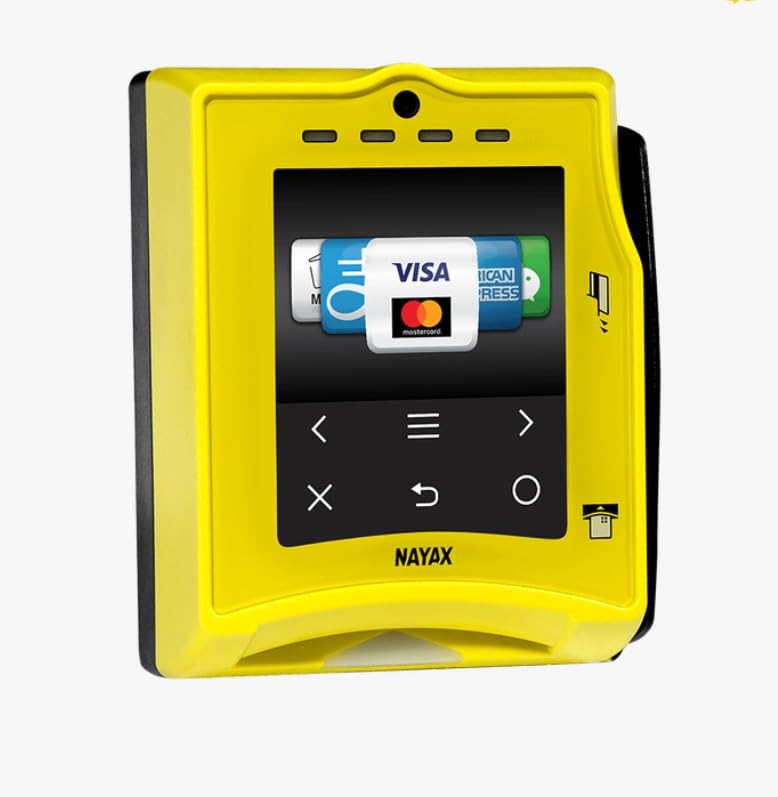
Nayax VPOS Touch Cashless Payment Reader
Customizable 2.4-inch touchscreen
Broad mobile wallet support
IP55 anti-vandal housing
Discover the best card readers for vending machines in 2026, comparing unattended payment compatibility, connectivity, security, durability, and setup needs.
Card readers for vending machines must do more than read a chip or accept a contactless tap. They need to integrate reliably with unattended equipment, communicate with the payment network, and remain easy for customers to operate without assistance. The best options also provide useful management, connectivity, and security features.
This guide compares ten supplied products on vending-machine suitability, supported payment methods, installation requirements, connectivity, durability, telemetry, and operational constraints. It includes purpose-built unattended payment terminals as well as general-purpose readers whose compatibility depends on the machine, controller, and payment platform being used.
Each review explains what the product is best positioned to handle, along with any activation, account, protocol, or development requirements. Ratings reflect the available customer feedback, while products without a listed rating are clearly identified as not yet rated. Prices and availability can change, so confirm current details before purchasing.
3.8Editor score

The table below compares all ten products by their core strengths, interfaces, payment support, and most important setup consideration. The most directly suitable options are the MDB- and Pulse-compatible VPOS Touch terminals; the other devices may require a vending controller, software integration, or a separate payment account.


The VPOS Touch is the strongest all-around choice in this group because it is explicitly designed for vending machines and related unattended equipment. Its listed customer rating is 3.8, and its feature set emphasizes the operational needs of remote machines rather than simply providing a generic USB reader. It supports EMV chip cards, NFC and contactless wallets, and magnetic stripe payments.
We may earn a commission when you buy through this link, at no additional cost to you.
Its high-gain 4G LTE antenna and MDB communication harness are especially useful for self-service locations where adding a wired network would be inconvenient. The MDB and Pulse protocol support also gives it a more credible path to connecting with compatible vending and kiosk controllers. A separate Wi-Fi or Ethernet connection is not described as necessary, although cellular coverage and service activation must still be arranged.
Remote management adds meaningful value for operators managing several locations. The device can report inventory, cash levels, sales data, and alerts through the Nayax management suite, reducing the need for routine physical inspection. PCI DSS compliance plus EMV Level 1 and 2 certification addresses important security concerns for a device exposed to customers and payment cards.
The principal trade-off is compatibility. A vending machine must support a suitable protocol, interface, and payment workflow before this reader can be considered. Cellular connectivity can also be less dependable than a wired connection in a shielded enclosure. Even so, operators seeking the most direct, purpose-built fit should give the VPOS Touch priority over general-purpose readers.
The integrated 4G LTE antenna and communication harness reduce the need for separate network hardware. That can simplify deployment in self-service machines where Wi-Fi reception is inconsistent or where pulling a network cable to the site is impractical.
Remote monitoring of sales, inventory, cash levels, and alerts helps operators identify issues sooner. These features are particularly valuable when servicing many machines across different locations.
We may earn a commission when you buy through this link, at no additional cost to you.
The Nayax VPOS Touch is built around the customer interaction required at an unattended machine. It supports traditional credit and debit cards, Apple Pay, Google Pay, Samsung Pay, WeChat Pay, Paytm, NFC, and QR codes. The title identifies MDB and Pulse compatibility, while the included MDB cable makes the intended vending-machine connection method clear.
We may earn a commission when you buy through this link, at no additional cost to you.
Its 2.4-inch color LCD supports multiple languages and voice prompts. Those features can make a machine easier to use when the audience includes customers who do not speak the primary installed language. The interface is customizable, and the device can also support loyalty programs, discounts, and punch-card promotions for operators seeking more than a basic payment terminal.
Physical design is appropriate for exposed equipment. The listed dragontrail glass, shock detection, and IP55 rating indicate attention to anti-vandal durability and resistance to dust and water. Remote software updates reduce the need to visit each machine for routine configuration changes, while real-time telemetry supports monitoring of sales, inventory, and machine performance.
No customer rating is provided, so its feedback history cannot be compared with the rated products. Buyers should also confirm the protocol supported by the target machine and the precise connection arrangement. Even with those caveats, the combination of payment breadth, a customizable screen, marketing tools, and rugged construction makes this a compelling premium option.
The color touchscreen, multiple-language display, and voice prompts improve usability in public settings. Customization also gives operators a way to guide customers through the payment flow and present machine-specific promotions.
Dragontrail glass, shock detection, and an IP55 rating make the enclosure more appropriate for an unattended environment. These protections do not eliminate the need for sensible placement, but they address common impacts, moisture, and wear.
We may earn a commission when you buy through this link, at no additional cost to you.
The Generic reader appears to be a compact standalone payment device, but the supplied information is limited. Its main documented requirement is activation using the included yellow instruction sheet. Buyers should therefore treat this listing as a specialized option rather than a confidently specified vending-machine solution.
We may earn a commission when you buy through this link, at no additional cost to you.
The absence of a customer rating means there is no visible rating history to guide the decision. The product description also does not identify supported payment methods, machine protocols, connectivity options, security certifications, dimensions, or compatibility with specific vending controllers. That missing information makes direct comparison with the purpose-built VPOS Touch terminals difficult.
The activation process is the most important practical consideration. The instructions say activation can take up to ten business days after submission, so this reader may not suit an operator who needs a unit operational quickly. It is also unclear whether activation is completed through an operator account, a service provider, or another platform.
This product may be worth investigating for a specialized project where the seller's activation team can confirm the necessary details. For a standard unattended vending machine, however, a reader with published MDB or Pulse support and clearly documented connectivity is the safer purchase. Ask for a compatibility sheet, complete interface list, service terms, and activation requirements before committing.
Activation may take up to ten business days after the required submission. Operators replacing failed equipment should plan ahead rather than ordering this reader as an immediate repair solution.
Payment methods, connectivity, dimensions, and controller protocols are not provided in the supplied listing. Obtain written compatibility information before integrating the device with an unattended machine.
We may earn a commission when you buy through this link, at no additional cost to you.
The Symcode reader is a general-purpose multi-function device rather than a vending-specific payment terminal. It has a listed rating of 2.8, and its strongest application is likely in a custom kiosk, membership, or check-in system where software reads card identifiers directly. It should not be confused with a terminal that processes a complete customer transaction.
We may earn a commission when you buy through this link, at no additional cost to you.
Three reading methods cover magnetic stripe, insertable chip, and left-side contactless NFC. Magnetic data can be read across all three tracks, while SLE4442 and CPU chip support is also listed. CPU card access requires APDU commands for deeper development, making software compatibility an important consideration for kiosk builders.
The reader can operate as a keyboard emulator in active or automatic reading mode. It can also be read by software in passive or HID mode, which provides flexibility when integrating with embedded systems. Two indicator lights show connection status and flashing during a swipe, offering basic operational feedback.
For a vending machine, this device is only appropriate if the existing controller and software are designed to communicate with a USB or HID card reader. It does not list cellular connectivity, a touchscreen, payment processing, remote telemetry, or vending protocols. It may suit a developer building a custom payment workflow, but conventional operators should favor a purpose-built unattended terminal.
Keyboard emulation and software-readable HID modes make the reader adaptable to different kiosk architectures. This flexibility is useful for developers who can build and maintain the transaction logic.
The magnetic stripe side is explicitly read-only and cannot write cards. A custom project that depends on issuing or rewriting magnetic-stripe credentials would need a different device.
We may earn a commission when you buy through this link, at no additional cost to you.
The Verifone VX520 is a countertop-oriented payment reader with a listed customer rating of 3.5. Its core strengths are EMV smart card compliance, NFC, Apple Pay, and both dial and Ethernet connectivity. These features make it familiar to operators already building payment systems around Verifone hardware.
We may earn a commission when you buy through this link, at no additional cost to you.
The product is not explicitly described as an MDB- or Pulse-compatible vending reader. Although its contactless capability is useful, compatibility with an unattended machine depends on whether the machine controller can communicate with the terminal and whether the acquirer or software platform supports the required transaction flow.
The VX520's physical form and smart card insertion method may also affect the customer interaction. A vending machine may need a suitable mounting arrangement, a visible bezel, and an unobstructed card path. Dial connectivity is available, but Ethernet can provide a more consistent link in a fixed installation when the surrounding system supports it.
This is a reasonable option for a custom or semi-custom kiosk project with established Verifone support. It is less compelling for a standard vending operator seeking a plug-and-play MDB terminal, a cellular option, or remote machine telemetry. Confirm processor, protocol, and unattended workflow support before buying it for a vending machine.
The VX520 supports EMV, NFC, and Apple Pay through a familiar countertop terminal design. It can fit projects whose software and processing infrastructure already support Verifone devices.
Both dial and Ethernet are listed, allowing an operator to select the available connection method. For a fixed machine, a stable wired network may be preferable when the payment platform supports it.
We may earn a commission when you buy through this link, at no additional cost to you.
This Multi-Function Card Reader is another general-purpose option aimed at membership, check-in, checkout, and kiosk systems. Its listed rating is 3.5. Although the product title uses reader and writer terminology, the supplied description clarifies that the magnetic-stripe side is read-only and cannot encode cards.
We may earn a commission when you buy through this link, at no additional cost to you.
The supported technologies include all three magnetic tracks, SLE4442 memory chips, CPU cards through APDU commands, Mifare RFID, contactless NFC, and contact PSAM cards. That breadth is attractive to developers creating access control or credential systems, particularly when a project needs several card formats through one unit.
A software disc, SDK, user manual, and testing card are included, which helps with initial setup. The documentation is especially important because CPU card communication and PSAM operation require more than a simple keyboard-wedge configuration. The package gives a technical buyer useful starting materials, although the included files should be checked for operating system compatibility.
This reader is not a self-contained vending payment terminal. It does not list a customer screen, cellular service, MDB or Pulse support, transaction processing, PCI certification, or remote machine management. It can work inside a vending machine only when the machine already has suitable software and controller support. For most operators, a purpose-built cashless terminal is easier to deploy.
Magnetic, memory, CPU, Mifare, NFC, and PSAM support is useful in mixed credential environments. The breadth can simplify hardware selection when a custom system must accommodate more than one card standard.
The included SDK, user guide, and testing card provide useful tools for setup. They do not remove the need to confirm hardware compatibility, operating system support, and the desired security architecture.
We may earn a commission when you buy through this link, at no additional cost to you.
The E-seek M-260 is an identity-card reader rather than a vending payment terminal. It has a listed rating of 4, the highest numerical customer rating among products with an available score, but that rating reflects its identity-document use rather than performance as a cashless vending reader.
We may earn a commission when you buy through this link, at no additional cost to you.
The device can read government-issued identification cards containing magnetic stripe information, 2D barcodes, or both. It is intended for point-of-sale, identity authentication, and law-enforcement environments. A six-foot USB smart cable is included, and data can transfer to a host through USB or RS-232.
A second interface connector is mounted on the bottom, making the unit easier to incorporate into a kiosk. That design consideration matters when a reader needs a fixed position and limited cable access. The M-260 can therefore fit specialized machines where age verification, identity checks, or regulated access control form part of the customer journey.
The M-260 should not be selected as the primary reader for ordinary card payments because its listed functions concern identification data rather than processing EMV or contactless purchase transactions. It is worth considering for vending or amusement systems that need verified-age or identity workflows, provided the host software can ingest and protect the information being read.
Reading both magnetic stripe and 2D barcode information supports systems in which identification must be checked before a customer can transact. The host application remains responsible for interpreting and validating that information.
The added bottom interface offers another route for connecting the reader in a fixed kiosk. This can make cable management and physical positioning easier than a side-only connection.
We may earn a commission when you buy through this link, at no additional cost to you.
The VP3350 is the most approachable compact payment terminal in this group for a small operator or custom machine project. It supports contactless payments, EMV contact, EMV contactless, and magnetic stripe, and the listing includes a stand. Its mobile-friendly design may be useful for a countertop kiosk or movable point of sale setup.
We may earn a commission when you buy through this link, at no additional cost to you.
Its security and platform support are attractive. The device is listed as PCI P2PE compliant, works with the CardPointe Virtual Terminal, supports the CardPointe Gateway API, and is compatible with Hosted iFrame Tokenize. It is also surcharge compatible, which may matter for a machine operator whose payment workflow includes customer-selected tips or adjustments.
The important condition is the requirement for a new SwyftPAY merchant account before shipment. That makes the reader less convenient for a buyer who already has another fully supported processing account. The operator should confirm how the account, reader, existing machine controller, and payment workflow will work together before placing an order.
No customer rating is available, and the supplied data does not list vending protocols or cellular capabilities. The VP3350 is therefore a budget-oriented payment terminal rather than a clearly specified MDB vending reader. It can be a strong fit for a compact kiosk using the supported CardPointe services, but not every vending controller will be able to communicate with it.
The included stand and mobile-friendly form factor suit a small kiosk, countertop machine, or temporary point-of-sale position. Its compact footprint also makes it easier to integrate where space is limited.
A new SwyftPAY merchant account is needed before the device ships. Operators should begin the application early and confirm that the new account supports their machine's transaction requirements.
We may earn a commission when you buy through this link, at no additional cost to you.
The MTMS15 Multi-Technology Card Reader is presented as an open-architecture payment device with support for card and PIN authentication, mobile NFC, magstripe, and real-time networked operation. Its appeal lies in flexibility for operators who want to integrate payment hardware into a broader system rather than rely on a fixed standalone workflow.
We may earn a commission when you buy through this link, at no additional cost to you.
The open architecture is particularly important for custom vending machines, kiosks, and other unattended projects. It may allow developers to connect the reader to suitable software and services, but the supplied information does not list specific MDB or Pulse support, host interfaces, processing partners, or machine-controller requirements. Those details must be obtained before installation.
Card plus PIN provides multi-factor interaction and can suit payment environments where a contactless-only terminal does not meet the operator's process requirements. Mobile NFC expands the range of devices customers can use, while real-time networking is valuable when transactions, diagnostics, or machine status need to be communicated promptly.
The MTMS15 is best considered an integration platform rather than a plug-and-play vending reader. It could suit a technically equipped operator willing to validate software, connectivity, and payment-provider support. For a standard machine purchase, the lack of a published protocol list and customer rating means it should move forward only after a documented compatibility check.
An open architecture can give developers more freedom to connect the reader with specialized machine software. That flexibility also places more responsibility on the integrator to validate the complete payment path.
Combining card and PIN interaction with mobile NFC supports several payment habits. The right customer flow depends on the machine interface and the processing platform connected to the reader.
We may earn a commission when you buy through this link, at no additional cost to you.
The Bluetooth X6BT VIP Reader is a wireless card reader and writer designed for mobile-device and custom application use. Its listed customer rating is 3.8. It connects through Bluetooth, receives power over USB, and can be used with iOS and Android devices through a mobile application.
We may earn a commission when you buy through this link, at no additional cost to you.
The software support is broad, covering Windows, macOS, iOS, Android, and Linux. The device can read and write all three magnetic tracks as applicable and provides support for ISO 7811-6 standards. These capabilities make it useful for membership programs, mobile service flows, and applications that issue or update magnetic-stripe credentials.
It is not described as a complete payment terminal and does not list a customer display, card insertion slot for EMV, vending protocol, cellular service, transaction processing, or remote machine management. Bluetooth also introduces operational considerations that a wired MDB terminal avoids, including pairing, reconnection behavior, and possible wireless interference.
The X6BT is most appropriate when a vending or amusement project is intentionally built around a mobile application and custom credential management. It could be paired with a mobile computer at a staffed or semi-staffed machine, but it is not a straightforward reader for a conventional unattended vending machine. Operators should confirm that their application supports the device and can securely handle wireless pairing.
Bluetooth removes the need for a fixed data cable between the reader and a nearby mobile device. That makes the reader useful in flexible service points and custom mobile workflows.
Unlike the read-only magnetic readers in this list, the X6BT can write all three tracks as applicable. It is therefore more relevant to membership, access, and credential-issuing applications than routine payment acceptance.
We may earn a commission when you buy through this link, at no additional cost to you.
The best reader is the one that matches the machine's controller, payment processor, connectivity, customer interface, and operating environment. Start with those requirements, then evaluate security, management, and durability features.
The reader must communicate with the vending machine controller, not merely recognize the same physical cards. MDB and Pulse support is explicitly listed for the two VPOS Touch products, making those options more clearly aligned with common unattended equipment. Other readers may rely on USB, HID, serial, Bluetooth, or a software service, but those interfaces do not automatically mean they can replace an MDB reader. Confirm the machine's payment interface, connector type, power requirements, firmware expectations, and supported transaction flow before ordering. A seller should be able to provide a compatibility matrix rather than only a statement that the device works with kiosks.
Modern vending customers may use a physical chip card, magnetic stripe, contactless card, or mobile wallet. A broad reader gives the operator more options, but the machine still needs a clear customer interface and a processor that accepts the selected method. The Nayax VPOS Touch lists cards, multiple wallets, WeChat Pay, Paytm, NFC, and QR codes, while the VPOS Touch supports EMV, NFC wallets, and magnetic stripe. Consider whether customers need insertion, tapping, PIN entry, or a combination. A reader with too many unfamiliar options can create confusion, so payment breadth should be matched to the audience and the simplicity of the machine's screen.
Connectivity determines whether a vending machine can authorize payments and report its status. The VPOS Touch includes a high-gain 4G LTE antenna and does not require separate Wi-Fi or Ethernet setup, which is useful for remote or poorly connected sites. The Verifone VX520 lists dial and Ethernet, while the MTMS15 is described as networked for real-time operation. Bluetooth is useful for a mobile application but is not a substitute for dependable unattended connectivity. Assess cellular coverage, signal interference, service fees, fallback behavior, and whether the machine can continue serving customers when the network is temporarily unavailable.
A card reader handles sensitive payment data and is accessible to members of the public, so security should be a central requirement. The VPOS Touch is listed as PCI DSS compliant with EMV Level 1 and 2 certification, and the VP3350 is listed as PCI P2PE compliant. These statements are useful screening points, but buyers should also confirm the certification scope, processor configuration, firmware update process, and responsibility for securing the host software. General-purpose identity or credential readers may excel at a different function without providing a complete payment-security architecture. Ask the provider for current compliance documentation and a clear explanation of how data flows through the system.
Vending readers may face impact, accidental contact, dust, moisture, temperature changes, and deliberate tampering. The Nayax VPOS Touch lists dragontrail glass, shock detection, and an IP55 rating, making it the most explicitly rugged option described here. Compact form can also reduce exposed surface area, as with the VP3350, but compactness alone does not guarantee resistance to impact or weather. Consider the actual mounting position, screen height, lighting, cleaning exposure, and likelihood of vandalism. Secure fasteners, cable strain relief, tamper awareness, and a protective enclosure may matter as much as the reader's headline specifications.
Remote management becomes increasingly valuable as the number of machines and locations grows. The VPOS Touch can report inventory, cash levels, sales, and alerts through the Nayax management suite, while the Nayax VPOS Touch also supports remote monitoring and software updates. These features can shorten troubleshooting cycles and help operators identify machines that need attention. A management platform is useful only if the alerts are actionable and the operator has enough information to diagnose the issue. Compare the dashboard, notification options, user permissions, reporting, API access, and support for the specific machine. Confirm that the included connectivity and service package keep these functions available.
The purchase is only one part of deployment. The Generic reader requires activation and may take up to ten business days after submission, while the VP3350 requires a new SwyftPAY merchant account before shipment. Other readers may depend on an SDK, development work, or compatibility with a particular processing platform. Identify every recurring or one-time requirement before buying, including activation, account approval, cellular service, payment processing, software licenses, API access, and technical support. A product with excellent hardware can still be a poor fit if its platform cannot be activated in time or does not communicate with the target vending controller.
The customer-facing hardware must fit the machine and be easy to use at the correct height. A touchscreen with multiple languages and voice prompts may help a diverse audience, while a compact terminal with a stand may suit a smaller kiosk. Consider screen visibility, tap placement, card path, accessibility, and the time required to complete each transaction. Maintenance planning should include glass cleaning, cable inspection, software updates, account management, and troubleshooting access. Also review replacement arrangements for a failed unit and whether remote diagnostics will be available before the next physical visit.
Begin by confirming that the machine's controller, power supply, wiring, and payment platform support the selected reader. Follow the manufacturer's activation or account process before mounting the unit, and complete any test transactions in a controlled setting. If the reader connects to a vending controller through MDB, Pulse, USB, serial, or another interface, use the specified cable and verify that the controller recognizes the device.
Install the reader where customers can see and reach it without obstructing the product dispenser, coin mechanism, or service door. Protect cables from pinching, moisture, and repeated movement. Test chip insertion, contactless tapping, magnetic swiping, mobile wallets, PIN entry, and any QR or promotional flow listed for the device. Operators should also test behavior during a temporary network outage and confirm how the machine communicates the service status to customers.
Clean the glass and card path with a soft, lint-free cloth and a cleaner approved by the manufacturer. Avoid abrasive pads, unapproved liquids, and forceful insertion of damaged cards. Review software updates, activation status, account notices, and management alerts regularly. When a transaction fails, check power, cables, network coverage, account status, and the machine controller before replacing equipment.
The VPOS Touch is the strongest general choice in this guide because it is explicitly designed for vending machines, supports MDB and Pulse protocols, includes 4G LTE connectivity, and provides remote monitoring. The best reader for your machine is ultimately the one supported by its controller, payment processor, location, and customer interface.
Many modern vending controllers use MDB or related cashless payment interfaces, so matching one of those protocols is usually the clearest path to integration. Other installations use USB, HID, serial, Bluetooth, or a proprietary controller connection. Always verify the exact machine interface before purchasing a replacement reader.
A regular reader can work if the machine's controller and software are specifically designed to communicate with it. The Symcode, Bluetooth X6BT, Verifone VX520, and other general-purpose products may require significant custom integration. They should not be assumed to replace a vending-specific MDB terminal without a documented compatibility check.
Cellular connectivity can be easier to deploy at remote locations because it avoids running a network cable and does not depend on local Wi-Fi availability. The VPOS Touch includes a 4G LTE antenna for this reason. Signal strength, interference, service coverage, and network-outage procedures still need to be evaluated for each site.
A touchscreen is not universally required, but it can make self-service prompts, wallet selection, promotions, and error messages easier to present. The Nayax VPOS Touch offers a customizable 2.4-inch color display with language and voice support. Other systems may use the vending machine's own screen and require only a smaller payment interface.
Several listed products support NFC and mobile wallets, including the VPOS Touch, Nayax VPOS Touch, and Verifone VX520. The device hardware alone is not enough: the connected payment processor must also support the relevant wallet, and the machine must provide a clear tap target and customer instructions.
Confirm the machine protocol, power source, data cable, payment processor, cellular coverage, and management software in advance. For account-based products, begin merchant approval early because activation or account approval can delay shipment and deployment. Test the full transaction flow before attaching the reader to customer traffic.
Clean the glass and card path regularly, inspect cables and mounting points, and keep the enclosure protected from moisture and impact. Review alerts, account notices, and software updates through the management system. If failures increase, check network coverage, power, cables, and processor status before replacing the device.
The VPOS Touch is the most balanced choice for operators seeking a purpose-built reader with cellular connectivity, remote telemetry, broad payment support, and MDB or Pulse compatibility. The Nayax VPOS Touch stands out for its customizable touchscreen, extensive wallet and QR support, promotional tools, and anti-vandal design. The VP3350 offers a more compact and budget-oriented route when a SwyftPAY account and supported CardPointe workflow are already part of the plan.
The remaining products serve narrower or more specialized situations. General-purpose readers may suit developers building custom kiosk or credential systems, while the E-seek M-260 is relevant to identity-verification workflows rather than ordinary payments. Prioritize machine compatibility, processor readiness, connectivity, security, and the customer experience before secondary features. The cheapest or most technically capable reader is not automatically the best choice if it cannot integrate with the machine.
Check the current product details, activation requirements, account terms, compatibility documentation, and pricing before purchasing. Product specifications and availability can change, and the newest listing is not necessarily the best fit for an established vending controller. A careful compatibility check will prevent most installation surprises.