
Kakyanill 115W Charging Station
4.5Editor score
115W aggregate charging capacity
Four USB-C charging ports
Retractable six-foot extension cord
Our Charging Tower guide compares ten vertical power strips, USB charging stations, surge protectors, outlet layouts, safety features, and cord designs for
A charging tower consolidates AC outlets and USB charging ports into one vertical hub, reducing cord clutter while giving multiple devices convenient access to power. The best models combine generous outlet spacing, useful charging options, surge protection, stable construction, and a cord that suits the intended workspace.
We compared the ten featured charging towers by examining outlet quantity, USB-C and USB-A capabilities, wattage ratings, surge protection, cord length, plug design, physical footprint, and stated safety features. The list includes options for compact desks, shared offices, dorm rooms, entertainment setups, and households with several high-power devices.
Each review identifies the strongest reason to consider that model and the trade-offs worth considering before purchase. Ratings reflect the supplied customer feedback, while technical details come from the stated product information. Prices and promotions can change, so shoppers should confirm current listings and compatibility before ordering.
4.5Editor score

4.7Editor score
4.7Editor score
The comparison below highlights the major differences among these vertical charging towers, including AC outlet capacity, USB charging performance, surge protection, cord length, and physical design.


The Kakyanill Power Strip Tower combines nine AC outlets with eight USB ports, including four USB-C connections and four USB-A connections. Its 4.5 rating reflects generally favorable customer feedback, while the feature set makes it a practical all-purpose hub for desks, dorm rooms, and home offices.
We may earn a commission when you buy through this link, at no additional cost to you.
Its most distinctive feature is the six-foot retractable extension cord. Rotating the tower stores the cord and reduces the loose cable typically left across a work surface, while pulling the base extends it to reach a wall outlet. The slim 0.35-inch plug and 45-degree angle also help the tower sit behind furniture without obstructing neighboring plugs.
The nine AC outlets are spaced 1.5 inches apart, which offers room for bulky adapters, and the tower is rated for 15 amps and 1,875 watts. USB charging totals 4.8 amps, so the ports are useful for phones, accessories, and tablets but should not be treated as a high-wattage laptop charging solution. Individual switches add control, although that feature does not replace a main master switch.
This is a strong choice for a user who wants a retractable cord and a balanced mix of AC and USB connections without moving to a high-power USB-C desktop charger. Its shared USB output and 4.5 rating place it behind the strongest models, but its outlet density, angled plug, and cord management make it a convincing general-purpose choice.
The retractable cord is especially useful in areas where a conventional extension lead would occupy a walkway or become tangled. Rotating the tower neatly gathers the cable, while the angled flat plug makes the unit easier to position behind a desk, sofa, or bedside cabinet.
Nine AC outlets and four USB-A ports cover many common household and office devices, while the USB-C ports add convenience for compatible accessories. The 1,875-watt rating supports higher-draw equipment, although buyers should still consider the combined load of everything connected.
We may earn a commission when you buy through this link, at no additional cost to you.
The JACKYLED Power Strip Tower Surge Protector offers twelve AC outlets and six USB ports, with two USB-C and four USB-A connections. Its 4.7 rating is the highest among the listed products, giving it a strong foundation for home offices, gaming desks, and entertainment centers crowded with electronics.
We may earn a commission when you buy through this link, at no additional cost to you.
Outlet spacing is one of its clearest advantages. At 2.2 inches, the twelve AC outlets provide ample room for large wall adapters and power bricks. A switch on each layer allows users to turn individual groups of devices off, and indicator lights help show whether a layer is active. This granularity makes the tower easier to manage than a conventional strip with only one master control.
The vertical 6.5-foot retractable copper cord adds another layer of convenience, helping eliminate cable clutter on a desk. USB output is shared at 4.8 amps and 24 watts, with individual USB-C ports rated at 5 volts and 3 amps and USB-A ports at 5 volts and 2.4 amps. That is sufficient for many accessories but modest for demanding modern laptops.
Protection includes 1,050 joules of surge suppression plus overload, short-circuit, overcurrent, overvoltage, and overheating protection. The surge capacity trails several competing towers, but the extensive layered controls and outlet spacing make this an excellent general recommendation. Choose it when organization, individual switching, and a tidy retractable cord matter more than maximum USB-C wattage.
Independent switches allow a printer, monitor, or other device group to be disconnected without affecting everything else on the tower. The built-in indicators also reduce uncertainty when checking whether a particular layer is receiving power.
The 2.2-inch outlet separation is the model’s standout practical feature. It reduces the need to angle an oversized plug in a way that blocks adjacent sockets, which is a common problem in densely packed power strips.
We may earn a commission when you buy through this link, at no additional cost to you.
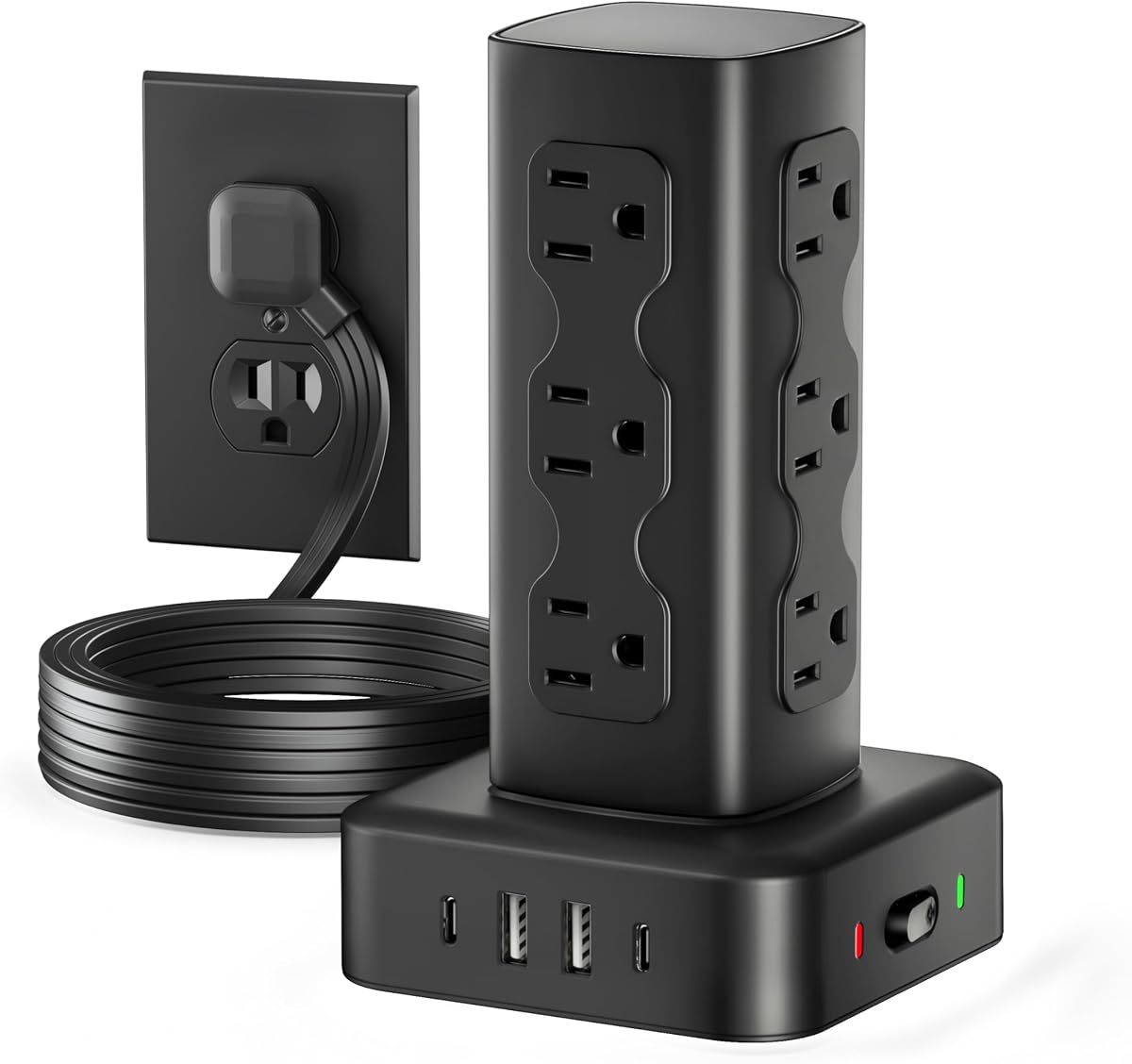
The Kakyanill 115W USB Charging Station combines nine AC outlets with eight USB ports and has a 4.5 customer rating. Its defining advantage is power delivery: two USB-C ports can provide up to 65 watts each, two more can provide up to 20 watts each, and the four USB-A ports share a five-volt, three-amp output.
We may earn a commission when you buy through this link, at no additional cost to you.
This charging distribution makes the tower more relevant to modern phone, tablet, and laptop setups than a basic USB power strip. It can serve several compatible devices simultaneously while still supplying nine AC outlets for monitors, lamps, printers, and other equipment. The 115-watt total makes it a premium option for users who expect more than basic accessory charging.
A six-foot retractable cord helps maintain a tidy appearance, and the compact four-sided tower uses little desk space. Four rubber feet improve stability, while a status indicator and reset/off switch add basic management controls. The product information also advises removing a phone case while charging to reduce the possibility of overheating.
This tower is best for a desk where both modern USB-C charging and conventional power connections are important. Its 4.5 rating is not the highest in the list, and the supplied specifications do not state a surge-energy rating, so buyers with unusually demanding protection needs should investigate that point. For everyday high-power charging, however, the 65-watt USB-C ports are compelling.
Two ports that can deliver up to 65 watts each stand apart from towers limited to basic five-volt USB output. They provide meaningful flexibility for compatible laptops, tablets, and phones when a single device is connected for maximum output.
The rotating cord mechanism reduces visible cable clutter, while the tower format keeps plugged-in cords gathered vertically. Rubber feet help prevent sliding when devices are connected or disconnected.
We may earn a commission when you buy through this link, at no additional cost to you.
The Olcorife 16-in-1 Power Tower supplies twelve AC outlets and four USB ports, including two USB-C and two USB-A connections. Its 4.7 rating and generous surge-protection specification make it an appealing value-oriented choice for a shared household, dorm, or office.
We may earn a commission when you buy through this link, at no additional cost to you.
The 2,000-joule surge rating is among the strongest listed, and the tower also includes short-circuit, overcurrent, overcharging, and overheating protection. Its 0.31-inch flat plug uses a right-angle orientation that helps it sit close to a wall and leaves room for a plug in the outlet below. A six-foot extension cord offers enough flexibility for most indoor arrangements.
USB charging is not the tower's primary strength. The two USB-C ports are listed at a maximum of 3 amps and 15 watts, while the USB-A ports reach 2.4 amps and 12 watts. Those figures suit phones, earbuds, watches, and similar accessories, but users seeking laptop-level USB-C charging will need a more specialized model.
For shoppers who prioritize outlet quantity, protection, and straightforward cable management, this is an excellent budget-oriented tower. The fixed six-foot cord is less tidy than a retractable design, and the low USB-C wattage rules it out as a high-power charging pick. Even so, the 4.7 rating and broad AC capacity make it one of the strongest value choices here.
The stated 2,000-joule surge capacity provides useful reassurance for computers, entertainment components, and other sensitive electronics. Multiple additional protections make this a sensible choice for a permanently installed desk or dorm setup.
Its thin, angled plug can slide behind a sofa, desk, or cabinet where a conventional projecting plug may block access. The six-foot cord then provides enough freedom to place the tower in a practical location.
We may earn a commission when you buy through this link, at no additional cost to you.
The TenTrend 230W Charging Tower offers six AC outlets and eight USB ports, with a 4.5 rating. It has the highest stated aggregate charging output in this group, making it the most ambitious model for phones, tablets, earbuds, and compatible laptops.
We may earn a commission when you buy through this link, at no additional cost to you.
Two orange USB-C ports can deliver up to 65 watts each, two green USB-C ports up to 20 watts, and four blue USB-A ports up to 15 watts. The color coding helps distinguish connection types and capabilities. Protection against overcurrent, overvoltage, short circuits, and overheating is built in, supporting its suitability as a central charging hub.
Its compact body measures approximately 3.15 by 3.15 by 5.12 inches, helping conserve desk space. The flat plug is only 0.31 inches thick, and the five-foot cord can lie along a floor or desk edge. Compared with towers carrying twelve AC outlets, however, this model offers less conventional plug capacity and a shorter fixed cord.
Buyers should choose this tower primarily for fast, simultaneous USB charging. It is a compelling center for a modern workstation where several personal devices need power throughout the day. It may be less suitable for offices dominated by monitors, printers, and other bulky AC adapters, for which a twelve-outlet alternative would be more practical.
The 230-watt total output gives the tower more headroom than standard USB strips. Its highest-output USB-C connections can handle compatible laptop charging, while lower-output ports serve phones and smaller accessories.
The small vertical footprint is excellent for uncluttered workspaces. The trade-off is six AC outlets rather than the twelve offered by several competing towers, so count larger adapters before choosing.
We may earn a commission when you buy through this link, at no additional cost to you.
The TenTrend 40W Power Tower combines twelve AC outlets with eight smart-charging USB ports, including two 20-watt USB-C connections. Its 4.7 rating places it among the most favorably reviewed options, while the 20-port layout suits large desks with many low- and medium-draw devices.
We may earn a commission when you buy through this link, at no additional cost to you.
The tower's most notable physical feature is its ten-foot pure-copper extension cord. That reach can be valuable when the nearest wall outlet is far from a workstation, entertainment center, or bed. The 0.27-inch flat plug and 45-degree angle help it fit behind furniture, and the stated 15-amp current capacity supports a suitably rated load.
USB performance is adequate rather than class-leading. The two USB-C ports are rated at 20 watts, and USB-A ports can reach 12 watts. The total output is 40 watts, so this is better suited to phones, tablets, cameras, and accessories than a demanding modern laptop. Its 1,875-watt maximum should not be exceeded.
This is a good pick for a home, dorm, or office where long reach and high outlet count matter more than advanced USB-C charging. The housing is described as fire-resistant ABS and PC, and overload protection is included. Buyers seeking retractable cables or 60-watt-class laptop charging should look elsewhere, but this model balances reach, capacity, and everyday charging well.
The long cord makes it easier to place a crowded tower near devices rather than directly beside the wall. It can also run along a baseboard or under a desk, provided the route remains dry and does not create a trip hazard.
Twelve AC outlets give the tower broad utility for home offices and dorm rooms. The upright arrangement separates cords vertically, reducing the tangled appearance often associated with a long horizontal power strip.
We may earn a commission when you buy through this link, at no additional cost to you.
The Anker Desktop Charger is a nine-in-one hub with three AC outlets, four USB-C ports, and two USB-A ports. It has a 4.7 rating and stands out for a more premium, compact design, particularly for desks where high-wattage USB-C charging is the priority.
We may earn a commission when you buy through this link, at no additional cost to you.
Two USB-C ports can each support up to 100 watts when used individually, making the tower relevant to compatible laptops, tablets, and other demanding devices. The remaining USB-C and USB-A connections provide flexibility for accessories. Because the high-wattage capability applies when an individual port is used, shoppers should check the intended power distribution for several simultaneous devices.
An eight-point safety system is designed to address overvoltage, short circuits, and other electrical risks. A 300-joule surge protector is included, although that figure is lower than the 1,050-, 1,700-, 1,800-, and 2,000-joule ratings offered by several alternatives. The listed weight of 19.75 ounces gives it enough presence for desktop use without being burdensome.
This is the best choice for a user who values refined charging performance, a compact footprint, and fewer but more capable USB-C ports over maximum outlet count. Its 4.7 rating reinforces that appeal. It is less appropriate for a room full of bulky AC adapters, but for a focused workstation, the Anker combination is compelling and purpose-built.
The four USB-C and two USB-A ports let users connect several compatible accessories without carrying a separate wall charger for each. This is particularly useful in a laptop-centered desk where charging standards vary by device.
Three AC outlets and six USB connections make this a focused desktop tool rather than a whole-room power hub. That smaller port count keeps the unit compact, while the high-output USB-C ports deliver the capabilities users are most likely to notice.
We may earn a commission when you buy through this link, at no additional cost to you.
The TenTrend 17-in-1 Tower provides twelve AC outlets, two USB-A ports, and three USB-C ports, including a dedicated 20-watt USB-C connection. Its 4.5 rating and long cord make it a versatile option for homes, offices, dorms, and recreational vehicles where several device types need centralized power.
We may earn a commission when you buy through this link, at no additional cost to you.
The dedicated USB-C port is designed for faster charging and is stated to charge an iPhone 17 from zero to 50 percent in 30 minutes. The other USB connections intelligently distribute power among earbuds, smartwatches, and power banks. A 1,800-joule surge protector, overload protection, and flame-retardant housing provide the stated safety foundation.
The ten-foot flat cord provides good reach and can be stored more neatly than a round cable. Outlet spacing of 1.5 inches accommodates oversized plugs without blocking adjacent outlets. A weighted, non-slip base helps prevent movement, and the 45-degree flat plug is practical behind sofas, beds, or desks.
This tower is well suited to shared spaces where a mixture of AC devices and small USB accessories is used. It is less impressive for high-power laptop charging because only one USB-C port reaches 20 watts, and the fixed cable does not retract. Even so, its 1,800-joule protection and 17-way capacity make it a balanced all-purpose recommendation.
Keeping a 20-watt USB-C port separate gives a compatible phone or accessory a predictable charging path. The remaining USB ports can handle watches, earbuds, and other lower-draw devices at the same time.
The long cord and compact vertical form suit dorm rooms, offices, and RVs where a single reachable wall outlet may serve an entire area. The weighted base and anti-slip design help keep the tower steady during use.
We may earn a commission when you buy through this link, at no additional cost to you.
The 6FT Power Strip Tower Surge Protector provides twelve AC outlets and four USB ports, including two USB-A and two USB-C connections. Its 4.7 rating suggests strong customer satisfaction, while the compact three-inch-square footprint makes it suitable for desks where horizontal space is limited.
We may earn a commission when you buy through this link, at no additional cost to you.
The USB system offers a total output of 3.4 amps, with USB-A ports reaching up to 3.1 amps and USB-C ports up to 3.4 amps. The listed information says the USB-C connection can charge up to 30 percent faster than a standard five-watt charger. This makes it appropriate for phones, tablets, and earphones, but not a substitute for a 65- or 100-watt laptop charger.
A 1,800-joule surge protector is backed by overload, short-circuit, and overcurrent protection. The reset/off switch provides a straightforward way to disable the tower, and the 0.30-inch flat plug with a right-angle profile helps it sit behind furniture without blocking the outlet below. Four rubber feet help keep the unit stable.
The six-foot extension cord is long enough for many indoor placements without adding excessive slack. This model is a well-rounded pick for a home office or dorm, particularly when outlet count matters more than rapid laptop charging. It shares several functional traits with the SUPERDANNY model, but the shorter cord and lower USB output distinguish it.
At approximately 3.15 by 3.15 by 5.79 inches, the tower occupies little desk area while still offering sixteen connection points. The vertical layout also separates cables, making the setup look more orderly than a crowded horizontal strip.
The 1,800-joule surge rating is competitive within this list, and the stated short-circuit and overcurrent protections add useful safeguards. The reset/off switch also allows the entire hub to be disconnected when it is not needed.
We may earn a commission when you buy through this link, at no additional cost to you.
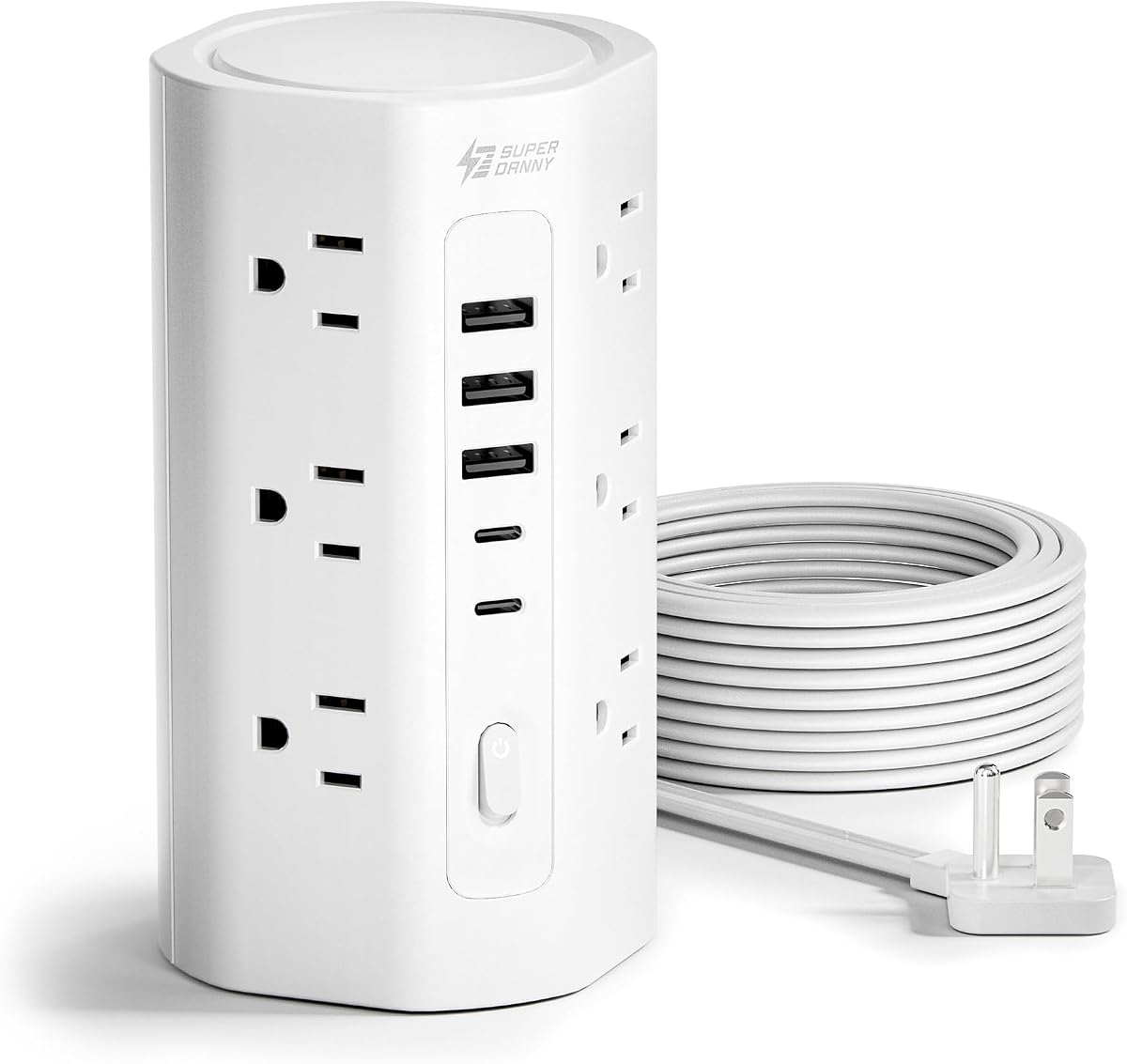
The SUPERDANNY 17-in-1 Tower combines twelve AC outlets, three USB-A ports, and two USB-C ports in a vertical form. It carries a 4.7 rating and is designed for home, office, and dorm use, with an emphasis on long reach, protected connections, and orderly cable placement.
We may earn a commission when you buy through this link, at no additional cost to you.
Its ten-foot flat extension cord is only 0.12 inches thick, allowing it to run along walls or tight corners more discreetly than a conventional round lead. The 0.31-inch wall plug sits flush against a receptacle, and the 45-degree angle preserves access to nearby plugs. The tower itself measures roughly three by three by 5.9 inches.
Protection is comprehensive according to the stated specifications. The tower has 1,700 joules of surge protection, 10-amp and 1,250-watt overload limits, and grounded, short-circuit, overcurrent, overvoltage, and overheating protection. Its V-0 fire-retardant casing is described as suitable up to 1,382 degrees Fahrenheit. A three-year maintenance or replacement plan adds reassurance.
The five USB ports automatically detect device power needs, with USB-A ratings of 5 volts and 2.4 amps and USB-C ratings of 5 volts and 3 amps. That makes them suitable for common accessories but modest for modern laptop charging. This is a dependable long-reach tower for users who want extensive AC capacity, broad protection, and a compact desktop footprint.
The thin ten-foot cord reaches distant outlets while taking up less visual space than a bulky round cable. Routing it along a wall or underneath a desk can reduce clutter, provided the installation avoids walkways and pinch points.
Multiple stated protections and a fire-retardant V-0 housing make the tower suitable for a stationary workstation or dorm installation. The included three-year maintenance or replacement plan is also a meaningful ownership benefit.
We may earn a commission when you buy through this link, at no additional cost to you.
The right charging tower depends on the devices you connect, the space available, and how much you value fast charging, outlet spacing, cord management, and layered protection.
USB-C charging specifications vary far more than the number of ports suggests. The Anker model provides two ports capable of up to 100 watts each, while the Kakyanill 115W station offers two 65-watt ports and two 20-watt ports. The TenTrend 230W tower also includes two 65-watt connections, whereas several alternatives provide only 15 to 20 watts. Higher wattage is most relevant when charging compatible laptops or tablets; phones and small accessories usually need much less.
Choose based on the most demanding device, not the largest printed total. A high total wattage can be shared across several connected devices, and a port may deliver reduced output when others are active. Review the individual port ratings and the manufacturer's guidance before assuming that every connected device will receive its maximum charge rate.
Many charging towers provide twelve AC outlets, making them suitable for monitors, lamps, printers, consoles, and other equipment. The TenTrend 230W and Anker models offer fewer AC connections, which may be sufficient for a focused desk but restrictive in a busy entertainment center. Outlet spacing matters almost as much as count. The JACKYLED's 2.2-inch spacing accommodates large adapters particularly well, while other models use approximately 1.5 inches.
Count not only devices but also bulky power bricks. A tower with fewer, widely spaced outlets can work better than a larger model whose sockets are blocked by adjacent plugs. Make a list of every AC adapter and compare its dimensions with the tower's stated spacing before purchasing.
Cord choice depends on the distance between your wall outlet and the intended tower location. Six-foot cords suit many desks and bedside tables, while ten-foot cords provide greater flexibility for dorm rooms, offices, and entertainment areas. Retractable systems add another layer of convenience: rotating the tower stores excess cord and reduces clutter. Fixed cords can still be routed neatly, but they do not disappear into the base when not needed.
Select a length that reaches comfortably without creating a trip hazard or a tangled loop. For retractable models, check whether the stated length is the usable extended length and whether the base is stable when the cord is pulled. For fixed models, consider the cable's thickness because a slim, flat cord is easier to route along a wall.
Surge protection is one of the most important distinctions among these products. Listed ratings range from 300 joules on the Anker model to 2,000 joules on the Olcorife tower, with several other products between 1,050 and 1,800 joules. A higher joule rating indicates greater capacity to absorb transient voltage spikes before the protection is exhausted. It does not mean the tower can safely absorb unlimited surges or protect against every electrical fault.
Look for overload, short-circuit, overcurrent, overvoltage, and overheating protection in addition to surge suppression. Fire-retardant housing and recognized certifications such as UL or FCC can also provide confidence. Match the total wattage to the devices: a tower rated below the combined draw of your equipment is unsuitable regardless of its port count.
A flat, angled wall plug can make a major difference in tight locations. The TenTrend 40W model has the thinnest stated plug at 0.27 inches, while several alternatives use 0.30- to 0.35-inch designs. A 45-degree profile generally allows the tower to sit behind furniture and helps preserve access to the adjacent wall outlet. A conventional projecting plug may be more durable but take up noticeably more room.
Consider the tower's actual position before buying. Measure the available space, inspect the wall receptacle, and identify whether furniture will block the plug or cord. Desktop models should also have enough stability for the weight of fully plugged-in adapters, making a non-slip base or weighted construction worth considering.
A vertical tower naturally separates cords and usually occupies less desk area than a horizontal power strip. Most models measure about three inches square and stand between roughly five and seven inches tall, although exact dimensions vary. The compact form is especially helpful in dorm rooms and home offices where monitor stands, notebooks, and charging cables already compete for space.
Do not equate a small footprint with a small capacity. Several models fit twelve AC outlets and multiple USB ports into a narrow upright body. Consider clearance around the top and sides as well as the base dimensions, and leave enough room to unplug devices without pulling the tower off the desk.
Control options can make a large power tower easier to manage. The JACKYLED model includes an independent switch on each layer, allowing selected groups of connected devices to be turned off. Other products emphasize a master on/off or reset switch, which is simpler but less granular. Indicator lights can confirm whether a tower or layer is active without unplugging anything.
Individual switching is useful for reducing standby draw and keeping workspaces orderly. A master switch is more useful when the entire setup should shut down at night or when leaving an office. Consider which behavior matches your routine, since extra switches can also make the tower slightly more complicated to operate.
USB-A remains useful for older accessories, power banks, and devices without USB-C, while USB-C provides broader compatibility with modern phones, tablets, and laptops. A balanced tower should include both types. Most products offer two to four USB-C ports, and the number of USB-A ports ranges from two to four. Rather than chasing equal port counts, identify which devices in your setup rely on each connection type.
Also pay attention to shared versus dedicated power. Several models distribute a stated total among all USB ports, so connecting several devices may reduce individual output. Dedicated high-wattage USB-C ports are the clearer choice when a laptop or tablet needs a reliable charge. Ensure the cable and device also support the intended USB-C power standard.
Position the tower on a dry, level surface close to its wall outlet. Avoid placing it under rugs, beneath furniture that traps heat, or near liquids. Connect the tower first, arrange frequently used cables vertically around it, and use the switches to prioritize the devices you need. For retractable models, pull the base to extend the cord and rotate the tower to store unused length.
Charge high-draw devices with their supplied or manufacturer-approved cables, and do not exceed the tower's stated amperage and wattage limits. Distribute demanding USB-C loads carefully because charging output may be shared across ports. A phone case should be removed if it interferes with heat dissipation or charging, and vents or openings should remain unobstructed.
Inspect the cord, plug, housing, and sockets periodically for damage, discoloration, looseness, or signs of overheating. Unplug the tower before cleaning it, and use a dry or lightly damp cloth rather than immersing it in water. If a breaker trips, reduce the connected load before resetting it. Replace the unit if the housing, plug, or cord is damaged rather than attempting to repair exposed electrical components.
A charging tower uses a vertical form to combine multiple AC outlets with USB charging ports. A regular power strip usually emphasizes AC outlets and lies horizontally. The tower format can reduce clutter, separate cords, and provide convenient charging for compatible USB devices without separate wall adapters.
It depends on the tower's individual and aggregate power ratings. Models with 60-watt or 100-watt USB-C ports can support some laptops, while lower-output towers are better for phones and accessories. Check the laptop's charging requirements and the tower's shared-output behavior before connecting several high-draw devices.
The listed models offer between nine and twenty total connection points, including AC and USB connections. The maximum number of usable devices depends on adapter size, charging protocols, the combined electrical load, and whether the tower's safeguards shut it down during overload. Counting connection points alone does not guarantee equal charging performance.
A higher joule rating generally indicates greater capacity to absorb voltage spikes, but it is only one part of overall electrical safety. Look for overload, short-circuit, overcurrent, overvoltage, overheating protection, sound construction, and appropriate certification as well. Surge protection also does not make a tower safe for every wiring condition.
Use the mechanism as directed by the manufacturer, pulling the base evenly and rotating the tower to store the cord. Do not force the cord, pull it sideways, or yank it from the wall while extended. Inspect the mechanism periodically and avoid operation if the cord or retraction assembly becomes damaged.
Many models are specifically designed for home, office, and dorm use, offering vertical arrangements and multiple safety protections. Always follow the facility's electrical policies and avoid extension cords where prohibited. Do not connect multiple power strips together, and never exceed the tower's rated wattage.
Modern towers include stated overload, overcurrent, overvoltage, short-circuit, and overheating protections, but switching off an unused tower can add safety and reduce unnecessary standby consumption. Avoid leaving high-draw appliances connected overnight unless they are designed for that use, and keep the tower ventilated and away from bedding or combustible materials.
A six-foot cord works well for many desks and bedside tables because it reaches a nearby outlet without excessive slack. Ten-foot cords offer more placement freedom in larger rooms but require careful routing. Retractable cords are helpful when the same tower must move or when a permanently cluttered extension lead is undesirable.
The JACKYLED tower stands out for its 4.7 rating, widely spaced outlets, independent layer switches, and retractable cord. The Anker desktop charger is the premium choice for high-wattage USB-C use, while the Olcorife model combines a 4.7 rating with 2,000-joule surge protection at a value-oriented level. Each serves a different kind of workspace.
Prioritize the features your devices actually need. Choose high USB-C wattage for compatible laptops, abundant and widely spaced AC outlets for bulky adapters, and a retractable or thin cord for clutter control. Also verify the tower's total load, surge rating, physical dimensions, and USB output-sharing behavior before placing an order.
Ratings, promotions, and prices can change over time, so shoppers should review the current listing and confirm the latest specifications. With the right balance of outlet capacity, charging performance, protection, and placement, a charging tower can turn a crowded outlet area into a safer and more organized power hub.